

Developer Workers
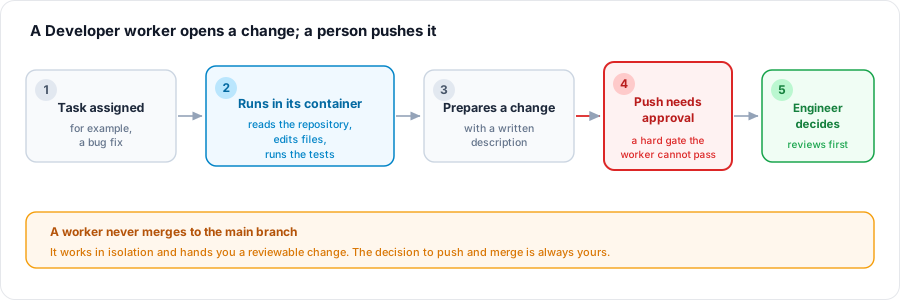
A Developer worker is a Virtual Worker that does hands-on code work in a real container: bug fixes, test-writing, dependency bumps, doc sync, and low-risk refactors, the delegable toil that pulls senior engineers off higher-value work. It runs on a coding-agent account you link, so your own model quality and quota carry over, and it prepares a change for a person to review. Pushing code always requires a human, and a worker can never merge to your main branch. After this page you will be able to put a Developer worker to work, understand its container and provider account, and rely on the no-push floor.
Developer workers use the Developer permission role and run in a container, typically on a linked coding-agent account. Container time is metered on usage credits while the worker works. See AI Connection and Budgets for linking an account and capping spend.
What to Delegate, and What Not To
After this section you will be able to scope a Developer worker to work it does well. A Developer worker is a force multiplier on well-defined tasks, not a replacement for engineering judgment. Give it work that is bounded and checkable:
- Bug fixes with a clear repro and expected behavior.
- Writing tests for existing code paths.
- Dependency bumps and routine maintenance.
- Documentation sync when code and docs drift.
- Low-risk refactors with a defined scope.
What it does not do is decide architecture, or ship anything unreviewed. The 2026 lesson from autonomous coding agents is that unattended merging still fails: a confident agent produces a broken change often enough that letting it merge on its own is a mistake. Backbuild is built around that lesson rather than against it, which is why the next section is a hard boundary, not a preference.
The No-Push Floor: A Worker Never Merges to Main
After this section you will be able to tell a tech lead exactly where the line is. Pushing code is a non-overridable approval floor. A Developer worker can read the repository, edit files, run tests, and prepare a complete change inside its container, but the act of pushing that change always requires a person. No autonomy setting can make it automatic. A worker cannot merge to your main branch. In practice the worker does the work and hands you a change to review: you read it, run it, and decide. The worker's job is to get a reviewable change to your door, not to walk through it.
Does pushing code require approval, or can it merge to main unattended? Pushing always requires a person and cannot be made automatic. A worker prepares a change and hands it to you for review; it cannot merge to main on its own.
How well does it actually do the work? Scope it to well-defined, checkable tasks, bug fixes, tests, dependency bumps, doc sync, and treat it as a force multiplier whose output you review. The transcript records exactly what it did, and you review the change before anything lands.
The Container and Least-Privilege Repository Access
After this section you will understand where a Developer worker runs and what it can reach. A Developer worker operates a real, isolated container, the same on-demand cloud computer you can launch yourself, with a terminal and a full editor. You choose its size (Small, Standard, or Large) when you configure the worker. Its reach is least-privilege: a worker is scoped to the project it is working in and gets only the repository access that project's role grants, nothing more. Because containers launch from a project and access follows your roles and permissions, confining a worker to one project's code is the same act as confining a contractor: scope the project, scope the role, and the worker cannot reach anything outside it.
Bring Your Own Provider Account
After this section you will be able to run a worker on your own coding-agent subscription. A Developer worker usually runs on a coding-agent account you link rather than platform credits, so the exact model and quota your team already pays for carry over to the worker. You link the worker's own provider-native account through its container, the connected desktop app, or an editor extension, or with an API key. Setting the worker's AI connection source to that linked account, and capping it with a weekly token budget, is covered in AI Connection and Budgets.
Whose provider account and quota does a Developer worker use? Whichever you link. Point the worker at its own coding-agent account and it uses that subscription's model and quota; leave it on usage credits and it draws on your plan instead. You choose the source explicitly.
Secrets Stay Out of Logs and Prompts
After this section you will be able to answer the secret-leakage question. The credentials a worker uses, its linked provider account and any tokens it needs, live in your organization's zero-knowledge, post-quantum secrets vault, encrypted on the device and unreadable to Backbuild. The model that drives the worker never receives a plaintext secret: there is no tool that returns one. When a credential is needed to act, a trusted path outside the model substitutes the real value at the moment of use and keeps it out of the model's context, its results, and the logs. A worker does not read your secrets into a prompt, and a secret does not appear in a transcript. The full treatment is in Security and Governance.
Will a worker leak secrets into logs or read my environment file? Credentials are held encrypted in the vault, substituted only on a trusted path at the moment of use, and value-redacted from logs and transcripts. The model never receives a plaintext secret, so a credential does not end up in a log or a change.
Where to Next
- AI Connection and Budgets: link a coding-agent account and cap the worker's weekly spend.
- Autonomy and Approvals: the no-push floor and the fix-bug capability in the autonomy model.
- Backbuild Containers: the container a Developer worker operates.
- Security and Governance: least-privilege access, the audit trail, and credential handling.