

Marketing Pages
Marketing pages are the public face of the product you sell: your landing page, feature pages, an about page, a pricing page, and any custom pages you need. You author them as structured content on a SaaS package, set their SEO and social-sharing fields, give each a clean URL slug, and publish when they are ready. Combined with a custom domain, this is how you stand up a branded marketing site for your product.
Pro Marketing pages are part of the SaaS Builder, included with the Backbuild Pro build-and-ship platform. See pricing.
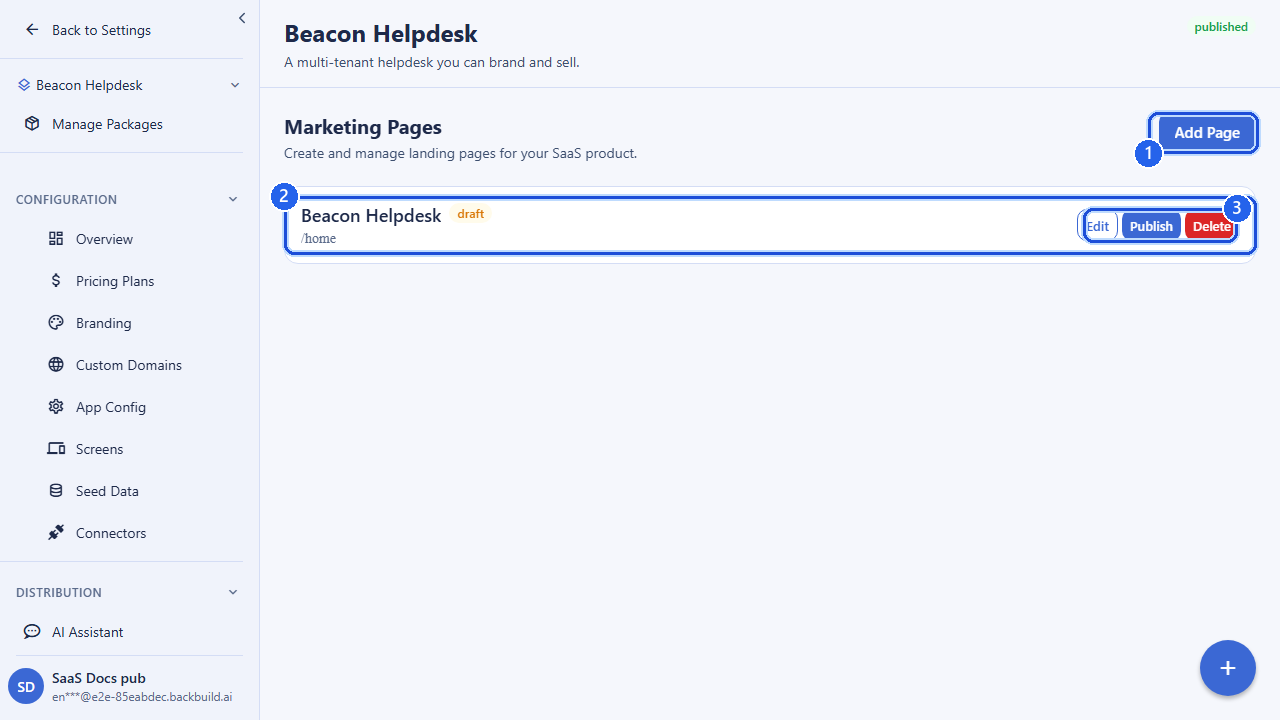
How marketing pages work
Each marketing page belongs to one of your SaaS packages. A page is created in a draft state, edited as many times as you like, and then explicitly published; publishing is the gate that makes a page visible to the public. You can have as many pages per package as your product needs, ordered however you choose.
A page carries a title, a slug (its
URL-safe identifier), a page type that classifies its role,
a structured content body, and a set of
SEO and social-sharing fields used to render its
<head> tags.
Page types
The page_type classifies the page so your storefront can render
it appropriately and so you can organize your marketing site. Accepted
values are:
| Type | Typical use |
|---|---|
landing | Your primary landing / home page. |
feature | A page describing a specific feature or capability. |
pricing | A pricing-overview page (pairs with your pricing plans). |
about | An about / company page. |
custom | Anything else. This is the default when you do not specify a type. |
Content
The content field holds the page body as a structured JSON
object: sections, blocks, copy, and references to media. Storing
content as structured data (rather than raw HTML) lets your storefront render
it consistently with your theme and keeps it safe to serve. The shape is up
to your product’s rendering layer; the API stores and returns whatever
structured content you provide, within a generous size bound.
The optional metadata field is a free-form JSON object for any
extra data you want to attach to a page: layout hints, A/B variant
keys, feature toggles for the page, and so on.
SEO & social fields
These fields populate the page’s document head and social-share cards.
They are independent of the on-page title, so you can tune the
text that appears in search results and link previews separately from the
heading shown on the page.
| Field | Type | Description |
|---|---|---|
seo_title | string | The title used for the page’s <title> / search-result heading (up to 255 characters). |
seo_description | string | The meta description shown in search results and link previews (up to 512 characters). |
og_image_url | string | The image used for social-share cards (Open Graph). Must be an https:// URL. |
Slug & ordering
| Field | Type | Description |
|---|---|---|
title | string | The page’s display title (1–255 characters). Required on create. |
slug | string | URL-safe identifier: lowercase letters, numbers, and hyphens only (up to 128 characters). Used as the page’s path. Optional; auto-derived if omitted. |
sort_order | integer | Controls the page’s position relative to its siblings (e.g. in a nav or list). |
A clean slug such as features or about-us becomes
the page’s path on your custom domain, e.g.
https://acme.com/features.
Publishing
Creating or updating a page leaves it in draft. Publishing is a separate, explicit action: it makes the page’s current content public on your storefront. This lets you stage edits safely: iterate on a draft, then publish when it is ready. To take a page down, delete it.
Example: create and publish a page
POST /v1/saas-packages/{packageId}/marketing-pages
Authorization: Bearer <token>
Content-Type: application/json

{
  "title": "Acme: Ship faster",
  "slug": "home",
  "page_type": "landing",
  "seo_title": "Acme | The fastest way to ship",
  "seo_description": "Acme helps teams ship products in days, not months.",
  "og_image_url": "https://cdn.acme.com/og/home.png",
  "sort_order": 0,
  "content": {
    "sections": [
      { "type": "hero", "heading": "Ship faster with Acme", "cta": "Start free" }
    ]
  }
}
Then publish it:
POST /v1/saas-packages/{packageId}/marketing-pages/{pageId}/publish
Authorization: Bearer <token>
API reference
All endpoints require an authenticated session and the relevant
marketing-page permission (organization owners and admins hold these by
default). The owning organization is resolved from your session;
{packageId} is the SaaS package the page belongs to and
{pageId} is the marketing page.
List marketing pages
GET /v1/saas-packages/{packageId}/marketing-pagesQuery parameters
| Parameter | Type | Description |
|---|---|---|
status | string | Optional status filter (e.g. draft vs. published). |
limit | integer | Page size. |
offset | integer | Number of pages to skip. |
Returns the marketing pages on the package, with pagination metadata.
Create a marketing page
POST /v1/saas-packages/{packageId}/marketing-pagesRequest body
| Field | Type | Required | Description |
|---|---|---|---|
title | string | Yes | Display title (1–255 chars). |
slug | string | No | Lowercase / numbers / hyphens (up to 128 chars). |
page_type | string | No | landing, feature, pricing, about, or custom (default custom). |
content | object | No | Structured page content. |
seo_title | string | No | SEO title (up to 255 chars). |
seo_description | string | No | SEO meta description (up to 512 chars). |
og_image_url | string | No | Open Graph image; must be https://. |
sort_order | integer | No | Ordering position. |
metadata | object | No | Free-form metadata. |
Returns the created page with 201 Created.
Get a marketing page
GET /v1/saas-packages/{packageId}/marketing-pages/{pageId}Update a marketing page
PUT /v1/saas-packages/{packageId}/marketing-pages/{pageId}Send only the fields you want to change; at least one field must be present. Accepts the same fields as create. Updating a published page edits the draft; publish again to push the changes live.
Publish a marketing page
POST /v1/saas-packages/{packageId}/marketing-pages/{pageId}/publishMakes the page’s current content public. No request body is required.
Delete a marketing page
DELETE /v1/saas-packages/{packageId}/marketing-pages/{pageId}Removes the page. Returns 404 if the page does not exist.
Frequently asked questions
- Can I build my product’s marketing site without code?
- Yes. Landing, feature, pricing, and about pages are configured in the builder, no front-end development required.
- Do these pages serve on my own domain?
- Yes. Point a custom domain at your package and your marketing pages serve from it under your brand.
- How do I control how a page looks when shared or searched?
- Each page carries SEO and social fields so its title, description, and preview are what you intend.
- How does a page go live?
- You publish it. Drafts stay private until you publish, so you can prepare a page before it is visible.
Related
- Custom Domains: serve these pages from your own domain
- Pricing Plans & Categories: the plans your pricing page presents
- SaaS Builder overview