

What Counts Toward File Storage vs Database Storage
Backbuild meters two storage pools, and knowing which pool your data lands in makes usage easy to predict. After this page you will be able to classify anything you store, estimate what growth beyond your allowance costs, free up space and see it count, and explain exactly what does and does not stop when a pool is full. Both pools include a free allowance on every plan; the pricing page is the canonical source for per-plan amounts.
The Two Pools
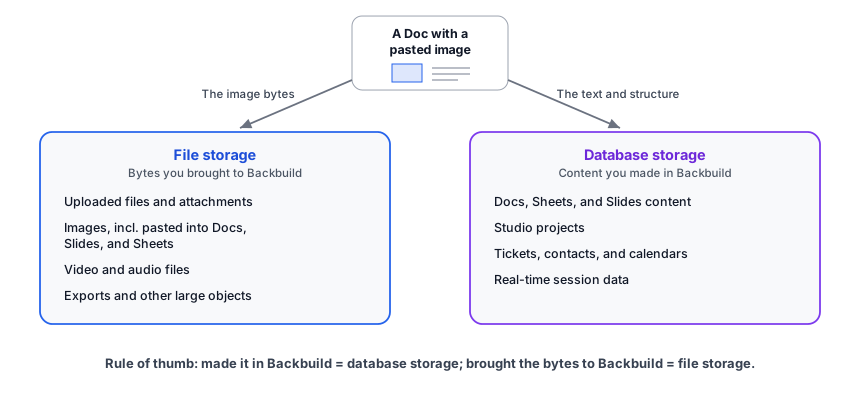
File storage (the object storage pool)
File storage holds your large binary data. It counts:
- Uploaded files and attachments
- Images, including images embedded in Docs, Slides, Sheets, and other surfaces
- Video and audio files
- Exports and other large binary objects
Beyond your plan's included allowance, file storage meters at 21 credits per GB-hour, about 15,330 credits per GB-month: roughly 10 cents per extra GB-month at entry package rates.
Database storage
Database storage holds the structured content you create in Backbuild's editors and surfaces. It counts:
- Docs, Sheets, and Slides (Diagrams and Whiteboards will count here when they launch)
- Studio projects
- Tickets, contacts, calendars, and similar records
- The data behind real-time sessions
Beyond your plan's included allowance, database storage meters at 685 credits per GB-hour: 500,000 credits per GB-month, so 1M credits keeps 2 GB for a month, about $3.33 per extra GB-month at entry package rates. Database storage is fully managed: redundant, high-performance, continuously backed up, and served on demand. The higher rate reflects that a GB of live, queryable, continuously protected structured data is a different product from a GB of file bytes at rest.
The rule of thumb for classification: if you made it in Backbuild, it is database storage; if you brought the bytes to Backbuild, it is file storage. A document with pasted images uses both, each at its own rate: the text and structure meter as database storage and the image bytes meter as file storage.
Allowances and a Worked Example
Every plan includes both allowances free, from 1 GB of file storage and 25 MB of database storage on Free up to per-seat terabyte-class allowances on Enterprise; the exact per-plan amounts are on the pricing page. Only usage beyond the allowance meters, and it simply draws universal usage credits.
A worked example: suppose your plan includes 25 GB of file storage and 500 MB of database storage, and one month you hold 27 GB of files and 1 GB of database content. The 2 GB of file overage draws about 30,660 credits for the month (2 × 15,330), and the 0.5 GB of database overage draws about 250,000 credits (0.5 × 500,000). Both are deducted automatically from your next month's credit allotment (see how overage settles), and everything inside the allowances stays free.
Because metering is per GB-hour, partial months bill fairly: holding an extra 10 GB of files for just three days costs roughly a tenth of the monthly figure, not the whole month.
Freeing Space, and Seeing It Count
Deleting content always works, even when a pool is blocked, and it always helps. Storage meters from regular measurements of what you actually hold, so when you delete files or content your metered footprint drops from the next scheduled measurement onward, typically within a day. There is no hidden pool that keeps counting against you after you delete, and you can always delete your way back under a limit without buying anything.
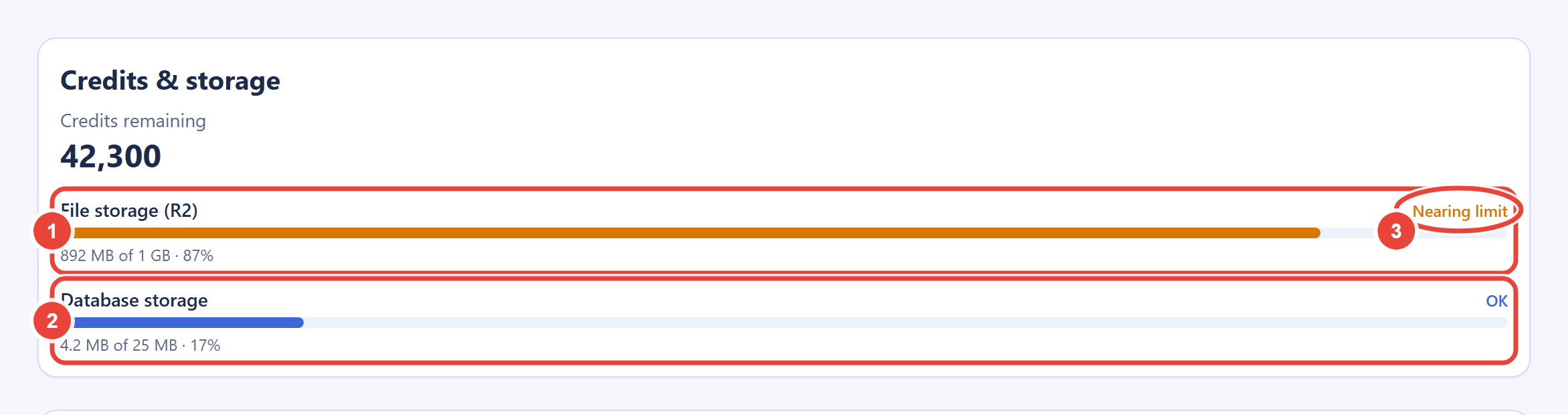
The storage meters on the Billing & Usage screen show each pool's usage against its allowance, so you can verify the effect of a cleanup instead of taking it on faith.
What Happens at the Limit
Storage enforcement is deliberately gentle, and it is capacity-aware: crossing your allowance does not block anything by itself.
- At 85% of an allowance you get an informational "nearing" warning. A warning always precedes any block.
- Over the allowance with credits to cover it, growth simply meters. Storage never hard-blocks while your credits cover the projected cost, up to this class's cap of half your month's available credits (see caps).
- Over the allowance without coverage, new writes and further growth in the affected pool are refused with a clear storage-limit error. Reads, downloads, exports, deletes, and edits that shrink content always keep working. Your data is never held hostage.
- Recovery is whichever is right for you: delete data, buy credits (capacity rises immediately, and the block clears at the next re-evaluation), or move to a plan with a larger allowance.
The Shared Rules
- Every plan includes both allowances free; only usage beyond them is metered.
- Overage draws universal usage credits, metered continuously per GB-hour, totaled monthly, and deducted from your next month's credit allotment. It is never billed separately, and there is no way to receive a storage invoice.
- Unused credits roll over for up to 3 months, so you can bank credits and burst higher in a heavy month.
- Each usage class (Real-Time Session Minutes, file storage, and database storage) is independently capped at half of your month's available credits, so no single class can drain the whole pool.
- Storage is not sold separately. Your two levers are credits and your plan's allowance.
Frequently Asked Questions
Which pool do images inside a document count against?
File storage. Embedded and pasted images are binary objects, so their
bytes meter as files while the document's text and structure meter as
database storage.
If I delete files, do I get my space back right away?
Yes. Deleted bytes stop counting from the next scheduled measurement
onward, typically within a day, and the Billing & Usage meters let
you confirm it.
Can I buy more storage directly?
There is no separate storage product to buy. Storage beyond your
allowance draws universal usage credits automatically, which is usually
cheaper and requires no decision in advance; for permanently larger
footprints, a higher plan raises the allowance itself.
What exactly stops working when a pool is full?
Only new writes and growth in that pool, and only when credits do not
cover the overage. Reading, searching, downloading, exporting, and
deleting always work, and the other pool is unaffected.
Why is database storage more expensive than file storage?
Database storage is live, structured, and fully managed: redundant,
continuously backed up, and served on demand for querying and real-time
collaboration. File storage is bulk bytes at rest. You are charged for
what each actually is.