

CLI Reference
The backbuild CLI brings the platform to your terminal: the
zero-knowledge secrets vault, project import, local task automation, and
agent integration, all from one small native binary. This reference
teaches you how the CLI is configured and documents every command group.
Availability
The CLI ships as a single, dependency-free native binary named
backbuild for Windows (x64), macOS (universal), and Linux
(fully static x86_64 and aarch64 builds, so one file runs on any
distribution). The binary is about 1.3 MB with no runtime to install.
Backbuild is in Early Adopter Alpha and a public download page for the CLI is coming soon. If you need the CLI binary for your platform today, request it through the contact page. The desktop app for Windows and macOS is available for download now.
Installation
Installation is the same on every platform: place the binary on your
PATH.
- Unpack the archive for your platform.
- Move the
backbuildbinary (orbackbuild.exeon Windows) into a directory that is on yourPATH. On macOS and Linux,/usr/local/binor~/.local/binare conventional; on macOS and Linux also ensure it is executable withchmod +x backbuild. - Close and reopen your terminal so the shell picks up the new command.
- Verify:
backbuild --version
If the shell reports the command is not recognized, the binary is not on
your PATH yet. On Windows, add the folder containing
backbuild.exe to your user Path environment variable
(Settings, then "Edit environment variables for your account"), then open
a new terminal. On macOS and Linux, confirm the install directory appears
in echo $PATH.
Core Concepts
Five ideas explain almost all CLI behavior. Learn these once and every command below becomes predictable.
Per-repository configuration
The CLI keeps project-level configuration in a
.backbuild-cli/ directory at the root of your repository
(the root is detected from Git, so commands behave the same from any
subdirectory). This is where init and
set-token write, where prove settings live, and where local
task state is stored. Configuration travels with the checkout.
Profiles
Profiles are named per-user slots (stored under
~/.backbuild/) that keep one machine's per-account state
separate, for example work and personal. The
secrets client is profile-aware end to end: every secrets
subcommand accepts --profile NAME, and each profile holds
its own machine identity and vault authorization (see the
Secrets CLI guide). The profile a
command uses is resolved in this order:
- The
--profileflag on the command - The
BACKBUILD_PROFILEenvironment variable - The
defaultprofile
If you never pass a profile, everything happens under
default, so a single-account machine never has to think
about profiles. API tokens are never echoed back in CLI output.
Token resolution
When a command needs an API token, the CLI looks in this order:
- The per-repository token saved by
set-tokenorinit --token - The
BACKBUILD_API_TOKENenvironment variable
API base
The CLI talks to https://api.backbuild.ai (production) by
default, and stays there unless you select another environment yourself.
To point it elsewhere, set BACKBUILD_API_BASE to a full base
URL, or BACKBUILD_ENV to an environment name; an explicit
setting always wins. The CLI never changes environments based on your
working directory or git branch name, so the target is predictable on any
machine.
Exit codes and strict parsing
Every command follows one contract, so scripts can rely on it:
| Exit Code | Meaning |
|---|---|
0 | Success |
1 or 2 | The operation failed: bad input, a missing prerequisite, an API failure, or an unreachable network |
2 | Usage error: unknown option, unknown command, or surplus arguments |
Success is always 0 and usage errors are always
2; whether a failed operation exits 1 or
2 varies by command family, so scripts should branch on
zero versus non-zero unless a command documents a finer contract
(prove ci does, below). Argument parsing is strict: unknown
options, unknown commands, and surplus positional arguments are rejected
rather than silently ignored. --help (or -h)
works globally and per command; --version, -V,
and version print the version.
Authentication with an API Key
The supported way to authenticate the CLI is with an API key minted in the app. After this section you will have a working authenticated CLI in under two minutes.
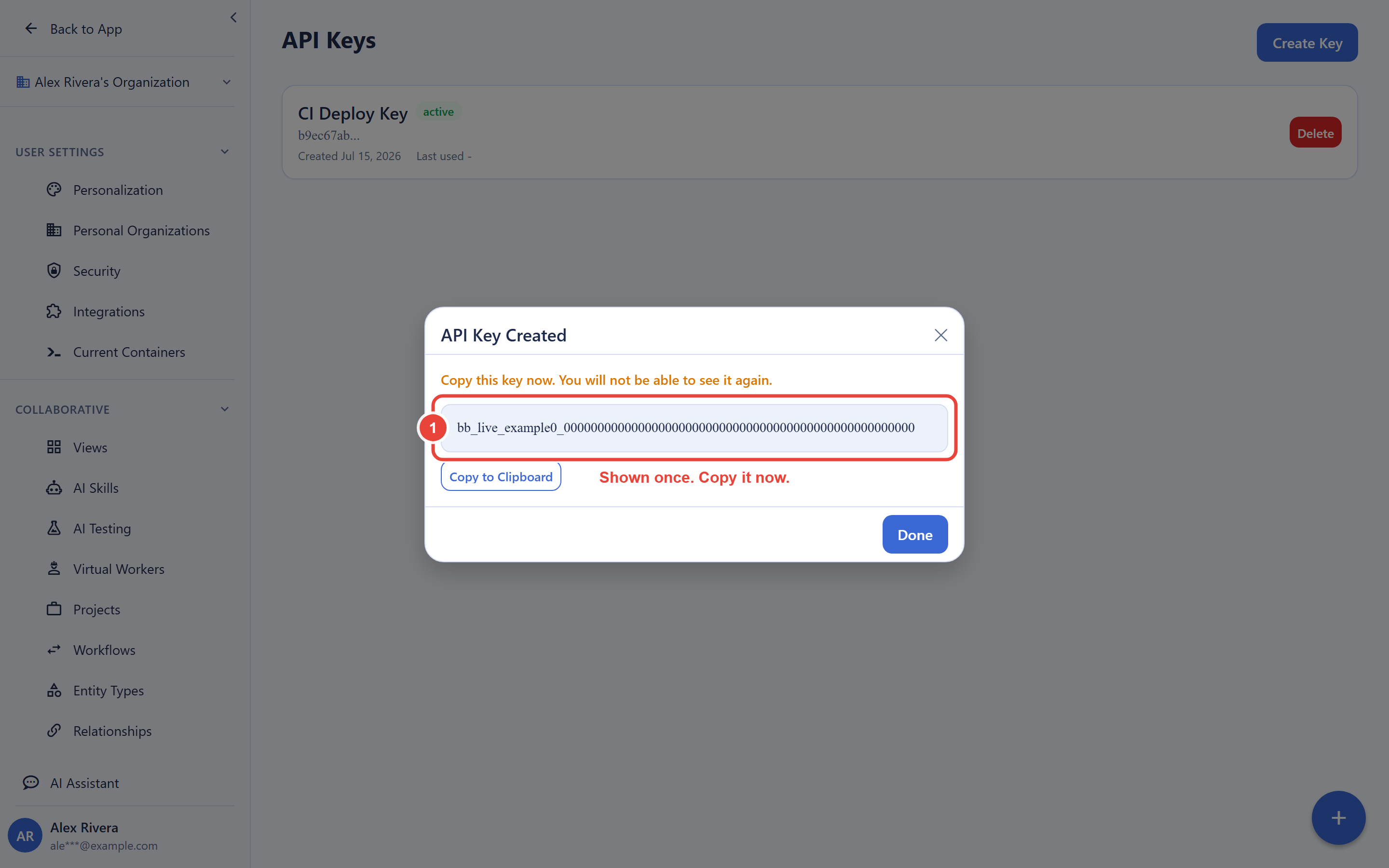
- In the app, open your API keys settings and create a key. Give it a descriptive name; the key value is shown once, so copy it then.
- Store it in the CLI with a secure hidden prompt (the value is typed twice and never appears on screen or in shell history):
backbuild set-token
For non-interactive environments such as CI, set the key in the
BACKBUILD_API_TOKEN environment variable through your CI
system's secret store instead. Because API keys work everywhere and need
no browser, they are the right choice for headless servers, SSH boxes,
and containers.
Treat an API key like a password: never commit it to a repository, and delete it from the app the moment it may have been exposed; deletion cuts off the key's access immediately. Create a separate key for each machine or automation so revoking one never disturbs the rest.
Configuration Commands
backbuild init
Initialize or update the per-repository configuration. Values you omit
(or pass empty) are left untouched, so init never clobbers
existing configuration.
backbuild init --api https://api.backbuild.ai| Option | Description |
|---|---|
--api | API base URL |
--token | API bearer token (or set BACKBUILD_API_TOKEN, or prefer set-token for a hidden prompt) |
backbuild set-token
Securely prompt for and save your API bearer token in the per-repository
configuration. The prompt is hidden and asks twice to catch typos; pass
--token only where an interactive prompt is impossible.
backbuild set-tokenSecrets Vault
The secrets command group is the CLI client for the
zero-knowledge Backbuild Secrets vault. Secret values are decrypted
locally on your machine; the platform never sees plaintext. This is the
command surface; for the full workflow (machine identity, the
authorization ceremony, replacing .env files, CI patterns, and
troubleshooting) read the Secrets CLI
guide.
| Command | Description |
|---|---|
backbuild secrets keygen | Generate this machine’s identity keypair (--force to replace). |
backbuild secrets login | Authorize this machine for vault access via a browser approval. |
backbuild secrets status | Show the selected profile's machine identity: its fingerprint and key state. |
backbuild secrets get | Fetch secrets (--vault ID, --reveal, --json). The item listing masks values unless --reveal is passed; --field NAME or --name NAME prints that single value in plaintext for scripts, and --json emits all values as plaintext JSON. |
backbuild secrets set | Store a secret field (--name FIELD_NAME required; the value is read from stdin, never from arguments). |
backbuild secrets run | Run a command with vault secrets projected into its environment: backbuild secrets run [--vault ID] COMMAND [ARGS...]. |
backbuild secrets export | Export secrets in dotenv, shell, or json format (--format). |
backbuild secrets logout | Remove this machine’s vault authorization (--yes to skip confirmation). |
All secrets subcommands accept --profile NAME.
The secrets client requires an operating system secure keystore and
refuses to run without one; machine keys are never written as plaintext
files.
Project Import
backbuild import-project
Import an existing project (specs and code) into Backbuild using AI-assisted analysis over a live connection.
# Import the current directory
backbuild import-project

# Import a specific path
backbuild import-project --project-path ./my-project

# Dry run to see what would be imported
backbuild import-project --dry-run| Option | Description |
|---|---|
--project-path | Project root directory |
--project-name | Name of the project |
--project-description | Project description |
--analysis-depth | shallow or deep (default: deep) |
--exclude-specs | Exclude spec files |
--exclude-code | Exclude code files |
--dry-run | Show what would be imported without starting |
Task Automation
The task commands drive a per-repository task workflow: generate tasks
from project analysis, work them with your local AI coding agents, and
track their states. Task state is kept inside the repository's
.backbuild-cli/ directory, so it travels with your checkout
and these commands keep working offline.
backbuild tasks
List all tasks for the current project. Filter by state with --state.
backbuild tasks
backbuild tasks --state Ready
backbuild generate
Run task generators to create tasks from project analysis.
backbuild generate
backbuild generate --generator my-generator
backbuild install-default-generators
Install the packaged default task generators into the local generators
directory. Existing generator files are preserved unless
--force is passed.
backbuild install-default-generators
backbuild install-default-generators --force
backbuild loop
Run the processing loop: analyze tasks, then execute ready tasks automatically.
backbuild loopbackbuild ui
Launch the interactive full-screen TUI: the task list on the left, streaming output in the middle, and the action menu on the right, with batch execution and automatic scheduling built in. In non-interactive terminals it falls back to a plain line-based interface.
backbuild uibackbuild remove <task_id>
Delete a specific task by ID.
backbuild archive <task_id>
Archive a specific task by ID.
backbuild archive-completed
Archive all tasks in the Complete state.
backbuild check-completion
Run the task completion checker on imported tasks.
# Check all tasks in ImportAnalysis state
backbuild check-completion

# Check a specific task
backbuild check-completion --task-id abc123

# Check tasks in a different state
backbuild check-completion --state Analyzing| Option | Description |
|---|---|
--task-id | Check a specific task by ID |
--state | Check tasks in a specific state (default: ImportAnalysis) |
Agent Integration
backbuild setup-codex
Auto-install the OpenAI Codex CLI for use with the agent task harness.
backbuild setup-codexbackbuild codex-login
Run codex login to authenticate with a ChatGPT plan.
backbuild codex-loginbackbuild agent-relay serve
Subscribe this machine to the AI-assistant agent relay and run pushed
assistant jobs locally with your own claude,
codex, or gemini CLI.
backbuild agent-relay serve --device-id my-workstation| Option | Description |
|---|---|
--device-id | Identifier for this device (required) |
--profile | Stored account profile to run under |
--no-reconnect | Exit instead of reconnecting when the relay connection drops |
Android Test Containers
The android command group drives an Android test container:
install-apk, start-app, input,
ui-dump, screenshot, and logcat.
Every subcommand requires --session <uuid>.
backbuild android screenshot --session SESSION_ID
backbuild android logcat --session SESSION_ID
Formal Verification (Prove)
Backbuild Prove is coming soon and is available for
pre-order; see the Prove documentation and
pricing. The prove command group is
documented here so the reference is complete for early access
participants.
backbuild prove run
Scan the project for pf2 annotations and verify them against the HOL kernel. Running bare backbuild prove is equivalent.
backbuild prove run
backbuild prove run --project-path ./my-project| Option | Description |
|---|---|
--project-path | Project root directory (defaults to current directory) |
backbuild prove watch
Watch for file changes and re-verify annotations automatically. The project is polled on a configurable interval and re-verified whenever the set of annotations changes.
backbuild prove watch
backbuild prove watch --poll-interval 5| Option | Description |
|---|---|
--project-path | Project root directory |
--poll-interval | Polling interval in seconds (default: 2.0) |
backbuild prove ci
Non-interactive verification for CI pipelines. Exits with code 0 if all annotations pass, 1 if any fail, 2 on error.
# Text output (default)
backbuild prove ci

# JSON output
backbuild prove ci --format json

# Generate JUnit XML report
backbuild prove ci --junit-xml reports/prove.xml| Option | Description |
|---|---|
--project-path | Project root directory |
--format | Output format: text or json |
--junit-xml | Path to write JUnit XML report |
backbuild prove status
Show project prove status: settings, annotation count, and per-file breakdown.
backbuild prove statusbackbuild prove settings
View or update project-level prove settings stored in .backbuild-cli/prove.json.
# View current settings
backbuild prove settings

# Change severity mode
backbuild prove settings --severity-mode warn

# Set verification timeout
backbuild prove settings --timeout 120000

# Add an exclude pattern
backbuild prove settings --add-exclude "vendor/**"

# Remove an exclude pattern
backbuild prove settings --remove-exclude "vendor/**"| Option | Description |
|---|---|
--severity-mode | strict, warn, or lenient |
--timeout | Verification timeout in milliseconds |
--max-parallel | Maximum parallel verifications |
--add-exclude | Add a glob pattern to exclude list |
--remove-exclude | Remove a glob pattern from exclude list |
backbuild prove publish
Build a signed certification bundle and publish it for public verification (see Certifications for what a bundle contains and proves).
# --project-id, --name, and --version are required
backbuild prove publish \
  --project-id YOUR_PROJECT_UUID \
  --name my-library-core \
  --version 1.2.0

# Build and inspect the bundle without uploading
backbuild prove publish \
  --project-id YOUR_PROJECT_UUID \
  --name my-library-core \
  --version 1.2.0 \
--dry-run| Option | Description |
|---|---|
--project-id | Backbuild project UUID (required) |
--name | Bundle name, e.g. my-library-core (required) |
--version | Semver version, e.g. 1.2.0 (required) |
--binary | Path to a compiled artifact to bind into the bundle (repeatable) |
--lean4-results | Path to Lean 4 cross-validation results JSON |
--project-path | Project root directory (defaults to current directory) |
--dry-run | Build the bundle and print metadata without uploading or registering |
The publish pipeline:
- Resolve or generate the signing key (Ed25519, stored at
~/.backbuild/bbprove-keys/) - Scan project for verified theorems and source files
- Build a tarball (manifest, theorems, file hashes, binary hashes, Lean 4 results)
- Sign the tarball SHA-256 locally with the private key
- Upload and register, then print the public verify URL
Your private key never leaves your machine. Only the public key and signature are sent to the API.
Environment Variables
| Variable | Description |
|---|---|
BACKBUILD_API_TOKEN | API bearer token (alternative to set-token; ideal for CI secret stores) |
BACKBUILD_PROFILE | Credential profile to use (overridden by the --profile flag) |
BACKBUILD_API_BASE | Override the API base URL (default https://api.backbuild.ai) |
BACKBUILD_ENV | Select an environment by name (for example production or staging) instead of a full URL |
Scripting, CI, and Offline Behavior
The CLI is built to be scripted. The rules you can rely on:
- Exit codes are a contract. 0 always means success and 2 always covers usage errors; treat any non-zero exit as failure.
prove cidefines the finer contract scripts can branch on: 0 all annotations pass, 1 verification failures, 2 errors. - Machine-readable output where it matters.
secrets get --jsonandprove ci --format jsonemit JSON suitable forjq, for examplebackbuild secrets get --json | jq '.[].fields'. - Errors go to stderr. Diagnostics and warnings are written to standard error, so they never corrupt the stdout your script is parsing.
- No hidden interactivity in CI. Authenticate with
BACKBUILD_API_TOKENfrom your CI secret store; nothing will try to open a browser. - Tokens never print, and secret values only print on request. API tokens are never echoed back. Vault values appear in output only when explicitly requested with
--reveal, a--field/--nameselector,--json, orexport; everything else masks them, which keeps CI logs clean by default. - Offline behavior is honest. Commands that need the network (import, secrets operations against the vault, publish) fail fast with a clear error and a non-zero exit code when it is unreachable. The per-repository task commands keep working offline because their state is local.
Frequently Asked Questions
The terminal says backbuild is not recognized right after I installed it.
The binary's directory is not on your PATH, or the terminal
was opened before you changed it. Add the directory to your
PATH, open a new terminal, and run
backbuild --version.
How do I authenticate on a headless server or in a container?
Use an API key: mint it in the app, deliver it via
BACKBUILD_API_TOKEN or set-token. No browser is
ever required for API key authentication. For vault access from the
secrets client, the authorization step prints a URL and code you can
approve from any browser on any device; see the
Secrets CLI guide.
Can I use my work and personal accounts on one machine?
Yes. For vault access, authorize each account under its own profile
(backbuild secrets login --profile work) and select with
--profile or BACKBUILD_PROFILE;
backbuild secrets status --profile work shows that
profile's machine identity. For API key commands, store each account's
key in its own repository with set-token, or set
BACKBUILD_API_TOKEN per shell.
Where does the CLI store things on disk?
Per-repository configuration and task state live in
.backbuild-cli/ at the repo root; per-user profile data
lives under ~/.backbuild/. Vault machine keys are held in
your operating system's secure keystore, and the secrets client refuses
to run without one. Tokens are masked in all output.
Does the CLI work offline?
Task commands do, because their state is stored in the repository.
Anything that talks to the platform requires connectivity and exits with
a clear error and a non-zero code without it.
See Also
- Secrets from the CLI: the complete vault workflow guide
- REST API Reference: the same platform, over HTTP
- Authentication API: registration, login, OAuth, and session endpoints
- Prove CLI: deeper documentation of the verification commands