

Collaborating & Sharing Research
This page is for anyone coordinating more than one person's work: a co-author pair, a lab of thirty, or a department standardizing on one environment. After reading it you will know how a project holds a whole paper together, exactly who can see unpublished results, how to onboard a rotating roster of students cheaply, and how to get all of your work back out at any time. Control over who sees what, and confidence that you are never locked in, are the two things that make a shared research tool safe to adopt, so this page addresses both directly.
Everything for a paper lives in one project
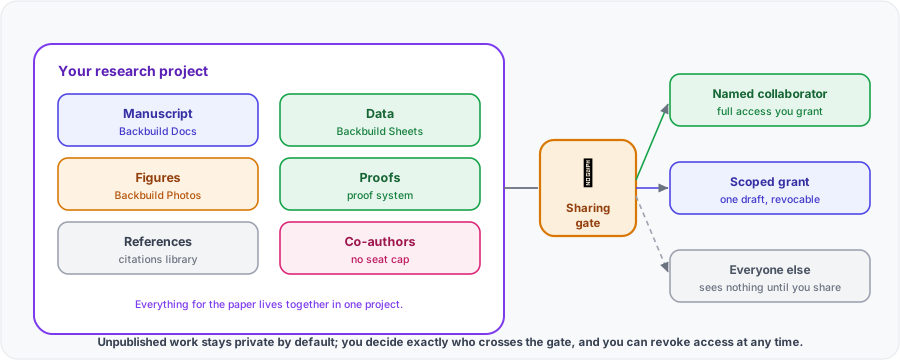
Research lives in projects. A project holds the manuscript, the data, the figures, the proofs, the references, and the people, together. That is the antidote to the fragmented stack most labs run today, an editor here, a spreadsheet there, a reference manager somewhere else, that drifts out of sync and loses the thread when a student leaves. Because the paper and the evidence behind it sit in the same project, the institutional memory of a result stays with the project, not on a departing student's laptop. See Projects for the general model.
Co-authoring in real time
Several authors work on the same document at once. Edits merge automatically, so two people typing in the same paragraph never overwrite each other, and you see live cursors and presence, leave and resolve inline comments, and turn on tracked changes to suggest edits an author accepts or rejects. A named version history records the document over time and restores an earlier version. None of this is throttled by a collaborator cap: co-authoring is not a seat you buy per person on a document. See the Docs editor for the authoring surface.
Authorship and contributor roles
Two different things are often called "authorship," and Backbuild keeps them clear:
- The byline in your paper (author names and order, corresponding author, affiliations) is content you write in the manuscript itself, so it renders exactly as your target venue requires.
- Who can do what in the project is controlled by project roles: you decide, per person, whether a collaborator can edit, comment only, or view. That is how you let a co-author write, a reviewer comment, and a funder read, without any of them stepping outside the access you granted.
See Roles & permissions for how roles and permissions work across the workspace.
Who can see unpublished work
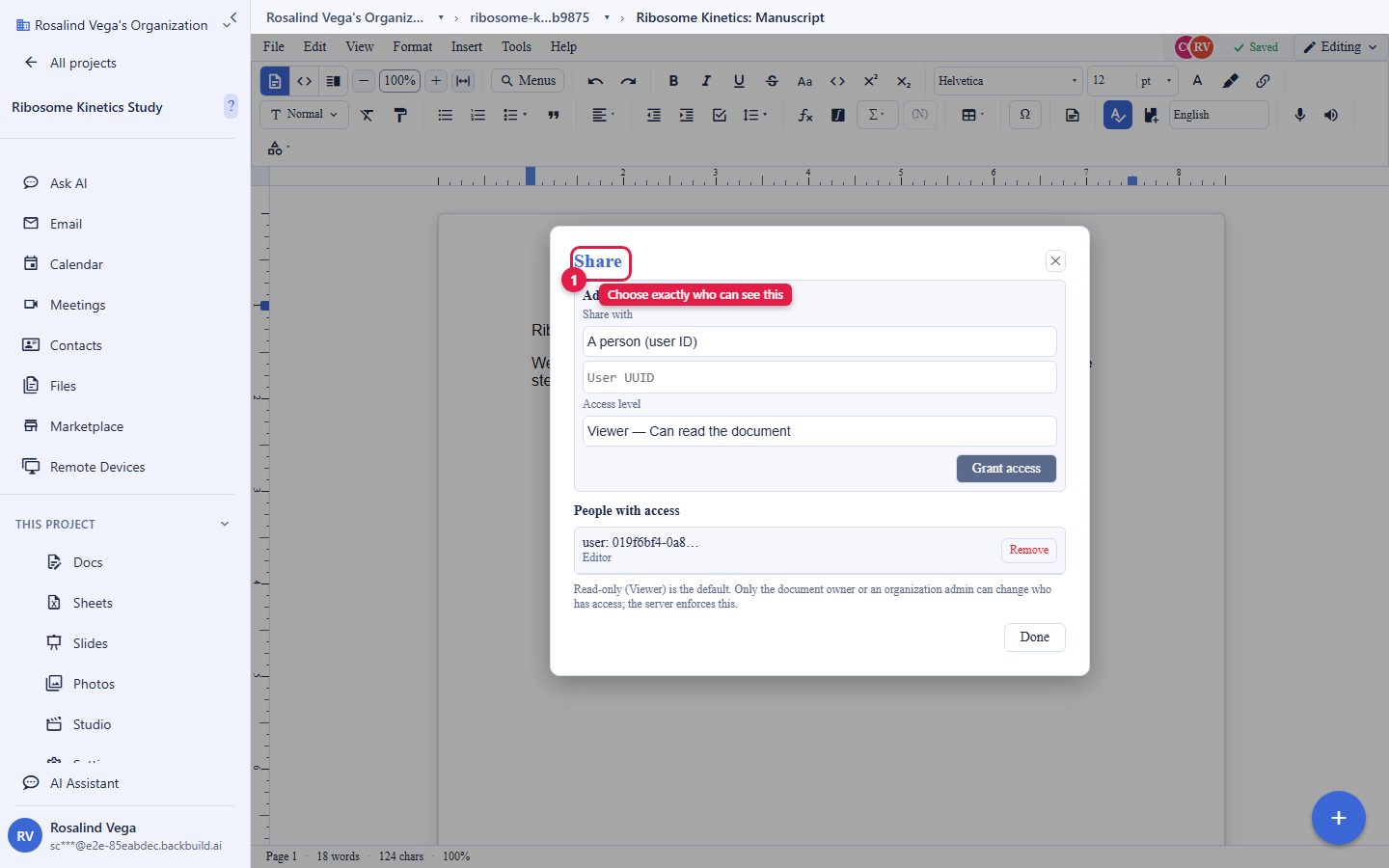
This is the question every principal investigator asks first, so the answer is plain: nothing is shared until you share it. Work in a project is visible only to the project's members. When you do share, you choose the scope, from narrow to broad:
- A specific person, for a single co-author or reviewer.
- A role, a group, or a department, for a sub-team.
- A project, or the whole organization, when a result is ready for the lab.
- A collaborator in another organization, granted directly to that organization or to a named person in it, for cross-institution work: this is how an outside reviewer or a co-author at another institution gets access without joining your organization.
- Everyone in your organization at once, an organization-wide tier your organization administrator must allow.
Each grant carries one of four access levels: Viewer reads, Commenter reads and comments, Suggester proposes tracked changes an author accepts or rejects, and Editor edits. A grant can also be narrowed to a single file or folder within the document's project. No one can grant a level above their own, organization policy and the document's classification set a ceiling no grant can exceed, and every grant and revocation is recorded in the audit log. Every grant is revocable at any time, and access is re-checked on every connection, so revoking access takes effect promptly rather than leaving stale access live. Embargoed and unpublished results stay controlled because visibility is something you grant deliberately, not a default.
Free student seats and academic seat management
The cost objection to per-seat research tools is that price multiplies across a lab of trainees. Backbuild Science collapses that: every verified student and faculty member is free, so a rotating roster of students does not multiply your bill. Each researcher verifies their own academic status (see Academic status & verification), which means onboarding a new student is the student verifying once, not a purchase. For paid seats, the Team, Business, and Enterprise plans provide centralized Science license management so an administrator can manage the lab's seats in one place. The exact per-seat numbers live on the pricing page, which is the single source of truth for price; this page does not restate them so it can never contradict them.
Audit trails and centralized administration
Grant reporting and lab management both need a record of what happened. Backbuild includes audit logging and role-based access control on every plan, not as an enterprise add-on, so security is standard rather than a paid extra. Administrators manage members, roles, and projects centrally, and the audit trail records security-relevant actions with attribution. For the full picture of what is logged and how access is governed, see Security & compliance and Roles & permissions.
Institutional identity: SSO and SCIM
When adoption crosses into a department or an institution, provisioning should ride on the identity system you already run. Backbuild supports single sign-on and SCIM provisioning, so accounts integrate with your institutional identity rather than becoming a separate directory to manage. See SSO & SCIM for how it integrates.
No lock-in: your work leaves with you
A multi-year project cannot depend on a tool you cannot leave, so exportability is a first-class property, not an afterthought:
- Manuscripts export as LaTeX (the native format) and also to Word, ODT, HTML, Markdown, RTF, EPUB, and plain text.
- Data exports as a portable SQLite database and as CSV, TSV, and XLSX (Parquet coming soon).
- Slides export as PowerPoint, OpenDocument, and PDF.
- Proofs are part of the project and can be re-checked and referenced.
Ownership of your documents never depends on your plan or your verification status. If you ever leave, you take open-format copies of everything, so adopting Backbuild Science does not stake your lab's work on the vendor's longevity. See Academic status & verification on how ownership stays constant as your status changes.
Frequently asked questions
- Who can see our unpublished data and results?
- Only a project's members, until you explicitly share. When you share, you pick the scope (a person, role, group, department, the whole organization, or a named collaborator in another organization), every grant is revocable at any time, and re-sharing is bounded by what your organization allows. Nothing is shared by default.
- How do the free verified-student seats work across a big lab?
- Every verified student and faculty member is free, so a rotating roster does not multiply cost. Each person verifies their own academic status once; paid seats are managed centrally on the Team, Business, and Enterprise plans. Exact numbers are on the pricing page.
- If we leave, do we keep our data? Is there lock-in?
- You keep everything. Manuscripts export as LaTeX and standard document formats, data as portable SQLite and CSV/XLSX, slides as PowerPoint, OpenDocument, and PDF. Ownership does not depend on your plan or status.
- Is there an audit trail and centralized admin for grant reporting?
- Yes. Audit logging and role-based access control are on every plan, and administrators manage members, roles, and projects centrally. See Security & compliance.
- Does it work with our institutional SSO and SCIM?
- Yes. Backbuild supports single sign-on and SCIM provisioning so accounts integrate with your institutional identity. See SSO & SCIM.
- Can I control author order and contributor roles?
- The byline and author order are content you write in the manuscript, so they render exactly as your venue requires. Who can edit, comment, or view is controlled by project roles.