

Entities
An entity is a single record of an entity type. If an entity type is the schema (the shape of a “Contact”, a “Support Ticket”, or an “RFI”), then an entity is one actual contact, one actual ticket, one actual RFI. Entities live inside a project and carry a name plus a bag of field values that conform to their type, so the data is structured and validated rather than typed loosely into cells.
Free Custom data modeling (entity types, entities, relationships, and views) is included on every plan, including Free, as is the Files app. The SaaS Builder, which packages your data model into installable, sellable apps, is part of Backbuild Pro. See pricing.
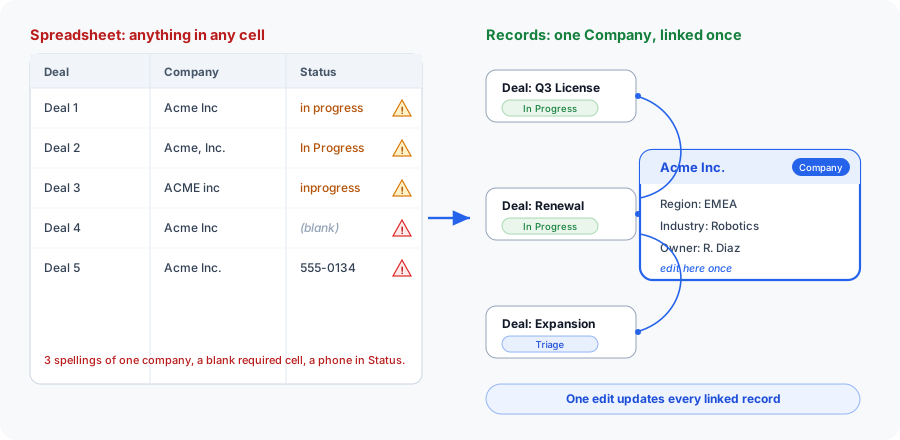
From a Spreadsheet to a System of Record
The reason to keep records as entities rather than rows in a shared sheet is that an entity knows what it is. Its type dictates which fields it has, which of them are required, what states it may occupy, and who is allowed to change it. A spreadsheet enforces none of that: anyone can overwrite any cell, put text where a date belongs, or leave a required value blank, and the data quietly rots. With entities, the rules travel with every record.
Structure also means update once, reflected everywhere. Because a record can reference another record rather than copying its details, correcting a company’s name or a contact’s email in one place flows to every record that points at it. There is no find-and-replace across ten tabs, and no chance that one copy is right while another is stale.
Create Your First Entity
After this section you will have created a real record and seen its type’s validation in action. Open a project, choose the entity type you want to add a record of, and select New. The editor shows exactly the fields the type defines: fill them in, and save. Required fields are marked; if you try to save with one empty, or put a value that breaks a field’s rule, the save is refused with a message naming the field, so you fix it before the record is ever stored.
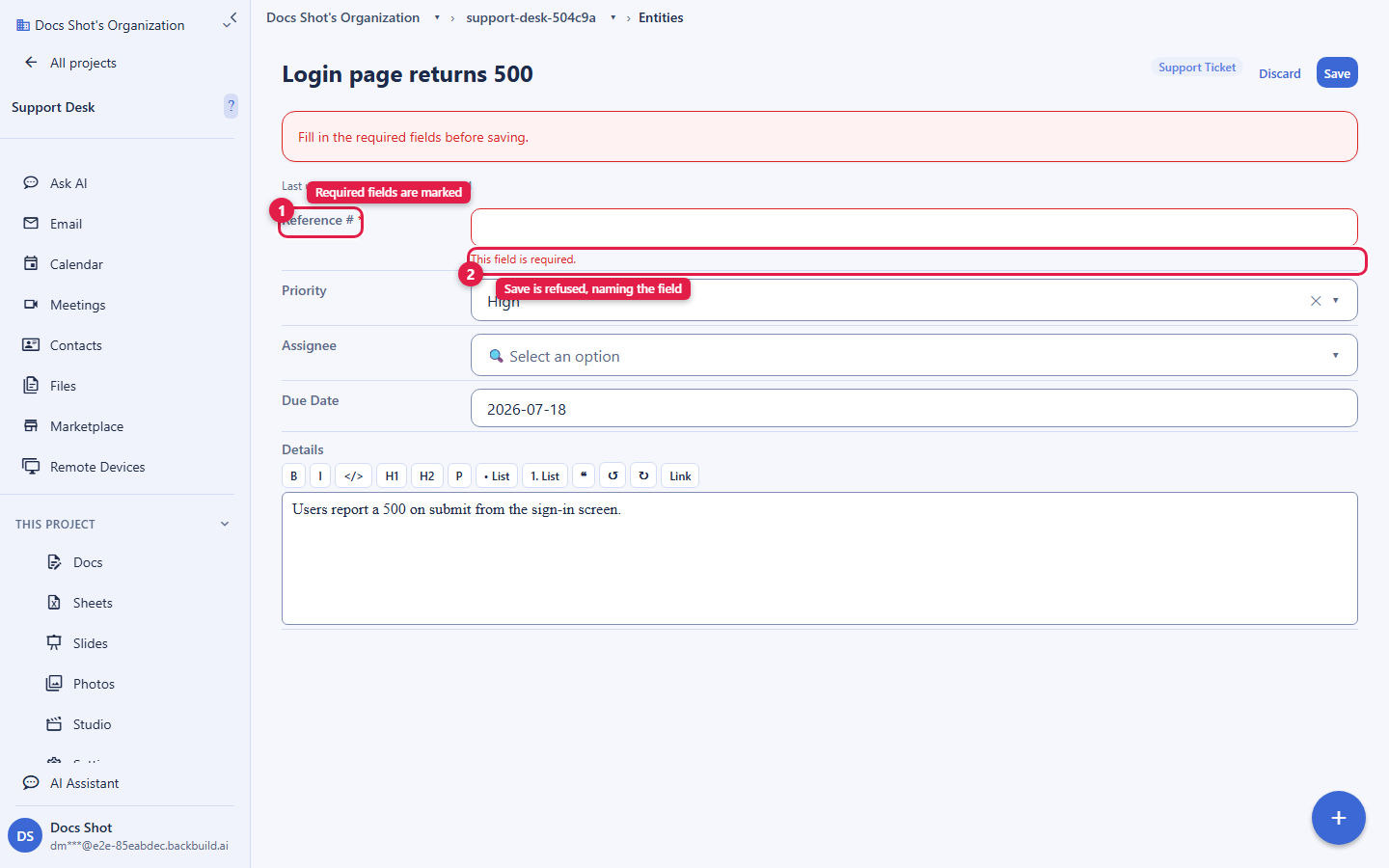
Records are created and edited through the app’s entity editor, which applies the type’s validation on every save, so whoever adds a record, the data stays clean. A dedicated public intake form surface, for letting people outside the workspace submit records, is coming soon; today, records are added by members through the editor (or through the API below).
What an Entity Carries
Every entity belongs to exactly one type and lives inside one project. The type defines which fields are available and how they are validated; the entity supplies the values. A record carries:
- A name: a human-readable title (1 to 512 characters), used in lists, search, and references.
- A field bag: the custom field values, addressed by the field keys defined on the type (see Field values).
- A workflow state: the record’s current state in its type’s workflow, if the type has one (see Moving a record through its workflow).
- A parent: an optional reference to another entity, forming a hierarchy (see Parent/child hierarchy).
- An owner scope: who the record belongs to for visibility (see Visibility).
- Timestamps: creation and last-modified times, used for optimistic concurrency.
Entities are scoped to your organization and to their project. Access is governed by org-scoped, project-aware access control, and every create, update, and delete is audit logged.
Field Values: Required, Merge, and Masking
A record’s field values are supplied in the data object on
create and update. Each key corresponds to a field on the type, and each value
must satisfy that field’s declared type and rules; the field types and
their validation options are documented on the
Entity Types page.
- Required fields are enforced on create. If the type marks a field required, creating a record without it is rejected with a validation error naming the missing field. This is enforced at the API boundary, so it holds whether the record is created in the editor, by an import, or by the AI assistant; the requirement is a real gate, not a UI hint.
- Updates merge by top-level key. On update, the
dataobject is merged into the existing field bag key by key: a supplied key sets or overwrites that field, an explicitnullclears it, and an omitted key is preserved. You can patch a single field without resending the whole record, and a full-snapshot save still works because every key is present. - Field-level edit permissions apply. A type can protect individual fields so only certain users may change them. An edit to a field you may not change is rejected with a message naming the field, so the editor can show an inline error rather than silently dropping the change.
- Fields you may not read are masked. When a field is gated by a permission flag you lack, its value is masked in the response, and the masking is designed so a masked read cannot accidentally clear the field on a later save.
The field bag is returned under the key metadata when you read a
record. For convenience, both data and metadata are
accepted as the field-bag key on create and update, so you can write back the
same key you read.
Creating Entities
Records are created within a project, so the project ID is part of the URL
path rather than the body. You never supply system-assigned fields: the
id, the owning org_id (from your session), and the
created_at / updated_at timestamps are all assigned
by the platform.
# Create a record in a project
curl -X POST https://api.backbuild.ai/v1/projects/019d.../entities \
  -H "Authorization: Bearer $TOKEN" \
  -H "Content-Type: application/json" \
  -d '{
    "entity_type_id": "019d...",
    "name": "Acme Corp - Enterprise Deal",
    "data": {
      "stage": "negotiation",
      "value": 150000,
      "contact_email": "buyer@example.com"
    }
  }'
A successful create returns 201 Created with the complete new
record in the canonical success envelope: its generated id, the
resolved org_id and project_id, the
title, the type reference, the full field bag, the resolved
owner_scope / owner_id, is_active, and
timestamps. You must be a member of the target project (organization admins and
owners may create records in any project in their organization).
# 201 Created
{
  "success": true,
  "data": {
    "id": "019e...",
    "org_id": "019a...",
    "project_id": "019d...",
    "parent_id": null,
    "title": "Acme Corp - Enterprise Deal",
    "type_uuid": "019d...",
    "metadata": {
      "stage": "negotiation",
      "value": 150000,
      "contact_email": "buyer@example.com"
    },
    "state_uuid": null,
    "sort_order": 0,
    "owner_scope": "org",
    "owner_id": null,
    "is_active": true,
    "created_by_user_id": "019b...",
    "created_at": "2026-01-01T00:00:00Z",
    "updated_at": "2026-01-01T00:00:00Z"
  }
}
Response Codes
| Status | Meaning |
|---|---|
201 Created | The record was created; the full record is returned. |
400 Bad Request | Validation error: missing/invalid name, a malformed UUID, an invalid field bag, or a missing required field. |
401 Unauthorized | Missing or invalid bearer token. |
403 Forbidden | Caller is not a member of the target project (and is not an org admin/owner), or sends a mismatched org_id. |
404 Not Found | The project, the entity_type_id, or a supplied parent_id was not found. |
409 Conflict | A supplied state_uuid is not a legal entry state of the type’s workflow. |
500 Internal Server Error | Unexpected server error. |
Reading Entities
You can fetch one record by ID, or list and search the records in a project.
Lists filter by type, parent, and status, and paginate with limit
and offset; the list envelope reports a total and
has_more computed over only the records you may see.
# Get one record
curl -H "Authorization: Bearer $TOKEN" \
  https://api.backbuild.ai/v1/entities/019d...

# List records in a project, filtered by type
curl -H "Authorization: Bearer $TOKEN" \
  "https://api.backbuild.ai/v1/projects/019d.../entities?entity_type_id=019e...&limit=50"

# Search within a project
curl -H "Authorization: Bearer $TOKEN" \
  "https://api.backbuild.ai/v1/projects/019d.../entities/search?query=acme&limit=25"
Reads honor visibility and sharing: a record you cannot see returns
404 Not Found rather than revealing that it exists, and field
values you may not read are masked in the response.
Updating Entities
Update a record by ID. You can change its name, parent, owner scope, and any
field values; as above, data is merged top-level-key-by-key, so
you can patch one field.
# Patch a single field
curl -X PUT https://api.backbuild.ai/v1/entities/019d... \
  -H "Authorization: Bearer $TOKEN" \
  -H "Content-Type: application/json" \
  -d '{ "data": { "stage": "closed-won" } }'
Optimistic concurrency
To avoid clobbering a concurrent edit, include the
expected_updated_at timestamp from the snapshot you loaded. If the
record changed since then, the update is refused with 409 Conflict
and you should reload and retry. The field is optional; omitting it falls back
to last-write-wins.
Moving a Record Through Its Workflow
Many records are not just data, they are work that moves through stages: a
ticket goes Open to In Progress to Resolved, a deal goes Qualified to
Negotiation to Won. A type can have a
workflow that defines those states and,
crucially, the legal transitions between them and who may perform each one.
A record’s current position is its state_uuid.
You do not move a record by editing that field directly. You call the transition endpoint with the state you want to move to, and the platform enforces the rules of the workflow: the move must be a legal edge out of the record’s current state, you must have edit access to the record, and you must satisfy any role or group the transition step requires. This is what stops a record jumping to an arbitrary state, and it is why “what is stuck, and who owns it” becomes a reliable question rather than a guess.
# Move a record to the next legal state
curl -X POST https://api.backbuild.ai/v1/entities/019d.../transition \
  -H "Authorization: Bearer $TOKEN" \
  -H "Content-Type: application/json" \
  -d '{
    "to_state_id": "019f...",
    "expected_updated_at": "2026-01-01T00:00:00Z"
}'to_state_id(required): the workflow state to move the record into. It must be reachable by a legal transition from the record’s current state.expected_updated_at(optional): the same optimistic-concurrency guard as on update; if the record changed since your snapshot, the transition is refused with409.
A record’s entry state is validated too: creating a record with a
state_uuid that is not a legal entry state of the workflow is
rejected with 409. Define a type’s states and role-gated
transitions on the Workflows page; this
endpoint is how a record actually advances through them.
Response Codes
| Status | Meaning |
|---|---|
200 OK | The record moved to the requested state; the response returns the record’s id, its previous and new state, the workflow, and the new update timestamp. |
400 Bad Request | Malformed entity ID or to_state_id. |
401 Unauthorized | Missing or invalid bearer token. |
403 Forbidden | Caller lacks edit access on the record, or does not meet the transition step’s role/group requirement. |
404 Not Found | The record does not exist or is not visible to the caller. |
409 Conflict | The requested move is not a legal transition from the current state, or the record changed since expected_updated_at. |
500 Internal Server Error | Unexpected server error. |
Parent/Child Hierarchy
Records can be organized into a tree by setting a parent_id. A
parent can have many children, letting you model nested structures: a deal with
line items, a ticket with sub-tasks, a folder with documents.
- Set
parent_idon create, or change it on update (sendnullto detach to the top level). - The parent must be an existing record in the same project; an unknown parent is rejected.
- List records under a specific parent with the
parent_idquery parameter. - Fetch a whole subtree with the tree endpoint, optionally rooted at a record and bounded by
max_depth(1 to 20).
# Get the record tree for a project (optionally rooted, depth-bounded)
curl -H "Authorization: Bearer $TOKEN" \
  "https://api.backbuild.ai/v1/projects/019d.../entities/tree?root_entity_id=019e...&max_depth=5"
A hierarchy is containment, one parent per child, one tree. For non-hierarchical links between records (“assigned to”, “blocked by”, “related to”), and for many-to-many connections, use relationships instead.
Entity Media and Attachments
Media fields on a type (image, audio, video, and attachment fields) hold uploaded binaries. You upload a file into a named media field on a specific record, and the field stores a reference to it. Delivery is authenticated; there are no public URLs.
- Upload via a multipart form (a
filepart plusfield_key), or as a raw body with the field key, filename, and content type supplied as query parameters. - Allowed types are a fixed allowlist of common image, audio, video, and document formats. The file’s actual contents are inspected and must match the declared type; mismatched or active-content files (for example, a script disguised as an image) are rejected before storage. Active-content document formats such as SVG are not accepted.
- Size cap is 100 MB per media file.
- Delivery re-checks your read access on the owning record on every request and streams the bytes with strict content-security headers. Renderable media is served inline; everything else is served as an attachment download.
# Upload an image into the record's "logo" media field
curl -X POST https://api.backbuild.ai/v1/entities/019d.../media \
  -H "Authorization: Bearer $TOKEN" \
  -F "field_key=logo" \
  -F "file=@logo.png"

# Fetch the stored media by its reference id
curl -H "Authorization: Bearer $TOKEN" \
  https://api.backbuild.ai/v1/entities/019d.../media/019f...
The upload response returns 201 Created with the full media
descriptor: the generated reference id, the owning
entity_id and project_id, the field_key,
the verified content_type, byte_size,
file_name, checksum_sha256, and
created_at. The id is what the field stores; knowing
it does not grant access, because every fetch is re-authorized against the
owning record.
{
  "success": true,
  "data": {
    "id": "019f...",
    "entity_id": "019d...",
    "project_id": "019e...",
    "field_key": "logo",
    "content_type": "image/png",
    "byte_size": 20480,
    "file_name": "logo.png",
    "checksum_sha256": "a1b2c3...",
    "created_at": "2026-01-01T00:00:00Z"
  }
}
Response Codes
| Status | Meaning |
|---|---|
201 Created | The media descriptor was recorded; the full descriptor is returned. |
400 Bad Request | Validation error: a missing/empty file, a content type outside the allowlist, an active-content mismatch, or a bad field_key. |
401 Unauthorized | Missing or invalid bearer token. |
403 Forbidden | Caller can see the record but lacks edit access on it. |
404 Not Found | The record does not exist or is not visible to the caller. |
413 Payload Too Large | The file exceeds the 100 MB media size cap. |
500 Internal Server Error | Unexpected server error. |
Comments
Records support threaded comments for collaboration. List the comments on a
record, or post a new one (optionally as a reply to another comment via
parent_comment_id). Viewing and posting both require read access
to the record. You supply only the content (1 to 16384
characters) and an optional parent_comment_id; the comment’s
id, org_id, author user_id, and
timestamps are assigned by the platform.
{
  "success": true,
  "data": {
    "id": "01a0...",
    "org_id": "019a...",
    "entity_id": "019d...",
    "user_id": "019b...",
    "content": "Looks good to me.",
    "parent_comment_id": null,
    "is_active": true,
    "created_at": "2026-01-01T00:00:00Z",
    "updated_at": "2026-01-01T00:00:00Z"
  }
}
Visibility
Each record has an owner scope that determines who can see it within the organization. The scope is set when the record is created (defaulting to the type’s configured default owner scope, see Ownership) and can be changed on update.
| Owner scope | Who can see the record |
|---|---|
user | Private to a single user (the owner). |
project | Members of the record’s project. |
group | Members of a specific group. |
department | Members of a specific department. |
org | Everyone in the organization. |
Visibility is the floor: a user who cannot see a record by its owner scope is
treated as if it does not exist (reads return 404). Sharing
(below) extends access beyond the owner scope to specific subjects.
Sharing: The Five-Right Model
Beyond the owner scope, records are shared with grants. Each grant targets a subject and conveys one or more of five independent capabilities, so you share at exactly the level you intend, never more.
Who you can share with (subject scopes)
- A user: a specific member of the organization.
- A group: everyone in a named group.
- A department: everyone in a department.
- A project: everyone who is a member of a project.
- The whole organization: every member.
The five rights
| Right | Allows |
|---|---|
can_visibility | See that the record exists and read its basic identity. |
can_read | Read the record’s field values and media. |
can_edit | Update the record. |
can_delete | Soft-delete the record. |
can_purge | Permanently purge the record (never conveyed implicitly by any scope; always an explicit grant, admin, or creator right). |
A grant can target a specific record or type by ID, or apply by criteria to a class of records (criteria grants are admin-only). Grants can be listed for access review and revoked at any time; a revoked grant conveys nothing. To audit access, resolve the effective rights a user has on a record, the computed five rights plus the grants and scopes that contributed them.
# Grant a user read + edit on a specific record
curl -X POST https://api.backbuild.ai/v1/entity-permissions \
  -H "Authorization: Bearer $TOKEN" \
  -H "Content-Type: application/json" \
  -d '{
    "resource_type": "entity",
    "resource_id": "019d...",
    "subject_scope": "user",
    "subject_id": "019e...",
    "can_read": true,
    "can_edit": true
  }'

# Review who has access to a record
curl -H "Authorization: Bearer $TOKEN" \
  "https://api.backbuild.ai/v1/entity-permissions?resource_type=entity&resource_id=019d..."

# See a user's effective rights on a record
curl -H "Authorization: Bearer $TOKEN" \
  "https://api.backbuild.ai/v1/entities/019d.../effective-permissions?user_id=019e..."
You never supply the grant’s id, org_id, or
created_at. A successful create returns 201 Created
with the full grant record:
{
  "success": true,
  "data": {
    "id": "01a1...",
    "org_id": "019a...",
    "resource_type": "entity",
    "resource_id": "019d...",
    "criteria": null,
    "subject_scope": "user",
    "subject_id": "019e...",
    "can_visibility": false,
    "can_read": true,
    "can_edit": true,
    "can_delete": false,
    "can_purge": false,
    "permission_flag": null,
    "created_by": "019b...",
    "created_at": "2026-01-01T00:00:00Z"
  }
}
Response Codes
| Status | Meaning |
|---|---|
201 Created | The grant was created; the full record is returned. |
400 Bad Request | Validation error: an invalid resource_type / subject_scope, supplying neither or both of resource_id and criteria, an unknown subject, an invalid permission_flag, or a grant that conveys no right. |
401 Unauthorized | Missing or invalid bearer token. |
403 Forbidden | Caller is not the resource owner or an org admin (criteria grants require an org admin), or sends a mismatched org_id. |
404 Not Found | The target record or type is not visible to the caller. |
500 Internal Server Error | Unexpected server error. |
Sharing also underpins cross-organization access and SaaS-package distribution, so a type (or record) can be made available to the tenants of a SaaS package.
Project Pinning
Pinning lets a user mark a record for quick access, for example starring a project so it surfaces in the sidebar. Pins are per-user and private: pinning a record affects only your own view, never anyone else’s. You still need view access to pin.
- Each user may keep up to 20 pins per type; exceeding the cap returns
409 Conflict. - An optional
positionin the body controls ordering among your pins. - The pin endpoints take the type and the record ID in the path; the pin’s
id,org_id, owninguser_id, andpinned_atare assigned by the platform.
# Pin a project (per-user, private)
curl -X POST https://api.backbuild.ai/v1/entities/project/019d.../pin \
  -H "Authorization: Bearer $TOKEN" \
  -H "Content-Type: application/json" \
  -d '{ "position": 0 }'

# Unpin it
curl -X DELETE https://api.backbuild.ai/v1/entities/project/019d.../pin \
  -H "Authorization: Bearer $TOKEN"
A denied pin is reported as 404 Not Found rather than forbidden,
so pinning can never be used to probe for records you cannot see.
Scale and Performance
Entities are the operational record layer, built to hold the working data of a business, not just a small knowledge base. Every read is paginated, filters and search run server-side, and per-row access is resolved as part of the query rather than after the fact, so a list stays responsive as the record count grows and never returns rows you are not entitled to see. Your plan’s included database-storage allowance, and how usage beyond it is metered, are on the pricing page and in File vs Database Storage; the record model itself is designed for operational volumes rather than a fixed row ceiling.
SaaS Builder Packages
When you turn your configuration into a SaaS package, records and their types are part of what the package ships, seeds, and gates for each tenant.
- Types travel with the package. The package defines the entity types your product needs; on provisioning, those definitions are distributed into the tenant’s organization, so every tenant starts with the same data model.
- Seed data creates starter records. A package can include ready-made records created in a new tenant, so customers begin with example or reference content rather than an empty workspace.
- Screen and view definitions shape how records appear. The package’s screen and view definitions determine which records are listed, the columns shown, and the default filters and sort.
- Per-plan feature flags gate the data model. Entity configuration and the entities/views capabilities are governed by feature flags (for example
entity-typesandviews); a tenant on a plan without the flag cannot access the gated capability. - Updates can be adopted. When a package publisher releases a new version of a type, subscribing tenants can adopt the update (even a clone that diverged locally) under a no-clobber merge.
Frequently Asked Questions
- What makes this different from a spreadsheet?
- A record’s type dictates its fields, its allowed states, and who may edit it, and those rules are enforced on every save. A record can reference another record instead of copying its details, so correcting a value in one place flows to everything that points at it.
- Does required-field validation actually block bad data?
- Yes. Required fields, type correctness, constraints, and allowed options are all enforced at the API boundary on save, so a record cannot be created or advanced with invalid or missing data, whoever or whatever is writing it.
- Can I stop people jumping a record to any status?
- Yes. Workflow states and their legal transitions are defined on the type; a record moves only via the transition endpoint, which enforces the legal edge and any role or group the transition requires.
- Can people submit records through a form instead of the grid?
- Members add records through the app’s entity editor, which applies the type’s validation on save. A dedicated public intake-form surface for people outside the workspace is coming soon.
- Will this scale past a few thousand records?
- The record layer is built for operational volumes: paginated reads, server-side filtering and search, and per-row access resolved in the query. Storage allowances and metering are on the pricing page.
- What if I build something and later cannot change it?
- Types are versioned and evolve safely: additive changes apply cleanly, and a change that would break existing records is refused rather than corrupting them. See evolving a type.
API Reference
Entity reads and writes are organization- and project-scoped. Creating and listing are project-scoped routes (the project ID is in the path); single-record routes address the record directly by ID.
Entity CRUD
| Method & Path | Description |
|---|---|
POST /v1/projects/:projectId/entities | Create a record in a project. |
GET /v1/projects/:projectId/entities | List records (filter by entity_type_id, parent_id, status; paginate with limit/offset). |
GET /v1/entities/:entityId | Get a single record. |
PUT /v1/entities/:entityId | Update a record (supports expected_updated_at optimistic concurrency). |
POST /v1/entities/:entityId/transition | Move a record to a new workflow state (to_state_id, optional expected_updated_at). |
DELETE /v1/entities/:entityId | Soft-delete a record. |
POST /v1/entities/:entityId/purge | Permanently purge a record (requires the purge right). |
Search, tree, and position
| Method & Path | Description |
|---|---|
GET /v1/projects/:projectId/entities/search | Search records by query (optionally filtered by type). |
GET /v1/projects/:projectId/entities/tree | Get the parent/child tree (optional root_entity_id, max_depth). |
GET /v1/entities/:entityId/set-position | Return a record’s ordinal and total within its sibling set (by parent_id and type_uuid), for previous/next navigation in a viewer. |
Media and comments
| Method & Path | Description |
|---|---|
POST /v1/entities/:entityId/media | Upload a binary into a media field (multipart file + field_key, or raw body). |
GET /v1/entities/:entityId/media/:mediaId | Authenticated delivery of a stored media file. |
GET /v1/entities/:entityId/comments | List comments on a record. |
POST /v1/entities/:entityId/comments | Add a comment (optionally a reply via parent_comment_id). |
Sharing and permissions
| Method & Path | Description |
|---|---|
POST /v1/entity-permissions | Create a share grant on a record or type (five rights; user/group/department/project/org subjects). |
GET /v1/entity-permissions | List grants for access review (paginated; include_revoked optional). |
DELETE /v1/entity-permissions/:permissionId | Revoke a grant. |
GET /v1/entities/:entityId/effective-permissions | Resolve the computed five rights on a record (self, or another user with ?user_id= for admins/creators). |
Pinning
| Method & Path | Description |
|---|---|
POST /v1/entities/:type/:id/pin | Pin a record (per-user, private; optional position). |
DELETE /v1/entities/:type/:id/pin | Unpin a record. |
Related concepts
- Entity Types: the schemas records conform to, including the field-type catalog and ownership defaults.
- Relationships: non-hierarchical, typed links between records.
- Views: saved board, table, calendar, timeline, and gantt presentations over records.
- Workflows: the states and role-gated transitions a record moves through.
- Files: project file uploads (the free workspace app).
See the API Reference for complete request and response documentation.