

Backbuild Secrets
Backbuild Secrets is the password and secrets manager built into your Backbuild workspace, free on every plan. It keeps your logins, cards, notes, API keys, SSH keys, and infrastructure secrets in encrypted vaults, lets you share a whole vault with your team under role-based access, and lets a machine or an AI agent use a secret at the moment it is needed without ever exposing the plaintext. It is zero-knowledge: everything is encrypted on your own device, and Backbuild stores only ciphertext it cannot read. After this page you will understand what Backbuild Secrets is, how to set your master password and unlock your first vault, what protects you, and where to go for each job you need to do.
What You Get
After this section you will understand the shape of the product and
which guide answers your question. Backbuild Secrets is a full
vault, not a notes field with a lock on it. It is the same product for a
person keeping their own logins, a small team sharing a bank login, an IT
department rolling out password hygiene, and a developer getting API keys out
of a .env file.
- Zero-knowledge by design. Encryption and decryption happen only on your own devices. Backbuild stores ciphertext, your public keys, and wrapped keys it cannot open, and never sees your master password or any secret value.
- Post-quantum encryption. Your keys are protected with hybrid post-quantum cryptography, so ciphertext harvested today cannot be opened by a future quantum computer.
- Vaults you organize and share. Everyone gets a Personal vault. Create named vaults for a team, a project, or a client, arrange them in a tree, and share a whole vault with a person, a group, a department, or your whole organization under owner, manager, and member roles.
- Every kind of secret. Logins, passwords, secure notes, cards, identities, API credentials, databases, SSH keys, servers, licenses, and more, each with typed fields, custom sections, one-time-passcode fields, and a masked field for kubeconfigs, certificates, and private keys.
- Secrets for machines and AI. Authorize a specific device or on-demand container to read a vault without a human unlocking each time, release a credential to a connected integration at use-time, and let AI agents work with secrets through tools that can never return a plaintext value.
- Drivable everywhere. The vault runs in the Backbuild web app and the Windows and macOS desktop apps, over the public REST API, through native tools for AI agents, and from the command line for infrastructure secrets.
Set Your Master Password and Unlock Your First Vault
After this section you will have an initialized vault and know how unlocking works. The first time you open Backbuild Secrets, you set one master password. It is the single thing that opens your vaults, and it never leaves your device.
- Open Backbuild Secrets from the workspace sidebar.
- Choose a master password. It must be at least fourteen characters and mix upper case, lower case, a digit, and a symbol. Choose something long and memorable that you do not use anywhere else. Initialization generates your encryption keys on your own device and creates your Personal vault; Backbuild only ever receives ciphertext and your public keys.
- Save your Emergency Kit. Initialization shows a one-time recovery secret, your Emergency Kit, exactly once. Store it somewhere safe and offline. Because the vault is zero-knowledge, this kit is how you get back in if you ever forget your master password, and no one at Backbuild can recover the password for you.
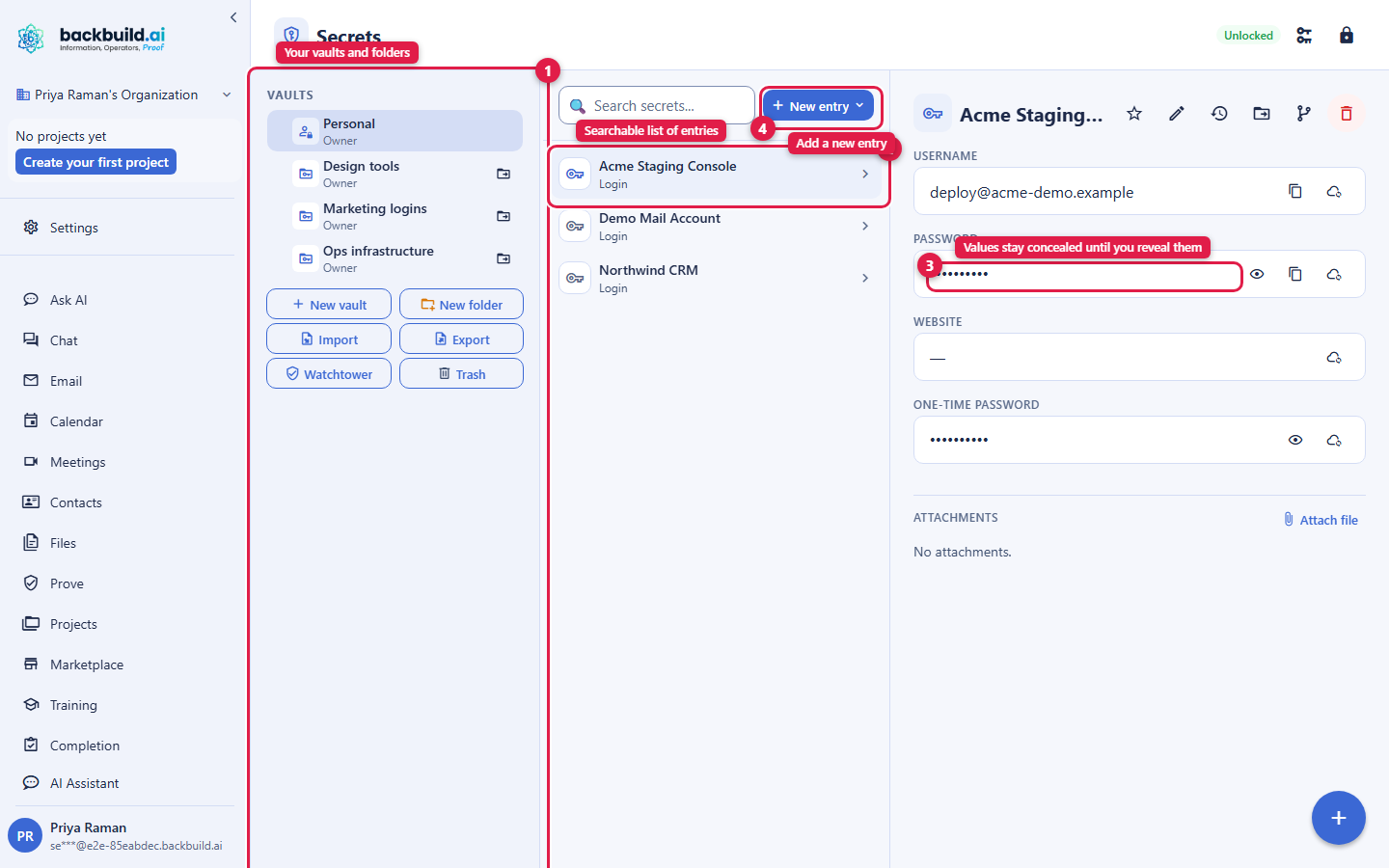
- Unlock and start adding secrets. Enter your master password to unlock, then use New Entry to add your first login. Your vault locks again on idle, when you sign out, when you switch organizations, or when your device locks, and unlocks with your master password (or a faster device gesture once you set one up).
Your master password is not recoverable by design. Backbuild cannot reset it, email it to you, or read the vault it protects, because the platform never holds it. That is the same property that guarantees no one else can read your secrets either. Keep your Emergency Kit safe, and see Unlocking, Device Factor and Recovery for every way back in.
What Zero-Knowledge Means for You
After this section you will be able to answer, plainly, whether Backbuild can see your passwords. Zero-knowledge is a precise claim, not a slogan. It means the key that unlocks your data exists only on your own devices. Your secrets are encrypted before they leave your device, and they are decrypted only after they arrive back on a device you control. Backbuild stores the encrypted result and the public halves of your keys, and holds nothing that can open a secret.
The practical consequences are the ones that matter to you. No Backbuild employee can read your vault, because there is nothing on the server to read it with. A breach of the server yields ciphertext, not passwords. A wrong master password is rejected on your own device, so the server is never a place an attacker can sit and guess against. And there is no password reset, because a provider that could reset your way in could also read your way in.
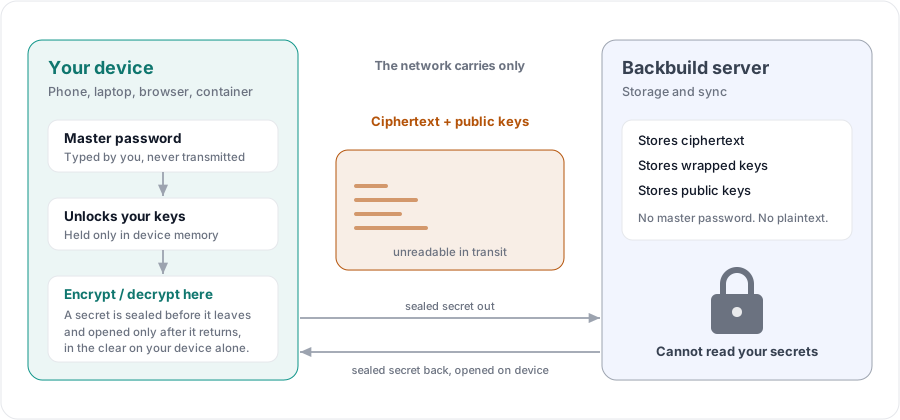
Independent research has shown that some managers advertising zero-knowledge fell short when tested against a compromised server. Backbuild Secrets is built so that the plaintext and the unlocking key never exist anywhere but your device, which is exactly the property that test probes. The specific algorithms and the wider posture, for the reviewer who needs them, are in Administration, Zero-Knowledge and Compliance.
Included on Every Plan
After this section you will know what is included and what draws credits. Backbuild Secrets is part of the workspace on every plan, including Free, the same way Backbuild Docs and Backbuild Calendar are. The security posture is not an enterprise add-on: zero-knowledge encryption, post-quantum key protection, role-based vault sharing, the audit log, machine grants, and Virtual Worker vaults are all on Free.
- The vault itself is free: unlimited vaults and items, the full item and field set, the password generator, value history, attachments, trash, and import from other managers, on every plan.
- Team sharing is free: share a vault with a person, a group, a department, or your whole organization under owner, manager, and member roles, with a tamper-evident audit log, on every plan.
- Machines and agents draw credits only where they run: the grant that authorizes a container or a Virtual Worker to use a secret is free; the container or worker session itself is metered as usage. See the pricing page for current rates.
Choose Your Guide
Each guide teaches one job end to end. Start with the one that matches what you need to do.
- Vaults, Items and the Password Generator: organize vaults into a tree, create every kind of entry, use typed fields and the masked field for keys and certificates, reveal and copy safely, keep one-time-passcode codes beside a login, generate strong passwords, and restore an earlier value from history.
- Sharing Vaults with Your Team: the vault-level sharing model, the owner, manager, and member roles, how a share is delivered without ever sending a password, confirming a new recipient, and how removing someone cuts off their access completely.
- Autofill with the Browser Extension: fill logins safely on the sites you authorize, save and update logins as you sign in, and understand why autofill sometimes refuses on purpose.
- Unlocking, Device Factor and Recovery: unlock faster with a device gesture, change your master password, and every way back in, including the Emergency Kit and administrator-assisted recovery that never exposes a secret.
- Secrets for Machines, Integrations and AI Agents: authorize a device or container, release a credential to a connected integration at use-time, give a Virtual Worker its own vault, and let AI agents work with secrets without ever seeing a value.
- Administration, Zero-Knowledge and Compliance: identity lifecycle and offboarding, enforcing multi-factor and device factors, the audit trail, the honest compliance posture, and the exact cryptography for reviewers.
What Backbuild Secrets Does Not Do Yet
Choosing well means matching the tool to the requirement. Backbuild Secrets is a complete vault today in the web app and the Windows and macOS desktop apps, and it already powers the browser inside Backbuild's on-demand containers. A few things are honestly still on their way:
- Browser autofill on third-party websites is delivered by the Backbuild browser extension, which is coming to the Chrome Web Store, Firefox Add-ons, and the App Store as a Safari extension. The store listings are marked Coming Soon on the download page. Until then, use the vault in the web and desktop apps. See Autofill with the Browser Extension for the full design.
- Native mobile apps are not available yet.
- A passkey record is a filed credential, not a working authenticator. The vault stores passkey metadata as a record; it does not create passkeys or answer sign-in challenges as an authenticator today.
- Backbuild Secrets is not a payment processor. A stored credit card is encrypted data you keep for your own reference and autofill, the same as any other item, not a card we process or charge.
Can Backbuild, or its employees, see my passwords?
No. The vault is zero-knowledge: your entries are encrypted on your device
under keys that never leave it, and the server holds only ciphertext it
cannot open. There is no server-side key and no employee tool that can read a
vault.
What happens if I forget my master password?
No one can reset it for you, by design. You recover with the Emergency Kit
you saved at setup, or, in an organization that turns it on, with
administrator-assisted recovery that still never exposes a secret value. See
Unlocking, Device Factor and
Recovery.
Is it really free?
Yes. The vault, team sharing, the audit log, and post-quantum zero-knowledge
encryption are included on every plan, including Free. There is no separate
subscription and no security tier.
Where does it run?
In the Backbuild web app and the Windows and macOS desktop apps today, over
the REST API and native agent tools, and from the command line. Browser
autofill and native mobile apps are on the way.