

Importing and Exporting
This guide teaches how data gets into and out of Backbuild Sheets, and, just as importantly, what survives each trip. After it you will be able to import an existing Excel or CSV file into a new sheet, take your data back out in an open format, and know exactly what an export preserves before you rely on it. Nothing here is trapped in a proprietary format, and the one caveat that matters most, that XLSX export is a values snapshot, is stated up front rather than discovered at a handoff.
Importing a File
After this section you will turn an existing spreadsheet into a Backbuild sheet. Choose File, then Import. An import creates a new sheet from the file, so your original is never touched. The supported formats cover what people actually have:
- CSV and TSV: comma- and tab-separated text, the universal exchange format.
- XLSX (Excel): a full Excel workbook, including multiple sheets and shared strings, with dates read into a normalized form and the historical calendar quirk handled correctly.
- ODS (OpenDocument): a LibreOffice or OpenOffice workbook.
Formulas in an imported workbook are translated as the file comes in, so a sheet of Excel formulas arrives computing rather than as inert text, within the coverage described in the formula guide. Imports are read carefully: a value that looks like a spreadsheet command is neutralized so an imported file cannot smuggle in an executable formula, compressed files are guarded against decompression attacks, and there are sensible caps on the number of cells, rows, and columns a single import can create.
How do I import my Excel file without losing my work? Use File, then Import, and pick the XLSX file. Multiple sheets, values, formulas, and formatting come across, with dates normalized on the way in. Import is faithful for the great majority of real workbooks; as with any cross-tool move, spot-check a complex or heavily-styled sheet after import rather than assuming a pixel-perfect copy. Your original file is never changed, because import creates a new sheet.
Exporting Your Data
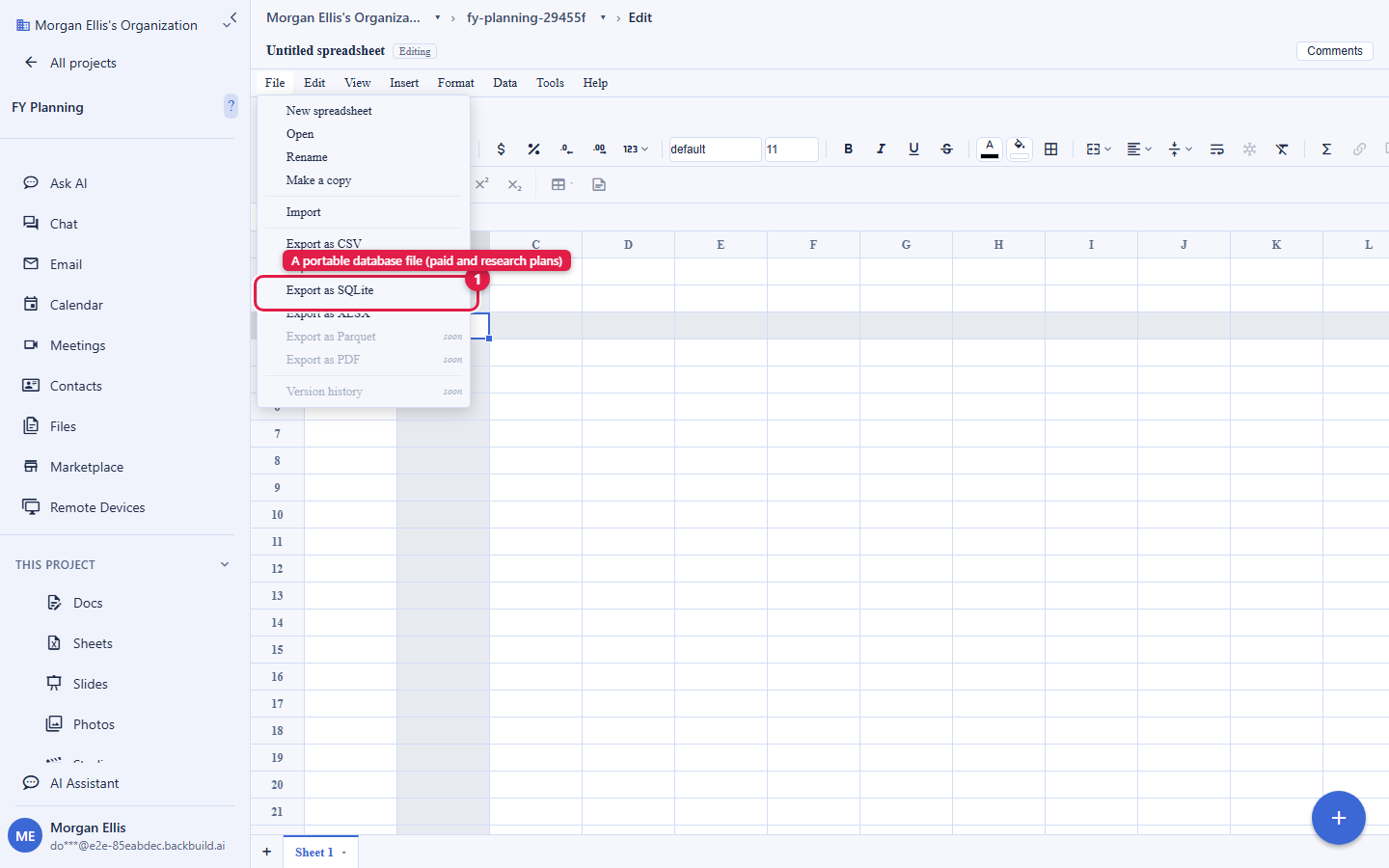
After this section you will take your data out in the format the next tool needs. Choose File, then the export format. Which formats are available depends on your plan:
- CSV and TSV, on every plan: plain separated-value text, for a quick handoff or a load into another tool.
- XLSX (Excel), on every plan: an Excel workbook that opens anywhere and imports cleanly back into Backbuild Sheets.
- SQLite, on the paid and research plans: a single portable database file, the natural format for analysis. It is included on the paid Lite, Pro, and Enterprise plans and with Backbuild Science (free for verified students and faculty) and Backbuild Prove. The file opens in the standard SQLite tooling, DB Browser, DuckDB, and data-analysis libraries.
XLSX, CSV, TSV, and SQLite export the computed values of your sheet, not the formulas behind them. An exported file is a snapshot of what the sheet currently shows, which is what makes it portable and what a recipient usually wants. If someone downstream needs the live formulas, keep the working copy in Backbuild Sheets and share it there, where the formulas stay live and collaborative. This is the one export fact worth knowing before a handoff, so it is stated plainly rather than buried.
What a Round-Trip Preserves
After this section you will know what to expect when data goes out and comes back. An XLSX export imports cleanly back into Backbuild Sheets, so Excel is a safe interchange path for values, formats, and structure. Because export carries the computed values rather than the formulas, a round-trip reproduces the numbers exactly but does not restore the formula logic behind them; keep the authoritative model in Backbuild Sheets and use the export as the shareable result. The SQLite export is the choice when the destination is analysis or a reproducible record: it is a single self-contained database file that a script, a notebook, or a database tool reads directly.
Can I get my data back out, or am I locked in? You can always get it out. CSV, TSV, and XLSX export are on every plan, including Free, and SQLite export is available on the paid and research plans. Your data is never trapped in a format only Backbuild can read.
Can I export a reproducible database for analysis or a paper? Yes: export the workbook as a single SQLite file, available on the paid plans and with Backbuild Science and Backbuild Prove. It opens in standard SQLite tooling, DuckDB, and data-analysis libraries, which makes it a clean data-availability artifact for a reproducible record. Parquet export is coming soon.
Is there a PDF export? PDF export is coming soon. For a fixed shareable copy today, export XLSX or SQLite; for a formatted printed document, author the narrative in Backbuild Docs and print to PDF there.
Where to Go Next
- Formulas, Functions, and the Calculation Engine: the formula coverage an imported workbook translates into.
- Collaboration, Comments, and Sharing: share the live sheet instead of a file when formulas must stay live.
- AI Assistance, the API, and Agents: import and export a sheet programmatically.