

Views
A view is a saved, configurable way of looking at your data. Instead of re-applying the same filters, sort, and columns every time, you save them as a named view (a “My open deals” table, a “Sprint board”, an “Upcoming milestones” timeline) and run it on demand. A view captures how to present a set of records; running it returns the rows.
Free Custom data modeling (entity types, entities, relationships, and views) is included on every plan, including Free, as is the Files app. The SaaS Builder, which packages your data model into installable, sellable apps, is part of Backbuild Pro. See pricing.
One Dataset, Many Views
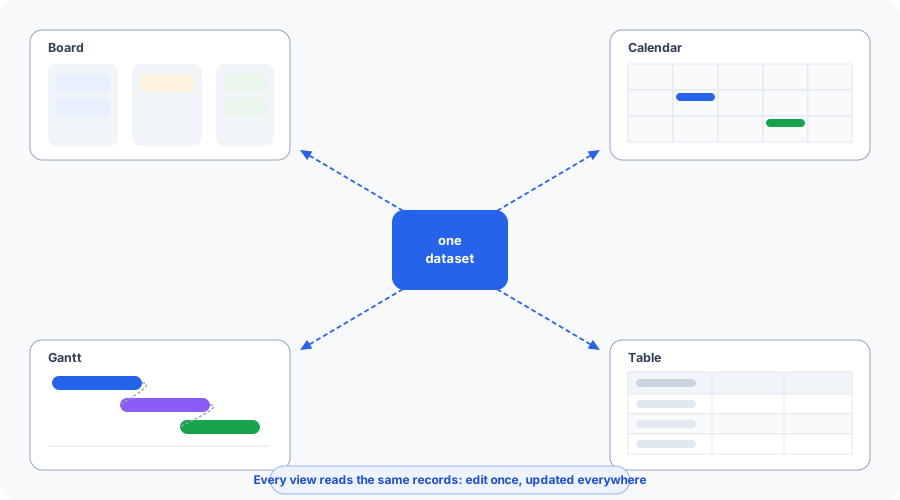
The point of a view is that it never copies your data. Every view reads the same underlying records, so editing a record in one view updates it in all of them. You can save the same deals as a board for today’s standup, a calendar for this month’s close dates, a gantt for the quarter’s plan, and a table for a bulk edit, without maintaining four copies that drift apart. This is what separates a connected workspace from a board-first tool where every layout is a separate board to keep in sync.
| When you want to… | Use this view |
|---|---|
| Group records into stage columns for a standup | board |
| Bulk-edit many records at once | table |
| See deadlines and events by date | calendar |
| See scheduled work grouped over time | timeline |
| Plan dependency-bearing work | gantt |
| Scan a simple, ordered list | list |
Create Your First View
After this section you will have a saved view over your records. In the app, open the Views area, choose New View, pick a display type (start with a table), and choose the data source. For an entity-source view, pick the entity type to show, choose the columns you want, and add a filter or two. Save it a name and run it; the rows appear immediately in a paginated grid, and the type you picked is saved on the view (see How view types render today).
Landing on a blank grid is the fastest way to lose a new user, so most teams start from a template instead of an empty view: a template arrives pre-configured with sensible columns and a filter, so the first run shows real, relevant work rather than nothing.
What a View Is
A view binds three things: a data source (which records to draw from), a display type (how to lay them out), and a configuration (columns, filters, sort, grouping). Views are organization-scoped and can optionally be pinned to a single project. Every view carries:
- A name: a title (1 to 200 characters), shown in pickers and menus.
- An optional description: free text (up to 1,000 characters).
- A view type: the display layout (see View types).
- An optional project: if set, the view is scoped to that project; if omitted, it spans the organization (see Project scoping).
- A configuration: the columns, filters, sort, and grouping (see Configuration).
- A shared flag: private to its creator, or visible to the organization (see Visibility and sharing).
- Timestamps: creation and last-modified times.
Views are governed by org-scoped, project-aware access control, and create, update, delete, and each execution are audit logged.
View Types
The view type declares how the records are meant to be laid out:
| View type | Layout |
|---|---|
table | A spreadsheet-style grid: one row per record, one column per configured field. Best for bulk editing and scanning many fields. |
list | A simple linear list of records (the default when no type is given). |
board | A Kanban board, with records grouped into columns by a chosen field (typically a status or stage). |
calendar | Records placed on a calendar by a date field. |
timeline | Records grouped over time in horizontal swimlanes; good for scheduled work seen across many records at once. |
gantt | A gantt chart for scheduled work with dependencies: single-record bars you can sequence and relate. |
Timeline versus gantt is a common question. Reach for
gantt when you need to map dependencies between individual pieces
of work (this task starts after that one finishes); reach for
timeline when you want many records grouped into swimlanes and
scheduled across a period without dependency mapping. Both, along with
calendar, are date-driven: they bind to the
records’ date fields and reflect the real dates live, so moving a
record’s due date moves it on the chart the next time the view runs.
The view type is purely presentational; it does not change which records the
view can read. Filtering, sorting, and grouping (below) apply across every
type; a board additionally uses the grouping field to form its
columns.
How view types render today
The view type is stored on the view and returned by every execution, so any
client knows how the rows are meant to be laid out. How the layout is drawn
depends on the surface. In the Backbuild app today, a saved view opens as a
paginated grid whatever its type, with the type carried on the view;
dedicated board, calendar, timeline, and gantt layouts for saved views are
coming soon. Purpose-built layouts already ship elsewhere in the platform:
the tickets surface renders a drag and drop board and a gantt chart, and
Backbuild Calendar renders full month,
week, and day layouts. API and MCP clients receive the
view_type, the group_by field, and the windowed
rows from every execution, so an external application or a
SaaS Builder screen can lay the
records out as a board, calendar, or timeline itself.
Data Sources
A view draws its rows from one of two sources, set by the source key:
- Tasks (
source: "tasks", the default): the view lists tasks and supports filtering by status, assignee, and priority, and sorting by common task fields. - Entities (
source: "entities"): the view lists records of your custom data model. An entity-source view can pin to a single entity type, project field values as columns, and filter on those values.
Both sources apply per-row access control when the view runs: you only ever see records you are entitled to see (see Executing a view).
Configuration
A view’s behavior lives in its configuration: one object
describing the source, columns, filters, sort, and grouping. You can send it as
a unified config object, or as discrete top-level fields that merge
into it. When both are present, keys inside an explicit config
object win.
| Config key | Meaning |
|---|---|
source | tasks or entities. A config without a source is treated as the default task source. |
entity_type_id | (entity source) Restricts the view to one type. Must reference an active type in your organization. |
columns | The fields to show, in order. For entity-source views, 1 to 64 field keys (each 1 to 128 characters); title plus any of the type’s field keys are valid. |
filters | The criteria that narrow which records appear (see Filters). |
sort_config | The sort: a field and a direction (asc or desc). Defaults to newest-first. |
group_by | A field key to group rows by (drives a board’s columns). |
metadata | Free-form presentation metadata carried with the view. |
The configuration is validated when you create or update a view: an unknown
source, an entity_type_id that is not an active type,
a columns array outside the allowed size, or an unsafe
filters shape are all rejected with a 400 naming the
problem. The same validation runs again at execution, so a stale or malformed
view fails cleanly rather than misbehaving.
Columns
Columns control which fields are projected into each row and in what order. For
entity-source views, columns is a list of field keys:
title for the record’s name plus any field key on the type.
Omit columns and an entity-source view defaults to just the title.
The keys you request are returned in a dedicated, namespaced cell bag per row,
so a field named like a built-in row attribute can never collide with it.
Filters
Filters narrow the rows a view returns; the available filters depend on the source:
- Task source: filter by
status_id,assigned_to, andpriority. - Entity source: filter on field values with a safe,
declarative criteria subset, equality on a field, or “is one of”
(
{ "in": […] }) against the type and top-level field keys. The criteria are evaluated as data, never assembled into a query, so they cannot be used to reach records the configuration did not intend.
Sorting and grouping
sort_config sets the order: a field plus asc or
desc. Task-source views can sort by creation time, last-update
time, due date, priority, sort order, or title; with no sort specified, rows
come back newest-first. group_by names the field used to cluster
rows, most visibly forming the columns of a board.
Private, Shared, and Why Sharing Never Leaks
A view’s reach is controlled by a single flag, is_shared,
set on create and changeable on update:
| Setting | Who can see and run the view |
|---|---|
is_shared: false (default) | Private: only the creator can see, run, edit, or delete it. |
is_shared: true | Shared: visible to and runnable by members of the organization. |
Because filter, sort, group, and columns all live on the view, a personal view is entirely yours: filtering it to “mine” or “this status” changes only your view and never disturbs anyone else’s. Changes are per-view, not global to the underlying data.
The security question that matters is whether sharing a view can hand someone rows they should not see. It cannot. Sharing a view shares only the definition, the saved columns, filters, and sort. It never widens access to records. Every time anyone runs a shared view, the rows are re-filtered on the server to what that viewer is entitled to see, and the count is filtered the same way:
- A task-source view scoped to a project will not return that project’s tasks to a non-member: a project-scoped view denies a non-member outright, and an organization-wide view simply excludes the rows (and their count) from projects the viewer cannot access.
- An entity-source view returns only the records the viewer can see under the entity visibility and sharing rules, and field values the viewer may not read are masked. The total count carries the same filter, so a shared view never leaks the existence of records the viewer cannot reach.
Access is always resolved server-side against the person running the view, never hidden only in the browser, so sharing a view is safe by construction: two people running the same shared view may legitimately see different rows and different counts.
Project Scoping and Pinning
A view is attached to a project by setting project_id at creation.
A project-scoped view draws only from that project; a view created without a
project_id spans the organization. When you create a
project-scoped task view, you must be able to access that project; binding a
view to a project you cannot reach is rejected up front rather than producing
an unusable view.
This association is how views participate in project pinning: a project-scoped
view appears alongside its project and travels with it. (Per-user, private
“pin to my sidebar” pinning applies to
records, not to view
definitions.) List the views belonging to a project by passing
project_id to the list endpoint.
View Templates
An organization can publish view templates: pre-built view configurations members start from instead of building a view from scratch. Templates are the answer to the blank-grid problem, they arrive with sensible columns and a filter, so the first run shows real, relevant work. Templates are listed organization-wide (default templates surface first) and can be filtered by view type, giving every member a consistent set of starting points (a standard “Backlog board”, a “This week’s work” list) for the data your team works with.
Executing a View
Executing a view runs its saved configuration against the live data and returns
the rows. The execute endpoint returns the resolved columns, an
array of rows, a total_count (the rows that match the
view’s filters, before pagination), and the view_type so the
client knows how to render. Execution is paginated with limit
(default 50, maximum 500) and offset.
As above, every execution applies the running user’s access per row, and
total_count reflects only the rows that user may see; there is no
separate hidden-count leak.
# Execute a view (canonical POST form, with pagination)
curl -X POST https://api.backbuild.ai/v1/views/019d.../execute \
  -H "Authorization: Bearer $TOKEN" \
  -H "Content-Type: application/json" \
  -d '{ "limit": 50, "offset": 0 }'

# Sample response
{
  "data": {
    "view_type": "table",
    "view_name": "Open enterprise deals",
    "source": "entities",
    "columns": ["title", "stage", "value"],
    "rows": [
      {
        "id": "019e...",
        "project_id": "019d...",
        "cells": { "title": "Acme Corp", "stage": "negotiation", "value": 150000 }
      }
    ],
    "total_count": 1,
    "group_by": null
  }
}
A read-only GET form of the execute endpoint is also available and
returns the same shape.
Creating, Updating, and Deleting Views
Views are created, listed, fetched, updated, and deleted by ID. The list
endpoint filters by project_id, view_type, and shared
state, with limit/offset pagination.
On create you supply only the definition: name,
view_type, optional project_id, the
config (or flat config fields), and is_shared.
System-assigned fields are never accepted: the id, the owning
org_id (from your session), created_by, and the
timestamps come from the platform.
# Create an entity-source table view scoped to a project
curl -X POST https://api.backbuild.ai/v1/views \
  -H "Authorization: Bearer $TOKEN" \
  -H "Content-Type: application/json" \
  -d '{
    "name": "Open enterprise deals",
    "view_type": "table",
    "project_id": "019d...",
    "is_shared": true,
    "config": {
      "source": "entities",
      "entity_type_id": "019e...",
      "columns": ["title", "stage", "value"],
      "filters": { "stage": { "in": ["negotiation", "proposal"] } },
      "sort_config": { "field": "created_at", "direction": "desc" }
    }
  }'

# List views in a project
curl -H "Authorization: Bearer $TOKEN" \
  "https://api.backbuild.ai/v1/views?project_id=019d...&view_type=table&limit=25"

# Update a view (share it, change its sort)
curl -X PUT https://api.backbuild.ai/v1/views/019d... \
  -H "Authorization: Bearer $TOKEN" \
  -H "Content-Type: application/json" \
  -d '{
    "is_shared": true,
    "sort_config": { "field": "updated_at", "direction": "desc" }
  }'
A successful create returns 201 Created with the full view record:
{
  "success": true,
  "data": {
    "id": "019d...",
    "org_id": "019a...",
    "project_id": "019d...",
    "name": "Open enterprise deals",
    "view_type": "table",
    "config": {
      "source": "entities",
      "entity_type_id": "019e...",
      "columns": ["title", "stage", "value"],
      "filters": { "stage": { "in": ["negotiation", "proposal"] } },
      "sort_config": { "field": "created_at", "direction": "desc" }
    },
    "is_shared": true,
    "created_by": "019b...",
    "created_at": "2026-01-01T00:00:00Z",
    "updated_at": "2026-01-01T00:00:00Z"
  }
}
Response Codes
| Status | Meaning |
|---|---|
201 Created | The view was created; the full record is returned. |
400 Bad Request | Validation error: a missing name or view_type, or an invalid config (unknown source, an entity_type_id that is not an active type, out-of-range columns, or an unsafe filters shape). |
401 Unauthorized | Missing or invalid bearer token. |
403 Forbidden | Caller lacks the view create permission, cannot access the supplied project_id, or sends a mismatched org_id. |
500 Internal Server Error | Unexpected server error. |
SaaS Builder Packages
When you turn your configuration into a SaaS package, views are part of how the package defines, ships, and gates the tenant-facing experience.
- Screen and view definitions ship with the package. A package declares screen definitions (and the view configurations they contain) that determine which records each screen lists, the columns, and the default filters and sort, so every tenant gets the same presentation out of the box.
- Data bundles capture and version the configuration. Screen and view definitions are part of the data bundle that snapshots package state, so they can be published, promoted across environments, and rolled back with the rest of the package.
- Seed data populates the views. Seed data can create starter records in a new tenant, so a shipped view shows meaningful content on day one rather than an empty grid.
- Per-plan feature flags gate views. The views capability is governed by the views feature flag; a tenant on a plan without it cannot create or run views.
Frequently Asked Questions
- Can I see the same data as a board today and a calendar tomorrow without rebuilding it?
- Yes at the definition level. Every view reads the same records, so you add a board, table, calendar, timeline, or gantt definition over one dataset, never a copy, and editing a record in one view updates it everywhere. In the Backbuild app today the rows open as a paginated grid whatever the type, with dedicated layouts coming soon; API and MCP clients receive the type and grouping with every execution and can draw the layout themselves.
- If I filter or sort a view, do I mess up everyone else’s?
- No. Filter, sort, group, and columns live on the view. A private view is entirely yours, and changes are per-view, not global to the data.
- Can I share a view without exposing rows people should not see?
- Yes. Sharing shares only the definition. Every execution re-filters rows to the running viewer’s access on the server, and the count is filtered the same way, so a shared view cannot hand anyone rows they are not entitled to.
- What is the difference between timeline and gantt?
- Gantt maps single-record bars with dependencies between tasks; timeline groups many records into swimlanes scheduled over a period without dependency mapping. Pick by whether you need dependencies or grouped scheduling.
- Do the calendar and gantt reflect the real dates?
- Yes. Date-driven views bind to the records’ date fields and reflect current dates each time the view runs.
- The first view I opened was empty. What do I do?
- Start from a view template. Templates arrive pre-configured with columns and a filter, so the first run shows real, relevant work rather than a blank grid.
API Reference
All view endpoints require authentication and are organization-scoped; the organization is resolved from the session.
View CRUD
| Method & Path | Description |
|---|---|
GET /v1/views | List views (filter by project_id, view_type, is_shared; paginate with limit/offset). |
POST /v1/views | Create a view (name, view_type, optional project_id, config/flat config fields, is_shared). |
GET /v1/views/:id | Get a single view definition. |
PUT /v1/views/:id | Update a view (name, config, sort, sharing). |
DELETE /v1/views/:id | Delete a view. |
Execution and templates
| Method & Path | Description |
|---|---|
POST /v1/views/:id/execute | Execute a view and return rows (optional limit 1 to 500, default 50; offset). Canonical form. |
GET /v1/views/:id/execute | Execute a view (convenience read-only form; same response shape). |
GET /v1/views/templates | List the organization’s view templates (optional view_type filter; default templates first). |
Related concepts
- Entities: the records an entity-source view lists.
- Entity Types: the schemas that define the field keys you use as columns and filters.
- Relationships: typed links between records.
- SaaS Builder: how screen and view definitions ship to tenants.
- Feature Flags: the
viewsentitlement.
See the API Reference for complete request and response documentation.