

The Help Desk API, MCP & Automation
Everything you can do with the help desk in the app, you can do from code. A public REST API drives filing, working, and exporting tickets and configuring the help desk itself, and a native set of Model Context Protocol tools lets an AI agent operate the queue directly. Every call runs under the same roles, permissions, and audit trail as the app, so automation never becomes a way around your access controls. After this page you will know what is programmable, how an agent drives it, and why status stays in sync without a fragile integration between two tools.
The whole Backbuild platform is drivable over the public REST API and MCP. For authentication, API keys, and the endpoint reference, see the REST API and the MCP server guides.
The REST API
After this section you will know the shape of the programmatic surface. The help desk exposes two families of REST endpoints:
- Ticket endpoints cover the filer and agent surface: create a ticket, read and list tickets, reply, assign, transition state, snooze, merge, submit a satisfaction rating, watch, manage labels and relations, list a ticket's children, read a reproduction, and export a filtered list.
- Configuration endpoints cover the setup surface: manage ticket types, workflows and their states and transitions, custom field definitions, labels, categories, SLA policies, the AI stage and category workers, and the projects you expose to subscribers.
In other words, both the day-to-day work and the whole administration model are programmable, so you can provision a help desk, migrate tickets in, or automate your own workflows around it.
The MCP Tools: Drive the Help Desk with an Agent
After this section you will know how an AI agent operates the queue. The native MCP tools expose the help desk to any agent you connect. An agent can create a ticket, fetch and list tickets, reply, assign, set status, snooze, merge, submit a satisfaction score, toggle a watch, add labels and relations, list children, and read a reproduction, plus the full configuration set for types, workflows, states, fields, labels, categories, and the AI worker assignments. This is the same tool surface a Backbuild Virtual Worker uses to draft a reply on a ticket, so anything a worker does on your help desk, your own connected agents can do too, within the access you grant them.
Every tool call is bounded by the identity behind it. An agent can never read or change a ticket the account it acts for could not, and requester and agent capabilities remain two separate models: the self-keyed requester path never gains staff powers.
One Object Graph, No Two-Tool Sync
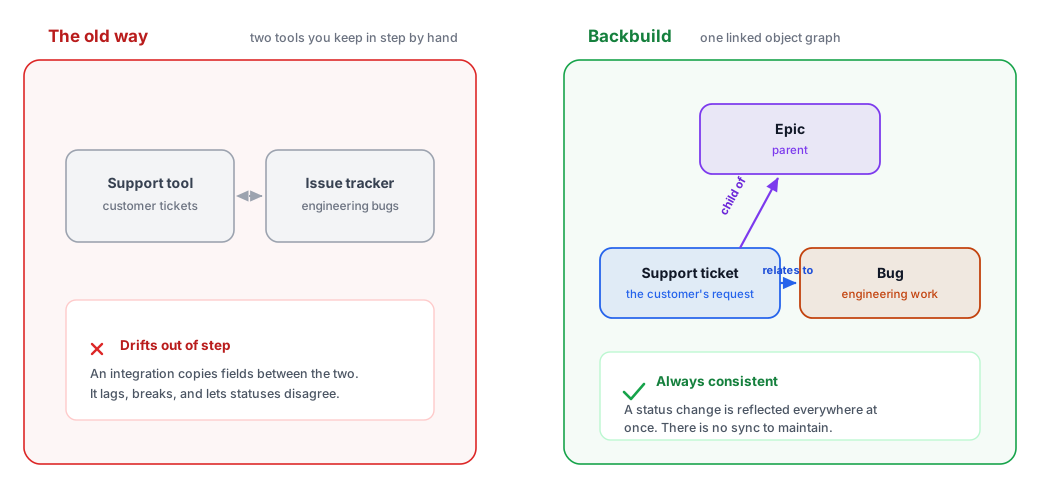
After this section you will understand why status does not drift. The classic support automation problem is a customer ticket in one tool and the engineering work in another, wired together by a sync that silently falls out of step. Backbuild does not have that seam. A support ticket and the engineering Bug, Story, or Epic that resolves it are the same object graph, linked by relations and hierarchy, so a status change is reflected everywhere at once. There is nothing to reconcile and no integration to keep alive.
Export and Send to Docs or Sheets
After this section you will be able to get ticket data out. Beyond the API, the app can export the current filtered and sorted queue to a CSV file or into Backbuild Sheets, and can send a single ticket's public conversation or its full work log into your organization's Support Ticket Workspace as a Backbuild Docs document. Exported threads land in a project, so your support records live alongside the rest of your organization's work rather than locked inside the help desk.
Is the help desk API and MCP drivable for automation and status sync? Yes. The full ticket and configuration surface is available over the public REST API and the native MCP tools. And because a support ticket and its engineering work are the same object, you do not need a two-tool sync at all; status is already consistent.
Can an agent do anything a person could not? No. Every API and MCP call runs under the identity behind it, with the same roles, permissions, and audit trail as the app. Requester and agent capabilities stay separate, and nothing bypasses your access controls.
Can I migrate existing tickets in? The create and configuration endpoints let you provision types and workflows and bring tickets in programmatically. Model your types and states first, then import.
Where to Next
- REST API: authentication, API keys, and the endpoint reference.
- MCP Server: connecting an AI agent to the native tools.
- AI Support with Virtual Workers: the same tools, driven by a supervised worker on a stage.
- Security, Privacy and Governance: the access model every call is bounded by.