

Sharing, Access, and Governance
This guide teaches how images move to the right people without ever leaking to the wrong ones. After it you will be able to choose the scope an image lives in, share it at exactly the access level a person or a team should have, deliver to someone outside your organization with a link you can expire and revoke, and explain to an administrator how access is enforced and how the whole library is protected. Sharing here is governed, not ad hoc, so a brand or a regulated team can trust it.
Scopes and Project Roles
After this section you will put each image where the right people reach it. Every photo lives in one of three scopes, and the scope is the first, broadest control over who can see it:
- Project images are visible to the members of that project, and what each member can do follows their project role.
- Organization images are shared across the whole organization, for brand assets everyone draws on.
- Personal images are yours alone until you deliberately share one.
Within a project, roles run from viewer to member to administrator to owner. A viewer can look and copy; a member can add and edit; an administrator and owner can manage the library and its sharing. A project set to organization-wide visibility lets other members of the same organization list and view its images without being able to upload or delete, which is the read-only shared-library pattern. The full access model behind this is the platform's Roles and Permissions.
Sharing an Image or an Album
After this section you will grant precisely the access you intend. Beyond the scope, you can share a specific image or album to a chosen audience:
- Who you share with: a specific person, a role, a group, a department, or the whole organization.
- What they can do: read access confers viewing and copying; write access additionally confers re-sharing.
- A ceiling on re-sharing: a person can never re-share beyond what they themselves are allowed to grant, so a share can never escalate access. A share is bounded by the sharer's own ceiling.
- Shared with me: images shared to you appear in a shared-with-me view, so a hand-off is somewhere you can find, not just a link in a message.
Public Links That Expire and Revoke
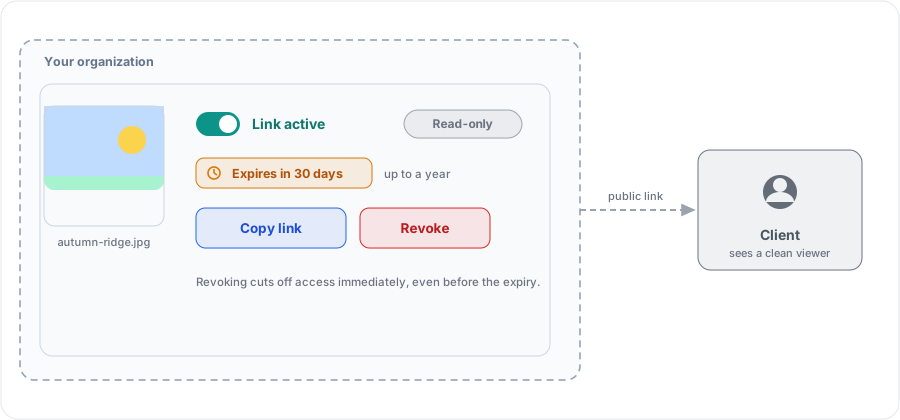
After this section you will deliver to someone outside your organization. When a recipient is not part of your workspace, for example a client reviewing a set, mint a public link:
- Read-only: the link shows the image; it cannot be used to change it.
- Optional expiry: set the link to stop working after a period, up to a year, so access is never permanent by accident.
- Revocable at any time: revoke a link and it stops working immediately, even before its expiry.
This is the difference between a professional delivery and a bare file link: the recipient sees your image in a clean viewer, and you keep control of how long they can, and can cut it off the moment a project ends.
How Access Is Enforced
After this section an administrator will trust that access holds. Access is decided on the server on every read and every write, deny by default, and re-derived from the sharer's and the viewer's actual permissions rather than trusted from the client. There is no client-side path around it. Images are delivered through authorized, streamed URLs, never a public address, so a thumbnail or a full-size view cannot be reached by guessing an address. A share across organizations happens only through the sanctioned, bounded, audited path, never by tampering with an identifier.
Audit and Governance
After this section you will have an accountable trail. Every write to the library is audit-logged with the acting user and a before-and-after record: uploads, edits saved, deletions, album and slideshow changes, and shares. An organization has a timestamped, attributable trail of activity, which is what a board-facing or a regulated team needs. Storage is isolated per organization, and access is enforced on every read, so one organization's images are never reachable from another.
How Your Data Is Protected
After this section you will know your images stay yours.
- Encrypted in transit and at rest. Images travel over TLS and are stored encrypted.
- Originals kept immutable. Your uploaded file is content-addressed and never modified; edits produce new renditions, so the source is always intact and recoverable.
- Location metadata stripped on upload. GPS coordinates and other sensitive metadata are removed before storage, with a preserve-metadata setting for when you need the full record.
- Nothing analyzed for advertising. Backbuild Photos does not run face recognition, does not profile the contents of your pictures, and does not use your images to target ads.
Photos in Your Documents
After this section you will place a library image directly into your work. Because Photos is part of the workspace, your project's images are available inside Backbuild Docs. When you write a document, insert a picture from a photo picker that browses your project, organization, and personal libraries, so the image you uploaded once is placed into the document without a second upload and without an external link. One library, one identity, and one set of roles across your documents and your images.
Who can view versus edit versus publish? Scope decides the broad audience; project roles decide what a member can do inside a project; and a per-image or per-album share sets read or write for a chosen person, role, group, department, or the whole organization. A public link is always read-only.
Can I share externally with a link that expires or can be revoked? Yes. A public link is read-only, can be set to expire up to a year out, and can be revoked instantly at any time.
Is there an audit trail of who changed or shared what? Yes. Every write, including shares, is recorded with the acting user and a before-and-after record, giving an accountable, timestamped trail.
If an employee leaves, do we lose the assets in their personal drive? No. Keep shared assets in the organization or project scope, where they belong to the organization and survive staff turnover, rather than in a person's private scope.
What happens to our assets if we leave? Your originals are kept immutable and you can download any image or selection at full resolution at any time, so your library is exportable and there is no lock-in.
Where to Go Next
- Your Library, Albums, and Slideshows: build the album you want to deliver.
- Roles and Permissions: the full workspace access model behind photo sharing.
- Security and Compliance: how the platform protects your data across every app.