

Data Bundles & Seed Data
A data bundle is a versioned snapshot of the configuration and seed data that ships with your product. When a new tenant is provisioned, they do not start from an empty workspace. They start pre-populated from your current bundle, so the first thing they see is a working product with example records, default settings, and ready-made structure. This page covers how to define a bundle, publish it as the live version, and roll back to a previous one.
Pro Data bundles are part of the SaaS Builder, included with the Backbuild Pro build-and-ship platform. See pricing.
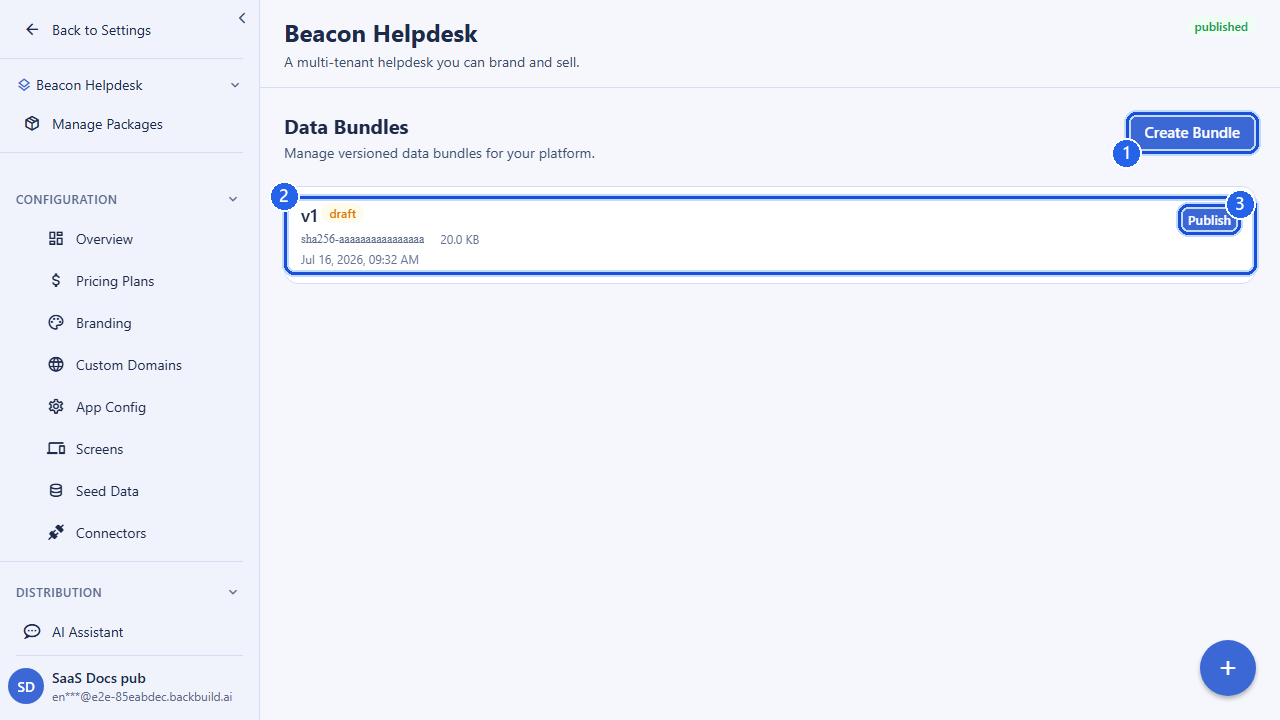
Why ship seed data
An empty product is a poor first impression. Seed data lets a tenant begin with the structure and examples that make your product immediately useful:
- Starter content: example projects, records, or documents that demonstrate the product and give the tenant something to edit rather than create from scratch.
- Default configuration: the screens, views, entity types, and settings that define how your product behaves for a fresh tenant.
- Reference data: lookup tables, categories, statuses, or templates your product depends on out of the box.
You author all of this once, capture it in a bundle, and every tenant who onboards after that bundle is published begins from the same known-good starting point. The seed data lives in the tenant’s own isolated organization, so each tenant can edit their copy freely without affecting anyone else.
What a bundle contains
A data bundle is a single, immutable, versioned record. It carries the bundle payload and the metadata that identifies and locates it.
| Field | What it holds |
|---|---|
saas_package_id | The package this bundle belongs to. A bundle is always scoped to one of your packages. Required. |
bundle_hash | A content hash that uniquely identifies this bundle’s payload; it serves as the version fingerprint. Required. |
content | The bundle payload itself: a bounded JSON object describing the seed data and configuration the bundle ships. Required. |
bundle_url | Optional URL to an externally stored bundle artifact, for payloads too large to carry inline. |
bundle_size_bytes | Optional size of the bundle payload, for tracking and reporting. |
Bundles are versioned by their hash. Each bundle you create is a distinct version; you never edit a bundle in place. To change what new tenants get, you create a new bundle and publish it, which keeps a clean, auditable history of every version that was ever the current one.
The bundle lifecycle
A bundle moves through three states from your perspective: you create it, you publish it to make it the current bundle, and if a published bundle turns out to be wrong you roll back to the previous one.
- Create: snapshot your seed data and configuration into a new bundle version. A newly created bundle is not yet live; it is a candidate.
- Publish: promote a bundle to be the package’s current bundle. From this point, new tenant provisions are seeded from it. The previously current bundle is retained.
- Roll back: revert to the previously published bundle if a published version has a problem, restoring the prior known-good seed for new provisions.
At any time exactly one bundle is the current bundle for a package, and that is the one a fresh tenant is seeded from. Publishing is how you change it; rollback is your safety net.
Creating a bundle
POST /v1/saas-packages/<packageId>/data-bundles
Authorization: Bearer <token>
Content-Type: application/json

{
  "bundle_hash": "sha256:9f2c...e1",
  "content": {
    "seed": {
      "projects": [
        { "name": "Sample Project", "status": "active" }
      ],
      "categories": ["Operations", "Sales", "Support"]
    },
    "settings": { "locale": "en-US", "currency": "USD" }
  },
  "bundle_size_bytes": 4096
}

# Response (201)
{ "success": true, "data": { "...bundle..." } }
The content object is the seed payload; shape it to match
what your product reads when a tenant is provisioned. Keep it bounded; very
large payloads should be stored externally and referenced via
bundle_url. A dangling :packageId returns a client
error rather than a server fault.
Listing and inspecting bundles
List every bundle version for a package (most recent first, paginated), fetch a specific bundle by ID, and ask for the one that is currently live.
# All bundle versions for a package
GET /v1/saas-packages/<packageId>/data-bundles?limit=50&offset=0

# The bundle new tenants are currently seeded from
GET /v1/saas-packages/<packageId>/data-bundles/current

# A specific version
GET /v1/saas-packages/<packageId>/data-bundles/<bundleId>
The current lookup returns 404 if the package has no
published bundle yet; until you publish one, new tenants are not seeded
from a bundle.
Publishing a bundle
Publishing promotes a created bundle to be the package’s current bundle. After this call, every newly provisioned tenant on the package is seeded from it. The bundle that was current before is retained so you can roll back.
POST /v1/saas-packages/<packageId>/data-bundles/<bundleId>/publishRolling back
If a published bundle has a problem, roll back to revert to the previously published version. New provisions immediately return to the prior known-good seed.
POST /v1/saas-packages/<packageId>/data-bundles/<bundleId>/rollbackHow seed data is applied on provisioning
Seed data is applied at tenant provisioning time. When you onboard a tenant (see Tenants & Subscriptions), Backbuild creates the tenant’s isolated organization and populates it from your package’s current bundle. The result is that the tenant’s very first session opens onto a product that already has the structure, defaults, and example records the bundle describes.
Because seed data is applied per tenant into the tenant’s own organization, each tenant gets an independent copy. Editing seeded records in one tenant never affects another, and a later bundle only changes what future provisions receive; tenants already provisioned keep the data they were seeded with. To roll out configuration changes to running apps without re-provisioning, pair data bundles with the per-platform app configuration and the public config endpoints, which running clients re-fetch.
A clean order of operations when preparing a new product version is: author your seed data and configuration, create a bundle that captures it, verify it, then publish, so that the moment your package starts onboarding tenants, they all land on the same intended starting point.
Two equivalent route groups
Data bundles are reachable through two route groups that operate on the same underlying bundles. The package-scoped paths take the package in the URL; the app-pipeline paths take it as a body field or query parameter and also host app configs and builds. Use whichever fits how you are working.
# Package-scoped
POST /v1/saas-packages/:packageId/data-bundles
GET  /v1/saas-packages/:packageId/data-bundles
GET  /v1/saas-packages/:packageId/data-bundles/current
GET  /v1/saas-packages/:packageId/data-bundles/:bundleId
POST /v1/saas-packages/:packageId/data-bundles/:bundleId/publish
POST /v1/saas-packages/:packageId/data-bundles/:bundleId/rollback

# App-pipeline (package supplied as body field / query param)
POST /v1/app/bundles
GET  /v1/app/bundles?saas_package_id=:packageId
GET  /v1/app/bundles/current?saas_package_id=:packageId
GET  /v1/app/bundles/:bundleId
POST /v1/app/bundles/:bundleId/publish
POST /v1/app/bundles/:bundleId/rollback
Permissions
Bundle operations are permission-gated within your organization: creating,
viewing, and publishing or rolling back a bundle each require the
corresponding data-bundle permission. Every state-changing call is scoped to
your organization and recorded in your audit trail with the acting user. A
caller without the right permission receives a 403; an unknown
bundle or package returns a 404.
API reference
All endpoints require an authenticated session in your organization and are gated by the SaaS Builder entitlement.
Package-scoped paths
| Method & path | Description |
|---|---|
POST /v1/saas-packages/:packageId/data-bundles | Create a bundle. Body: bundle_hash, content, optional bundle_url, bundle_size_bytes. Responds 201. |
GET /v1/saas-packages/:packageId/data-bundles | List bundles for the package. Optional limit, offset. |
GET /v1/saas-packages/:packageId/data-bundles/current | Get the currently published bundle. 404 if none is published. |
GET /v1/saas-packages/:packageId/data-bundles/:bundleId | Get a specific bundle version. |
POST /v1/saas-packages/:packageId/data-bundles/:bundleId/publish | Publish the bundle as the package’s current bundle. |
POST /v1/saas-packages/:packageId/data-bundles/:bundleId/rollback | Roll back to the previously published bundle. |
App-pipeline paths (equivalent)
| Method & path | Description |
|---|---|
POST /v1/app/bundles | Create a bundle. Body: saas_package_id, bundle_hash, content, optional bundle_url, bundle_size_bytes. |
GET /v1/app/bundles | List bundles. Optional saas_package_id, limit, offset. |
GET /v1/app/bundles/current | Get the current bundle. Requires saas_package_id. |
GET /v1/app/bundles/:bundleId | Get a specific bundle version. |
POST /v1/app/bundles/:bundleId/publish | Publish the bundle. |
POST /v1/app/bundles/:bundleId/rollback | Roll back to the previous bundle. |
Create bundle: request fields
| Field | Type | Required | Description |
|---|---|---|---|
saas_package_id | uuid | app-pipeline only | The package the bundle belongs to (in the URL on the package-scoped path). |
bundle_hash | string | yes | Content hash identifying this bundle version (1–128 chars). |
content | object | yes | The seed-data and configuration payload (bounded JSON). |
bundle_url | string | no | URL of an externally stored bundle artifact. |
bundle_size_bytes | integer | no | Size of the bundle payload in bytes. |
Related: Tenants & Subscriptions (where seed data is applied on provisioning), App Configurations & Builds (per-platform config and the public config endpoints), and SaaS Packages (the package a bundle belongs to). Full request/response schemas are in the API Reference.
Frequently asked questions
- What does a brand-new tenant start with?
- The current published data bundle: your configuration plus any seed records you include, so a new customer opens a ready workspace instead of an empty one.
- Can I change what new tenants receive without disturbing existing ones?
- Yes. Bundles are versioned. Publish a new version for future tenants, or roll back to a prior one. Existing tenants are not retroactively rewritten.
- Is my seed data and configuration mine to take with me?
- Yes. A bundle is a versioned, retrievable snapshot of your product definition. See Owning Your Product & Data.