

Connect a Local AI Agent
The Backbuild browser extension can connect an AI agent you run on your own machine (a command-line coding assistant, a desktop assistant, or an IDE helper) to your Backbuild account. The agent works as you, through the extension, but only within a permission gate you set and only as an identity you have actually signed in. Every call is re-authorized on the server, every call is audited, and you can revoke an agent at any moment.
After reading this page you will be able to: pair a local agent in one paste without minting a long-lived key or hand-rolling an authorization flow; choose which of your signed-in identities it acts as; explain to a security reviewer exactly what it can and cannot reach and why; compose many tool calls into one small program; and revoke a single agent without disturbing anything else.
Availability
The local agent gateway ships with the Backbuild browser extension. It is a local connection point that your own agent talks to, so it becomes generally available as the extension reaches your browser's store.
Backbuild is in Early Adopter Alpha, and the browser extension (and this gateway with it) is coming soon, marked Coming Soon on the download page. Today, an external agent can already connect to your organization over the cloud tool endpoint described on the MCP and Agent Integration page; the local gateway adds the option to run that connection point on your own machine, through the extension, once it lands. If you need early access, ask through the contact page.
How it works
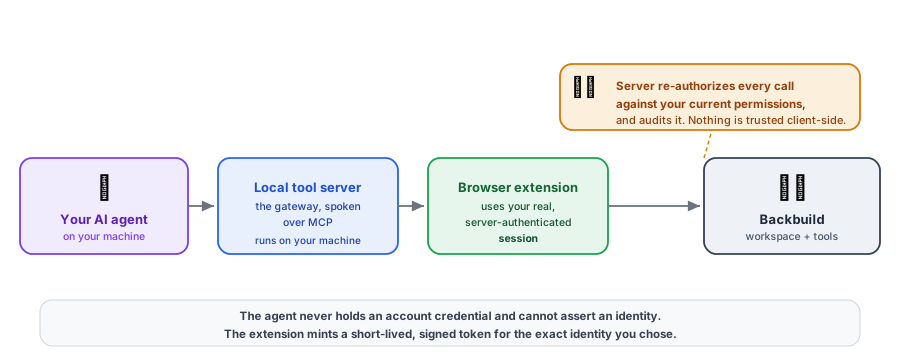
The extension pairs with your agent and exposes a standard local tool server, the kind your agent already knows how to talk to through the Model Context Protocol (MCP). Your agent sends each request to that local server, the server relays it to the extension, and the extension makes the request against Backbuild using your real, server-authenticated session. The agent never holds your account password or any long-lived account credential, and it can never assert an identity: identity always comes from a short-lived, signed token the extension mints for exactly the identity you chose.
Every request is re-authorized on the server at the moment it runs, against the identity's current permissions, not just checked once at connect time. Nothing is trusted from the agent's side of the connection.
Pairing an agent
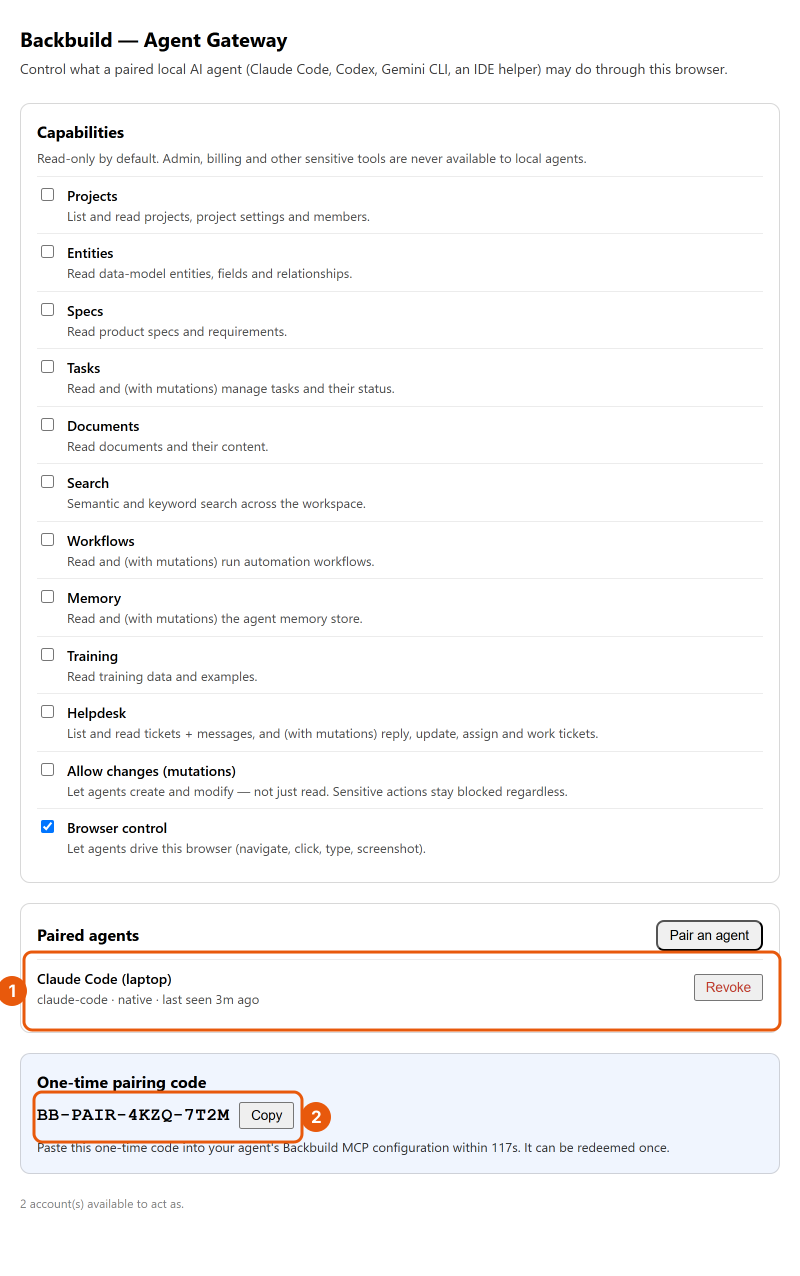
Open the extension's agent-gateway settings and choose Pair an agent. The extension generates a one-time pairing code and shows it to you. You copy that code into your agent's Backbuild tool configuration, and the agent connects. The code can be redeemed once, and only within a short validity window, so you do not register an application, run an authorization flow by hand, or mint a long-lived key yourself.
The one-time code is the only secret you handle. Where it goes depends on the transport your tool uses: most command-line tools use a local (stdio) transport, where your Backbuild entry is a command to launch; tools that prefer a network transport use a local URL instead. Either way you paste the code into that entry, the tool redeems it once on first connect, and from then on each paired agent has its own credential and the extension mints the short-lived, signed tokens every request needs. Treat the code as sensitive and paste it promptly, since it expires quickly.
Each paired agent is named and listed in the extension, and each has its own credential. A program on your machine that you have not paired cannot reach the gateway. Revoking an agent stops its access immediately and does not affect any other agent or your own session.
How do I authenticate without a long-lived key or a manual flow?
Pairing is one paste of a one-time code. Each agent then gets its own
credential, and the extension mints short-lived, signed tokens for the
identity you chose; you never register an app or hand-roll an authorization
flow, and you never paste a long-lived account secret into the tool.
stdio or a network transport, and where does the code go?
Whichever your tool uses. You paste the one-time pairing code into your
tool's Backbuild MCP entry: a local (stdio) launch command, or a local URL
for a network transport. The code is redeemed once on first connect, after
which the agent has its own credential.
How do I revoke one agent?
Each agent is listed by name with its own credential in the extension.
Revoke it individually and its access stops at once, with no effect on your
other agents or your session.
Choosing which identity the agent acts as
Because you can be signed in to several accounts and organizations, the agent asks the extension which identities it may act as and picks one. It sees the contexts you authorized (each a combination of user, organization, and environment), selects one to act as, and can switch between them. The agent can also select which project to work in. What it can never do is supply a user, organization, or environment of its own: it can only choose from the identities you are actually signed in as, so every action traces back to you. By default only your production identities are offered, and one gateway serves every recognized environment at once.
Whose identity does the agent act as, and can it choose its own?
It acts as one of the identities you are signed in as (a specific user,
organization, and environment), chosen from the set you authorized. It can
never supply or elevate an identity of its own, so every autonomous action
is attributable to you.
What an agent can and cannot reach
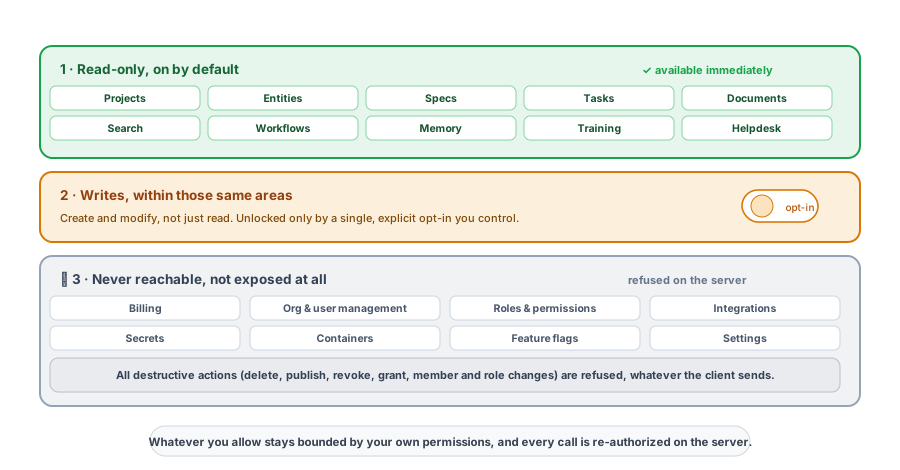
The gateway is default-deny. Out of the box an agent can read your projects, entities, specs, tasks, documents, search, workflows, memory, training, and support surfaces, read-only, and nothing more. Writes are a single, explicit opt-in that you control.
Administrative areas are never reachable through the gateway at all: billing, organization and user management, roles and permissions, integrations, secrets, containers, feature flags, and settings are simply not exposed. Destructive actions are refused on the server regardless of any client-side toggle. And whatever you do allow stays bounded by your own permissions: the gate can only narrow what you are able to do, never widen it, and the server re-checks every single call against your current access.
Two consequences matter for a reviewer. First, the tools an agent sees come from one published, controlled surface, not from arbitrary third-party servers, and there are no hidden administrative or destructive verbs to reach, so instructions smuggled into a tool description cannot unlock something that is not there. Second, because the gate narrows rather than grants, connecting an agent can never turn into a way around your access controls.
What can my agent do by default, and can it delete things?
By default it is read-only across projects, entities, specs, tasks,
documents, search, workflows, memory, training, and support. Writes take a
single explicit opt-in, and destructive actions are refused on the server no
matter what the client sends.
Is every call re-checked, or only the handshake?
Every call is re-authorized on the server at the moment it runs, against
your current permissions. Nothing is trusted from the client, and there is
no elevated agent context.
How is tool poisoning prevented?
The tools an agent can see come from one published, controlled surface, not
arbitrary servers, and administrative and destructive verbs are absent from
the exposed set, so injected instructions have nothing hidden to reach.
Writing one program that chains many calls
For work that would otherwise take many round trips, the gateway offers a code mode: your agent writes one small local program that calls several Backbuild tools and returns only the result. Those calls run under the same identity and the same permission gate as any other call, and each is re-authorized and audited on the server, so code mode is faster without ever escaping the gate.
Can I compose many calls into one program instead of chattering call by call?
Yes. In code mode the agent writes one small local program that composes
several tool calls and returns only the result, under the same identity,
the same gate, and the same per-call re-authorization and audit as any other
call.
If you do not run the local gateway
You do not have to run the local server. The extension can instead hand your agent a scoped, short-lived token for a chosen identity that the agent uses directly against Backbuild's cloud tool endpoint. The same default-deny permission gate and the same per-call re-authorization apply, so the safety boundary does not change with the transport. See MCP and Agent Integration for the cloud path and how tool discovery works there.
Seeing what an agent did
Beyond the server-side audit trail that records every re-authorized call, the extension keeps a local record of recent agent activity, so you can see at a glance what your paired agents have been doing on your machine and, if anything looks wrong, revoke the agent on the spot.