

Collaboration, Comments, and Sharing
This guide teaches how a sheet becomes a shared source of truth: several people editing the same grid at once, discussing cells in place, and controlling exactly who can do what. After it you will be able to invite collaborators, work the sheet live together, leave and resolve comments, and share with the right level of access using links you can scope, expire, and revoke. It also answers the questions an administrator asks: how access is enforced, how work is saved and audited, and what happens on a phone or a flaky connection.
Real-Time Co-Editing
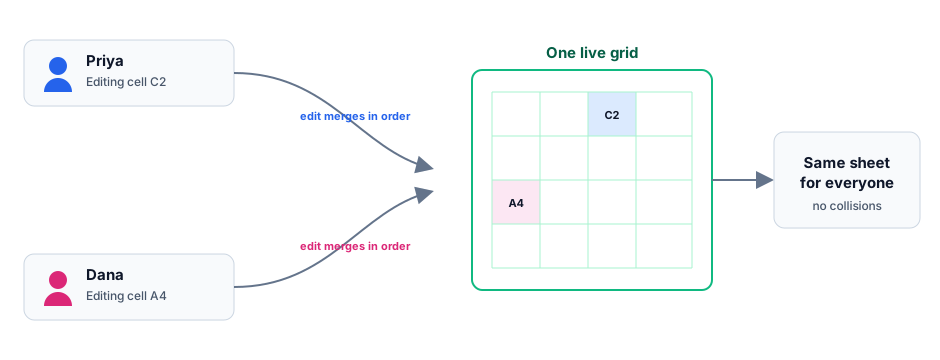
After this section you will work the same grid as your teammates without stepping on each other. Everyone opens one live copy of the sheet. Changes stream between collaborators as compact updates, apply in order, and appear for everyone within moments, so the grid stays consistent no matter how many people are editing it. There is no file to pass around, no version to reconcile, and no per-collaborator seat charge to co-edit.
- Automatic merge: two people editing different cells never collide, and the sheet you see is the sheet everyone sees.
- In order, within moments: each edit streams as a compact update and applies in sequence, so a teammate's change lands in your grid moments after they make it.
- Cross-device: the same live sheet is available wherever you sign in, and edits sync between your devices.
Comments on a Cell
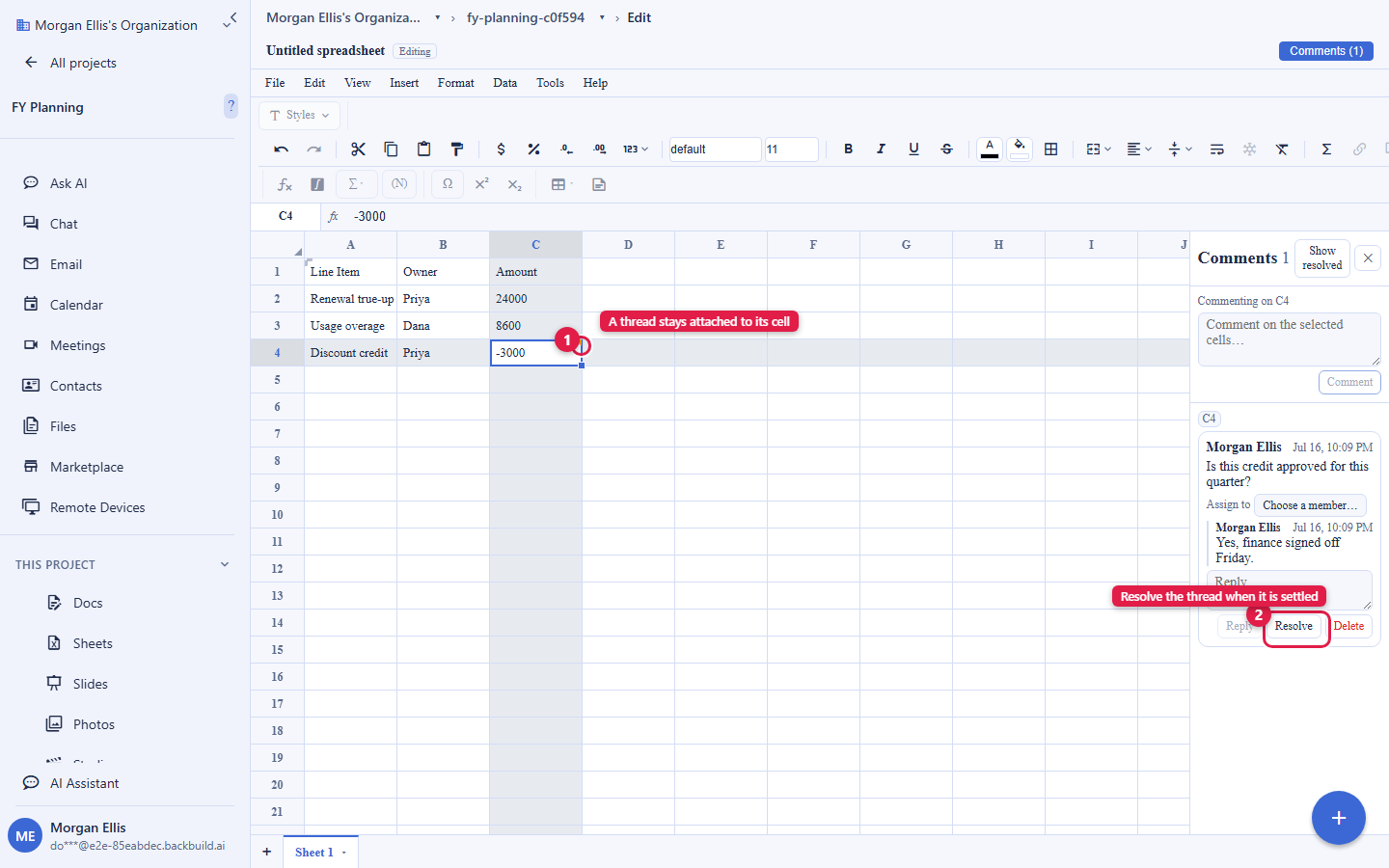
After this section you will discuss the data where it lives. Anchor a comment to a cell or a selection and a thread opens in the comments sidebar. Add a comment to ask a question or flag a number, reply to continue the discussion, and resolve the thread when it is settled, so the conversation stays attached to the exact cell it is about rather than getting lost in a chat or an email.
Sharing and Access Levels
After this section you will give exactly the right people exactly the right access. A sheet is shared through the same access model as the rest of your workspace, so you control who can do what, at the level of detail the situation needs.
- Access levels: grant view, comment, or edit access. A viewer reads, a commenter reads and discusses, and an editor changes the data.
- Who you share with: a specific person, a role or group, a department, everyone in the organization, or, where allowed, a public link, so a sheet reaches precisely the audience it should.
- Links you control: a shared link can be scoped to an access level, set to expire, and revoked at any time, so access is never permanent by accident.
For the full model, including how sharing spans organizations, see the platform's Roles and Permissions.
How Access Is Enforced
After this section, an administrator will trust that access holds. Access is checked on every live connection, not just when a sheet opens. A viewer without write access cannot write, and when you change or remove someone's access, that change takes effect within seconds on their live connection rather than waiting for them to reload. There is no client-side path around it: the checks live on the server, so what a person can do is what their access allows.
Autosave, History, and Audit
After this section you will know your work is safe and accountable. Everything you do is saved as you do it, and the record supports both recovery and review.
- Autosave: every edit is saved continuously and persists safely, so there is no Save button and nothing to lose if a tab closes.
- Undo and redo: every edit can be reversed and reapplied within your session.
- Audit: changes are recorded, so an organization has an accountable trail of activity on a sheet, which matters for a board-facing or a regulated workbook.
- Version history: a browsable, named version history you can roll back to is coming soon. Until it ships, rely on continuous autosave and undo within a session, and take an export as a point-in-time snapshot (see Importing and Exporting).
Can I share a sheet with someone and have them co-edit live? Do they need an account? Yes to live co-editing: invite them with edit access and you both work the same grid in real time. Whether they need an account depends on how you share. Sharing to a person, role, group, or organization is tied to workspace identity; a scoped public link can reach someone outside it at the access level you set. You choose per share.
Does a change to someone's access take effect right away? Within seconds, on their live connection. Access is re-checked continuously rather than only at open, so revoking edit access (or removing a person) stops their writes promptly rather than waiting for a reload.
Does it work on my phone and offline? The sheet is available across your devices and syncs between them. Real-time co-editing depends on a connection: while you are connected, edits stream live to everyone; a brief drop reconnects and resyncs. Treat continuous connectivity as the model for live collaboration rather than long-term offline editing.
Is there an audit trail I can trust for reporting? Yes. Activity on a sheet is recorded, giving an organization an accountable trail of who did what. A browsable named version history you can restore from is coming soon; for a fixed snapshot today, export the workbook.
Where to Go Next
- Charts, Sorting, Filtering, and Data Validation: keep shared data clean as a team enters it.
- Importing and Exporting: bring a colleague's file in and take a snapshot out.
- Roles and Permissions: the full workspace access model behind sheet sharing.