

Backbuild Photos: Gallery, Albums, and a Pro Image Editor
Backbuild Photos is the photo library and image editor in the Backbuild workspace. It holds the images for a project, organizes them into albums and slideshows, and edits them in a non-destructive, layer-based editor. It is part of the free workspace on every plan, it keeps your original files private, and it never analyzes your photos for advertising. This page explains what Backbuild Photos does today, and it is direct about what it does not do yet.
Backbuild Photos is a private, in-workspace photo library and a professional editor, not a phone backup service. You upload images from your computer with a file picker or drag and drop. Backbuild Photos does not automatically back up your phone's camera roll, and it does not group faces or search the contents of your pictures with machine learning. If automatic phone backup and machine-learning search are your first requirement, read the honest limits below before you switch.
The gallery
Every project has a Photos area in its sidebar. It opens on a fast, virtualized grid of thumbnails. From the gallery you can:
- Upload: pick files with the native file picker, or drag and drop images anywhere on the grid. Uploads run in parallel with per-file progress, and one bad file does not stop the batch.
- View: click a thumbnail to open the lightbox, a full-size view with previous and next, zoom, and a metadata panel showing the dimensions, format, size, and capture date that were kept.
- Sort and search: sort by newest, oldest, or name, and filter with the search box. Search matches the file name and the camera details that were preserved, such as the camera make, model, and lens.
- Select in bulk: select several photos to add them to an album, start a slideshow, download them, or delete them in one action.
- Download: download any selection back to your computer at full resolution, named by the original file name.
Albums and slideshows
Albums group photos without moving or copying the files. An album is a named, ordered collection: a photo can belong to many albums, you set a cover image, you reorder by dragging, and deleting an album never deletes the photos in it.
A slideshow turns an album or a selection into a playable show. Each slide has a duration and a transition, and you can set a Ken Burns pan and zoom by dragging start and end crop rectangles on a preview. The player advances on a timer, animates the motion, cross-fades between slides, loops, and responds to the keyboard, for a full-screen presentation of your images.
The non-destructive editor
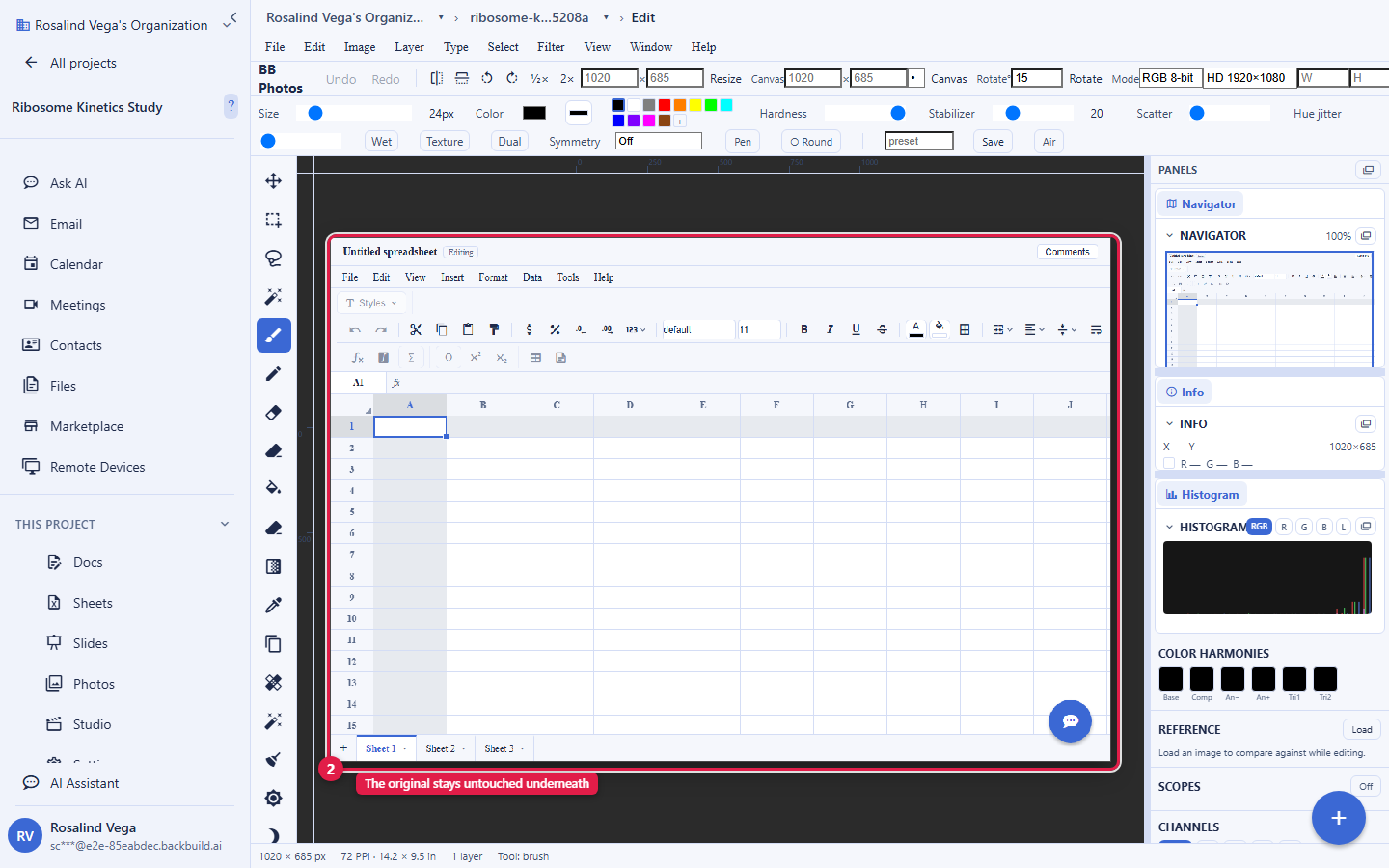
Double-click a photo, or open it with Edit, and it opens in a professional, layer-based image editor. The editor is non-destructive: your uploaded original is never overwritten. Every change lives in an edit document, a stack of layers and operations, and saving writes a new rendered image alongside the original while recording the lineage from the source. That lineage is a free version history you can branch from.
The editor is deep. It provides a layer stack with groups, masks, blend modes, and layer styles; adjustment and smart-filter layers; selection tools including marquee, lasso, magic wand, one-click subject selection, and background removal; retouching with a healing brush and content-aware fill; a paint and brush engine with dodge, burn, and clone; curves, levels, color balance, hue and saturation, and selective color; a develop panel for exposure, temperature, highlights, and shadows on camera RAW; transforms, warp, liquify, lens correction, and perspective crop; and export with print resolution control. It reads a wide range of image formats, including HEIC and camera RAW, decoding them to a viewable form while keeping the original bytes.
The editor exceeds a consumer photo app. Where a typical cloud photo service gives you crop, filters, and a small set of one-tap fixes, Backbuild Photos gives you a layer-based editor with masks, selections, retouching, and color grading. There is no monthly cap on how many edits you can save.
AI image tools you invoke
Backbuild Photos includes AI image tools that run only when you ask for them. From the gallery you can generate a new image from a text prompt, and inside the editor you can select an area and fill it from a prompt, a generative fill that blends the result into the selection on the current layer. Both run on Backbuild's own image models and are metered by usage credits, and a generated image enters the library through the same content-addressed, access-checked, audit-logged pipeline as an uploaded photo.
This is a different thing from analyzing your library. Backbuild Photos never scans, indexes, groups, or profiles the photos you store: the AI runs on the single request you make, not in the background over everything you have uploaded. Your stored pictures are held, not read.
The public REST API
The whole Backbuild Photos surface is available over the public REST API, under the same organization roles and audit log as the app. You can upload images and download them at full resolution, list a project's library, create and rename albums and set their cover and order, save slideshows, create and revoke shares across every scope, generate images and generative fills, and issue and revoke expiring public tokens. See the API reference for the endpoints, so an automation or an AI agent can drive the library programmatically rather than only through the screen.
Sharing and access
Backbuild Photos uses the same access model as the rest of the workspace, so sharing is governed, not ad hoc. Photos live in a project, and project membership and visibility decide who can see them. Beyond that, a photo can be shared across eight granular scopes: a specific person, a role, a group, a department, a project, the whole organization, everyone signed in, or a public link that you can set to expire and revoke. Read access confers viewing and copying; write access confers re-sharing, bounded by the organization's sharing ceiling so a share can never exceed what the sharer is allowed to grant. Every image is delivered through an authorized, streamed URL, never a public bucket path.
Photos in your documents and slides
Because Photos is part of the workspace, your project's images are available inside the other editors. In Backbuild Docs and Backbuild Slides you insert a picture from a photo picker that browses your project's Photos library, so the image you uploaded once is placed directly into a document or a slide without a second upload or an external link. One library, one identity, one set of roles across your documents, slides, and images.
Privacy and your data
Backbuild Photos is built so your images stay yours:
- Location metadata is stripped on upload. When you upload a photo, GPS coordinates and other sensitive EXIF fields are removed before the image is stored. The safe details, such as dimensions and capture time, are kept for display and search.
- Your originals are immutable. The uploaded file is content-addressed and never modified; edits produce new renders, so the source is always intact.
- Nothing is analyzed for advertising. Backbuild Photos does not run face recognition, does not build a profile from the contents of your pictures, and does not use your images to target ads. Storage is isolated per organization and access is enforced on every read.
Storage and pricing
Images you upload count toward your workspace file-storage allowance, and storage beyond the included allowance is metered in usage credits rather than a separate subscription. The Free plan includes a file-storage allowance plus credits, and paid plans raise the included allowance per seat. See pricing and what counts toward file storage for the current allowances.
What Backbuild Photos does not do yet
Being clear about the limits matters, especially if you are moving from a consumer cloud photo service:
- No automatic phone backup. You upload from a computer. There is no background auto-upload from a phone's camera roll today.
- No machine-learning search. Search matches file names and kept camera details, not the contents of the image. You cannot search for "beach" or "dog" and have the photos found by content.
- No face grouping or People view. Backbuild Photos does not detect or cluster faces.
- No automatic memories or highlight albums. Albums are ones you create.
- Native mobile apps are still rolling out. The native mobile app is built and its app-store distribution is in progress, so today you reach Backbuild Photos through the web app and the free Windows and macOS desktop app.
These are on the roadmap and tracked as feature requests. If any of them is a hard requirement for you right now, weigh it before you switch.