

Feature Flags & Entitlements
Feature flags let you decide which capabilities your product offers and which of your pricing plans unlock each one. Map a feature to a plan, and every tenant who subscribes to that plan (and pays its price) gets the feature; tenants on a lower plan do not. You can also grant or restrict an individual feature for a single tenant, independent of their plan.
Pro Feature flags and entitlements are part of the SaaS Builder, included with the Backbuild Pro build-and-ship platform. See pricing.
Flags versus entitlements, in one line. A feature flag in the operational sense answers “is this feature built and rolled out?” An entitlement answers “does this customer’s plan include it?” The SaaS Builder is about the second: it maps features to the plans you sell, so what a tenant can do is a deterministic, auditable consequence of what they pay for, not a loose toggle. That is why a plan change updates access without a code deploy.
The model
Entitlements in the SaaS Builder come together from three layers, evaluated in order:
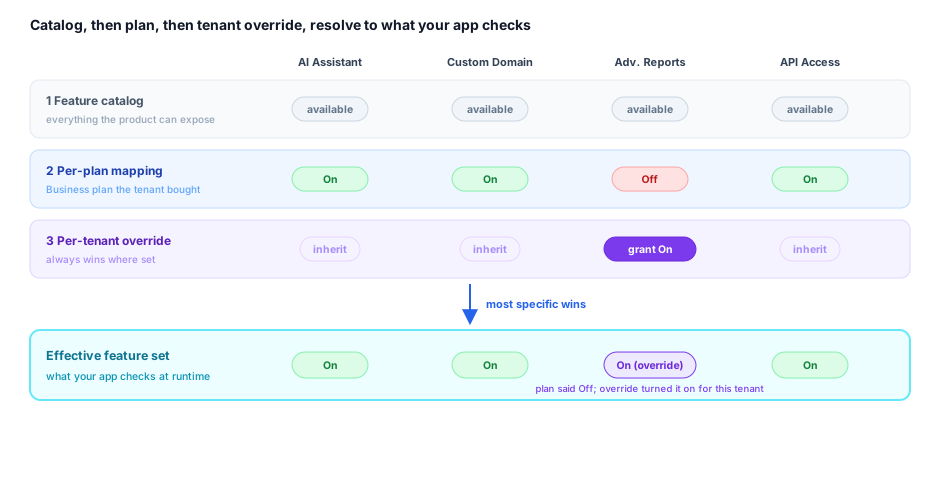
- Your feature catalog: the set of features your product can expose.
- Per-plan mapping: which features each pricing plan unlocks. This is the default a tenant gets from the plan they buy.
- Per-tenant overrides: an explicit grant or restriction for one specific tenant, layered on top of their plan.
The effective set of features for a tenant is their plan’s mapped features, adjusted by any per-tenant overrides. This is what your application should check before showing or running a gated capability.
Your feature catalog
A feature flag in your catalog describes one capability of your product. You create the flags that make sense for what you sell: an “Advanced analytics” dashboard, an “API access” surface, a “Priority support” channel, and so on. Each flag has:
| Field | Type | Description |
|---|---|---|
slug | string | A stable, URL-safe identifier (lowercase letters, numbers, hyphens), e.g. advanced-analytics. This is what your app code checks. |
name | string | The human-readable name shown in the builder UI and, optionally, to tenants. |
description | string | Optional explanation of what the feature does. |
is_enabled | boolean | Whether the feature is available at all. Disabling it here turns it off everywhere, regardless of plan mappings. |
metadata | object | Optional structured data your app can use (e.g. a numeric limit associated with the feature). |
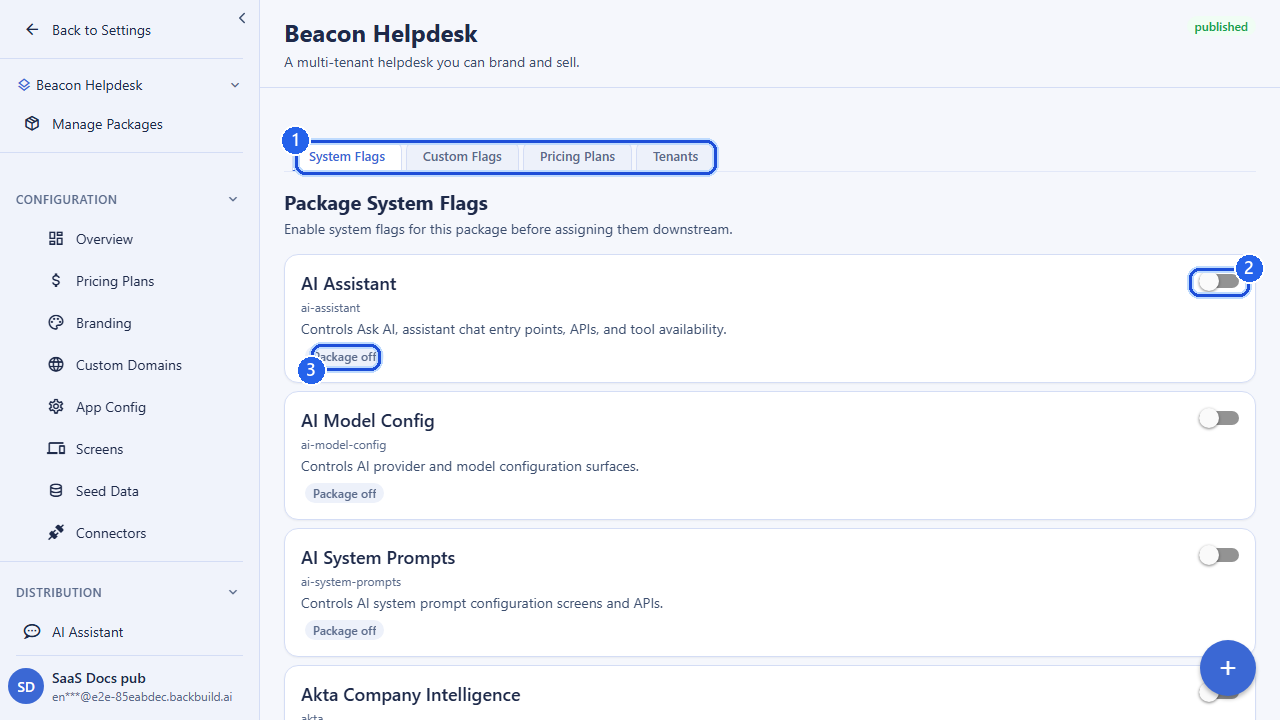
Two kinds of feature appear in your catalog: the custom features you define for your own product (full create/update/delete control), and a set of built-in product capabilities you can switch on for the package. Both are mapped to plans the same way; the difference is only that you author and own the custom ones.
Defining a custom feature
POST /v1/saas-packages/{packageId}/feature-flags
Authorization: Bearer <token>
Content-Type: application/json

{
  "slug": "advanced-analytics",
  "name": "Advanced Analytics",
  "description": "Cohort and funnel dashboards",
  "is_enabled": true
}
Mapping features to plans
This is the core of monetization: you attach features to each pricing plan,
and that mapping is the entitlement a tenant receives by subscribing. A
tenant on your business plan unlocks the features mapped to that
plan; a tenant on individual unlocks the (typically smaller) set
mapped there. Because plan price and plan features are both things you set,
the price a tenant pays directly determines what they can do.
You set a plan’s entitlements by sending the full list of feature assignments for that plan. Each assignment names a flag (by id), says whether the feature comes from your custom catalog or the built-in capabilities, and whether it is enabled for that plan.
PUT /v1/saas-packages/{packageId}/pricing-plans/{planId}/feature-flags
Authorization: Bearer <token>
Content-Type: application/json

{
  "assignments": [
    { "flag_source": "custom", "feature_flag_id": "019d-aaaa...", "is_enabled": true },
    { "flag_source": "custom", "feature_flag_id": "019d-bbbb...", "is_enabled": true },
    { "flag_source": "system", "feature_flag_id": "019d-cccc...", "is_enabled": false }
  ]
}| Field | Type | Description |
|---|---|---|
flag_source | string | custom for a feature you defined, or system for a built-in product capability. |
feature_flag_id | uuid | The id of the feature being mapped. |
is_enabled | boolean | Whether the plan grants this feature. Optional; defaults to enabled. |
metadata | object | Optional per-plan data for the feature (e.g. a plan-specific limit). |
A common pattern is to map the same feature to several plans with different
metadata: for example, an “exports” feature
that allows 100/month on the team plan and 10,000/month on the business plan.
Reviewing a plan’s entitlements
GET /v1/saas-packages/{packageId}/pricing-plans/{planId}/feature-flagsReturns the features currently mapped to that plan and whether each is enabled.
What a tenant sees when they subscribe
When a tenant buys a plan, they inherit that plan’s mapped features as their starting entitlement. Your application reads the tenant’s effective feature set and shows or hides capabilities accordingly: an upgrade unlocks more, a downgrade removes what the new plan does not include. Because the mapping is per plan, changing which features a plan unlocks immediately changes what every subscriber of that plan can do (subject to your own rollout choices).
Per-tenant overrides
Sometimes you need to deviate from the plan for one customer: grant an enterprise prospect early access to a feature their plan doesn’t normally include, or restrict a feature for a tenant who is abusing it. A per-tenant override does exactly that: it grants or restricts a single feature for a single tenant, on top of whatever their plan provides.
Overrides are set the same way as plan mappings (a full list of assignments), but scoped to one tenant organization rather than a plan.
PUT /v1/saas-packages/{packageId}/tenants/{tenantOrgId}/feature-flags
Authorization: Bearer <token>
Content-Type: application/json

{
  "assignments": [
    { "flag_source": "custom", "feature_flag_id": "019d-aaaa...", "is_enabled": true },
    { "flag_source": "custom", "feature_flag_id": "019d-dddd...", "is_enabled": false }
  ]
}
An override of is_enabled: true grants the feature even if the
tenant’s plan does not include it; is_enabled: false
restricts a feature the plan would otherwise grant. Overrides always win over
the plan default for that tenant.
Resolving the effective set
GET /v1/saas-packages/{packageId}/tenants/{tenantOrgId}/feature-flags/effectiveReturns the final, resolved feature set for the tenant: their plan’s features adjusted by any overrides. This is the authoritative answer your application should use to gate behavior. To inspect only the overrides themselves (without the plan baseline), use the override-list endpoint below.
API reference
All endpoints require an authenticated session. The owning organization is
resolved from your session. {packageId} is your SaaS
package; {planId} is one of its pricing plans;
{tenantOrgId} is a subscribing tenant’s
organization id.
Custom feature catalog
| Method & path | Description |
|---|---|
GET /v1/saas-packages/{packageId}/feature-flags | List the package’s feature flags. |
POST /v1/saas-packages/{packageId}/feature-flags | Create a custom feature flag. Returns 201 Created. |
GET /v1/saas-packages/{packageId}/feature-flags/{flagId} | Get a single feature flag. |
PUT /v1/saas-packages/{packageId}/feature-flags/{flagId} | Update a custom feature flag. Send at least one field. |
DELETE /v1/saas-packages/{packageId}/feature-flags/{flagId} | Delete a custom feature flag. |
Built-in product capabilities
| Method & path | Description |
|---|---|
GET /v1/saas-packages/{packageId}/system-feature-flags | List the built-in capabilities available to switch on for the package, with their current state. |
PUT /v1/saas-packages/{packageId}/system-feature-flags | Set which built-in capabilities the package enables (full list of assignments). |
Request body (PUT)
{
  "assignments": [
    { "feature_flag_id": "019d-cccc...", "is_enabled": true }
  ]
}
Per-plan entitlements
| Method & path | Description |
|---|---|
GET /v1/saas-packages/{packageId}/pricing-plans/{planId}/feature-flags | List the features mapped to a plan. |
PUT /v1/saas-packages/{packageId}/pricing-plans/{planId}/feature-flags | Set the features a plan unlocks (full list of assignments, each with a flag_source). |
Per-tenant overrides
| Method & path | Description |
|---|---|
GET /v1/saas-packages/{packageId}/tenants/{tenantOrgId}/feature-flags | List the explicit overrides set for a tenant. |
PUT /v1/saas-packages/{packageId}/tenants/{tenantOrgId}/feature-flags | Set a tenant’s overrides (grant/restrict features beyond their plan). |
GET /v1/saas-packages/{packageId}/tenants/{tenantOrgId}/feature-flags/effective | Resolve the tenant’s final effective feature set (plan + overrides). |
Assignment fields
Per-plan and per-tenant assignments entries use the same shape:
flag_source (custom or system),
feature_flag_id (uuid), optional is_enabled
(boolean, defaults to enabled), and optional metadata (object).
The built-in-capabilities PUT omits flag_source because those
assignments are always built-in.
Frequently asked questions
- What is the difference between feature flags and entitlements?
- An operational flag says whether a feature is built and rolled out. An entitlement says whether a plan includes it, and it is commercial and auditable. The SaaS Builder uses entitlements for packaging, so a plan change deterministically updates who has access.
- Can I change what a plan unlocks without an engineering cycle?
- Yes. Mapping features to a plan is configuration. Your app reads the tenant’s effective feature set, so changing the mapping changes access without a deploy.
- Can I toggle features per client so I can upsell tiers?
- Yes. Per-plan mapping lets you gate features by tier, and per-tenant overrides let you grant or restrict a single feature for one customer, for example giving a design partner early access, without forking the product.
- Can I preview the effective feature set a specific tenant sees?
- Yes. Resolve the tenant’s effective set (plan mapping adjusted by any overrides) before you ship a change, so you can confirm exactly what a given customer will and will not have.
- Are gated features actually enforced?
- The effective set is the authoritative answer your application checks before showing or running a gated capability, and a feature disabled in your catalog is off everywhere regardless of plan mappings.
Related
- Pricing Plans & Categories: the plans you map features to
- Tenants & Subscriptions: per-tenant overrides in context
- SaaS Builder overview