

AI Assistance, the API, and Agents
This guide is for the reader who wants the spreadsheet to do work on its own: the operations builder wiring a sheet into a workflow, and anyone who would rather describe a change than click through it. After it you will know how the in-app AI assistant edits a sheet, how the whole spreadsheet surface is drivable from code over the public REST API, and how an AI agent operates a sheet through native tools, all under the same access checks a person passes. This is the capability that sets Backbuild Sheets apart from a spreadsheet you can only click.
The In-App AI Assistant
After this section you will hand routine sheet work to an assistant. The assistant works inside the sheet and makes its changes through the same authorized path a person's edits take, so it is simply another collaborator with the permissions you grant it. Ask it to build a formula, clean a column, add a chart, or restructure a table, and it edits the live grid, which everyone sees update. Every action it takes is authorized per call and recorded, so an assistant can never do something your access would not allow.
On your own AI keys or on usage credits. The assistant runs on your own AI provider keys, in which case that usage is billed by your provider, or on Backbuild's universal usage credits if you have not brought your own keys. See Usage and Credits for how metering works and the AI assistant for bringing your own keys.
The REST API
After this section you will know the sheet surface is fully scriptable. The entire Backbuild platform is drivable over the public REST API, and Backbuild Sheets is no exception. Create a spreadsheet in a project, read and write ranges, set formulas, manage sheet tabs, apply formatting, and import and export, all from code.
- Authenticated and organization-scoped: every call is authenticated and scoped to your organization, and gated by the same permissions as the app, so a script can never reach beyond what its identity is allowed.
- The full surface: create spreadsheets, read and write cell ranges, get and set formulas, insert and delete rows and columns, manage tabs, apply styles, add comments, and import and export.
For endpoints, request and response shapes, and authentication, see the REST API reference and API authentication.
MCP Tools for AI Agents
After this section an AI agent will be able to operate a sheet as part of a larger task. Backbuild Sheets exposes a full set of native tools on the platform MCP surface, so an agent connected to your workspace drives a spreadsheet the same way you do. The tools cover the whole working surface:
- Documents and tabs: create, open, and list spreadsheets, and list, create, rename, reorder, and delete sheet tabs.
- Data: read a range, write cells, and get and set a formula.
- Structure: insert and delete rows and columns, resize a row or column, merge and unmerge cells, and set frozen panes.
- Presentation and search: apply a style, and find a value.
- Data exchange and discovery: import and export a workbook, and list and describe the available functions.
Each tool runs under the caller's authenticated identity, scoped to your organization and gated by the same access checks as the app, and each call is recorded. An agent is, in effect, a collaborator you have given specific permissions to. How to connect an agent over MCP is covered in MCP and Agent Integration and the MCP server reference.
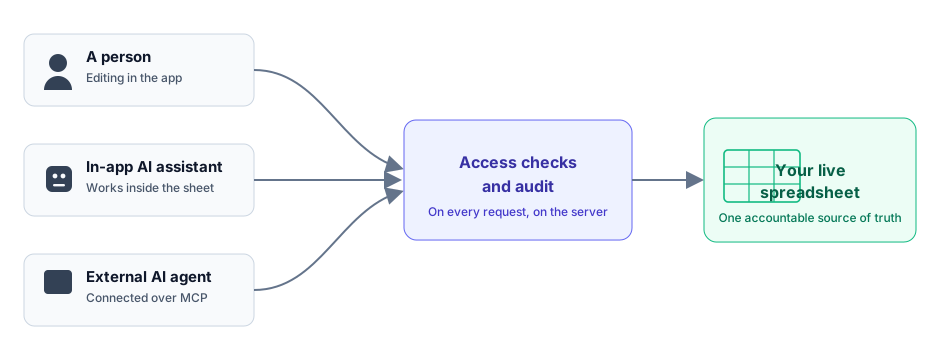
Can I wire a sheet into automation and have an AI agent operate it? Yes, and this is a core reason to choose Backbuild Sheets. An AI agent connected over MCP can create a sheet, read and write ranges, set formulas, manage tabs, format, and import or export, and the in-app assistant does the same inside the app. Every action passes the same access checks a person does and is recorded, so you get automation without giving up control or an audit trail.
Is an AI agent a security risk to my data? An agent holds exactly the access you grant it and nothing more. It cannot read or change a sheet its identity is not allowed to, every call is authorized on the server, and every action is recorded. It is governed like any other collaborator, not given a back door.
Where to Go Next
- Formulas, Functions, and the Calculation Engine: what an assistant or agent computes with.
- Collaboration, Comments, and Sharing: the access model an agent is governed by.
- REST API Reference: the full endpoint documentation.
- MCP and Agent Integration: connect an AI agent to your workspace.