

Real-Time Session Minutes
Real-Time Session Minutes measure the live syncing that keeps Backbuild feeling instant: web, desktop, and mobile apps staying in step, IDE extensions syncing in real time, and containers communicating with your workspace. After this page you will know exactly what counts, what never counts, how far the free allowance goes, and what happens, step by step, if you use it all.
What Counts, and What Never Counts
Only active processing time meters. When a sync connection is actually doing work (applying your edits, relaying presence, streaming container events), those seconds count. Everything else is free:
- Idle time never counts. A document left open all day costs nothing while nobody touches it.
- Time between messages never counts. A connection that syncs for two seconds, waits five minutes, then syncs again meters roughly four seconds, not five minutes.
- Working offline never counts; changes sync when you reconnect and only the active sync time meters.
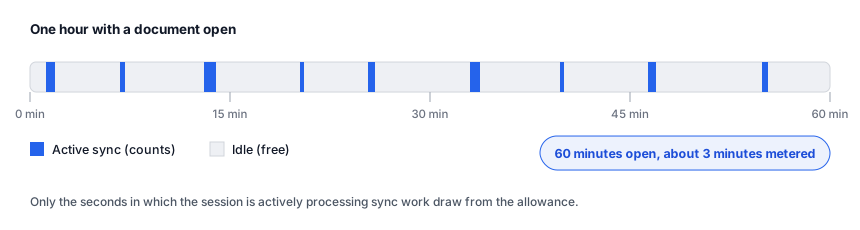
This is why the allowance stretches much further than it first sounds: an hour "in the app" is typically a few minutes of metered activity, not sixty.
One boundary worth knowing: Backbuild Meetings is metered separately. Live meeting time runs on universal usage credits at its own per-participant-minute rate and never draws Real-Time Session Minutes. The meetings billing story is in Backbuild Meetings on your plan.
The Free Allowance and the Rate
Every plan, including Free, includes 10,800 Real-Time Session Minutes per organization per calendar month: 180 hours of active sync time. Beyond that, active time draws universal usage credits at 1 credit per active session-second (60 per minute, 3,600 per hour). At entry package pricing an extra hour of active sync costs about 2.4 cents.
The data your real-time sessions store counts toward your database storage allowance, not toward a separate meter.
Watching Your Usage
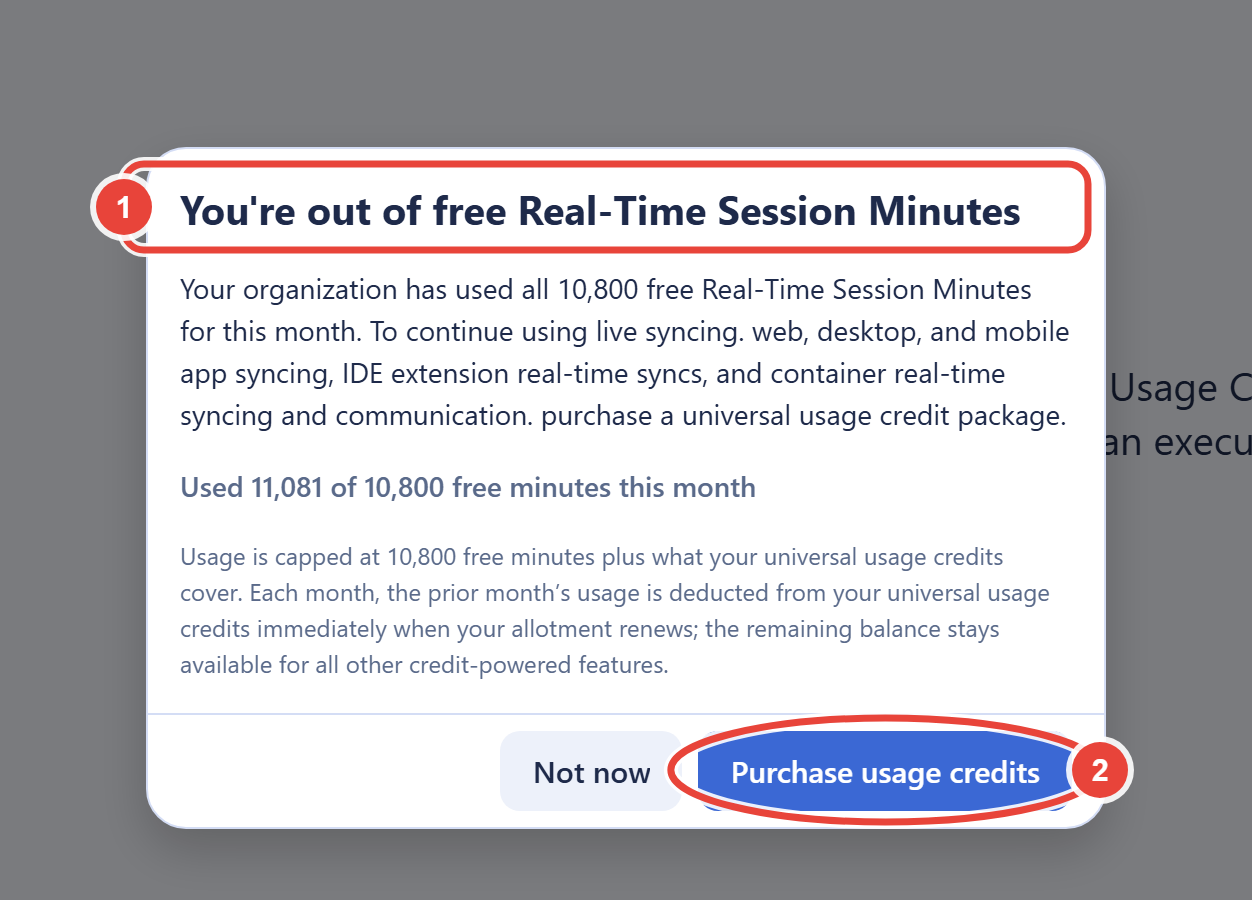
Real-time session spending is visible on the Billing & Usage screen as the Real-Time Session Minutes category of the billable usage breakdown, so any overage credits are always attributable there. When the free allowance itself is at stake, the app tells you directly: exhaustion surfaces the dialog below, which reports your month-to-date minutes against the free 10,800. Usage resets with the calendar month.
Beyond the Allowance: Exactly What Happens
Overage in this class uses deferred deduction: metered continuously, totaled at month close, and subtracted from the next month's credits. The full mechanics, including the oldest-first ordering and carry forward, are covered in How Monthly Overage Settles. What matters day to day is the boundary behavior:
- With credits available, sessions continue past the free allowance seamlessly. Active seconds draw credits at the published rate, up to this class's cap of half your month's available credits (see caps).
- Without credits, new sessions stop exactly at the free allowance. Existing live sessions are never cut mid-stream; only the opening of new sessions is refused. Because enforcement runs on a regular cycle, a block can take up to an hour to engage after the line is crossed, and usage in that window meters normally.
- When blocked, the app tells you plainly with a paywall dialog explaining that free Real-Time Session Minutes are exhausted, with a button that takes you straight to Billing & Usage. Purchasing a credit package restores capacity immediately, and the block clears on the next enforcement cycle.
Metering is engineered to be customer-favorable at the margins: in rare failover conditions a sliver of active time may go uncounted, and that loss is always yours to keep, never billed back.
Sizing Guidance
180 free hours of active time per month is generous for interactive work. A five-person team editing documents and sheets all day typically meters a small fraction of it, because human editing is mostly idle time. The workloads that reach overage are continuous machine-driven ones: long container automation runs, agents that sync constantly, or a product you built on Backbuild whose end users generate sessions. If that is you, watch the meter through your first busy month and size a credit package from real numbers; the usage breakdown's windows show which categories consumed time and when.
Frequently Asked Questions
Does leaving a document or dashboard open burn minutes?
No. Idle connections are free. Only seconds in which the session is
actively processing sync work are metered.
Will my running session or automation die when the allowance runs out?
No. Existing traffic is never cut mid-stream. Exhaustion only prevents
new sessions from starting, and only when there are no credits to cover
overage.
Do video calls or meetings use session minutes?
No. Backbuild Meetings meters its own usage: live meeting time draws
universal usage credits at a per-participant-minute rate and never draws
Real-Time Session Minutes. Session minutes cover workspace sync (apps,
IDE extensions, containers). The meetings billing story, including the
rate and what happens at zero balance, is in
Backbuild Meetings on your plan.
What do session minutes cost in dollars?
Beyond the free 180 hours, an hour of active sync is 3,600 credits:
about 2.4 cents at entry package rates, less on larger packages. See
the credit package table.
I run a SaaS on Backbuild. Do my end users' sessions count against me?
Yes, consenting customer usage attributes to the publisher, which is how
you resell real-time capability inside your own product. The
publisher usage
report breaks it down per customer so you can bill your own users
accurately.