

Payments & Stripe Connect
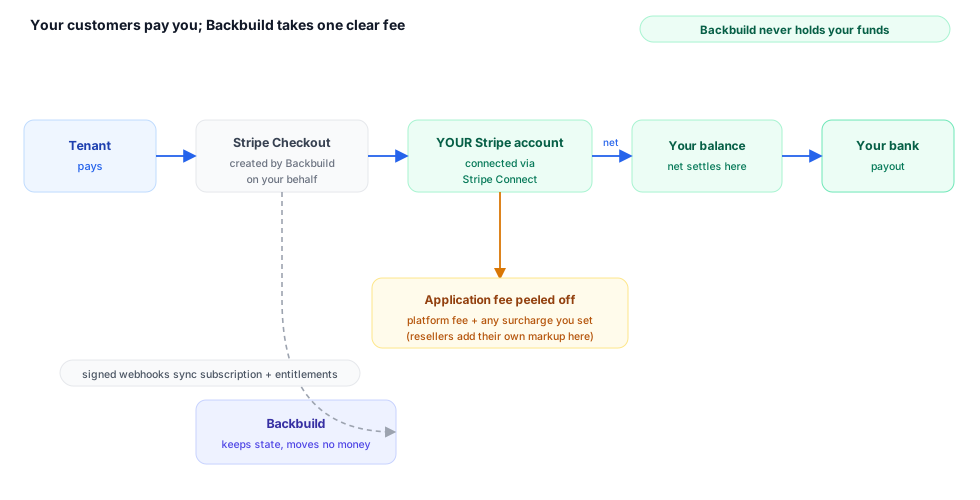
When you sell your product on Backbuild, your tenants pay you, not Backbuild. You connect your own Stripe account, and every charge your tenants make settles into that account directly. Backbuild runs the entire billing lifecycle on top of it (checkout, subscriptions, invoices, webhooks) so you never build a payment flow yourself, and takes its share as a transparent application fee on each transaction.
Pro Stripe Connect billing is part of the SaaS Builder, included with the Backbuild Pro build-and-ship platform. See pricing.
The money flow
Backbuild uses Stripe Connect to route payments. You bring your own Stripe account; Backbuild acts as the platform that creates the charges on your behalf. The funds land in your Stripe balance and pay out to your bank on your own Stripe payout schedule. Concretely, for every tenant payment:
- Your tenant checks out (one-time or subscription) through a Stripe-hosted or embedded Checkout flow that Backbuild creates.
- The charge is created against your connected Stripe account, with an application fee deducted off the top.
- The net amount settles into your Stripe balance; Stripe pays you out directly.
- Stripe sends events back to Backbuild via webhooks, which keep your subscription, invoice, and entitlement state in sync automatically.
Because the charge is created against your account, the relationship of record is between you and your tenant. You see the customers, charges, and payouts in your own Stripe Dashboard.
Getting set up to receive payouts
If you have never connected a payment processor before, here is what actually happens, in plain terms. To be paid, you complete a short identity and business verification once (this is a standard requirement for anyone accepting card payments, not a Backbuild rule). You do it through a secure, Stripe-hosted flow: Backbuild sends you to Stripe, you confirm who you are and where payouts should land, and you return. Verification is usually quick but can take a little longer if Stripe asks for a document. Once it is complete, your account can take live payments and money pays out to your bank on your own schedule. You never hand Backbuild your bank details; they go to Stripe, the same processor millions of businesses already use.
Stripe Connect profiles
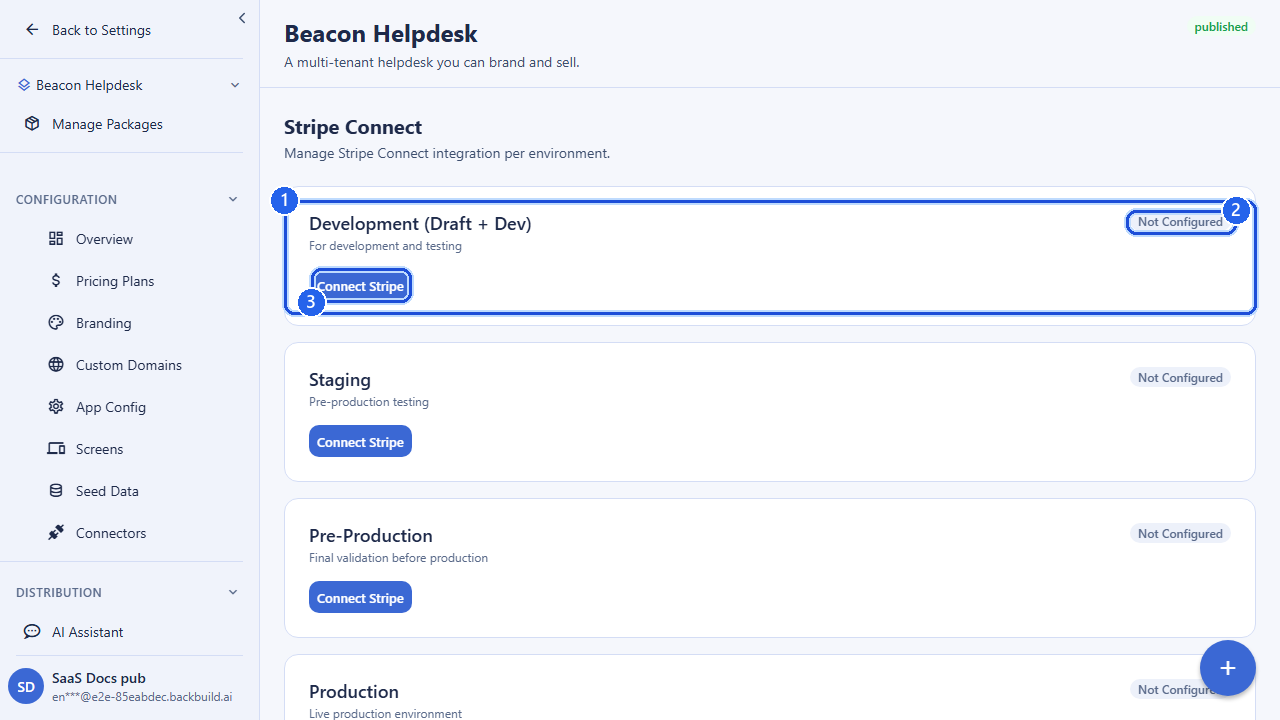
A Stripe Connect profile represents one real Stripe Connect account you own. You create a profile, complete Stripe’s onboarding (KYC, bank details, terms), and then link it to one or more of your SaaS packages, per environment. This model lets you:
- Share one Stripe account across packages. Many packages can link to the same profile; their Stripe Products simply coexist on that account.
- Keep test and live separate. A test-mode profile can be linked to your
developmentandstagingenvironments; a live-mode profile topreprodandproduction. A profile’s live-vs-test nature is fixed once onboarding completes and never changes. - Save configuration before KYC. Package links can be created in a
draftstate before onboarding finishes; they activate automatically once the profile is ready and the environment is compatible.
You never supply a Stripe account ID yourself. Backbuild creates the connected account on your behalf during onboarding and records the resulting account ID server-side; this is what prevents one builder’s account from being claimed by another.
Onboarding flow
The lifecycle of a profile, end to end:
- Create a profile: give it a name, an account type (
standardorexpress), and optionally a country and default currency.POST /v1/stripe-profiles. - Start onboarding: Backbuild creates the connected account and returns a Stripe-hosted onboarding URL. Redirect your team member there to complete KYC.
POST /v1/stripe-profiles/:profileId/onboard/start. - Complete onboarding: after the operator returns, Backbuild re-reads the account from Stripe and records the resulting capabilities (charges enabled, payouts enabled, details submitted).
POST /v1/stripe-profiles/:profileId/onboard/complete. - Link packages: attach a
(package, environment)to the profile so checkouts for that package route to this account.POST /v1/stripe-profiles/:profileId/links.
A profile’s onboarding_status moves through
pending → onboarding →
restricted/active. Only an active
profile (charges and payouts enabled) can take live payments. If you later
disconnect the account from your Stripe Dashboard, the profile flips to
disabled and Backbuild pauses affected tenant subscriptions
until you reconnect.
The platform fee model
Backbuild deducts an application fee from each transaction. The total fee applied to a tenant’s payment is the sum of two parts:
| Fee component | Who sets it | What it is |
|---|---|---|
platform_fee_percent | Backbuild | Backbuild’s platform fee. A per-profile override may apply; otherwise your organization default applies; otherwise the system default (10%). |
client_fee_percent | You (the builder) | An optional surcharge you add on top, in your favor, on each tenant transaction. Defaults to 0%. |
The application fee Backbuild applies to a Checkout session is
platform_fee_percent + client_fee_percent. Both are configured
per profile. Fee changes are a sensitive, owner-level action: updating fees
requires a recent multi-factor step-up and is recorded in your audit trail.
Each fee value is bounded (0–50%) and changes use optimistic
concurrency: you submit the version you expect, and a stale write is
rejected so two edits never silently clobber each other.
For resellers and agencies: your markup is the client surcharge.
The client_fee_percent is your margin on top of the
platform fee, and it flows to you. Combined with per-plan pricing, this is
how you set a retail price above your wholesale cost and keep the spread on
every client transaction. You collect from your clients through your own
connected account; the platform never sits between you and that revenue
beyond its stated fee.
Per-package Stripe credentials
Stripe credentials (the connected account ID, publishable key, and a reference to the webhook signing secret) are held against the profile and resolved per SaaS package and environment when a checkout runs. Secret material is encrypted at rest and never returned to the client; the public client configuration endpoint exposes only the publishable key your front end needs. You rotate the webhook signing secret through a dedicated, step-up-gated endpoint; Backbuild accepts both the old and new secret during a short overlap window so in-flight events are not dropped.
The billing lifecycle Backbuild runs for you
Once a profile is connected and linked, you do not implement any payment code. Backbuild exposes a billing surface your app calls, and handles the Stripe-side mechanics behind it.
Checkout
To start a paid subscription, your app requests a Checkout session for a plan’s Stripe price and your package. Backbuild looks up the linked connected account, computes the application fee, applies any server-validated trial, and returns a Stripe Checkout URL (or a client secret for embedded Checkout). Redirect URLs are validated against your application’s own domains to prevent open-redirect abuse.
POST /v1/billing/create-checkout-session
Authorization: Bearer <token>
Content-Type: application/json

{
  "price_id": "price_1Q...",
  "package_id": "019d3f6a-...-...",
  "success_url": "https://app.yourproduct.com/welcome",
  "cancel_url": "https://app.yourproduct.com/plans"
}

# Response
{ "success": true, "data": { "checkout_url": "https://checkout.stripe.com/c/pay/cs_..." } }
A trial length supplied by the client is treated as a hint only: Backbuild
clamps it to the plan’s configured maximum, so a tenant cannot mint a
longer trial than you allow. For collecting a card without charging (for
example, to start a free trial that converts later), the embedded Checkout
endpoint supports mode: "setup".
Subscriptions
Subscriptions can be created and managed through the billing API directly,
and their state is kept current by Stripe webhooks. Status values follow
Stripe’s vocabulary: active, trialing,
past_due, canceled, incomplete, and
paused. Updating a subscription supports plan changes, seat
changes, and scheduling a cancellation at period end.
PUT /v1/billing/subscriptions/<subscriptionId>
Authorization: Bearer <token>
Content-Type: application/json

{
  "plan_id": "pro_monthly",
  "seats": 5,
  "cancel_at_period_end": false
}
Webhooks
Backbuild owns the Stripe webhook endpoint and verifies every event’s
signature before acting on it. Connect events are routed to the correct
profile and, for product/price/subscription events, to the correct package
and environment. You do not register or handle webhooks yourself;
payment-succeeded, payment-failed, and subscription-updated events flow
straight into your subscription and entitlement state. After a Checkout
redirect, your app can poll GET /v1/billing/subscription-status
to confirm the webhook has activated the subscription.
Trials, cancellations, and failed payments are handled for you
You do not have to build (or debug) the messy edges of subscription billing. Backbuild, together with Stripe, runs them for you:
- Free trials convert to paid automatically at the end of the trial window; the trial length is capped to the maximum you set on the plan, so a customer can never mint a longer trial than you allow.
- Cancellations can be immediate or scheduled for period end, and the subscription status reflects the change (
canceled) so your app shows the right state. - Failed payments move a subscription to
past_dueand Stripe retries on its dunning schedule; your plan’s grace period controls how long access continues before it is suspended, and billing-update prompts are handled through Stripe.
Each of these transitions arrives as a verified webhook and updates the subscription and entitlement state automatically, so what a customer can do always matches what they have paid for, without you writing any billing code.
API reference
Stripe Connect profiles: /v1/stripe-profiles
All endpoints require authentication and are gated by the SaaS Builder entitlement. Profiles, fees, and links are scoped to your organization.
| Method & path | Description |
|---|---|
GET /v1/stripe-profiles | List your Stripe Connect profiles. Supports page, page_size, and status (pending, onboarding, restricted, active, disabled). |
POST /v1/stripe-profiles | Create a profile. Body: name, optional description, account_type (standard/express), country, default_currency, business_profile. A stripe_account_id is never accepted here. |
GET /v1/stripe-profiles/:profileId | Get one profile (sensitive read; audit-logged). |
PATCH /v1/stripe-profiles/:profileId | Update name, description, country, currency, or business profile. Requires expected_version. |
PATCH /v1/stripe-profiles/:profileId/fees | Update platform_fee_percent and/or client_fee_percent (0–50). Requires expected_version and a recent MFA step-up. |
POST /v1/stripe-profiles/:profileId/webhook-secret/rotate | Rotate the webhook signing secret. Requires expected_version, new_webhook_secret_ref, and a recent MFA step-up. |
DELETE /v1/stripe-profiles/:profileId | Archive a profile (soft delete; preconditions enforced). Requires expected_version; optional deletion_reason. |
POST /v1/stripe-profiles/:profileId/onboard/start | Create the connected account (if needed) and return a Stripe onboarding URL. Optional refresh_url/return_url (clamped to allowed hosts). |
POST /v1/stripe-profiles/:profileId/onboard/complete | Re-read account capabilities from Stripe and finalize status. Requires expected_version. |
POST /v1/stripe-profiles/:profileId/sync | Queue this profile’s plans for re-push to Stripe. Optional environments filter. Returns 202. |
GET /v1/stripe-profiles/:profileId/links | List the package/environment links on this profile. |
POST /v1/stripe-profiles/:profileId/links | Link a package to this profile for an environment. Body: saas_package_id, environment, optional link_status (draft/active/suspended). |
DELETE /v1/stripe-profiles/:profileId/links/:pkgId/:env | Unlink a package/environment. Optional ?archive_stripe_products=true. |
Billing: /v1/billing
All endpoints require authentication and are scoped to the calling organization.
| Method & path | Description |
|---|---|
GET /v1/billing | Billing overview for the org (owner/admin). |
GET /v1/billing/client-config | Stripe publishable key for the front end. |
GET /v1/billing/subscription-status | Poll subscription activation after a Checkout redirect. |
POST /v1/billing/create-checkout-session | Create a Stripe Checkout session. Body: price_id, package_id, optional success_url, cancel_url, trial_period_days. Returns checkout_url. |
POST /v1/billing/create-embedded-checkout-session | Create an embedded Checkout session. Supports mode = subscription (default) or setup. Returns a client_secret. |
POST /v1/billing/subscriptions | Create a subscription. Body includes plan_id, interval, payment_method_id, billing_details, optional seats. |
GET /v1/billing/subscriptions | List subscriptions. Filter by status; paginate with limit/offset. |
PUT /v1/billing/subscriptions/:id | Update a subscription (plan_id, seats, cancel_at_period_end). |
GET /v1/billing/invoices | List invoices. Filter by status, from_date, to_date; paginate with limit/offset. |
GET /v1/billing/payment-methods | List saved payment methods for the org. |
PUT /v1/billing/payment-methods | Save/update a payment method. Body: payment_method_id, optional set_as_default, billing_details. Ownership is verified against the org’s Stripe customer. |
GET /v1/billing/usage | Billable-usage rollup. Optional env_id (UUID or all) and window (24h/7d/30d/90d/all). |
Frequently asked questions
- Is the Stripe account mine (payouts to me) or the platform’s?
- Yours. You connect your own Stripe account, charges are created against it, and payouts land in your bank on your own schedule. Your customers, charges, and payouts appear in your own Stripe Dashboard.
- What exactly does the platform take?
- A single application fee per transaction: a platform fee (10% by default) plus any surcharge you add for yourself, each bounded 0 to 50 percent. It is deducted transparently off the top and itemized on the Stripe charge.
- Can I set my own markup on top of the platform fee?
- Yes. The client surcharge is your margin and flows to you. Combined with your plan pricing, it is how you sell at a retail price above your wholesale cost.
- Whose account collects from my clients?
- Your own connected account. If one payment account is disconnected or at risk, only the tenant subscriptions tied to that account are paused, never your whole book.
- Are trials, cancellations, and failed payments handled for me?
- Yes. Trial-to-paid conversion, self-serve cancellation, past-due retries under Stripe dunning, and your plan’s grace period are all handled and kept in sync through verified webhooks, with no billing code from you.
- How are test and live payments kept apart?
- A profile is fixed as test or live at onboarding. Test-mode profiles link to development and staging; live-mode profiles link to preprod and production. Test charges never touch live subscribers.
See Pricing Plans & Categories for how plans and their Stripe prices are defined, Tenants & Subscriptions for managing the customers who buy them, and Owning Your Product & Data for how ownership and fees fit together. Full request/response schemas live in the API Reference.