

Academic Status & Verification
Backbuild Science is free for verified students and faculty. This page explains exactly how the verification check works, what happens if it does not go through the first time, how your access changes over the years after you graduate, and what stays true no matter what: your projects and documents are always yours. After reading this you will know precisely what to expect at every stage of your academic life.
What verification is
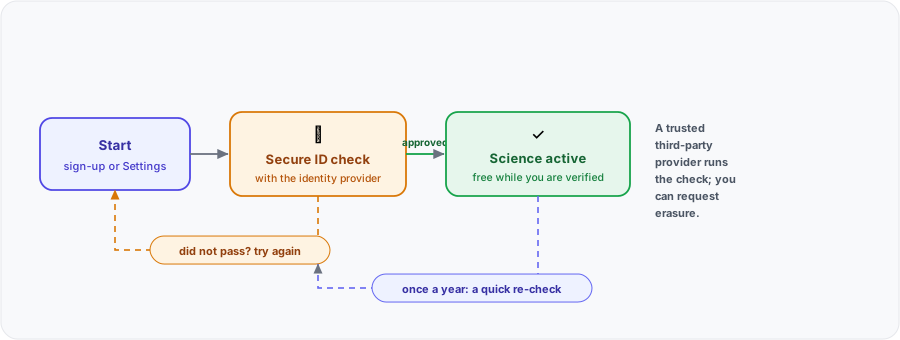
Verification is a one-time identity check that confirms you are a real student or faculty member at an accredited institution. It is handled by a trusted third-party identity provider, so the check happens in a dedicated, secure flow rather than by emailing a copy of your ID to anyone. You present a government-issued student or faculty credential, the provider confirms it, and your Backbuild Science entitlement unlocks. Backbuild accepts government-issued student and faculty IDs from accredited institutions worldwide.
Where to start verification
There are two entry points, so you can verify whether you are brand new or already have an account:
- During sign-up. When you create your account and choose the Academic option, the verification step is part of onboarding. Complete it there and your workspace unlocks free.
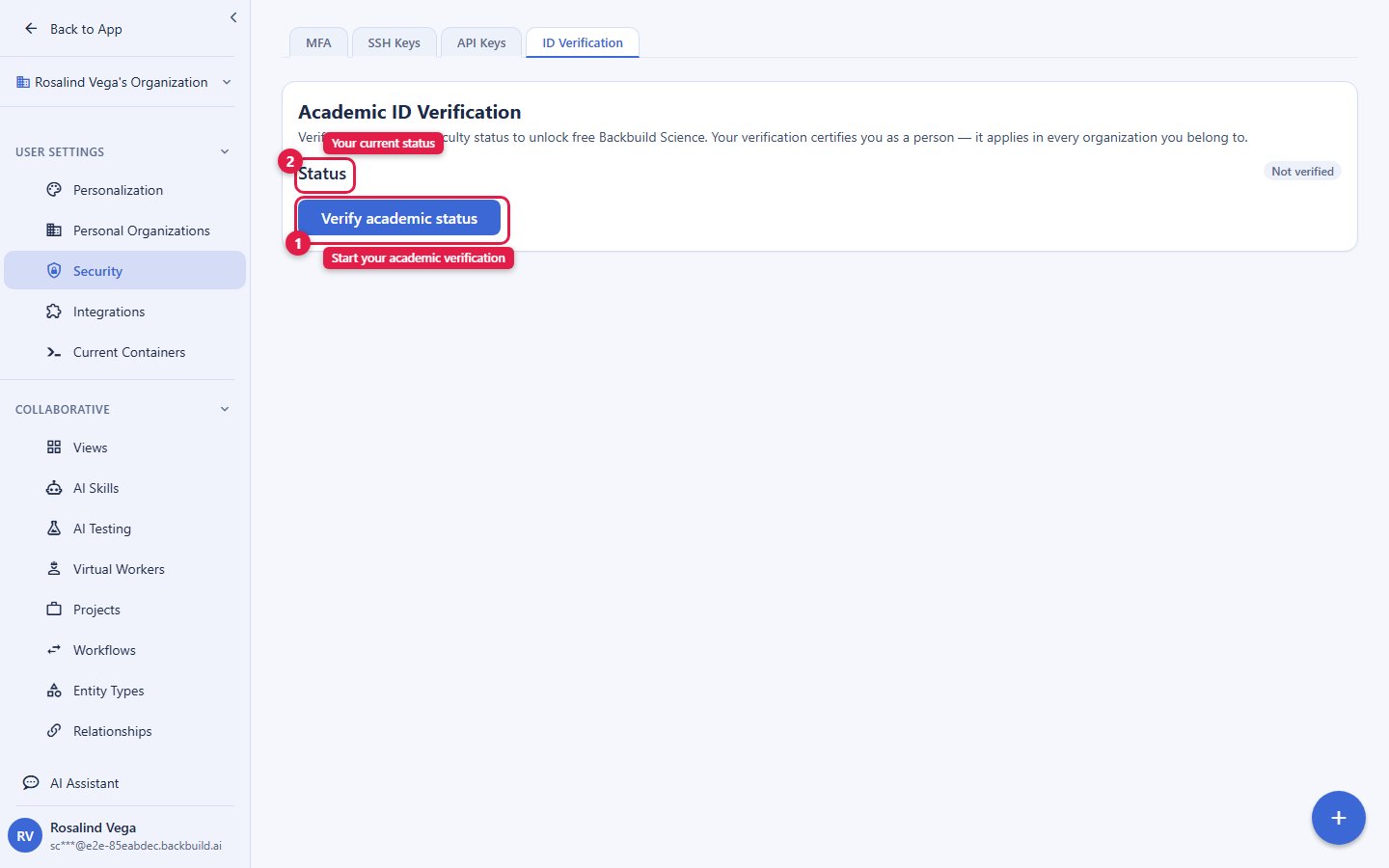
- From Settings. If you already have an account, open Settings and go to the security area, where you will find ID verification. This is the entry point returning users use, and it is also where you re-verify when your status changes (a new academic year, a move from student to faculty, a new institution).
Completing the check
When you start, you are guided through the identity provider's secure steps on your device. Keep your institutional ID within reach. When the provider confirms your credential, your status updates to verified and Backbuild Science is active. Your verified status is recorded against you as a person, not against a single organization, so it carries with you: if you belong to more than one Backbuild organization (for example a personal workspace and a lab), your academic entitlement follows you rather than being tied to one place.
If your first attempt does not go through
A verification attempt can be inconclusive for ordinary reasons: a blurry photo of the ID, a name that does not match, or a document the provider could not read clearly. If that happens, you will see a clear message and you can simply start the check again from the same place, with a better-lit or clearer capture. If verification is temporarily unavailable in your environment, the screen tells you it is not available right now rather than guessing; you are never approved by accident, and there is no way to self-approve. If you have retried and still cannot get verified, reach out to support and describe what you saw; a person can help.
Staying verified: the annual re-check
Academic status changes over time, so eligibility is re-checked once a year. When a re-check is due, you re-verify from the Settings security area, the same place you started. If you re-enroll for a new year or rejoin a faculty role, your free tier resets: a valid ID always means free. Keeping your verification current is the only thing you need to do to keep the Academic tier.
What happens after you graduate
Your access does not switch off the day your ID expires. It steps down gradually, so you are never surprised by a bill:
| Your status | Backbuild Science Individual |
|---|---|
| Current student or faculty (valid ID) | Free |
| ID expired 6 months ago or less | Free |
| 6 to 18 months past expiration | Large graduate discount |
| 18 to 30 months past expiration | Half-price graduate discount |
| 30 to 42 months past expiration | Smaller graduate discount |
| Beyond that | Standard Individual rate |
The graduate ladder applies to the Individual plan on yearly billing. The exact prices at each step are on the pricing page, which is the single source of truth for price. If you go back to school or take a faculty appointment at any point, re-verify and you are free again.
Your work is always yours
Whatever stage you are at, your projects, manuscripts, data, and proofs remain yours and stay in your workspace. Verification controls the price of the research entitlement, not ownership of your documents. You can export your manuscripts as LaTeX and your data as portable SQLite at any time, so you are never locked in and never at risk of losing access to your own work. See Collaborating & sharing research for exporting and ownership in detail.
Your identity data
The identity check is run by the third-party provider through a secure flow; Backbuild records that you are verified and the status that follows from it, not a copy of your ID for casual viewing. If you want your verification identity data removed, you can request erasure, and Backbuild honors data-subject erasure requests. See Security & compliance for how your data is protected across the workspace.
Frequently asked questions
- How does the student ID check actually work?
- You start it in onboarding or from Settings, then complete a secure identity check with a trusted third-party provider using a government-issued student or faculty ID. When the provider confirms it, Backbuild Science unlocks.
- What if my school is not recognized or my first attempt fails?
- Backbuild accepts IDs from accredited institutions worldwide. If a check is inconclusive, you get a clear message and can retry with a clearer capture; if you still cannot get verified, contact support and a person will help. You are never approved by accident.
- Is "free for students" a trial that expires?
- No. It is free while your ID is valid, free for 6 months after it expires, then a multi-year graduate discount. There is no countdown trial and no card required for the Academic tier.
- Do I need to verify again each year?
- Yes, eligibility is re-checked annually. Re-verify from the Settings security area; re-enrolling or rejoining a faculty role resets your free tier.
- What happens to my documents when I stop being a verified student?
- They stay yours. Your access price steps down gradually along the graduate ladder, and you can export everything in open formats at any time. Ownership never depends on your verification status.
- Does my verified status work across multiple organizations?
- Yes. Verification is recorded against you as a person, so your academic entitlement follows you across the Backbuild organizations you belong to.