

Roles, Groups & Permissions
Access in Backbuild is role-based and always scoped to a single organization. This page teaches you what each built-in role actually lets a person do, the hierarchy rule that makes privilege escalation structurally impossible, and how groups, departments, and custom roles let you model your real org chart without hand-assigning permissions.
After reading this page you will be able to: pick the right role for any hire or contractor in seconds, explain to an auditor exactly why a given person can or cannot perform a given action, and use groups and departments so that access follows team structure automatically.
The Built-in Roles, in Plain Language
Every organization ships with a set of system roles. A person holds one role per organization (plus any roles layered on through groups and departments, covered below), and can hold different roles in different organizations. Higher rows in this table outrank lower rows.
| Role | Give it to | Can do | Cannot do |
|---|---|---|---|
owner | The person accountable for the organization | Everything: billing and plan management, all settings and policies, all members and roles, all projects and data | Remove or demote the last owner (the platform refuses) |
admin | Your operations or IT lead | Run the organization day to day: members, invitations, settings, policies, projects, integrations | Manage billing or the plan |
manager | Team leads who run projects and people | Create and manage projects, tasks, and project teams | Delete projects; change org-wide settings |
developer | Builders doing hands-on work | Create, edit, and delete projects and their contents (entities, specs, tasks, documents); manage groups and departments | Manage org members, settings, or billing |
member | Everyday teammates | View shared work and create within the areas they are given | Administer anything |
security_viewer | Security reviewers and auditors | Read security and audit surfaces, nothing else | Create, change, or delete anything |
viewer | Stakeholders who only need to see | Read organization resources | Create or modify anything |
guest | External collaborators, clients, contractors | See only the few things explicitly shared with them | Everything else, including browsing other projects or the member roster |
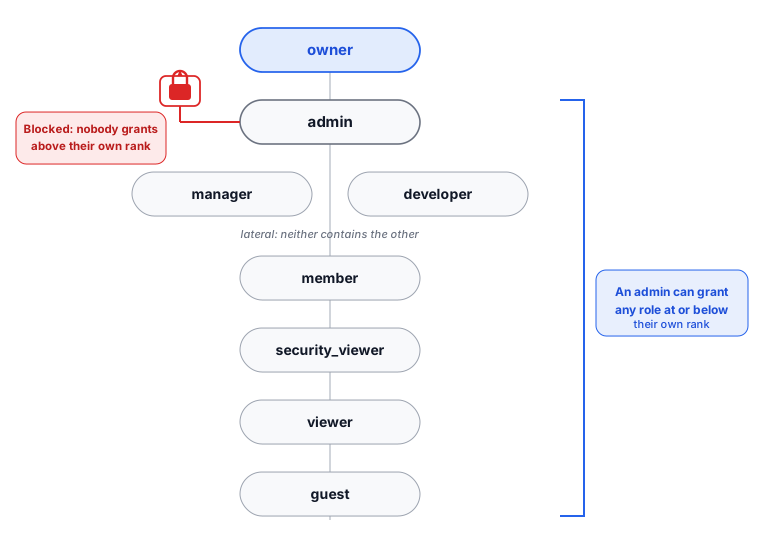
Two of these are lateral rather than nested: manager and
developer sit at different levels but neither contains the
other. A manager runs project structure and people; a developer builds
and can delete what they build. Pick by job, not by seniority.
The system roles are fixed. You cannot rename, edit, or delete them, so their meaning stays stable for audits and for anyone reading a role name across organizations. When a built-in role does not fit a job exactly, build a custom role rather than trying to bend a system one.
The Hierarchy Rule
Every role has a rank, and the server enforces one rule everywhere roles are assigned: you can only grant or manage roles at or below your own rank. An admin can make managers and members but can never mint an owner. A manager cannot promote anyone to admin. Nobody can promote themselves. Owners are peers: one owner may act on another, which is what lets co-founders manage each other while still preventing anyone below owner from touching an owner.
Because the rule is enforced on the server for every request, it holds no matter how the request arrives: the web app, the API, an integration, or an AI agent acting on someone’s behalf.
Permissions Under the Hood (What You Can Rely On)
Roles bundle fine-grained permissions, and enforcement happens server-side on every request:
- Organization membership is verified for every operation.
- The role and permission check is scoped to the specific organization being accessed, never inherited globally from another organization.
- Write operations validate the exact permission for the operation type before executing.
- Every authorization refusal is a distinct, logged event, so a probing account leaves a visible trail.
You do not need to memorize the permission catalog to run a team; the role table above is the operational summary. When you do need fine-grained control, use custom roles.
Custom Roles
The built-in roles cover most teams, but real jobs rarely map onto exactly eight fixed tiers. When you need a role shaped to a specific job, build a custom role: a named bundle of exactly the permissions that job requires, and nothing more. This is how you get least privilege without the classic trap of role explosion, where every slightly-different need spawns another near-duplicate role nobody can keep straight.
After this section you will be able to create a custom role from a least-privilege starting point, understand precisely what you can and cannot grant through one, and edit or retire it cleanly.
Where custom roles live
Open Settings → IAM → Roles. The Roles tab lists the built-in system roles and every custom role your organization has created, each shown with its permission count and a preview of its permissions. System roles carry a System role badge and cannot be edited or deleted; custom roles have full Edit and Delete controls. A search box filters the list by name or description. Creating or changing a role requires the role-management permission, which owners and admins hold by default.
Creating a custom role
Choose + New Role and fill in three things:
- Name (required): name it for the job, not the person, for example “Billing Reviewer” or “Support Agent (read only)”. Reuse one coarse role across everyone who does that job rather than minting a variant per individual.
- Description (optional): a sentence on what the role is for, so a future reviewer understands it at a glance.
- Permissions: the heart of the role. Backbuild ships more than two hundred fine-grained permissions, each naming a resource and an action (for example
project.create,entity.update,audit.read). The picker groups them by category with a collapsible section per category and a selected-count badge on each, so you can see at a glance how much a category is opened up.
Build the role the least-privilege way: start from zero and add only the permissions the job actually needs. Work category by category, opening only the ones the job touches. When you save, the role is available to assign immediately.
What a custom role can and cannot grant
Two boundaries keep custom roles safe, and both are enforced on the server when you save:
- The catalog boundary. Every permission you select must be a real permission from the catalog. There is no free-text permission field, so a role can never grant a capability that does not exist.
- The owner ceiling. A custom role may grant any capability an
ownercan hold, and no more. The permission catalog you choose from contains exactly the capabilities that can be delegated within your organization, so a custom role can never exceed what an owner already has. This is why the model is safe to hand to your admins: the worst a custom role can do is grant what an owner can grant.
Note that you do not place a custom role in the hierarchy yourself. Every custom role is created at a fixed default rank, and like every role it is bound by the hierarchy rule above: it can never be assigned by, or used to reach, a rank above the person assigning it.
Editing and retiring a role
- Edit: choose Edit on a custom role card to reopen the same form. Saving replaces the role’s entire permission set with your new selection, under the same catalog and owner-ceiling checks. Adjust a role’s permissions here rather than cloning a new near-duplicate.
- Delete: choose Delete and confirm. Members currently assigned the role lose the permissions it granted (they keep every other role they hold), and the deletion cannot be undone. Delete a role when the job it modeled is retired.
- System roles are protected: the built-in roles cannot be edited or deleted, so their meaning stays stable for audits. Build a custom role instead of trying to bend a system one.
Groups and Departments
Assigning roles person by person stops scaling around the second team. Groups and departments fix that:
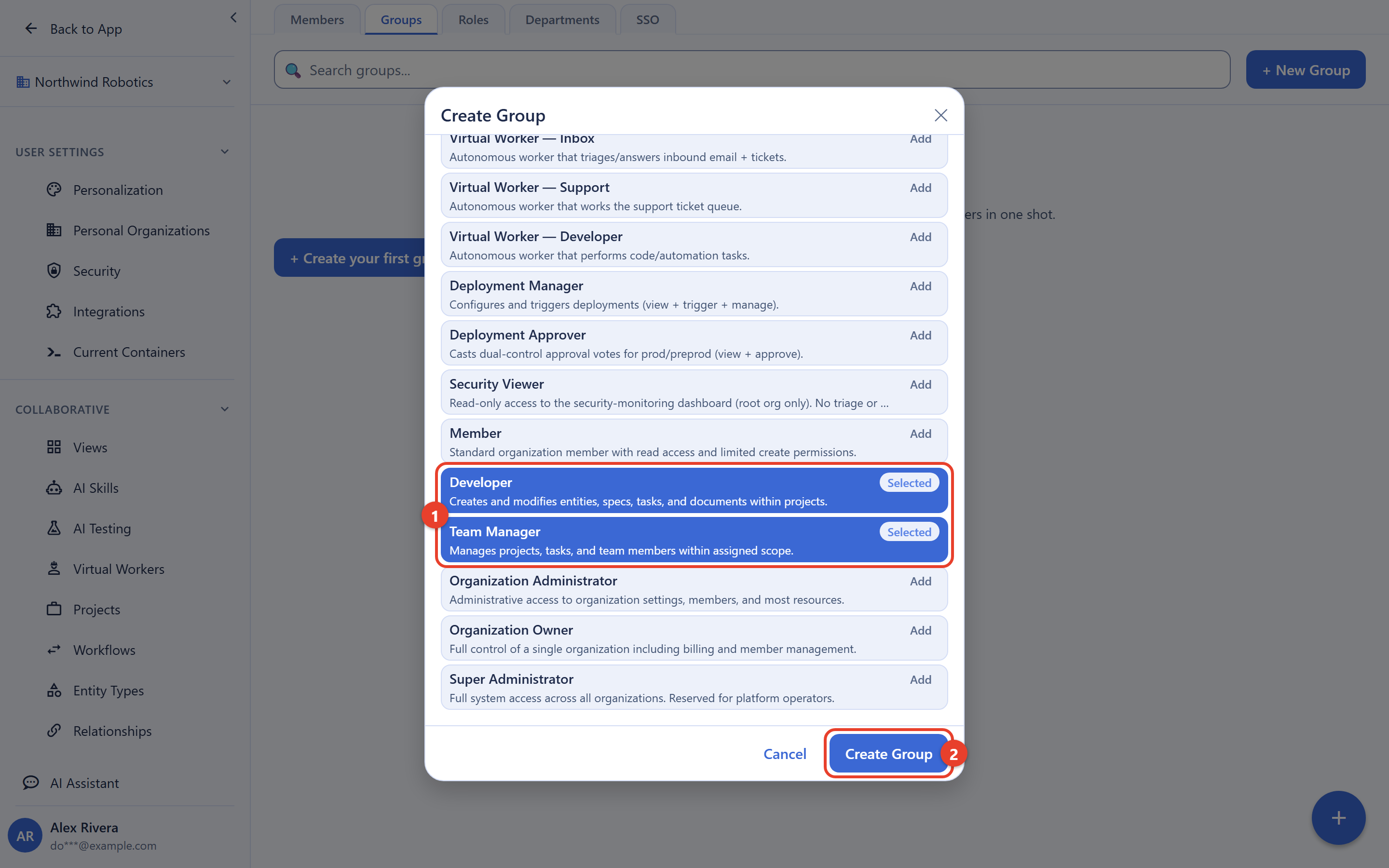
- Groups are ad hoc collections (a project taskforce, an on-call rotation, “Contractors Q3”).
- Departments mirror your org chart (Engineering, Finance, Support).
- Attach roles to a group or department, and every member of it gains those roles automatically. A person’s effective permissions are the union of their direct role and every role from their groups and departments, and the IAM area can show you that computed result per person, which is the answer to “why can this user do that?”
- Adding people to a group or department is governed by the same self-ceiling guards as direct role assignment: no cross-organization additions, and you can only assign a group or department whose roles grant permissions you yourself already hold. A group or department that would hand someone a permission you do not hold is not offered to you and cannot be assigned.
- Groups and departments are also targets for seat assignment, so licensing can follow team structure too.
Manage all of this from the IAM area: Members, Roles, Groups, and Departments tabs.
Access Reviews and Audits
Everything above is recorded: role grants and changes, group and department membership changes, and every refused attempt, each with the acting user and timestamp. For a periodic access review, walk the member list, check effective permissions for the sampled users, and pull their activity trails from the member detail page. Role creep is caught by looking, not by archaeology.
Frequently Asked Questions
What is the difference between an owner and an admin?
Billing and the plan. An admin can run everything operational; only an
owner manages billing and plan changes. Keep at least two owners so the
last-owner protection never has to save you.
Can an admin make themselves an owner?
No. The hierarchy rule is enforced on the server: no one can grant a
role above their own rank, and no one can change their own role from the
admin surface.
Which role for a contractor or client?
guest, combined with membership in only the specific
project they need. The full recipe, including what the contractor can
and cannot see, is in
Projects.
How do I see why a user can do something?
Open their effective permissions in the IAM area. It shows the union of
their direct role and everything inherited from groups and departments.
Can I rename or delete the built-in roles?
No; system roles are fixed so their meaning is stable for audits and
documentation. Create custom roles for anything the built-ins do not
cover.
The built-in roles never fit exactly. How do I add custom roles
without ending up with a mess of near-duplicates?
Build custom roles from the catalog of over two hundred fine-grained
permissions, starting from zero and adding only what a job needs. Beat role
explosion by modeling roles around job functions rather than individuals,
reusing one coarse role across everyone who does that job, and using
groups and departments to layer
access on top instead of minting a one-off role for every exception.
What happens to members when I delete a custom role?
They lose the permissions that role granted and keep every other role they
hold; nothing they created is touched. The deletion is logged and cannot be
undone, so delete a role only when the job it modeled is retired.
Can a role I create grant more than I have, or be used to reach
admin or owner?
No. A custom role can grant at most what an owner can hold,
and every role, custom or built-in, is bound by the hierarchy rule, so it
can never be assigned by or used to reach a rank above the person assigning
it.
API Reference
Roles, permissions, groups, departments, and effective-permission
queries are exposed under /v1/rbac. See the
RBAC API reference for complete request and
response documentation.