

RBAC (Role-Based Access Control)
Fine-grained access control with roles, permissions, policies, departments, and groups. All authorization is scoped to the organization level.
After reading this page you will be able to: build a least-privilege custom role from the system permission catalog, understand exactly which permissions a custom role may and may not hold, layer allow and deny policies on top of roles, model your org chart with departments and groups, and read the fully computed set of permissions any user resolves to. Everything here is scoped to one organization; a caller can never touch another organization’s roles or permissions.
Roles
All RBAC endpoints scope to the authenticated user’s organization, which is resolved from the session; the organization is never passed in the body or query string. There are two kinds of role:
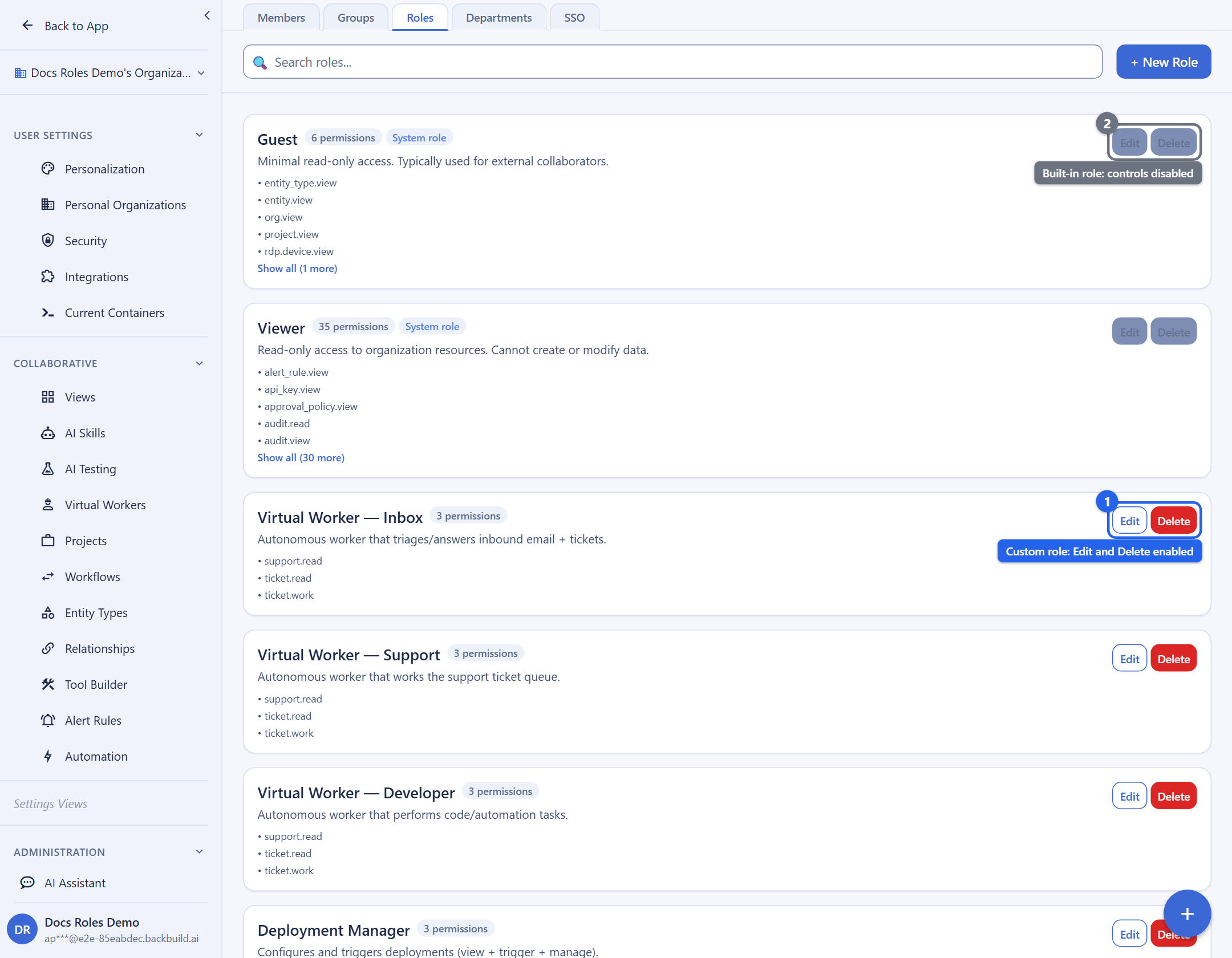
- Built-in roles ship with the platform (for example
owner,admin,member). They are read-only: you cannot create, edit, or delete them, and a custom role may not reuse a built-in role’s key. - Custom roles are the ones you create. They are always non-system, are bounded to the permissions your organization is allowed to delegate, and are the focus of the next section.
List Roles
GET /v1/rbac/rolesQuery Parameters
| Parameter | Type | Description |
|---|---|---|
search | string | Filter roles by name |
limit | integer | Max results (max: 100) |
offset | integer | Pagination offset |
Response
{
  "data": {
    "roles": [
      {
        "key": "admin",
        "name": "Administrator",
        "description": "Full organization access",
        "is_system": true,
        "created_at": "2026-01-01T00:00:00Z"
      }
    ],
    "pagination": {
      "total": 6,
      "limit": 20,
      "offset": 0
    }
  }
}
Create Role
POST /v1/rbac/rolesCreating or updating a custom role requires the manage-roles permission. The role key is generated by the platform; custom roles are always non-system.
Request Body
{
  "name": "Project Lead",
  "description": "Manages projects and assigns tasks",
  "permission_ids": ["project.view", "project.manage", "task.assign"]
}
permission_ids is a list of permission slugs (dot-notation text
keys such as project.view), not UUIDs. Up to 200 may be
supplied. The organization is taken from the authenticated session.
System-assigned fields (id, key,
is_system, created_at, updated_at) are
never supplied in the request body; they are assigned by the platform. Any
attempt to set is_system is rejected with a 400.
How permissions are validated
Every slug in permission_ids is checked against the system
permission catalog. Two rules govern what a custom role may hold, and both
are the privilege-escalation containment boundary that a security reviewer
will ask about:
- The slug must exist in the catalog. An unknown or
misspelled slug fails the whole request with
400and codeINVALID_INPUT(the message lists the unknown keys). The request is all-or-nothing: one bad slug rejects the entire role. - You can only delegate what you hold. A custom role may
only grant permissions you yourself hold through your own roles.
Requesting a permission you do not hold fails with
403
      FORBIDDEN
. This is what stops a custom role from being used to escalate beyond your own access.
Use List Permissions to discover the exact slugs available to you before you build a role, so you never guess a key.
Hierarchy level
A custom role’s hierarchy_level is bounded to
1 through 99. Level 100 is reserved
and is rejected. Lower-privilege roles sit lower in the hierarchy.
Response
Returns the full created role record on success.
{
  "success": true,
  "data": {
    "id": "...",
    "key": "project_lead",
    "org_id": "...",
    "name": "Project Lead",
    "description": "Manages projects and assigns tasks",
    "hierarchy_level": 50,
    "is_system": false,
    "permissions": ["project.read", "project.write", "task.assign"],
    "created_at": "2026-04-13T10:00:00Z",
    "updated_at": "2026-04-13T10:00:00Z"
  }
}
Response Codes
| Status | Meaning |
|---|---|
201 Created | Role created; the full record is returned |
400 Bad Request | Validation error: missing/invalid name, an unknown permission slug, or an out-of-range hierarchy level |
401 Unauthorized | Authentication required or invalid |
403 Forbidden | Caller lacks the manage-roles permission, or the role requests a permission the caller does not hold |
409 Conflict | A role with this name already exists in the organization (or collides with a built-in role) |
500 Internal Server Error | Unexpected server error |
Get Role
GET /v1/rbac/roles/:id
The :id in the path is the role’s text slug key (for
example project_lead), not a UUID. Both built-in and custom
roles are addressed by their slug.
Update Role
PUT /v1/rbac/roles/:idRequest Body
{
  "name": "Senior Project Lead",
  "permission_ids": ["project.read", "project.write", "project.delete", "task.assign"]
}
Delete Role
DELETE /v1/rbac/roles/:id
Built-in roles cannot be deleted. A custom role can only be deleted when no
members are currently assigned to it; reassign its members first. A custom
role key may also never collide with a built-in role key: attempting to
create one that shadows a built-in role returns 409 with code
DUPLICATE.
Custom-Role Error Reference
When building or editing a custom role, map the response to the cause and the fix:
| Status & code | Cause | Fix |
|---|---|---|
400 INVALID_INPUT | A permission slug is not in the system catalog, the name is missing, or the hierarchy level is outside the 1 to 99 range | Correct the slug (list the catalog), name, or level |
403 FORBIDDEN | The caller lacks manage-roles, or the role requests a permission the caller does not themselves hold | Grant manage-roles, or drop any permission the caller does not hold from the role |
409 DUPLICATE | The role name or key collides with an existing role or a built-in role | Choose a distinct name |
Permissions
Permissions are a fixed system catalog managed by the platform. You do not
create or delete permissions; you reference the ones that already exist by
their dot-notation slug (for example project.view,
org.manage_roles) when you build a custom role or write a policy.
List the catalog to discover the exact slugs available to your organization.
List Permissions
GET /v1/rbac/permissionsQuery Parameters
| Parameter | Type | Description |
|---|---|---|
search | string | Filter permissions by name |
limit | integer | Max results (max: 100) |
offset | integer | Pagination offset |
Response
{
  "data": {
    "permissions": [
      {
        "key": "project.view",
        "name": "View Projects",
        "description": "Read access to projects",
        "category": "project"
      }
    ]
  }
}
Each entry’s key is the slug you pass in a role’s
permission_ids or a policy’s scope. A slug that is not in
this catalog is rejected when you try to use it.
Effective Permissions
GET /v1/rbac/effective-permissionsQuery Parameters
| Parameter | Type | Description |
|---|---|---|
user_id | UUID | Target user (defaults to authenticated user; querying another user requires admin/owner) |
project_id | UUID | Scope evaluation to a specific project (optional) |
Returns the computed set of permissions for a user within the organization, after evaluating all role assignments, group memberships, department inheritance, and explicit policy overrides. Deny policies take precedence over allow policies.
Response
{
  "data": {
    "user_id": "...",
    "org_id": "...",
    "permissions": [
      "project.read",
      "project.write",
      "task.read",
      "task.assign",
      "document.read"
    ],
    "roles": ["project_lead", "member"],
    "groups": ["engineering"],
    "departments": ["product"]
  }
}
Policies
List Policies
GET /v1/rbac/policiesQuery Parameters
| Parameter | Type | Description |
|---|---|---|
search | string | Filter policies by name |
resource_type | string | Filter by resource type |
status | string | Filter: active, inactive, all |
limit | integer | Max results (max: 100) |
offset | integer | Pagination offset |
Create Policy
POST /v1/rbac/policiesRequest Body
{
  "policy_name": "Restrict financial entity deletion",
  "effect": "deny",
  "subject_type": "role",
  "subject_id": "member",
  "operation": "DELETE",
  "resource_type": "entities:financial:*"
}
Policy Fields
| Field | Type | Description |
|---|---|---|
policy_name | string | Policy name (required; name is also accepted) |
effect | string | allow or deny. Deny takes precedence. |
subject_type | string | user, role, group, department, or org |
subject_id | string | The ID or key of the subject (may be null for role-scoped defaults) |
operation | string | One of CREATE, READ, UPDATE, DELETE, *. (Or supply an actions array / action_pattern.) |
resource_type | string | Resource pattern with wildcard support (e.g., entities:*). (resource_pattern is also accepted.) |
The organization is taken from the authenticated session. System-assigned fields
(id, is_active default, version,
created_by, created_at, updated_at) are never
supplied in the request body; they are assigned by the platform.
Response
Returns the full created policy record on success.
{
  "success": true,
  "data": {
    "id": "...",
    "org_id": "...",
    "policy_name": "Restrict financial entity deletion",
    "display_name": null,
    "description": null,
    "evaluation_order": 0,
    "priority": 100,
    "operation": "DELETE",
    "resource_type": "entities:financial:*",
    "resource_filter": {},
    "subject_type": "role",
    "subject_id": "member",
    "subject_filter": {},
    "effect": "deny",
    "actions": ["*"],
    "conditions": {},
    "is_active": true,
    "is_system_protected": false,
    "version": 1,
    "created_by": "...",
    "created_at": "2026-04-13T10:00:00Z",
    "updated_at": "2026-04-13T10:00:00Z"
  }
}
Response Codes
| Status | Meaning |
|---|---|
201 Created | Policy created; the full record is returned |
400 Bad Request | Validation error: missing/invalid field (e.g. unknown effect, operation, or subject_type) |
401 Unauthorized | Authentication required or invalid |
403 Forbidden | Caller lacks the policy-create permission or active membership |
409 Conflict | A policy with this name already exists in the organization |
500 Internal Server Error | Unexpected server error |
Get Policy
GET /v1/rbac/policies/:idUpdate Policy
PUT /v1/rbac/policies/:idDelete Policy
DELETE /v1/rbac/policies/:idDepartments
List Departments
GET /v1/rbac/departmentsQuery Parameters
| Parameter | Type | Description |
|---|---|---|
search | string | Filter departments by name |
limit | integer | Max results (max: 100) |
offset | integer | Pagination offset |
Create Department
POST /v1/rbac/departmentsRequest Body
{
  "name": "Engineering",
  "description": "Software engineering team",
  "parent_id": null
}
The organization is taken from the authenticated session. System-assigned fields
(id, is_active, created_at,
updated_at) are never supplied in the request body; they are
assigned by the platform. When parent_id is provided it must reference
an active department in the same organization.
Response
Returns the full created department record on success.
{
  "success": true,
  "data": {
    "id": "...",
    "org_id": "...",
    "parent_id": null,
    "name": "Engineering",
    "display_name": null,
    "description": "Software engineering team",
    "is_active": true,
    "created_at": "2026-04-13T10:00:00Z",
    "updated_at": "2026-04-13T10:00:00Z"
  }
}
Response Codes
| Status | Meaning |
|---|---|
201 Created | Department created; the full record is returned |
400 Bad Request | Validation error: missing/invalid name or malformed parent_id |
401 Unauthorized | Authentication required or invalid |
403 Forbidden | Caller lacks the manage-departments permission or active membership |
404 Not Found | The supplied parent_id does not reference an active department in this organization |
409 Conflict | A department with this name already exists in the organization |
500 Internal Server Error | Unexpected server error |
Update Department
PUT /v1/rbac/departments/:idDelete Department
DELETE /v1/rbac/departments/:idGroups
List Groups
GET /v1/rbac/groupsQuery Parameters
| Parameter | Type | Description |
|---|---|---|
search | string | Filter groups by name |
limit | integer | Max results (max: 100) |
offset | integer | Pagination offset |
Create Group
POST /v1/rbac/groupsRequest Body
{
  "name": "Frontend Team",
  "slug": "frontend-team",
  "description": "Frontend engineering group",
  "role_ids": ["role-uuid-1", "role-uuid-2"]
}
The organization is taken from the authenticated session. System-assigned fields
(id, is_active, created_at,
updated_at) are never supplied in the request body; they are
assigned by the platform.
Response
Returns the full created group record on success.
{
  "success": true,
  "data": {
    "id": "...",
    "org_id": "...",
    "name": "Frontend Team",
    "display_name": null,
    "description": "Frontend engineering group",
    "ai_instructions": null,
    "membership_rules": {},
    "linked_sso_group_id": null,
    "is_active": true,
    "created_at": "2026-04-13T10:00:00Z",
    "updated_at": "2026-04-13T10:00:00Z"
  }
}
Response Codes
| Status | Meaning |
|---|---|
201 Created | Group created; the full record is returned |
400 Bad Request | Validation error: missing/invalid name |
401 Unauthorized | Authentication required or invalid |
403 Forbidden | Caller lacks the manage-groups permission or active membership |
409 Conflict | A group with this name already exists in the organization |
500 Internal Server Error | Unexpected server error |
Update Group
PUT /v1/rbac/groups/:idDelete Group
DELETE /v1/rbac/groups/:idSync RBAC
POST /v1/rbac/syncTrigger a full RBAC synchronization for the authenticated user’s organization. This recomputes all effective permissions based on current role assignments, group memberships, department hierarchy, and policy evaluations. Useful after bulk role or membership changes. The request body carries the synchronization configuration; the organization is resolved from the session. Admin or owner privileges are required.
Frequently Asked Questions
Are custom-role permissions least-privilege, or can I grant
anything?
A custom role may only hold permissions you yourself hold. Requesting a
permission you do not hold returns 403, so a custom role can
never be used to escalate beyond your own access.
How do I know which permission slugs exist?
Call List Permissions. Permissions are a
fixed system catalog; you reference existing slugs by their dot-notation
key rather than inventing new ones. An unrecognized slug is rejected with
400 INVALID_INPUT.
Can I edit or delete the built-in roles?
No. Built-in roles are read-only, and a custom role may not reuse a
built-in role’s key. Create a custom role instead.
Why does deleting a role fail?
A custom role can only be deleted when no members are assigned to it.
Reassign its members to another role first. Built-in roles cannot be
deleted at all.
Allow and deny policies conflict. Which wins?
Deny always wins. Effective permissions are computed from role
assignments, group memberships, and department inheritance, then policy
overrides are applied with deny taking precedence over allow.
Can I see another user’s effective permissions?
Yes, if you are an admin or owner. Pass user_id to
GET /v1/rbac/effective-permissions; without admin or owner
rights you can only query your own.