

Container Policies and Administration
Giving a whole team self-service cloud computers is only safe if you can set the guardrails. Backbuild lets an administrator decide which sizes, backends, and regions people may launch, set a sensible default, and override the rules for a specific project, with every choice enforced at the server rather than merely hidden in the interface. This guide teaches the policy model, how to scope a contractor, the audit trail, keeping data in a chosen region, running on your own compute, and reselling containers in a product you build on Backbuild. After this page you will be able to offer containers to your team on exactly the terms you intend.
Container policy is set by an administrator with the permission to manage containers for the organization. Access follows your organization's roles and permissions.
The Execution Policy
After this section you will be able to control exactly which containers your team can launch. An organization's container execution policy is the set of rules that decide what appears on the launch screen and what a person is allowed to spin up. As an administrator you decide:
- Allowed run locations. Each run location pairs a cloud provider with a region. You allow or deny each one; a location you deny is never offered, and a container asked to run there is refused. Because the region is part of the run location, this is also where you keep a workload in a chosen jurisdiction.
- Allowed sizes. Which tiers are selectable in each allowed run location, with each tier's vCPU, memory, and universal credit cost per hour shown so you can weigh capability against spend.
- The defaults. The run location and size a person gets when they do not choose one, and whether people may pick a non-default run location at all.
You set these across two places in Settings. The allowed run locations and sizes are configured in Container Operations, which presents them on a Run locations tab and a Sizes tab alongside the live container inventory. The master switch that turns containers on or off for the whole organization, the limit on how many may run at once, the automatic AI session lifecycle, and per-project overrides live in Policies, under Containers, which also shows a read-only summary of the allowed run locations and sizes and links across to Container Operations.
A person only ever sees the run locations and sizes you permit. There is no way to select something you disallowed, because a location or size is offered only if the policy allows it.
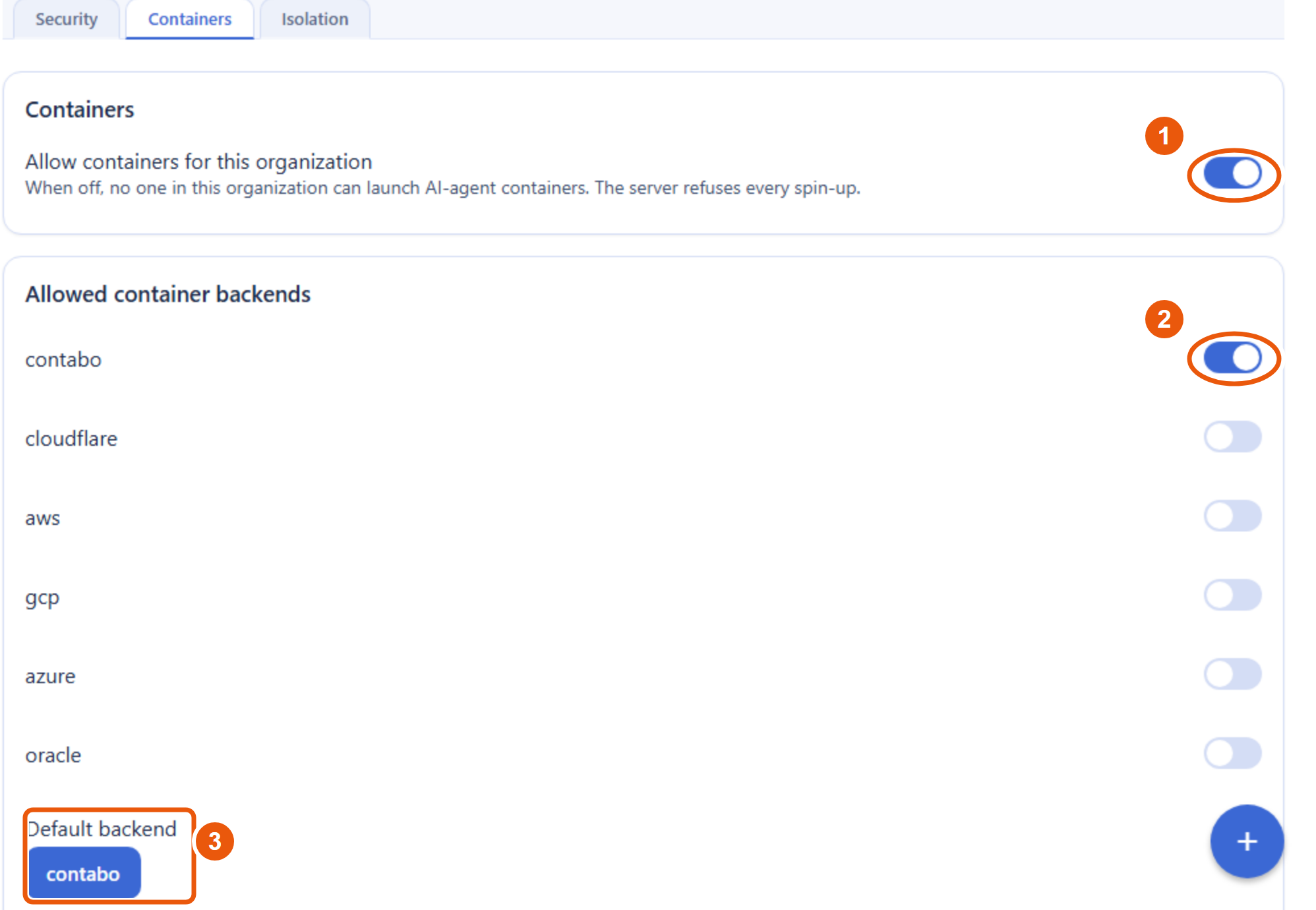
Enforced Server-Side, Not Just Hidden
After this section you will be able to answer, for a security review, whether the policy is a real guardrail. It is. The policy is enforced at the server, on every launch request, regardless of what client made it. A request to launch a size or backend that your policy does not allow is refused by the server, not merely absent from the interface. A developer cannot get around the rule by editing a request, scripting the API, or using a different client, because the decision is made where the container is actually provisioned, not in the browser.
Can a developer bypass the interface and launch a blocked size? No. The allowed backends, sizes, and regions are checked server-side on every launch. A disallowed choice is refused no matter how the request is made, so the guardrail holds whether someone uses the app, a script, or the API.
Per-Project Overrides
After this section you will be able to tune the rules for one project without changing them for everyone. The organization policy is the baseline. A specific project can carry its own override, so a project that needs a larger tier or a particular region can be granted it precisely, while the rest of the organization keeps the stricter default. This lets you say yes narrowly rather than loosening the policy for all. You configure a project's override in Settings, under Policies, then Containers.
Scoping a Contractor or Partner
After this section you will be able to give an outside collaborator containers without exposing the rest of your organization. Because containers launch from projects and access is governed by roles and permissions scoped to a single organization, you confine a contractor by confining their project membership and their role. Add them to the one project they should work in, give them a role that can launch containers there and nothing more, and they get a bounded environment: their own containers in that project, billed and audited under your organization, with no reach into other projects or data. When the engagement ends, removing their membership removes their access, and their activity remains in the audit trail.
Can I let a contractor use containers in just one project? Yes. Scope their membership and role to that project. They can launch containers there under your policy and billing, and they cannot reach anything outside it. Everything they do is attributed to them in the audit log.
The Audit Trail
After this section you will know what is recorded. Container activity is audit-logged with the identity of the person who performed it. Who launched what, when, and the lifecycle and access events around a session, are recorded, so you can review usage and answer a compliance question with a real record rather than a guess. This is the same tamper-evident audit approach used across the platform; see Security and Compliance.
Data Residency
After this section you will be able to keep container workloads in a chosen jurisdiction. Because the region a container runs in is part of the policy you set, you can restrict where containers may be scheduled and keep that workload's data in a region you have chosen. Combined with the platform's residency options, this lets you meet a requirement to process data in a particular jurisdiction. See Data Residency for the wider platform treatment.
Running Containers on Your Own Compute
After this section you will know that you are not locked to managed nodes. Containers run on Backbuild's managed cloud backends by default. An administrator can also enroll a host your organization controls and offer it as a compute backend, so cost-sensitive teams, or teams with negotiated cloud pricing of their own, can run container work on their own infrastructure while keeping the same launch experience, policy, and audit trail. This is the answer to the fear of lock-in: your work is portable, and the compute underneath it does not have to be ours.
Do we have to use your servers, or can we bring our own? You can bring your own. An administrator can enroll a host you control as a backend for containers, so you run on your own infrastructure under the same policy and governance.
Reselling Containers in Your Own Product
After this section you will know how to offer containers to your own customers. If you package a product on Backbuild with the SaaS Builder, you can decide whether your customers may use containers, which ones, and at what price. You set a resale price with your markup, which is floored at the underlying credit cost so a sale never runs at a loss, and the charge flows through the billing path connected to your own payment account. This turns containers into a capability you resell inside your product rather than only a tool your own team uses. See the SaaS Builder guides for packaging, pricing, and payments.
Where to Next
- Roles and Permissions: how organization roles govern who can launch and administer containers.
- Security and Compliance: per-organization isolation, the audit trail, and the platform's wider posture.
- SaaS Builder: packaging and pricing capabilities, including container resale, in a product you launch.
- Agents, Automation, and the API: driving containers programmatically under the same policy.