

AI Assistance, the API, and Agents
This guide teaches how automation and AI work with a deck, and it is honest about the line between what an agent builds and what you finish. After it you will know exactly what an AI agent can do in a deck today, why the words stay yours, how the model and its cost are your choice, and how to drive decks over the public REST API and the native tool surface. It is written for the analyst who cannot ship a hallucinated number and the operator who wants to script deck production.
What an AI Agent Can Build Today
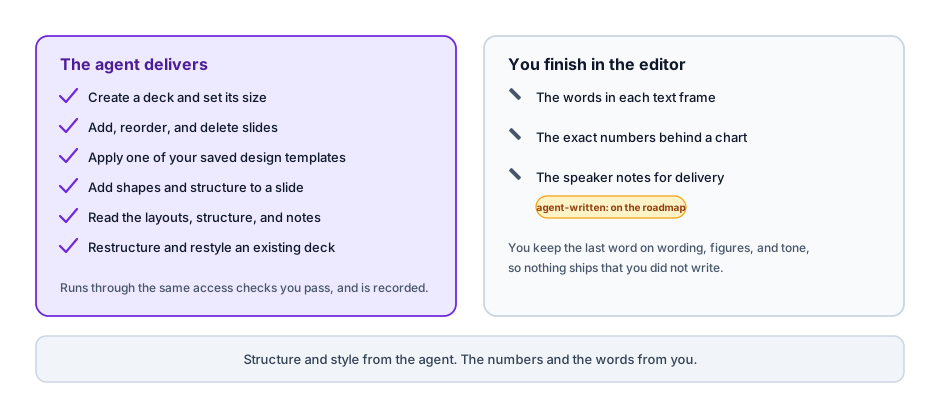
After this section you will know exactly what to expect from an agent on a deck. Backbuild Slides exposes a native tool surface an AI agent drives, whether that is an AI tool you connect or the built-in workspace assistant. Through it an agent can:
- Create a new deck.
- Add, delete, and reorder slides.
- Set the slide size.
- Apply one of your design templates.
- Add shapes to a slide.
- Read every slide's layout and every slide's speaker notes.
So an agent can stand up a structured, styled deck: the right number of slides in the right order, at the right size, on your template, with shapes in place, and it can read back the whole deck to reason about it.
Why the Words Stay Yours
After this section you will understand the deliberate limit, and why it is a feature for anyone who ships facts. Writing finished body text into slide text frames, and writing speaker notes, through the agent surface is on the roadmap, not available today. Applying a design template through the agent brings the template's structure and styling and leaves its text frames for you to fill. A one-step, prompt-to-finished-deck generator is on the same roadmap.
The practical result is the honest position that a chart-heavy, fact-sensitive team actually wants: an agent lays down the structure and the styling, and you own the numbers and the words. A deck that looks finished but is full of fabricated figures is worse than a plain deck with correct ones, so keeping the words under your control is the safe default. Charts render from the values you enter (see Adding Content), so a figure on a slide is a figure you put there, never one a model guessed.
Every Agent Action Is Governed Like a Person's
After this section a security reviewer will treat the agent surface as safe. An agent is not a back door. It authorizes through the same access checks a person passes, its identity is fixed on the server rather than asserted by the caller, and every change it makes is validated and recorded in the audit log just like a human edit. An agent can only reach and change a deck that the identity it acts as is allowed to reach and change, so delegating work to an agent does not widen what is permitted.
Your Model, Your Cost
After this section you will know what AI assistance costs and who bills it. AI runs one of two ways, your choice:
- Your own AI provider keys: bring your own keys and the inference is billed by your provider, not by Backbuild, so the model and the price are entirely yours.
- Universal usage credits: or use Backbuild's usage credits, metered per use, with no separate AI subscription and no per-deck AI gate.
Customer content is not used to train AI models, on either path. See Usage and Credits for how metering works.
Drive Decks Over the API and Tools
After this section you will script deck production, not click through it. The deck surface is available over Backbuild's public REST API and as native tools, so the same actions an agent takes are available to your own automation. An operator can create decks, build out and reorder slides, set the size, apply a template, add shapes, and read a deck's structure and notes programmatically, through the same access checks and audit trail as everything else. This is how a recurring deck gets assembled on a schedule or wired into a pipeline, with the human finishing the words. See the REST API reference and MCP and Agent Integration for the platform surface.
Does the AI invent numbers or citations for my deck? No. An agent builds structure and style, not the facts. It does not write your body text today, and charts render from the values you enter, so the numbers and words on a slide are yours. This is the deliberate design for fact-sensitive decks.
Can an agent build a finished deck from a prompt in one step? Not yet. Today an agent creates and structures a deck, sets its size, applies a template, adds shapes, and reads the deck back, and you finish the words in the editor. A one-step prompt-to-finished-deck generator and agent-written slide text are on the roadmap.
Is the agent a security hole? No. An agent authorizes through the same access checks as a person, acts as a server-pinned identity, and has every action validated and audited. It can only touch a deck that identity is allowed to touch.
Can I drive decks from my own automation? Yes. The deck surface is available over the public REST API and as native tools, so you can create and build decks programmatically under the same access and audit controls.
What does the AI cost, and is my content used for training? Bring your own AI provider keys and your provider bills the inference, or use Backbuild usage credits metered per use. On either path, customer content is not used to train AI models.
Where to Go Next
- Adding Content: Shapes, Charts, Diagrams, and Media: finish the deck an agent structured, with charts from your own numbers.
- Building a Deck: Slides, Themes, and Layouts: save the templates an agent applies.
- MCP and Agent Integration: connect an AI agent to your whole workspace.