

Usage, Storage & Credits
This section teaches you how Backbuild meters usage and how to stay in control of it. After reading it you will know exactly what your plan includes for free, what draws credits, what happens when an allowance or balance runs out, and how to read every number on the Billing & Usage screen. The model is deliberately simple, and it has one headline rule: Backbuild can never send you a surprise bill.
The Model in One Minute
Your subscription buys your plan's features plus a set of monthly free allowances. Beyond those allowances, everything metered draws from a single prepaid pool of universal usage credits. One pool, one currency, organization-wide. There are no separate meters to buy, no add-on SKUs, and no per-feature bills.
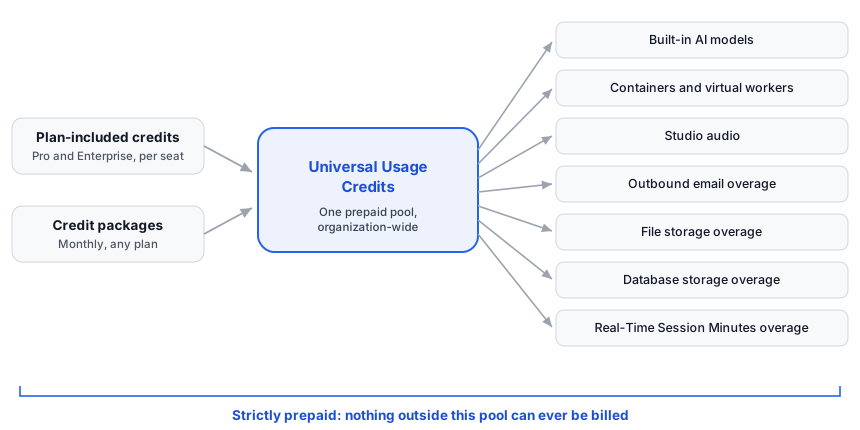
Three rules govern everything in this section:
- Strictly prepaid. A metered action that would cost more than your available credits is refused, cleanly and with a clear message. Backbuild never performs the work and bills you afterward. Your maximum possible monthly spend is your subscription plus the credit packages you explicitly chose to buy. Nothing else exists.
- Allowances first. Every plan, including Free, includes monthly free allowances: Real-Time Session Minutes, file storage, database storage, and outbound email sends. Credits are only touched by usage beyond an allowance. Many small organizations never spend a credit.
- Warnings before blocks. You are warned when you approach a limit, and blocked only when you cross it without credits to cover the difference. Reads, exports, and deletes always keep working. Buying credits lifts a block; you are never locked out of your own data.
What Is Free and What Is Metered
The question behind most usage anxiety is simply "what costs something?" Here is the complete inventory. If an activity is not in the metered column, it does not draw credits, full stop.
| Metered (draws credits beyond any allowance) | Never metered |
|---|---|
| Built-in AI models (chat, assistant, automations using platform AI) | Viewing, reading, and searching your content |
| Containers, remote desktops, and virtual workers | Downloading and exporting your data |
| Studio audio: speech-to-text and text-to-speech | Deleting content (deletes free up allowance) |
| Outbound email beyond your plan's included sends | Everyday editing inside your allowances |
| File storage beyond your plan's allowance | Idle time in any app (only active work meters) |
| Database storage beyond your plan's allowance | AI usage through your own provider keys (bring your own keys) |
| Real-Time Session Minutes beyond the free 10,800 per month | Receiving email |
Free allowance amounts per plan live on the pricing page, which is always the canonical source for current numbers. As one anchor: every plan, including Free, gets 10,800 free Real-Time Session Minutes each month, which is 180 hours of active sync time.
Your First Five Minutes: Check Your Balance
Before anything else, learn where your numbers live. Open your
organization's Billing & Usage screen: it lives at
/billing under your organization in the app, and every usage
banner and limit message links straight to it. It shows your credit
balance, your recent usage broken down by category, and your storage
meters, all on one page.
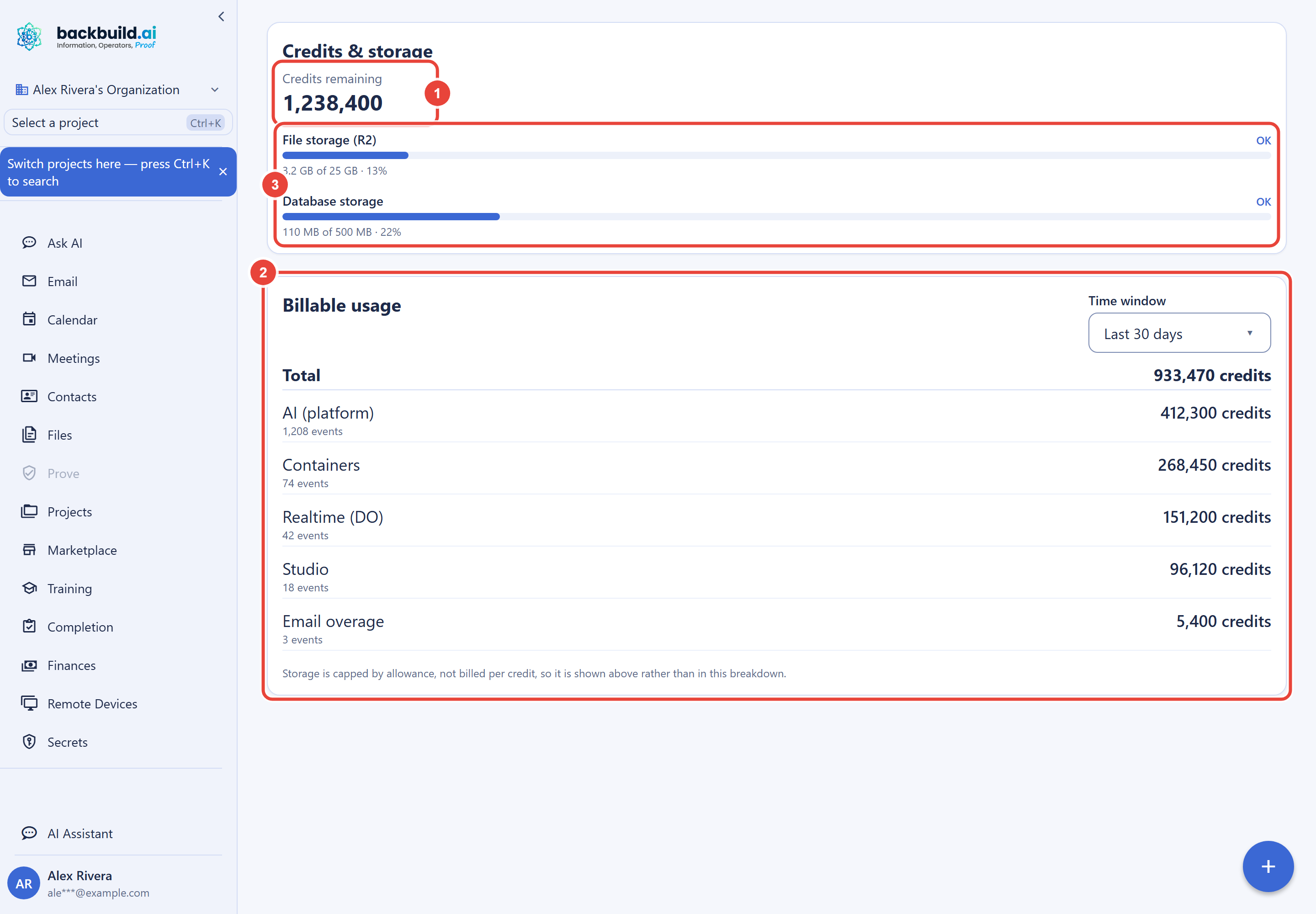
Everything on that screen is explained meter by meter in The Billing & Usage Screen. If a number there ever surprises you, the screen resolves it: every credit movement is recorded with a type, a time, and a category, the breakdown attributes billable usage per category over the window you choose, and storage is measured on its own meters. Nothing deducts silently.
Where to Go Next
Frequently Asked Questions
Can Backbuild ever charge my card for overage automatically?
No. There is no overage billing of any kind. Usage beyond an allowance
draws prepaid credits, and when credits run out, new metered actions are
refused rather than billed. The only charges that can ever reach your
payment method are the subscription and credit packages you explicitly
purchased.
Is the free plan enough to run a small operation?
Often, yes. Free includes the full workspace app suite, 1 GB of file
storage, 25 MB of database storage, 500 outbound emails per month, and
10,800 Real-Time Session Minutes per month. You only need credits when
you use the built-in AI models, run containers or virtual workers, or
grow past those allowances. See the pricing page
for the full plan comparison.
Do I need a credit card to start?
No. Signup is free with no plan selection and no card. Credits are an
optional monthly package you add only if and when you need them, on any
plan including Free.
Does my free account expire?
Only through long inactivity. A free account with no activity for 6
consecutive months receives a deactivation notice; if another 30 days
pass with no activity, the account is deleted and its data is permanently
wiped. Signing in at any point during that time keeps the account active.