

MCP Server
The Model Context Protocol (MCP) server is a single JSON-RPC 2.0 endpoint that exposes the platform’s capabilities as tools an AI agent can discover and call. It is an aggregator: rather than dumping hundreds of tools on your client, it advertises three discovery meta-tools and lets the client fetch and call the rest on demand.
After reading this page you will be able to: connect an agent with a scoped API key, complete the initialize handshake, discover tools without loading a giant menu, call any tool through the aggregator, authenticate a headless agent with no browser, and explain to a security reviewer why the aggregated path and the native path enforce the identical permission gate.
This page is the protocol-level reference. For the conceptual overview of what agents can do and why an agent can never exceed the caller’s access, see MCP & Agent Integration.
Endpoint and Authentication
POST https://api.backbuild.ai/v1/mcpAll MCP traffic is JSON-RPC 2.0 over this one endpoint. Authenticate with either credential:
-
An API key (
bb_live_...) that holdsmcp:*or the specificmcp:scopes the tools you call require. This is the path for a headless agent: no browser, no interactive login. - A signed-in session (including SSO or SCIM provisioned identities), for an agent running inside an authenticated app context.
Either way, the connection is bounded by exactly the access of the identity
behind the credential. OAuth clients can discover the protected-resource
metadata at
/.well-known/oauth-protected-resource/v1/mcp.
Connecting and the Handshake
The endpoint uses MCP Streamable HTTP. Every JSON-RPC 2.0 POST carries your
Bearer credential. For the legacy 2025-11-25 protocol,
initialize returns an MCP-Session-Id response
header. Send that value unchanged with the
notifications/initialized acknowledgement and each later
request. Supported MCP clients perform this lifecycle automatically.
# Initialize: negotiate protocol version, read capabilities, and capture
# the MCP-Session-Id response header.
curl -i -X POST https://api.backbuild.ai/v1/mcp \
  -H "Authorization: Bearer bb_live_abc123_yourSecret" \
  -H "Content-Type: application/json" \
  -H "Accept: application/json, text/event-stream" \
  -d '{
    "jsonrpc": "2.0",
    "id": 1,
    "method": "initialize",
    "params": {
      "protocolVersion": "2025-11-25",
      "capabilities": {},
      "clientInfo": { "name": "my-agent", "version": "1.0.0" }
    }
  }'

# Complete initialization. A successful notification returns HTTP 202 with no body.
curl -i -X POST https://api.backbuild.ai/v1/mcp \
  -H "Authorization: Bearer bb_live_abc123_yourSecret" \
  -H "Content-Type: application/json" \
  -H "Accept: application/json, text/event-stream" \
  -H "MCP-Protocol-Version: 2025-11-25" \
  -H "MCP-Session-Id: <value returned by initialize>" \
  -d '{ "jsonrpc": "2.0", "method": "notifications/initialized" }'

# Send later calls with the same headers and the same MCP-Session-Id.
Beyond initialize, the server supports tools/list,
tools/call, resources/list,
resources/read, and ping.
Supported agents and MCP clients
Backbuild’s launch target includes six native coding agents in a container: Claude Code, Codex, Gemini CLI, Kimi Code, Cursor Agent, and Devin CLI. The same MCP integration surface is also designed to connect to the Cursor editor, Windsurf Editor with Cascade, Devin Desktop, and Devin Local. Cursor Agent and Devin CLI are the terminal agents; the editor and desktop products are separate client surfaces.
| Surface | How it connects | What to expect |
|---|---|---|
| Claude Code, Codex, Gemini CLI, Kimi Code, Cursor Agent, and Devin CLI | Hosted MCP or the local gateway | Choose the agent in a container, then use the account and vault controls for that exact tool. |
| Cursor editor | Cursor’s MCP settings | Use the hosted endpoint or the local gateway according to where the editor runs. |
| Windsurf Editor and Cascade | Windsurf’s MCP settings | The discovery tools keep the visible catalog small, so Cascade can search and call the larger Backbuild tool surface on demand. |
| Devin Desktop and Devin Local | The product’s MCP configuration | These are configured independently from a paired Devin CLI account. |
Kimi Code and Devin CLI can also run under an editor host that supports the Agent Client Protocol (ACP). ACP launches the coding agent; MCP grants access to Backbuild tools. Configure MCP separately because an ACP connection never supplies an MCP credential or permission.
Client setup examples
The examples below connect directly over Streamable HTTP. Keep the API key in an environment variable or your client’s secure credential store rather than committing it to a project configuration file.
Claude Code
claude mcp add --transport http backbuild https://api.backbuild.ai/v1/mcp \
  --header "Authorization: Bearer $BACKBUILD_MCP_TOKEN"
Codex
Add this to ~/.codex/config.toml:
[mcp_servers.backbuild]
url = "https://api.backbuild.ai/v1/mcp"
bearer_token_env_var = "BACKBUILD_MCP_TOKEN"
Restart the client after changing its MCP configuration. The server’s
initialize response includes the recommended
find_tools → get_tool_schema →
call_tool workflow as server instructions.
Tool Discovery: The Aggregator
tools/list does not return every tool. It advertises three
discovery meta-tools, giving your client a tiny, stable menu to work from:
| Meta-tool | Purpose |
|---|---|
find_tools | Search the registry for tools that match a description of what you want to do. |
get_tool_schema | Fetch the full input schema for a named tool before you call it. |
call_tool | Execute any registry tool by name, passing its own arguments nested inside. |
Your client searches for what it needs, reads that tool’s schema, then calls it. This keeps the advertised tool list tiny no matter how many tools exist behind it.
For Backbuild Science proof chains, proofs.renameNode performs
an identity-preserving rename. It updates incoming citations and exact formal
references in the affected proof documents instead of leaving callers to
repair those dependencies one at a time. The operation requires proof and
document write access, and it will not modify a locked node. A synchronous
call is limited to 25 affected documents and 32 MiB of proof source; larger
requests return RENAME_CORPUS_TOO_LARGE before publishing any
change.
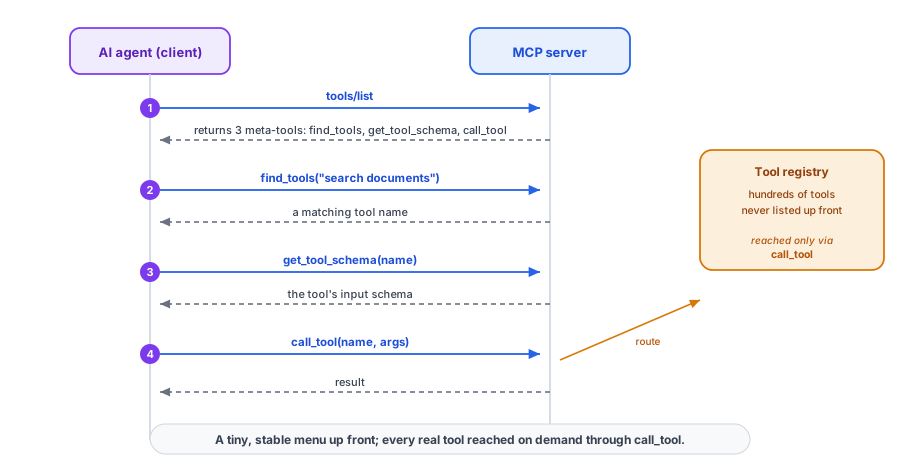
call_tool.Discover, Then Call: A Worked Example
First list the meta-tools, then find a tool, then call it. The
call_tool meta-tool takes the target tool’s
name and its own arguments object nested inside.
# 1. List tools (returns the 3 discovery meta-tools)
curl -X POST https://api.backbuild.ai/v1/mcp \
  -H "Authorization: Bearer bb_live_abc123_yourSecret" \
  -H "Content-Type: application/json" \
  -d '{ "jsonrpc": "2.0", "id": 2, "method": "tools/list" }'

# 2. Find a tool for the job
curl -X POST https://api.backbuild.ai/v1/mcp \
  -H "Authorization: Bearer bb_live_abc123_yourSecret" \
  -H "Content-Type: application/json" \
  -d '{
    "jsonrpc": "2.0", "id": 3, "method": "tools/call",
    "params": { "name": "find_tools", "arguments": { "query": "search documents" } }
  }'

# 3. Call the discovered tool through the aggregator
curl -X POST https://api.backbuild.ai/v1/mcp \
  -H "Authorization: Bearer bb_live_abc123_yourSecret" \
  -H "Content-Type: application/json" \
  -d '{
    "jsonrpc": "2.0", "id": 4, "method": "tools/call",
    "params": {
      "name": "call_tool",
      "arguments": {
        "name": "search_documents",
        "arguments": { "query": "overdue invoices" }
      }
    }
  }'
You may also invoke a tool with the native tools/call method
directly by its name, if your client already knows it. Both routes are
equivalent in what they enforce, which is the point of the next section.
Scopes Gate Every Call, On Both Paths
Not every tool is available to every key. The server evaluates the
caller’s scopes, role, membership, and feature entitlements before it
runs a tool, and it applies the same check whether you reached the
tool through the call_tool aggregator or the native
tools/call method. There is no bypass path: the facade can never
do something the native method would deny, and vice versa.
A key is authorized for a tool when its scopes contain the tool’s
fine-grained scope (for example mcp:secrets.read), the matching
coarse grant, or mcp:*. A call that the key is not scoped for is
rejected as a JSON-RPC error, and the message names the scope the tool
requires so your agent can request a stepped-up key rather than guess. For
example, a key that holds only mcp:secrets.read calling a write
tool receives:
{
  "jsonrpc": "2.0",
  "id": 4,
  "error": {
    "code": -32603,
    "message": "API key does not have the 'mcp:secrets.write' scope required for tool 'secrets.requestGenerate'"
  }
}
To keep an agent least-privilege, scope its key to only the tools it needs and give it a short expiry. See API Keys for the scope allowlist and rotation.
Resources
In addition to tools, the server exposes readable resources. Use
resources/list to enumerate what the caller may read and
resources/read to fetch a resource by its identifier. Resources
are gated by the same access checks as tools.
Headless and CLI Agents
A server or CI agent authenticates with an API key alone: attach it as the Bearer credential and start calling. No browser, no redirect.
A command-line coding agent that a person operates can instead obtain a key through the browser-approved device authorization flow, so no long-lived secret is pasted into the tool. That flow is documented under Device Authorization, and the resulting key is used exactly as above.
Frequently Asked Questions
How is discovering a tool different from calling one?
tools/list returns only the three discovery meta-tools. You
call find_tools to locate a tool, get_tool_schema
to read its inputs, and call_tool to run it. The real tools
are reached through call_tool, never listed up front.
Do I need a session id, and are responses streamed?
No. This endpoint is stateless: there is no session id to capture or echo,
and each JSON-RPC POST returns a single JSON response. Just send your
Bearer credential on every request. If a generic MCP client expects a
session-id handshake, it is safe to skip it here.
How do I authenticate an agent with no browser?
Use an API key with the needed mcp: scopes as the Bearer
credential. The key path requires no interactive login.
Does the aggregator let a tool bypass permissions?
No. call_tool and the native tools/call run the
identical scope, role, membership, and entitlement check. Neither path can
do what the other would deny.
What does an under-scoped call return?
A JSON-RPC error whose message names the scope the tool requires, so your
agent can request a key with that scope rather than retry blindly.
Can an agent reach data I cannot?
No. The connection is bounded by exactly the access of the identity behind
the key, scoped to one organization. There is no elevated agent context.