

Sandbox Execution
A sandbox is a real, disposable computer you provision on demand. It gives an AI agent, a test run, or a developer a shell, a Python kernel, a Node.js runtime, a headless browser, and a browser-based IDE in one isolated workspace, then tears down cleanly when the work is done. Untrusted, model-generated code runs here safely: the sandbox has no access to your production data or secrets, and its outbound network is denied by default.
Sandboxes run on usage credits and are available on every plan, including Free. Larger instance sizes draw more credits. See pricing and the usage credits guide.
What Is Inside a Sandbox
After this section you will know what you get in a single sandbox and why you do not need to stitch separate services together. Most agent workflows otherwise juggle one service for compute, another for a browser, and another for an editor. A Backbuild sandbox bundles all of them in one workspace, so the same session that runs your code can also drive a browser and open an IDE.
| Runtime | What it is for |
|---|---|
| Shell | An interactive shell for running commands, driven through the terminal API. |
| Python | A Python kernel for executing Python code and notebooks. |
| Node.js | A JavaScript runtime for executing Node code. |
| IDE | A browser-based code editor, reached through the sandbox proxy. |
| Browser + display | A headless browser and a virtual display, viewable through the proxy, for automated browsing and rendering. |
These runtimes coexist in the same workspace. There is no per-language base image to choose at provision time: you provision one sandbox and use whichever runtimes the task needs.
Your First Sandbox
After this section you will be able to provision a sandbox, run code in it, and tear it down. The lifecycle is a small set of session-scoped operations. Each sandbox is bound to a session you name, so every call refers to the same workspace by its session id.
- Provision a sandbox for a session, choosing a size and, optionally, a git repository to clone.
- Run commands and code through the terminal, Python, and Node.js runtimes, or open the IDE, browser, and display through the proxy.
- Collect the artifacts the work produced.
- Tear down the sandbox, which saves the workspace and releases the compute.
# Provision a sandbox for a session
curl -X POST https://api.backbuild.ai/v1/sandbox \
  -H "Authorization: Bearer $TOKEN" \
  -H "Content-Type: application/json" \
  -d '{
    "sessionId": "019d...",
    "size": "standard-1"
  }'
# Run a command in the sandbox shell
curl -X POST https://api.backbuild.ai/v1/sandbox/terminal/019d... \
-H "Authorization: Bearer $TOKEN" \
-H "Content-Type: application/json" \
-d '{
"action": "exec",
"command": "python --version"
}'
Provisioning a sandbox needs the project.update permission, the
same permission that lets you change a project. See
Roles & Permissions.
Sandbox Sizes
After this section you will be able to pick the right instance size
for a workload. Five named sizes are offered. If you omit the size,
you get standard-1. Larger sizes have more CPU, memory, and
disk, and draw more usage credits while they run.
| Size | CPU | Memory | Disk |
|---|---|---|---|
| basic | 1/4 vCPU | 1 GiB | 4 GB |
| standard-1 (default) | 1/2 vCPU | 4 GiB | 8 GB |
| standard-2 | 1 vCPU | 6 GiB | 12 GB |
| standard-3 | 2 vCPU | 8 GiB | 16 GB |
| standard-4 | 4 vCPU | 12 GiB | 20 GB |
Older size names are still accepted and mapped to the closest current size,
so existing callers keep working: small maps to standard-2,
standard to standard-3, and large to standard-4.
Prefer the named sizes above for new work.
Session Persistence: Teardown and Resume
After this section you will understand exactly what survives a teardown and how to pick up where you left off. A sandbox is tied to its session, and the session record is kept after teardown so it can be resumed. This is what lets an agent stop consuming compute between bursts of work without losing state.
- Teardown flushes the workspace to your organization's storage, pushes any paired git changes, and stops the container, releasing its compute.
- Resume restarts the sandbox for the same session and reconstitutes the workspace from where teardown left it.
- A fresh start is a new session id. Provision with a new session id whenever you want a clean workspace.
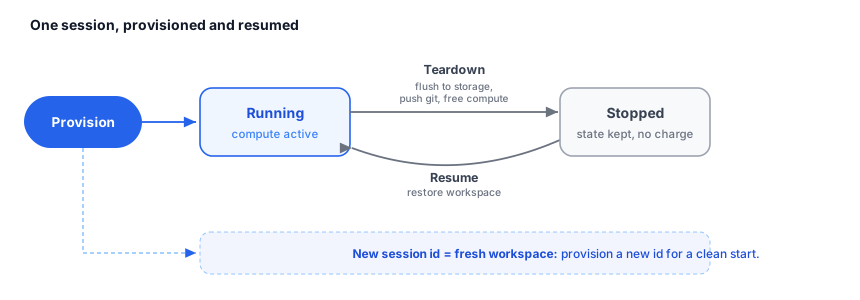
What survives a teardown? The workspace files are flushed to your organization's storage and any paired git changes are pushed. Resuming the same session restores that workspace. The running compute is released, so you stop paying for it while torn down.
How do I start completely fresh? Provision a new session id. Each session id is its own workspace.
Cloning a Git Repository
After this section you will be able to start a sandbox with your code already checked out. Pass a repository and, optionally, a branch when you provision, and the sandbox clones it into the workspace before you start.
curl -X POST https://api.backbuild.ai/v1/sandbox \
  -H "Authorization: Bearer $TOKEN" \
  -H "Content-Type: application/json" \
  -d '{
    "sessionId": "019d...",
    "size": "standard-2",
    "gitRepo": "owner/repo",
    "gitBranch": "main"
  }'
The clone uses your own connected GitHub credentials, scoped to your
account, so a sandbox only ever reaches repositories you can already access.
If you ask for a repository but have not connected GitHub, provisioning fails
rather than proceeding without credentials. Repository and branch names are
validated to a strict character set, so only well-formed values are accepted.
Agents that do not need a repository simply omit gitRepo.
Artifacts
After this section you will be able to retrieve the files a run produced. The work a sandbox does, generated files, build outputs, reports, is available as artifacts you can list and download for the session.
| Method & path | Description |
|---|---|
GET /v1/sandbox/artifacts/:sessionId | List the artifacts produced in the session. |
GET /v1/sandbox/artifacts/:sessionId/:name | Download a single named artifact. |
Artifact downloads are served defensively: they are delivered as attachments with a safe content type so that a downloaded file is saved, not executed or rendered in place.
Reaching the IDE, Notebook, and Display
The browser-based IDE, the Python notebook, and the virtual display are
reached through a transparent proxy scoped to the session, so you can open
them in a browser or embed them in your own product. The proxy path is
ALL /v1/sandbox/proxy/:sessionId/*, with convenience routes for
the editor, the notebook, and the display surface.
Safety and Isolation
After this section you will be able to answer, for a security review, whether it is safe to run untrusted code here. Every time an agent executes model-generated code, it runs software you did not write, so the sandbox is built to contain it by default rather than to trust it. The controls below are the user-facing security posture of a sandbox.
- Per-session and per-organization isolation: a sandbox belongs to one session in one organization. It cannot reach another sandbox, and a request that reaches across the organization boundary is treated as not found.
- Deny-by-default egress: outbound network access is restricted to a fixed allowlist of package and source registries (such as GitHub, npm, PyPI, container registries, and operating-system package mirrors). Everything else is denied, so a sandbox cannot call arbitrary or attacker-chosen hosts.
- Egress quota: the volume of outbound traffic is metered and capped, which bounds how much data could ever leave a sandbox.
- Output secret scrubbing: command and code output is scrubbed for secret material before it is returned, so credentials that appear in output are not surfaced back verbatim.
- Resource limits: CPU, memory, and disk are capped by the selected instance size.
- No production data or secrets: a sandbox has no access to your production data stores or platform secrets.
- Safe artifact delivery: downloads are forced to save as attachments with a safe content type rather than render in place.
- Audit logging: sandbox operations are recorded with the identity of the user who performed them.
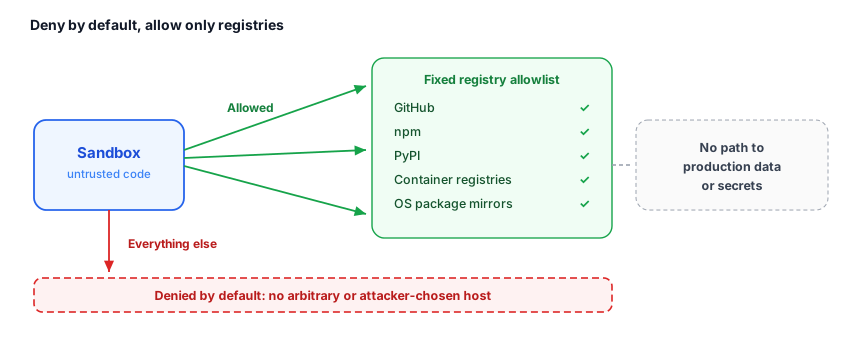
Is it safe to run untrusted, model-generated code? Yes. Each session is isolated, outbound network is denied by default except for a fixed registry allowlist, egress is quota-capped, output is scrubbed for secrets, and there is no access to your production data or secrets.
Can a sandbox reach my internal services or another tenant? No. Egress is allowlisted to package registries only, and cross-organization access is treated as not found.
Access and Credits
Provisioning, resuming, tearing down, and driving a sandbox require the
project.update permission. Sandboxes run on usage credits and
are available on every plan, including Free; larger instance sizes draw more
credits while they run. The usage credits
guide explains how credits are metered and the pricing
page lists each plan's included usage.
Use Cases
AI agent code execution
When an agent needs to write and run code, it provisions a sandbox for its session, runs the generated code through the shell and runtimes, validates the output, and tears the sandbox down. The untrusted code runs inside the isolation boundary the whole time, so a bad prompt cannot reach production resources or the open internet.
Automated testing
Run a test suite in a clean, isolated workspace. Each run can start from a fresh session, which eliminates state left over from a previous run, and clone the repository under test on provision.
Sandboxed development
Give a person an interactive environment, IDE, shell, and runtimes, to experiment with code or configuration without touching a production workspace, then flush it to storage and resume it later.
API Reference
| Method & path | Description |
|---|---|
POST /v1/sandbox | Provision a sandbox for a session (size, optional git clone). |
GET /v1/sandbox/status/:sessionId | Query the live state of a session's sandbox. |
POST /v1/sandbox/terminal/:sessionId | Drive the shell: create, write, read, and exec. |
POST /v1/sandbox/resume/:sessionId | Resume a torn-down sandbox, restoring its workspace. |
POST /v1/sandbox/teardown/:sessionId | Flush the workspace, push git, and stop the sandbox. |
GET /v1/sandbox/artifacts/:sessionId | List artifacts; add /:name to download one. |
ALL /v1/sandbox/proxy/:sessionId/* | Transparent proxy into the IDE, notebook, browser, and display. |
See the Tools & Sandbox API for complete request and response documentation.