

Reports and Sales Tax
Daily bookkeeping only pays off when it turns into a picture you can act on: what you earned, what you own and owe, who is late, and whether cash will be there next month. This guide teaches the reports Backbuild Finances produces, all drawn straight from the ledger so every number traces to a real transaction, and how sales-tax tracking works, plainly, including what it does not do. After this page you will be able to read the core statements, watch cash and aging, budget against actuals, and track the sales tax you owe.
Financial statements, aging, cash flow, and budgets are part of the back office, free for teams up to 50 seats. Sales-tax tracking is part of the paid tiers. Current figures are on the pricing page.
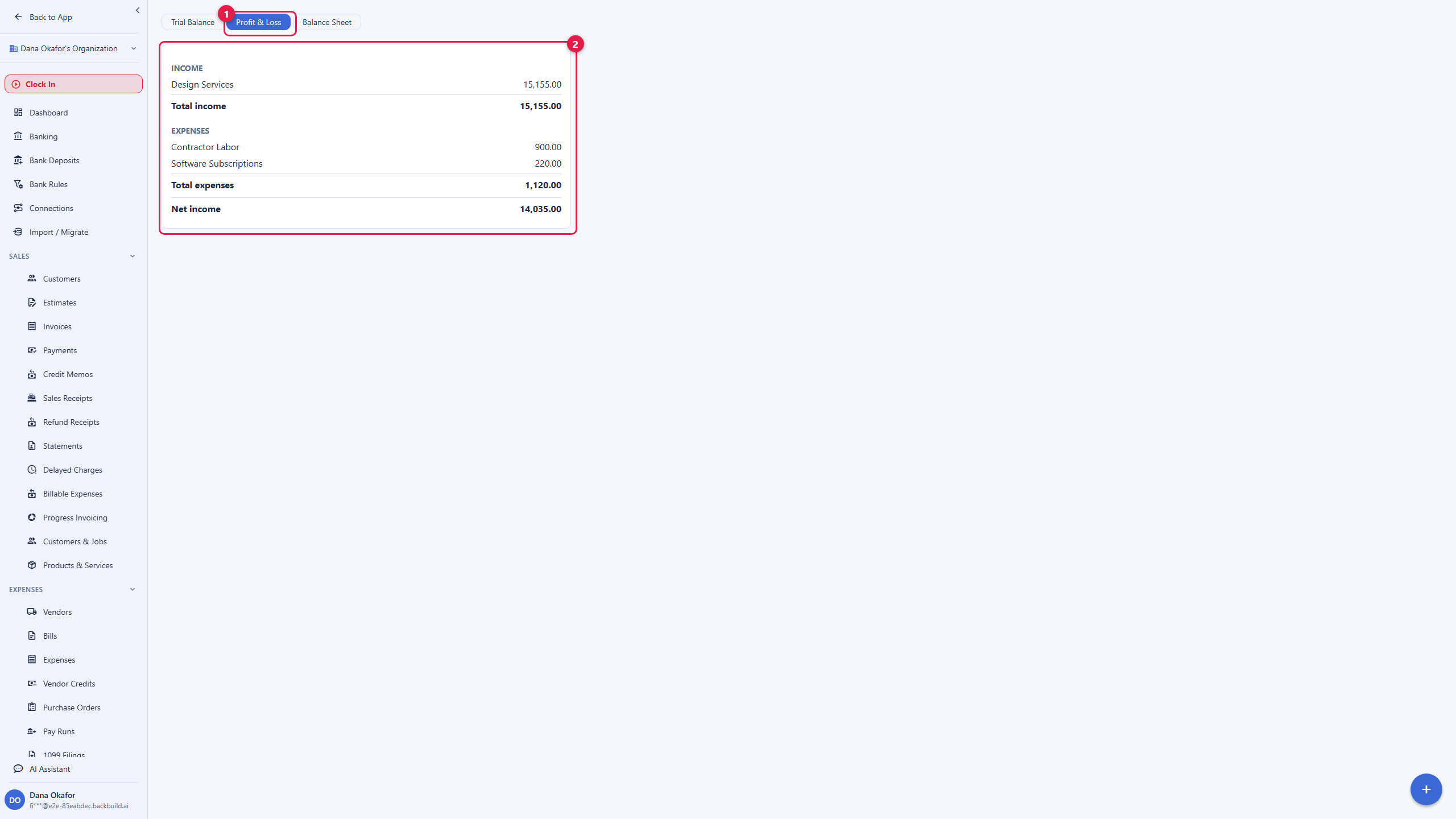
The Core Statements
After this section you will read your business at a glance. Open Reports from the Finances sidebar. The three statements every business and every accountant expect are here, each for any period you choose.
- Profit and Loss: your income and expenses over a period, ending in net profit. This is the "am I making money" report.
- Balance Sheet: your assets, liabilities, and equity as of a date. This is the "what do I own and owe" report.
- Trial Balance: every account's debit and credit totals, which proves the ledger balances. This is the accountant's starting point.
Because the statements are computed from the ledger rather than typed in, they trace to source: a number on the profit-and-loss goes back to the transactions that make it up, so you can trust the total and defend it in an audit. Until you have posted activity, the reports show honest empty states rather than fabricated figures.
Aging and Cash Flow
After this section you will manage cash, not just record it. Profit is not cash, and the reports that keep a small business alive are the ones about timing.
- Accounts-receivable aging: who owes you and how overdue, in current, 1 to 30, 31 to 60, 61 to 90, and 90-plus buckets.
- Accounts-payable aging: what you owe vendors and when it is due, so you plan payments.
- Cash-flow projection: a forward look at cash based on what is coming in and going out, so you see a squeeze before it arrives.
- Customer and vendor statements: a per-party summary you can send.
Budgets Versus Actual
After this section you will hold spending to a plan. Create a budget, add lines for the accounts you want to hold, and run the budget-versus-actual report to see where you are over or under against the plan for the period. It turns a static budget into a live check on the business rather than a spreadsheet no one reopens.
Save, Schedule, and Reuse Reports
After this section your month-end pack will assemble itself. Any report you run with a set of period and filter choices can be saved so you rerun it in one click, and reports can be scheduled so the pack you look at every month is prepared for you on a cadence. That removes the repetitive part of reporting and makes sure the same views are compared period over period. Additional ledger tools, including recurring transactions, fixed-asset depreciation, and loan amortization, also feed these reports so the full picture stays current.
Sales-Tax Tracking
After this section you will know the tax you owe. Sales-tax tracking is part of the paid tiers. Open Accounting, then Sales Tax.
- Set up the tax rates you charge.
- Apply tax on invoice lines so it is collected and recorded as you bill.
- Run the tax-liability report to see what you have collected and owe for a period.
Be clear about the boundary: this tracks the tax you charge and owe. It does not automatically determine the correct rate by the customer's address, and it does not file or remit sales tax to the tax authorities for you. Automatic rate determination and automated filing are separate capabilities, not part of Backbuild Finances today. For now, sales tax is tracked, not filed for you, and the liability report is what you or your accountant use to file. Your organization's tax identifier itself is held in the encrypted vault and revealed only by explicit action.
Do I get a real P&L, balance sheet, and cash-flow view? Yes. All three core statements plus aging and a cash-flow projection, each drawn from the ledger for any period, with figures that trace back to source transactions.
Can I trust the numbers for decisions? Yes. Reports are computed from the ledger, not entered by hand, and the trial balance proves the books balance. Empty states are shown honestly until there is real activity.
Does it handle cash versus accrual? Reports honor the accounting method set on your book. See The Accounting Ledger.
Does it file my sales tax? No. It tracks the tax you charge and owe and produces a liability report; it does not determine rates by address or file and remit for you. Use the liability report to file.
Can I schedule my month-end reports? Yes. Save a report with its period and filters and schedule it to be prepared on a cadence.
Where to Next
- The Accounting Ledger: where every reported figure comes from.
- Invoicing and Getting Paid: the receivables the aging report tracks.
- Banking and Reconciliation: reconcile before you rely on a statement.
- Access, Security and the API: export reports and pull them over the API.