

The Billing & Usage Screen
Everything Backbuild meters is visible in one place. After this page you will be able to read every meter on the Billing & Usage screen, trace any credit movement to its cause, run a five-minute weekly check that makes usage surprises impossible, and, if you publish a product on Backbuild, pull the per-customer numbers you need to bill your own users.
Where It Lives and Who Can See It
Billing & Usage lives at /billing
under your organization in the app, and every usage banner, paywall
dialog, and limit message links straight to it.
Access is permission-gated: members need billing view permission,
granted through your organization's
roles and permissions. Money
movements and plan changes additionally follow your organization's admin
roles, so a member who can see the meters cannot necessarily buy or
cancel anything.
The Tour, Card by Card
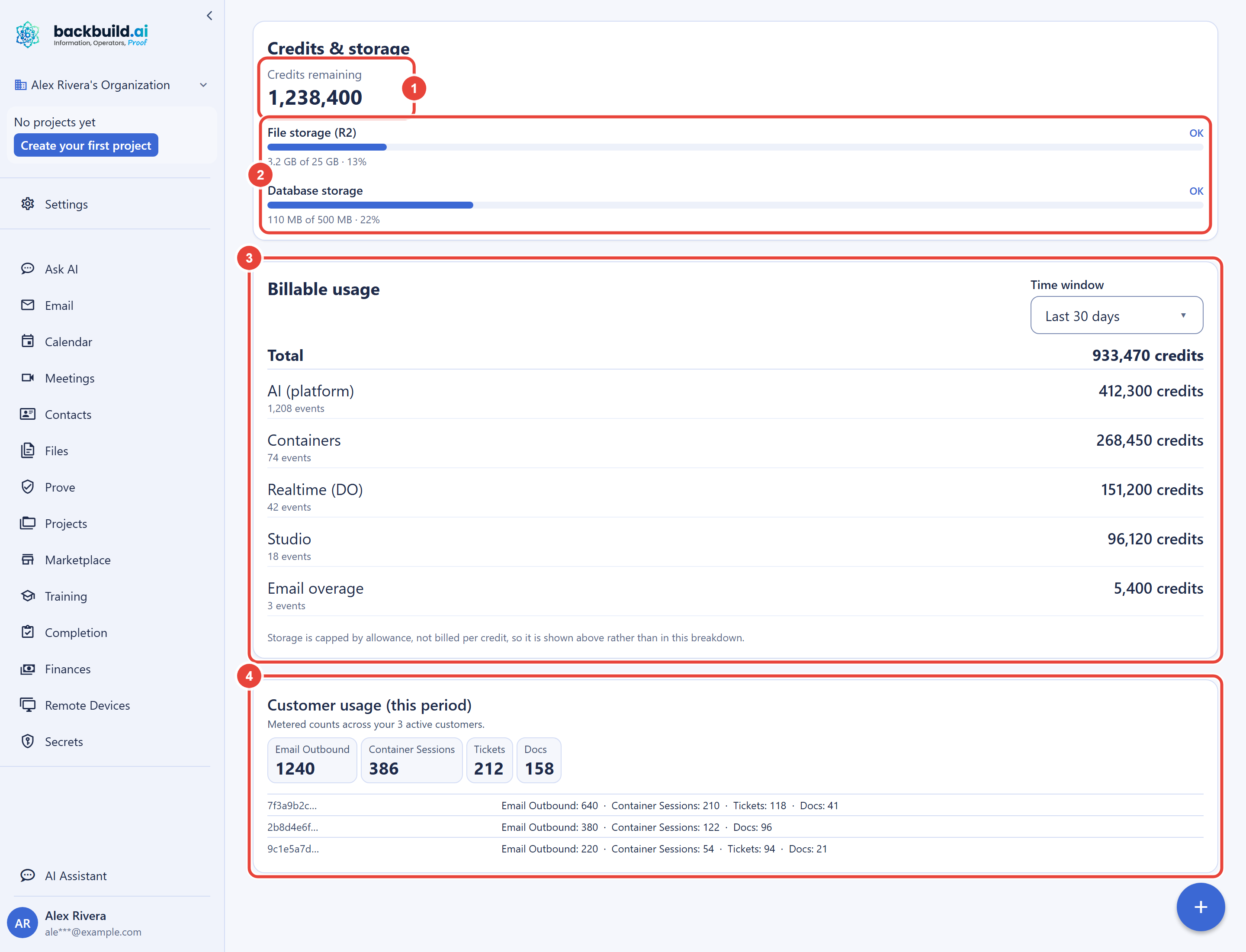
Credit balance
Your organization's current spendable balance, at the top of the Credits & storage card. When the balance runs low the card says so visibly, matching the yellow banner state described in Warnings, Caps, and Running Out, and it flags plainly when credits are exhausted. This is the number every other meter ultimately draws against.
Storage meters
File storage and database storage, each shown as used-versus-allowance with its current status on the same card as the balance. The classification rules for what lands in which pool are in the storage guide. Watch for the "nearing" state at 85%: it is your early, actionable signal.
Usage breakdown
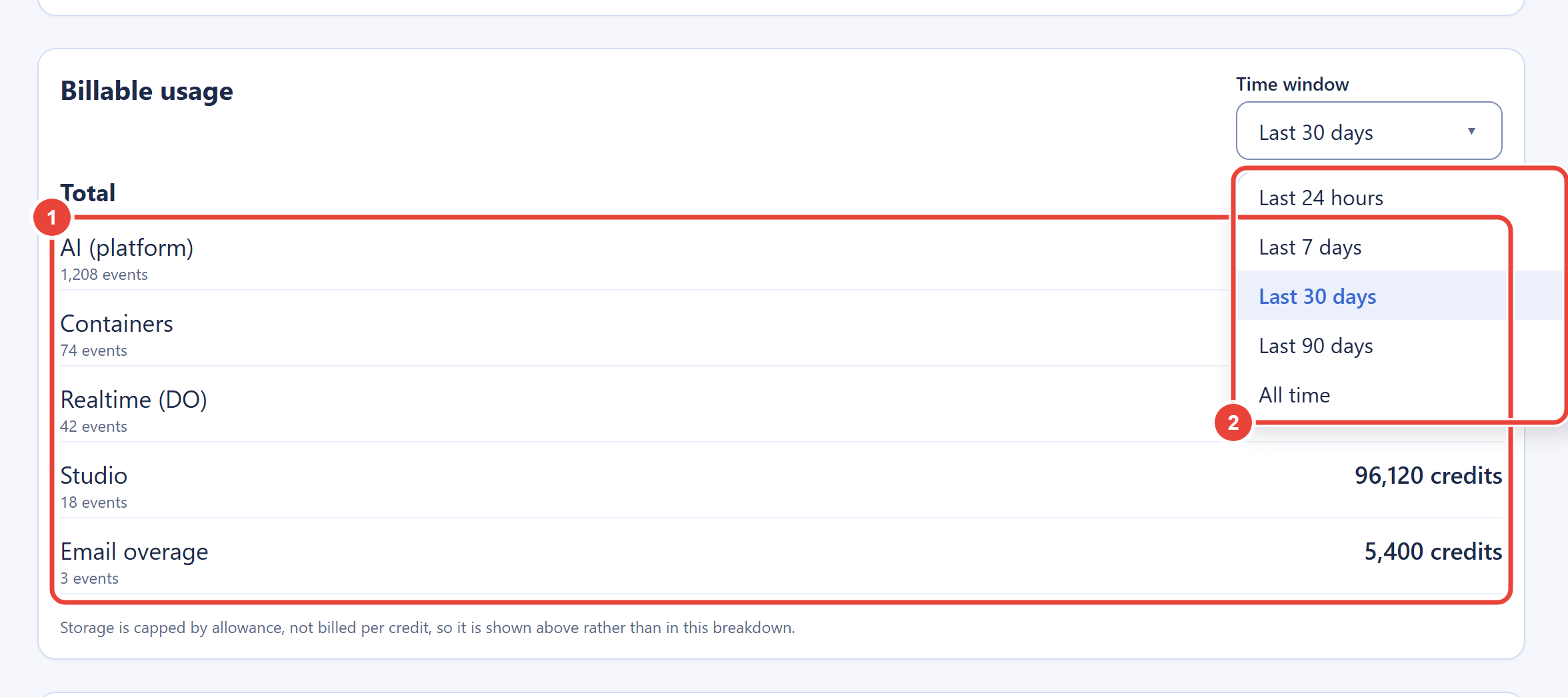
Billable consumption by category: AI usage on platform models, containers, Studio, email overage, real-time sessions, and related classes, over a time window you choose, from the last 24 hours out to all time. Storage does not appear here, because it is not billed per action: storage beyond your plan's included allowance is metered per GB-hour and settles once a month, so it shows up as a single Storage overage line in Credit history rather than as a row here; its meters live above. This is the panel to consult before resizing a credit package: it turns sizing into arithmetic on your own numbers rather than a guess.
Credit history
Beneath the usage breakdown, the Credit history card lists your individual credit movements in the order they happened, newest first, with a running balance. Where the breakdown answers "what did I spend on," the history answers "what exactly happened, when, and what was my balance afterward." Each line shows the date, a plain-language description of the movement, the signed credit change (additive amounts such as monthly plan credits and credit pack purchases in green with a plus sign, deductions with a minus sign), and the balance immediately after that movement. Every movement type appears here: trial credit, monthly plan credits, credit pack purchases, refunds, per-class usage such as AI usage, containers, Studio, and real-time session minutes, storage overage settlements, and rollover expiry. An activity-type filter narrows the list to a single kind, and a "Load more" control pages further back through your history. This is the record that makes the prepaid model auditable: if the balance changed, the reason is a line here you can read.
Real-time sessions
Real-time session overage appears as the Real-Time Session Minutes category of the usage breakdown, so session spending is always attributable here. When the free allowance itself runs out, the app surfaces the paywall dialog described in Real-Time Session Minutes, which reports month-to-date minutes against the free 10,800.
Buying credits and managing your plan
Credit packages, your plan, seats, and billing interval are managed one step away, under Personal Organizations in your user settings; the walkthrough is in Universal Usage Credits. A purchase raises your balance immediately, and any blocked usage class clears at its next automatic re-evaluation; the package table with current prices is on the pricing page. Remember the boundary: charges exist only for things you explicitly subscribed to or bought. Usage overage never generates one.
Nothing Deducts Silently
Every credit movement in Backbuild is a line item you can see, with a type, a timestamp, and a running balance: grants from your plan, package purchases, per-action usage, monthly deferred settlements, and rollover expiry. The Credit history card lists those movements one by one, newest first, so you can reconcile exactly where your credits went; the usage breakdown adds the aggregate spending view by category over the window you choose, and the balance card reflects every grant, purchase, settlement, and expiry as it lands. This is the answer to the classic credit-system fear of balances that "just drop": in Backbuild, if the balance changed, there is a visible line explaining why.
Two legitimate patterns surprise people at first, and both are recorded rather than silent. Storage cost accrues on held bytes around the clock, metered per GB-hour, so a month's storage overage grows even overnight while nobody is working; it posts as the monthly settlement, not as per-action deductions. And that monthly settlement deducts a previous month's session or storage overage at the start of the next month (see how overage settles), so a fresh month's allotment arrives pre-reduced by exactly the overage the prior month accrued.
Banners Across the App
You do not have to live on the billing screen to stay informed. A yellow banner appears on your organization's screens when credits run low or a storage pool is nearing its allowance; it is dismissible for the day, per severity. If new work is actually being refused, the banner is red and stays until the condition clears. Banner state and enforcement state come from the same source, so what a banner tells you always matches what the platform is doing. Blocked-write errors across the app carry the same message and a buy-credits action, so the fix is one click away from wherever you hit it.
A Five-Minute Weekly Routine for Admins
- Open Billing & Usage. Check the balance card: comfortably above your typical weekly burn?
- Scan the two storage meters. Anything past 85% gets a decision now (clean up, add credits, or upsize) instead of during a block.
- Check the Real-Time Session Minutes row of the usage breakdown over a longer window. Recurring session overage there means the free 10,800 minutes are no longer covering your real-time workloads.
- Open the usage breakdown on the 7-day window. Any category spending out of pattern? The event counts tell you whether it was many small actions or a few big ones.
- If you ran storage or session overage this month, remember it settles against next month's allotment; confirm the allotment still covers your plans, and if not, resize the package this week, not after the settlement.
An organization that runs this routine will encounter the warning ladder's yellow state occasionally and its red state essentially never.
For Publishers: The Usage Report
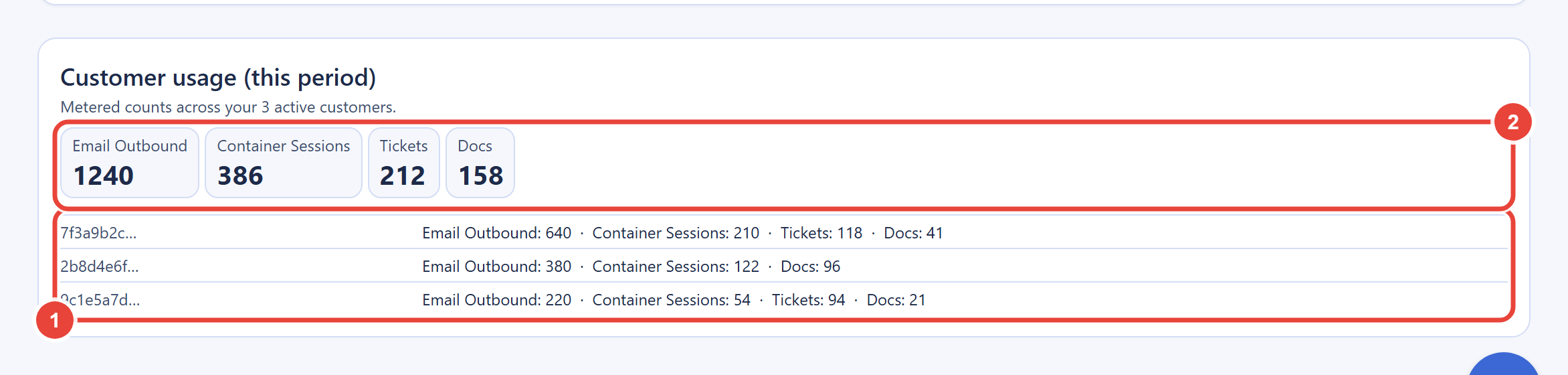
If you build and sell a product on Backbuild through the SaaS Builder, your consenting customers' usage attributes to your organization's pool, and the publisher usage report on this screen breaks it down per customer and in aggregate across the metered count dimensions you defined, such as outbound emails, container sessions, tickets, and documents. It exists so you can bill your own end users accurately from real numbers. Customer organizations cannot see your report, and attribution applies only to customers who have consented to publisher-paid usage. You meter and cap your end users on resource counts through your package definitions; Backbuild itself never bills you on counts, only on bytes and credits.
Frequently Asked Questions
Why did my credits drop overnight when nobody was working?
Storage meters continuously on held bytes, and the monthly settlement
deducts the prior month's deferred overage when a new month opens. Both
are recorded as clearly labeled entries; neither is silent or
unattributable.
How do I see which category is spending?
The usage breakdown panel, with its window selector, is exactly that
view: every billable category as its own row, with its event count and
credits used, over the window you choose.
Who in my organization can see billing?
Only members granted billing view permission through your roles. Seeing
the meters and changing the money are separate capabilities.
Do I get records of my charges for tax and bookkeeping?
Yes. Every real charge, subscriptions and credit packages, is processed
through checkout with a receipt, and only those explicit purchases can
ever charge your payment method. Usage overage is not a charge, so it
produces no invoice at all.
Can my SaaS customers see my publisher usage report?
No. The report is visible to your organization's owners and admins
only. Your customers see their own organization's meters, including the
shared pool's block state where it affects them.