

API Keys
API keys are long-lived, scoped credentials for callers that run without a browser: a backend service, a CI job, or an autonomous AI agent. A key carries exactly the scopes you grant it, is bound to one organization, and can be rotated or revoked at any time.
After reading this page you will be able to: create a key scoped to only what a caller needs, read and reason about the scope allowlist, set the mandatory expiry, rotate a key with no downtime, revoke a key immediately, and explain to a security reviewer why a key can never exceed its grant or reach another organization.
API keys are available on every plan, including Free. Use them anywhere you would otherwise paste a user access token into a machine.
Key Format
bb_live_{prefix}_{secret}
A key has three parts: the bb_live_ label, a short public prefix
that identifies the key in listings and audit logs, and a long secret. Only
the secret grants access. Present the whole value in the standard header:
Authorization: Bearer bb_live_abc123_yourLongSecretThe Secret Is Shown Once
The full key value is returned only in the response to the create call. It is never shown again and cannot be recovered: the platform stores only what it needs to verify the key, not the secret itself. Copy the value into your secret manager the moment you create it. If you lose it, revoke the key and create a new one; there is no way to reveal it after the fact.
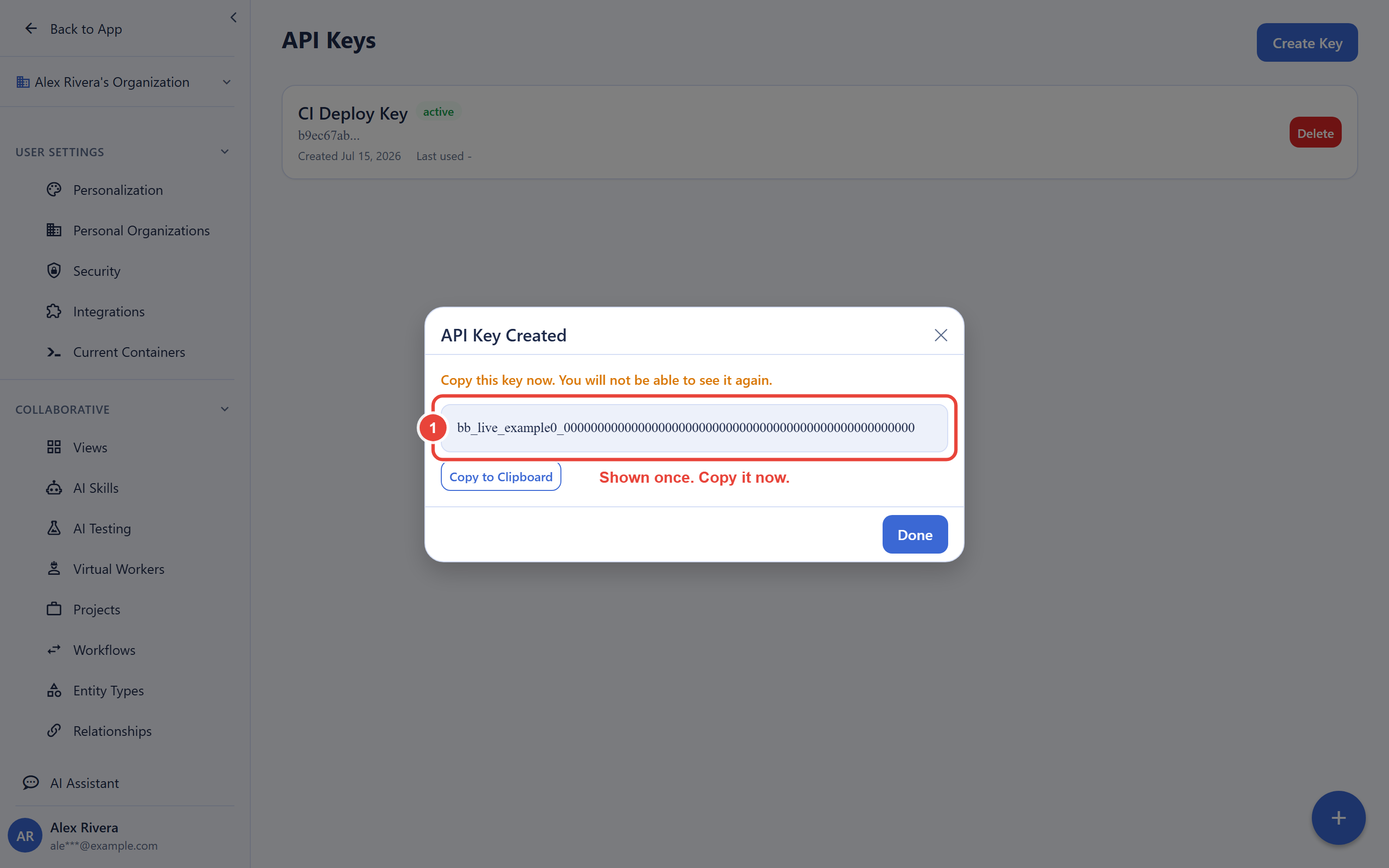
Create a Key
POST /v1/api-keysCreating a key requires a recently completed authentication (a step-up re-auth). If your session’s authentication is stale, the request is rejected and you must re-authenticate before retrying. This applies to creating, rotating, and revoking keys, because each is a credential-lifecycle action.
Request Body
{
  "name": "CI deploy bot",
  "scopes": ["bbdocs", "mcp:secrets.read"],
  "expires_in_days": 90
}| Field | Required | Description |
|---|---|---|
name | Yes | A human label so you can identify and revoke the key later |
scopes | Yes | The allowlisted scopes the key may use (see below) |
expires_in_days | Recommended | Lifetime in days, 1 to 365. If you omit it, the key is created with the maximum 365-day lifetime. There is no non-expiring key. |
Response
The response carries the full key value once, plus the key’s identifying metadata. The scopes and expiry you set are stored on the key and are returned whenever you list your keys.
{
  "success": true,
  "data": {
    "id": "...",
    "name": "CI deploy bot",
    "prefix": "abc123",
    "key": "bb_live_abc123_yourLongSecret",
    "created_at": "2026-07-16T00:00:00Z"
  }
}
Mandatory Expiry
Every key expires; there is no permanent key. When you supply
expires_in_days it must be between 1 and
365; if you omit it, the key is created with the maximum
365-day lifetime. This is a deliberate rotation-hygiene control: a leaked key
that is never rotated is one of the most common ways credentials are abused,
so the platform caps the lifetime and expects you to rotate on a schedule.
Pick the shortest lifetime that fits the caller’s job (30 or 90 days is
typical for a service; 1 day is right for a short-lived agent run).
Scopes
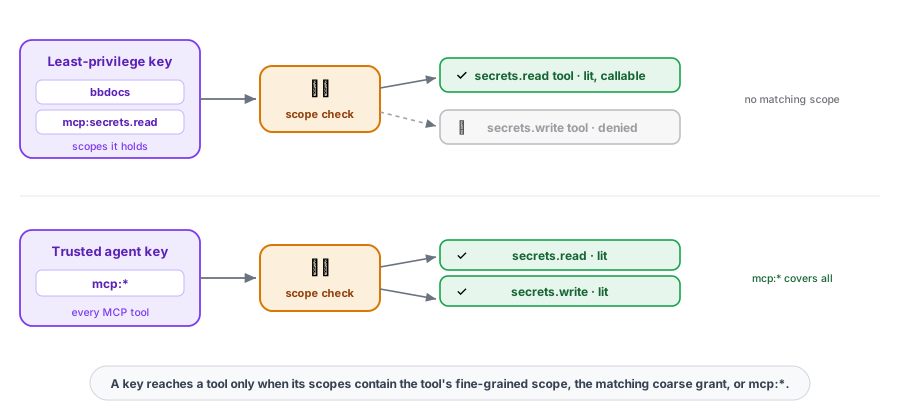
Scopes are an allowlist: a key can do only what its scopes permit, and nothing else. There are no wildcard grants beyond the explicit MCP grant described below, so you never accidentally hand a key “everything.” Scopes come in two grains.
| Grain | Examples | What it grants |
|---|---|---|
| Fine-grained | mcp:secrets.read, mcp:secrets.write | One specific capability. Prefer these for least privilege. |
| Coarse | bbdocs, bbsheet, secrets | A whole product area. |
| MCP grant | mcp:* | Every MCP tool. Use only for a trusted, general-purpose agent. |
When a key calls an MCP tool, the key is
authorized if its scopes contain the tool’s fine-grained scope
or the matching coarse grant or mcp:*. So a
key with mcp:secrets.read can read secrets through MCP but not
write them, while a key with mcp:* can use every tool. Grant the
narrowest set that lets the caller do its job.
An unknown or unsupported scope is rejected at create time with a
400 whose message lists the scopes you are allowed to request,
so a typo fails loudly rather than silently under-granting.
mcp:*.List Keys
GET /v1/api-keys
Returns every key in the organization with its metadata (id, name, prefix,
scopes, expiry, last-used and created timestamps). The secret is never
included. A convenience read is also available at
GET /v1/settings/api-keys.
{
  "success": true,
  "data": {
    "keys": [
      {
        "id": "...",
        "name": "CI deploy bot",
        "prefix": "abc123",
        "scopes": ["bbdocs", "mcp:secrets.read"],
        "last_used_at": null,
        "expires_at": "2026-10-14T00:00:00Z",
        "created_at": "2026-07-16T00:00:00Z"
      }
    ]
  }
}
Rotate a Key With No Downtime
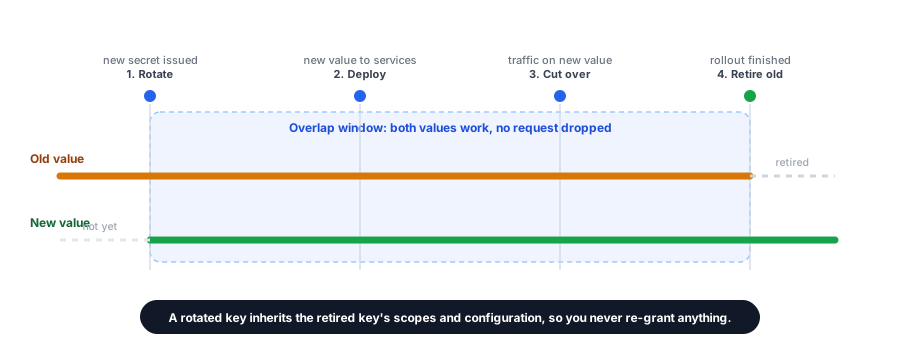
POST /v1/api-keys/{id}/rotateRotation issues a fresh secret that carries over the retired key’s name, scopes, rate limit, and expiry, so you do not re-grant anything. Requires a step-up re-auth, like creation. The response returns the new full value once, exactly as create does. Crucially, the old secret does not stop working the instant you rotate: it stays valid for a short overlap window (a few minutes by default) so in-flight requests are not dropped mid-rollout. Roll it out like this:
- Call rotate and capture the new key value from the response.
- Deploy the new value to every service, within the overlap window.
- Confirm all traffic is on the new value (watch the new key’s last-used and your logs).
- The old secret retires automatically when the overlap window ends; after that it returns
401.
Because the new key inherits the retired key’s scopes and configuration, you rotate on a schedule without editing scope grants or reconfiguring the caller.
Revoke a Key
DELETE /v1/api-keys/{id}
Revoking a key invalidates it immediately; any caller still presenting it
starts receiving 401. Requires a step-up re-auth. Revoke a key
the moment it is no longer needed or is suspected of exposure, then create a
fresh scoped key for the caller that still needs access.
Security Guarantees
- A key holds only its scopes. It can never perform an action outside the allowlist you granted, and there is no hidden elevated context.
- A key is bound to one organization. It cannot read or write another organization’s data; a cross-organization id simply reads as not found.
- The secret is never echoed. After creation or rotation it is unrecoverable. Store it in a secret manager, never in source control.
- Lifecycle actions require step-up. Creating, rotating, or revoking a key needs a recently completed authentication, so a stale session cannot mint or destroy credentials.
- Every key expires. The mandatory 1 to 365 day lifetime enforces rotation hygiene.
Frequently Asked Questions
Can I see the key again after I create it?
No. The full value is shown once, at creation (and again after each
rotation). If you lose it, revoke the key and create a new one.
How do I rotate without downtime?
Call rotate, deploy the new value everywhere within the overlap window,
confirm traffic has cut over, then let the old secret retire when the
window ends. The new key carries over the retired key’s scopes and
configuration.
Can I avoid wildcard grants?
Yes, and you should. Grant fine-grained scopes such as
mcp:secrets.read rather than mcp:*. A key holds
only its allowlisted scopes.
Why must a key have an expiry?
Every key expires (1 to 365 days) as a rotation control. There is no
permanent key, so a forgotten leaked key cannot live forever.
How is a key different from a user access token?
An access token is short-lived and tied to a signed-in user session; a key
is long-lived, scoped, and revocable, and it needs no interactive login,
which is what makes it right for servers and agents. Both are bounded by
the access of the identity behind them. See
MCP Server for how a key drives agent tools.
My create call was rejected even though I am signed in. Why?
Key creation requires a recent authentication. Re-authenticate (a step-up
re-auth) and retry.