

Agents, Automation, and the API
A container is not only for a person at a keyboard. The same machine can be driven by an AI agent that browses the web, operates a desktop, and runs code, or by a script through the public API. This guide teaches how an agent gets a browser that is already logged in, when to reach for page-level versus desktop-level control, how untrusted model-generated code is contained, how a credential is used without the model ever seeing it, and how to drive the whole lifecycle over REST. After this page you will be able to put an agent to work in a container with a clear view of what it can reach and what keeps it safe.
Every capability here rides the platform's Model Context Protocol (MCP) surface and its public REST API, and runs under your organization's roles and permissions. An agent can never exceed the access of the identity behind it.
A Browser That Logs Itself In
After this section you will understand why an agent skips the login step. The single biggest friction in agent browser automation is getting the browser signed into your workspace without a human pasting credentials. A Backbuild container solves this at the source. When it is launched with a browser, the Backbuild browser extension is already installed and authenticates itself as the session's own user through managed policy. The agent opens the app and it is simply already signed in. There is no login form to fill, no token to hand the model, and no credential for the agent to fumble.
For third-party sites that do need a login, the agent uses your encrypted vault rather than a secret in its prompt: a login is filled through a trusted path that supplies the real value at the moment of use and keeps it out of the model's context and the logs. The agent can therefore sign in and act without ever handling the credential itself.
How does the agent's browser log in without a human? The container's browser authenticates itself as the session's user through managed policy, so it is already signed into your workspace with no login step. For other sites, credentials come from your vault through a trusted path, so the model never receives a plaintext secret.
Page Control and Desktop Control
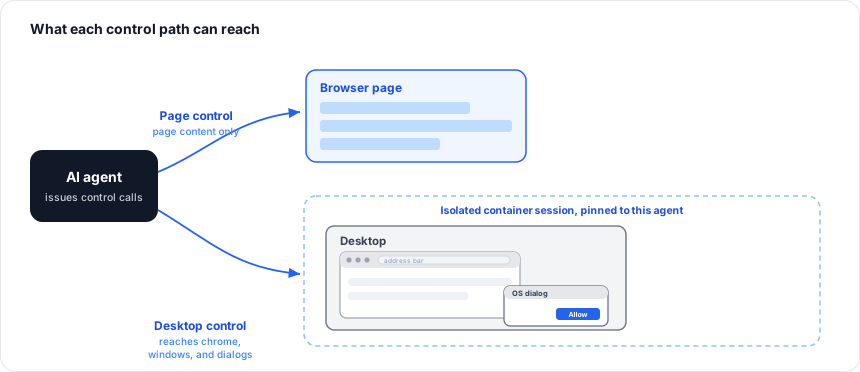
After this section you will know which tool set to use for which task. An agent drives a container through two complementary families of tools, and the distinction matters because each reaches a different layer.
| Tool family | What it drives | Reaches |
|---|---|---|
| Page control | The content of the web page: navigate, read the elements on the page with their positions, click, type, list tabs, and capture the page. | Everything that is page content, driven through the browser. |
| Desktop control | The whole desktop: take a screenshot, move and click the mouse, type, press keys, and scroll, by screen position. | Anything on screen, including browser chrome, native windows, and operating-system dialogs that a page tool cannot touch. |
Use page control for work inside a web page, it is precise and reads the page's real structure. Use desktop control when the target is not page content: the browser's own address bar and tabs, a file-picker or permission dialog the operating system shows, or any native application window. The desktop path is what lets an agent finish a task that a page-only tool would stall on. Both are pinned to the agent's own container session, so an agent drives its container and no one else's.
Can the agent do things a web page cannot reach, like an OS dialog? Yes. Page-control tools drive page content; desktop-control tools drive the whole screen by position, so they can operate browser chrome, native windows, and operating-system dialogs that page tools cannot.
How mature is the control surface? It is the same MCP surface the platform uses in production, reached the standard way through the MCP tools, and the container lifecycle is also fully drivable over the REST API. It is built to be driven, not demonstrated.
Running Untrusted Code Safely
After this section you will be able to answer, for a security review, whether it is safe to run model-generated code in a container. Every time an agent runs code it wrote, that is software you did not write, so a container is built to contain it by default rather than to trust it. The user-facing posture:
- Per-session and per-organization isolation. A container belongs to one session in one organization. It cannot reach another container, and a request that crosses the organization boundary is treated as not found.
- Least-privilege execution. Code runs without root and with reduced privileges, so a process cannot help itself to the machine.
- Deny-by-default outbound network. A container cannot call arbitrary hosts. Outbound access is restricted by default, which bounds where any data could go and blunts an exfiltration attempt.
- No cloud-metadata and no production secrets. The paths an escaped process would probe for credentials are closed, and a container has no access to your production data stores or platform secrets.
- Disposable and reset. Each session is its own machine and is torn down after use, so nothing carries from one run into the next.
- Attributable. Container operations are audit-logged with the identity that performed them.
The same isolation model, in full, is described for the API-first agent surface in Sandbox Execution, and the platform's wider posture in Security and Compliance.
What stops an agent exfiltrating data or being hijacked by a malicious page? A container's outbound network is denied by default, so there is no open path to send data to an arbitrary host; each session is isolated and reset; and credentials come from the vault through a trusted path rather than being exposed to page content, so a hostile page has nothing to steal from the model's context.
Can a container reach our internal systems or another tenant? No. Outbound access is denied by default, and any request across the organization boundary is treated as not found.
Driving the Lifecycle Over REST
After this section you will know how to provision and drive containers from your own code. The entire container lifecycle, listing the sizes your policy allows, launching a session, checking its status, connecting to it, and closing it, is available over the public REST API, under the same authentication and the same organization-scoped policy as the app. An agent orchestrator or a CI job can therefore launch a container, do its work, and tear it down without a person involved, and every call is governed by the caller's permissions.
# Base URL
https://api.backbuild.ai/v1

# Example: list your organizations
curl -H "Authorization: Bearer $TOKEN" \
  https://api.backbuild.ai/v1/organizations
See the Containers API reference for the complete request and response documentation, the MCP Server guide for driving containers as tools, and Authentication and API Keys for how to authenticate a script or an agent.
Where to Next
- Virtual Workers: a governed, autonomous AI worker that operates a container for you under your roles, vault, and audit trail.
- Sandbox Execution: the API-first, disposable code-execution model with git clone and artifact download.
- Password and Secrets Vault: how a credential is used by an agent without the model ever seeing it.
- Containers API Reference: the endpoints for the whole lifecycle.