

App Configurations & Builds
An app configuration describes how your product is packaged for a single platform: web, iOS, Android, or desktop. It carries the per-platform identity (app name, bundle identifier, version), the launch presentation (icon, splash screen), and a free-form block of platform options. Once a platform is configured, the build pipeline turns it into a distributable app bundle, and the public build-config endpoint hands the right settings to each running client.
Pro App configurations and the build pipeline are part of Backbuild Pro. See pricing.
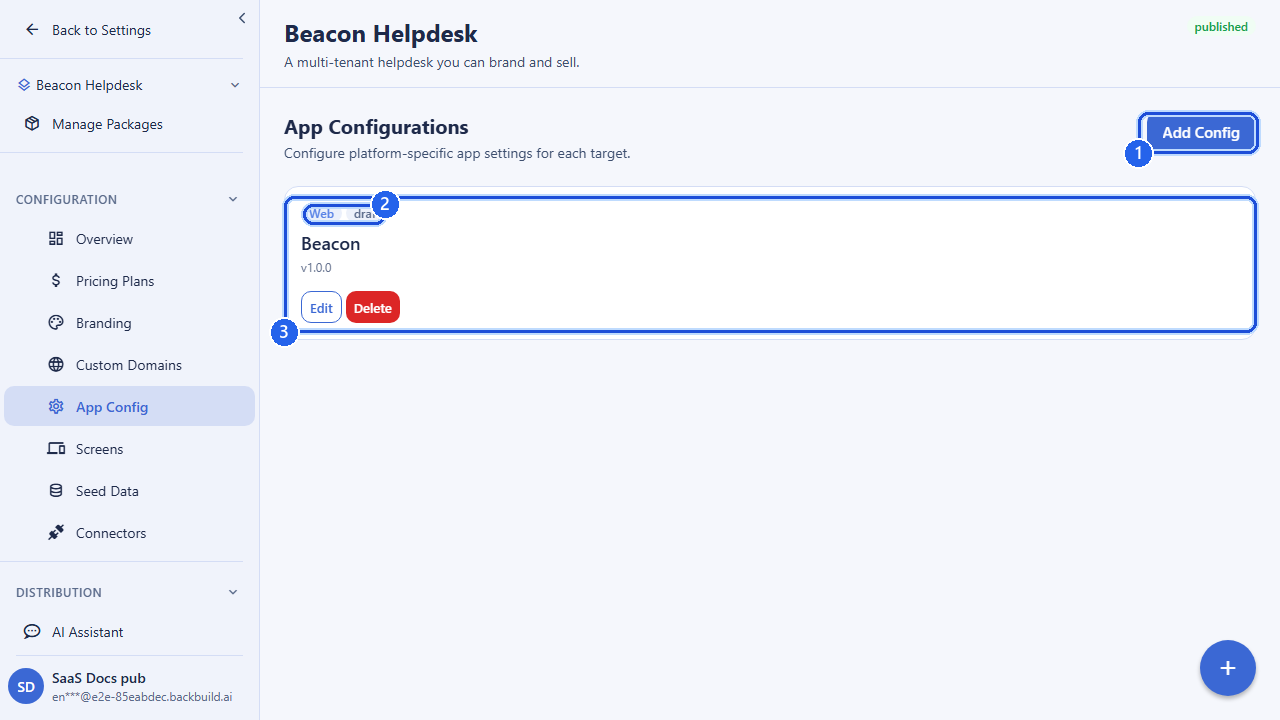
How the Pieces Fit Together
App configurations sit under a SaaS package. You create one app config per platform you want to ship, then reference that config when you kick off a build. The flow is:
- Configure a platform: create an app config for each target (web, iOS, Android, Windows, macOS, Linux).
- Build: create a build job that points at the app config and a build system; track it to completion.
- Distribute: running clients fetch their settings from the public build-config endpoint, and native builds flow on to store submission and desktop release distribution.
App configs and builds are available through two equivalent route groups: the
package-scoped paths under /v1/saas-packages/:packageId/app-configs,
and the app-pipeline paths under /v1/app (which also host build
jobs and screen definitions). Use whichever fits how you are working; both go
through the same underlying configuration.
App Configuration Fields
Each app config is a per-platform record. The platform is fixed
at creation; everything else can be refined as you iterate.
| Field | What it controls |
|---|---|
platform | The target platform: one of web, ios, android, windows, macos, linux. Required, and set once on create. |
app_name | The application name on this platform (the name shown on the device or in the browser). Required. |
bundle_identifier | The platform bundle/app identifier, such as a reverse-DNS id (com.yourcompany.app). Alphanumeric with dots, hyphens, and underscores. |
version_name | The human-readable version string, such as 1.4.0. |
version_code | The integer build/version code that stores use to order releases. |
icon_url | URL of the app icon. |
splash_screen_url | URL of the splash-screen image shown on launch. |
splash_background_color | Hex background color behind the splash screen (for example #FFFFFF). |
signing_config_ref | A reference to the signing configuration used to sign native builds. The reference points at a stored credential rather than carrying raw signing material in the config. |
platform_config | A free-form object for platform-specific options: theme, navigation, and any other per-platform settings your app reads. |
eas_project_id | An optional external build-project identifier used by certain managed native build systems. |
status | The config’s lifecycle state (draft, building, published, or suspended), set through updates. |
Signing material is never placed directly in the app config; only a reference to a stored signing configuration is. This keeps certificates and keys out of the configuration payload.
Creating an App Config
POST /v1/saas-packages/:packageId/app-configs

{
  "platform": "ios",
  "app_name": "My SaaS",
  "bundle_identifier": "com.mycompany.mysaas",
  "version_name": "1.0.0",
  "version_code": 1,
  "icon_url": "https://cdn.example.com/icon.png",
  "splash_screen_url": "https://cdn.example.com/splash.png",
  "splash_background_color": "#0A0A0A",
  "platform_config": {
    "theme": { "mode": "dark" },
    "navigation": { "style": "tabs" }
  }
}
Create one config per platform you intend to ship. Updates take only the
fields you want to change, and optional URL or reference fields can be cleared
by sending them as null on the package-scoped update path.
App Bundles & Builds
A build job turns an app config into a distributable bundle. You create a build by referencing the package, the app config, the platform, and the build system to run it on, then track the job’s status as it progresses.
| Build field | Meaning |
|---|---|
saas_package_id | The package being built. Required. |
app_config_id | The app config that defines the target platform’s settings. Required. |
platform | One of ios, android, windows, macos, linux. (Native builds only; web is served, not built into a bundle here.) |
build_system | Which builder runs the job: one of cloudflare_container, codemagic, eas_build, self_hosted_mac. |
build_type | Optional: development, preview, or production. |
A build job moves through pending → queued
→ in_progress and ends in success,
failed, or cancelled. As it runs, the job records a
build-log URL, the produced artifact URL, and any error message, so you can
follow it from start to finish and retrieve the output.
# Start a production iOS build
POST /v1/app/builds

{
  "saas_package_id": ":packageId",
  "app_config_id": ":configId",
  "platform": "ios",
  "build_system": "eas_build",
  "build_type": "production"
}
You can list builds (filtered by package, platform, status, or build system), fetch a single build, update its status, and cancel a build that is still in flight.
Data Bundles
Alongside native builds, a data bundle is a versioned snapshot
of the configuration and seed data a fresh tenant starts with. You create a
bundle, then publish it to make it the current bundle, or roll back to a
previous one. This lets running apps pick up configuration changes without a
full rebuild. See
Data Bundles for the full
treatment; the endpoints live under /v1/app/bundles and
/v1/saas-packages/:packageId/data-bundles.
Serving Configuration to Running Apps
Once a platform is configured, running clients need their settings at launch. Two public, cached endpoints handle that. No authentication is required, so they are fast to bootstrap from:
| Endpoint | Purpose |
|---|---|
GET /v1/marketplace/app-config | The full application configuration for a domain: branding and presentation for pre-auth rendering. |
GET /v1/marketplace/build-config | The platform-specific build configuration for a domain and platform: the settings a built client reads. |
GET /v1/marketplace/build-targets | Discovery of the active build targets, optionally narrowed by domain, platform, organization, or environment. |
# Platform-specific build config for a domain (public, cached)
GET /v1/marketplace/build-config?domain=app.yourproduct.com&platform=ios

# Active build targets
GET /v1/marketplace/build-targets?domain=app.yourproduct.com
These responses are cached and safe to call on every page load or app launch. Updating your package’s presentation refreshes the cached configuration for any domains pointing at it.
Store Submission & Desktop Distribution
For native apps, the build output continues into the publishing pipeline:
- Store accounts and listings: connect your Apple, Google Play, or Microsoft store account, attach listing metadata (title, descriptions, screenshots, categories), set age ratings, run pre-submission compliance checks, and track submission status. These live under
/v1/store. - Desktop releases: publish versioned desktop releases and channels, with signing-key management and a public current-release lookup, under
/v1/releases.
Those surfaces are covered in their own pages; this page focuses on configuring the app per platform and producing the build.
API Reference
App-config and build endpoints require an authenticated session in your
organization. The build-config, app-config, and build-targets discovery
endpoints under /v1/marketplace are public and cached.
Create App Config
POST /v1/saas-packages/:packageId/app-configsRequest Body
| Field | Type | Required | Description |
|---|---|---|---|
platform | string | yes | One of ios, android, windows, macos, linux, web |
app_name | string | yes | Per-platform app name (1–500 chars) |
bundle_identifier | string | no | Platform bundle/app identifier |
version_name | string | no | Version string (max 64 chars) |
version_code | integer | no | Integer version/build code |
icon_url | string | no | App icon URL |
splash_screen_url | string | no | Splash-screen image URL |
splash_background_color | string | no | Hex color, e.g. #FFFFFF |
signing_config_ref | string | no | Reference to a stored signing configuration |
platform_config | object | no | Platform-specific options (theme, navigation, etc.) |
eas_project_id | string | no | External build-project identifier |
Responds 201 with the created app config. A dangling :packageId returns 404; an invalid body returns 400.
List App Configs
GET /v1/saas-packages/:packageId/app-configsQuery Parameters
| Parameter | Type | Description |
|---|---|---|
platform | string | Filter by platform |
page | integer | Page number, 1-based |
page_size | integer | Results per page (1–100) |
Returns a paginated list of app configs.
Get App Config
GET /v1/saas-packages/:packageId/app-configs/:configIdReturns the full app-config record, or 404 if not found in your organization.
Update App Config
PUT /v1/saas-packages/:packageId/app-configs/:configIdRequest Body
| Field | Type | Description |
|---|---|---|
app_name | string | Per-platform app name |
bundle_identifier | string | Platform bundle/app identifier |
version_name | string | Version string |
version_code | integer | Integer version/build code |
icon_url | string / null | App icon URL, or null to clear |
splash_screen_url | string / null | Splash-screen URL, or null to clear |
splash_background_color | string | Hex color |
signing_config_ref | string / null | Signing-config reference, or null to clear |
platform_config | object | Platform-specific options |
eas_project_id | string / null | External build-project id, or null to clear |
status | string | draft, building, published, or suspended |
At least one field is required. Responds 200 with the updated record.
Delete App Config
DELETE /v1/saas-packages/:packageId/app-configs/:configIdRemoves the app config. Responds 404 if it does not exist.
App-Pipeline Paths (Equivalent)
The same app configs are reachable directly by ID under the app-pipeline
router, which also hosts build jobs. On these paths the package is supplied as
a body field on create and a saas_package_id query parameter on
list.
POST   /v1/app/configs
GET    /v1/app/configs?saas_package_id=:packageId&platform=ios
GET    /v1/app/configs/:configId
PUT    /v1/app/configs/:configId
DELETE /v1/app/configs/:configId
Build Jobs
POST   /v1/app/builds
GET    /v1/app/builds?saas_package_id=:packageId&status=in_progress
GET    /v1/app/builds/:buildId
PUT    /v1/app/builds/:buildId/status
POST   /v1/app/builds/:buildId/cancel
Create Build: Request Body
| Field | Type | Required | Description |
|---|---|---|---|
saas_package_id | uuid | yes | The package to build |
app_config_id | uuid | yes | The app config defining the platform settings |
platform | string | yes | ios, android, windows, macos, linux |
build_system | string | yes | cloudflare_container, codemagic, eas_build, self_hosted_mac |
build_type | string | no | development, preview, or production |
The build-status query and update accept pending,
queued, in_progress, success,
failed, and cancelled. A status update can also
record a build_log_url, artifact_url, and
error_message.
Public Configuration & Discovery
GET /v1/marketplace/app-config?domain=app.yourproduct.com
GET /v1/marketplace/build-config?domain=app.yourproduct.com&platform=ios
GET /v1/marketplace/build-targets?domain=app.yourproduct.com| Endpoint | Parameters | Notes |
|---|---|---|
app-config | domain or package_id | Public, cached. Full app configuration for pre-auth rendering. |
build-config | domain (required), platform (required) | Public, cached. platform is one of the six targets. Returns 404 if no config exists. |
build-targets | domain, platform, org_id, environment (all optional) | Public, cached. Lists active build targets. |
Pair this with Screen Definitions to shape what each platform renders, or return to the SaaS Builder overview.
Frequently Asked Questions
- Do I configure each platform separately?
- Yes. App configuration is per platform (web, iOS, Android, and desktop), so each target can carry its own settings and native assets.
- How does a running app get its configuration?
- It fetches its configuration keyed by the domain it is served from, at startup, so it renders correctly from the first paint without a rebuild.
- Where do native app icons and splash screens live?
- On the per-platform app configuration. See Branding & Themes for the brand assets involved.