

Relationships
A relationship is a typed, directional link between two entities: “this deal is assigned to that contact”, “this ticket is blocked by that ticket”, “this RFI relates to that drawing”. Where the parent/child hierarchy models containment (one tree, one parent), relationships model a graph: any record can be linked to any number of others, in either direction, with as many kinds of link as you define.
Free Custom data modeling (entity types, entities, relationships, and views) is included on every plan, including Free, as is the Files app. The SaaS Builder, which packages your data model into installable, sellable apps, is part of Backbuild Pro. See pricing.
Link, Lookup, and Rollup: Which Is Which
Before the mechanics, settle the single most common data-modeling question, because getting these three straight is what separates a clean model from a tangle of copied values:
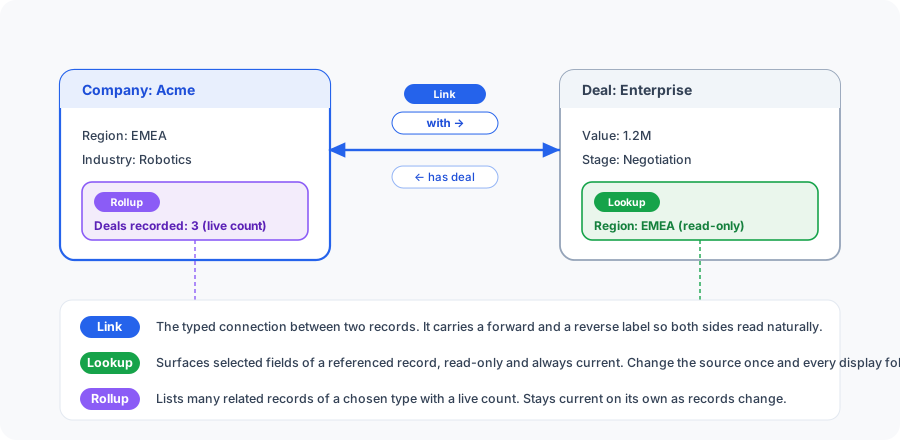
- A link (relationship) is the connection itself: it joins one record to another. “This Deal is with that Company.” The link is stored once and is the thing you create, list, and delete on this page.
- A lookup surfaces selected fields from a referenced record and displays them, read-only and always current. Give a Deal a reference to a Company, and the company’s industry can show on the deal without being copied into it; change the company once and every display of it follows. A lookup is not a separate field type: it is the display fields you add to a reference-style field on the type.
- A rollup lists the child records of a chosen type that sit
under one record, read-only, with a live count. On an order, a rollup can
list every line item recorded under it; on a project, every task under it. A
rollup is the
entity_rollupfield type: you pick the referenced type and which of its fields to show per row. It answers “which records, and how many”; it is a list with a count, not a numeric sum or average.
In one sentence: the link makes the connection, a lookup reads selected values from a referenced record, and a rollup lists many related records with a count. A worked example: Company and Deal, linked by a “with” relationship. On each Deal, a reference to its Company can surface the company’s region as a lookup. On each Company, a rollup lists the deals recorded under it and shows how many there are, staying current as deals are added, so you never maintain the list by hand.
One-to-Many and Many-to-Many
Decide the cardinality before you build, because it determines how you model the link:
- One-to-many (a Company has many Deals, each Deal has one Company): create one relationship type (for example “with”) and link each Deal to its Company. The one side reads its many children through the reverse direction; the many side reads its one parent through the forward direction.
- Many-to-many (a Project has many Contributors, a Contributor works on many Projects): the same mechanism handles it directly, create a relationship type and add an edge for each pairing. There is no separate junction table to build by hand; the graph of edges is the junction.
The classic mistake is duplicate links, the same two records joined twice by
the same type, which quietly inflates counts and rollups. Backbuild prevents
it: the same source, target, and type can be linked only once (a repeat is
rejected with 409 Conflict). Give every relationship type a clear
forward and reverse label so both sides read naturally
(“blocks” one way, “is blocked by” the other), and the
model documents itself.
Two Layers: Types and Links
Relationships have two layers, mirroring the entity / entity-type split:
- A relationship type is the definition, the kind of
link. It is named, organization-scoped, and reusable, and it carries the
labels shown in each direction (a
blockstype with a forward label “blocks” and a reverse label “is blocked by”). - A relationship (the link itself) is one actual edge between a specific source record and a specific target record, of a given relationship type.
You define each relationship type once, then create as many links of that type as you need. Types live at the organization level, so the same vocabulary is available across every project. Both types and links are scoped to your organization and the active environment, and all create and delete operations are audit logged.
Relationship Types
A relationship type describes one kind of link and how it reads in each direction. Defining types up front gives you a consistent, self-documenting vocabulary instead of free-text labels scattered across links.
| Field | Type | Description |
|---|---|---|
name | text (1 to 200) | The type’s name. Must be unique within the organization; a duplicate is rejected with 409 Conflict. |
forward_label | text (1 to 200) | How the link reads from source to target (for example “blocks”, “assigned to”, “depends on”). |
reverse_label | text (1 to 200) | How the same link reads from target to source (for example “is blocked by”, “owns”, “is depended on by”). |
description | text (optional, up to 2048) | An optional note explaining what the type is for. |
icon | text (optional) | An optional icon name used when the type is rendered. |
color | hex color (optional) | An optional display color; must be a valid hex code such as #FF0000. |
A type also carries an active flag. Listing returns active types by default, and only active types can be used for new links. Creating a type requires the relationship-type creation permission (typically held by organization admins and owners); any active member can list the types in their organization.
# Define a relationship type
curl -X POST https://api.backbuild.ai/v1/relationship-types \
  -H "Authorization: Bearer $TOKEN" \
  -H "Content-Type: application/json" \
  -d '{
    "name": "blocks",
    "forward_label": "blocks",
    "reverse_label": "is blocked by",
    "description": "One work item blocks another from proceeding.",
    "icon": "lock",
    "color": "#E11D48"
  }'
You never supply the type’s id, org_id,
is_active, or timestamps. A successful create returns
201 Created with the full record, including the generated
id you pass as relationship_type_id when creating
links. The full response shape is under
Request / response shapes.
Response Codes
| Status | Meaning |
|---|---|
201 Created | The type was created; the full record is returned. |
400 Bad Request | Validation error: missing/over-long name, forward_label, or reverse_label, or an invalid hex color. |
401 Unauthorized | Missing or invalid bearer token. |
403 Forbidden | Caller lacks the relationship-type create permission, or sends a mismatched org_id. |
409 Conflict | A relationship type with the same name already exists. |
500 Internal Server Error | Unexpected server error. |
Linking Two Records
A relationship links a source record to a
target record using a relationship type. The
relationship_type_id is the id of a type you already defined.
# Link two records: source "blocks" target
curl -X POST https://api.backbuild.ai/v1/relationships \
  -H "Authorization: Bearer $TOKEN" \
  -H "Content-Type: application/json" \
  -d '{
    "source_entity_id": "019d...",
    "target_entity_id": "019e...",
    "relationship_type_id": "019f..."
  }'
The platform enforces these rules on create:
- Both records must exist and be live, and the type must be active; a missing or inactive referent is rejected with
404 Not Found. - No self-references: source and target must differ; linking a record to itself is rejected with a validation error.
- No duplicates: the same source, target, and type can be linked only once; a repeat is rejected with
409 Conflict. The reverse pairing (target to source of the same type) is a distinct edge, because relationships are directional. - Same environment: both records must be in the same environment; a link can never cross environments.
- Access on both ends: you need edit access to the source and at least visibility of the target (see Visibility and access).
- Restrictions may apply: if the source’s type is in restricted mode, only allowed pairings are permitted (see Restricting allowed relationships).
You supply only the two record IDs, the relationship_type_id, and
an optional metadata object; the link’s id,
org_id, is_active, created_by_user_id,
and timestamps are assigned by the platform. A successful create returns
201 Created with the full record (see
shapes).
Response Codes
| Status | Meaning |
|---|---|
201 Created | The link was created; the full record is returned. |
400 Bad Request | Validation error: a missing/malformed ID, a self-reference, or a link disallowed by the source type’s restrictions. |
401 Unauthorized | Missing or invalid bearer token. |
403 Forbidden | Caller can see the source but lacks edit access on it, or sends a mismatched org_id. |
404 Not Found | The type, the source, or the target was not found or is not visible to the caller. |
409 Conflict | The same source, target, and type are already linked (duplicate edge). |
500 Internal Server Error | Unexpected server error. |
Direction and Cardinality
Every relationship is directional: it points from a source to a target, and that direction is what makes the labels meaningful. The same edge reads as “A blocks B” from A’s side and “B is blocked by A” from B’s side. The link is stored once; both perspectives are derived from the one edge plus the type’s two labels.
Cardinality is open by default: a record can be the source of many links and the target of many links, across any mix of types. There is no one-to-one or one-to-many cap baked into a type; you model many-to-many simply by creating multiple edges, and you constrain which pairings are allowed (rather than how many) with restrictions. To model strict containment with a single owner instead, use the parent/child hierarchy.
Metadata on a link
A relationship may carry an optional metadata object: a small bag
of context attached to the link at creation (for example, a note about why two
items are related). It is bounded in size and validated on input. The primary,
queryable shape of a link is its source, target, and type; metadata is
supplementary rather than a structured, per-field schema like an entity’s
field bag.
How Relationships Appear on a Record
Relationships are listed per record: you ask for the relationships of
a specific record, so the entity_id query parameter is required.
You can ask for one direction or both:
| Direction | Returns |
|---|---|
forward | Links where the record is the source (read with the type’s forward label). |
reverse | Links where the record is the target (read with the type’s reverse label). |
both | All of the record’s links, in both directions (the default). |
For backward compatibility, outgoing and incoming are
accepted as aliases for forward and reverse. You can
filter to a single type with relationship_type_id and paginate
with limit and offset.
Each listed relationship is returned resolved for display: alongside the raw IDs, the response includes the type’s name, forward and reverse labels, icon, and color, plus the related record’s id, title, and type, so the UI can render “blocks → Acme onboarding” without a second round-trip.
# List all of a record's relationships (both directions)
curl -H "Authorization: Bearer $TOKEN" \
  "https://api.backbuild.ai/v1/relationships?entity_id=019d..."

# Only the links where this record is the source, of one type
curl -H "Authorization: Bearer $TOKEN" \
  "https://api.backbuild.ai/v1/relationships?entity_id=019d...&direction=forward&relationship_type_id=019f..."
In views and fields
Relationships also feed views and the
field-type catalog. Reference-style fields can draw their options from your
relationship configuration (the relationship_types option source
lists the configured types, and valid_relationships lists the
allowed pairings), so a field or view can present relationship choices that
stay in sync with your model. See the
option sources.
Restricting Allowed Relationships
Each entity type has a relationship mode that governs which links its records may take part in as the source:
-
open: links are allowed broadly; any defined type can connect records of this type to others, subject only to access rules. -
restricted: only explicitly configured pairings are permitted. A link is allowed only when a rule says “records of this source type may be linked to records of that target type via this relationship type”. Anything not on the allowlist is rejected.
Restricted mode is how an architect keeps a model’s integrity: it ensures a “blocks” link can only connect work items to other work items, never to contacts. Combined with same-environment enforcement and constrained references, restricted relationships give you deliberate control over which connections are legal, rather than leaving the graph open to anything. Mode is configured on the entity type (see Entity Types).
Visibility and Access
Relationships have no visibility scope or share grants of their own; access to a link derives from access to the two records it connects. The entity model’s visibility (owner scope) and sharing govern the edges between records:
- Creating a link requires edit access to the source and at least visibility of the target; the edge is a change to the source, so the source’s edit right is checked.
- Listing a record’s relationships requires being able to see that record; if you cannot, the request returns
404as though it does not exist. - Edges to records you cannot see are dropped. When you list one record’s relationships, any edge whose other endpoint is hidden from you (or has been deleted) is omitted entirely, so a hidden record’s title and type never leak.
- Deleting a link requires edit access on at least one of the two records it connects; a link whose endpoints you cannot see at all returns
404, and one you can see but lack edit on is refused as forbidden.
You grant and revoke access at the record level (visibility scope and share grants); relationships inherit those decisions automatically. See the Sharing section of Entities for subject scopes and the five rights.
Project pinning
Pinning applies to records, not to individual links; you pin a record (such as a project) for quick personal access, and its relationships travel with it. There is no separate pin for a single link.
SaaS Builder Packages
When you package your configuration with the SaaS Builder, your relationship vocabulary ships as part of the data model, so every tenant starts with the same way of connecting their records.
- Relationship types travel with the package. The types you define (with their labels, icons, and colors) are seeded into each tenant’s own organization on provisioning, so the same link vocabulary is available out of the box.
- Restrictions ship with the entity types. Because allowed pairings are configured on entity types, they travel with the packaged types, so a restricted model arrives already constrained.
- Seed data can create starter links. A package’s seed data can pre-create example records and the relationships between them, so a new tenant opens to a connected dataset rather than an empty graph.
- Screen and view definitions surface relationships. The package’s screen and view definitions determine where related records appear and how relationship pickers are presented.
- Per-plan feature flags gate the data model. Whether a tenant can model relationships is governed by the package’s feature-flag entitlements (the same flags that gate types and views).
Frequently Asked Questions
- What is the difference between a link, a lookup, and a rollup?
- The link (relationship) makes the connection between two records; a lookup surfaces selected fields of a referenced record, read-only and always current; a rollup lists many related records of a chosen type with a live count. The link lives here; lookups and rollups are fields on the type.
- Do I need a junction table for many-to-many?
- No. Create a relationship type and add an edge for each pairing; the graph of edges is the junction. The same source, target, and type can be linked only once, so you cannot accidentally create duplicate links that inflate counts.
- Can I restrict which records a link is allowed to connect?
- Yes. Put the source’s type in restricted mode and configure the legal pairings; a link is allowed only when a rule permits that source type, target type, and relationship type together. Links are also confined to a single environment.
- Why do forward and reverse labels matter?
- A link is directional and stored once. The forward and reverse labels let the same edge read naturally from both ends (“blocks” and “is blocked by”), which keeps the model self-documenting.
- Who can see a relationship?
- Access derives entirely from the two records. You need edit on the source to create a link and visibility of a record to list its links; edges to records you cannot see are dropped so nothing leaks.
API Reference
Relationship reads and writes are organization- and environment-scoped and
derive authorization from the records being linked. All id values
are UUIDs.
Relationships
| Method & Path | Description |
|---|---|
POST /v1/relationships | Create a link. Body: source_entity_id, target_entity_id, relationship_type_id, optional metadata. Source and target must differ. |
GET /v1/relationships | List a record’s relationships. Requires entity_id; optional direction (forward/reverse/both, aliases outgoing/incoming), relationship_type_id, limit, offset. |
DELETE /v1/relationships/:relationshipId | Delete a link by its ID. |
Relationship Types
| Method & Path | Description |
|---|---|
POST /v1/relationship-types | Define a type. Body: name, forward_label, reverse_label (required); optional description, icon, color. Name must be unique in the org. |
GET /v1/relationship-types | List the organization’s types (active by default). Paginate with limit/offset. |
Request / response shapes
# POST /v1/relationship-types  (request)
{
  "name": "blocks",
  "forward_label": "blocks",
  "reverse_label": "is blocked by",
  "description": "One work item blocks another.",  // optional
  "icon": "lock",                                   // optional
  "color": "#E11D48"                                // optional, hex
}

# 201 Created  (full relationship_type record)
{
  "success": true,
  "data": {
    "id": "019f...",            // relationship_type_id (UUID)
    "org_id": "019a...",
    "name": "blocks",
    "forward_label": "blocks",
    "reverse_label": "is blocked by",
    "description": "One work item blocks another.",
    "icon": "lock",
    "color": "#E11D48",
    "is_active": true,
    "created_at": "2026-01-01T00:00:00Z",
    "updated_at": "2026-01-01T00:00:00Z"
  }
}

# POST /v1/relationships  (request)
{
  "source_entity_id": "019d...",
  "target_entity_id": "019e...",
  "relationship_type_id": "019f...",
  "metadata": { "note": "discovered during review" }  // optional
}

# 201 Created  (full relationship record)
{
  "success": true,
  "data": {
    "id": "01a0...",
    "org_id": "019a...",
    "source_entity_id": "019d...",
    "target_entity_id": "019e...",
    "relationship_type_id": "019f...",
    "is_active": true,
    "created_by_user_id": "019b...",
    "created_at": "2026-01-01T00:00:00Z",
    "updated_at": "2026-01-01T00:00:00Z"
  }
}

# GET /v1/relationships?entity_id=019d...  (resolved-for-display list item)
{
  "id": "01a0...",
  "source_entity_id": "019d...",
  "target_entity_id": "019e...",
  "relationship_type_id": "019f...",
  "direction": "forward",                  // forward | reverse
  "type_name": "blocks",
  "type_forward_label": "blocks",
  "type_reverse_label": "is blocked by",
  "type_icon": "lock",
  "type_color": "#E11D48",
  "related_entity_id": "019e...",
  "related_entity_title": "Acme onboarding",
  "is_active": true,
  "created_at": "..."
}
Related concepts
- Entities: the records relationships connect, with their visibility and sharing.
- Entity Types: where relationship mode, allowed-relationship restrictions, and the rollup field type are configured.
- Views: saved presentations that can surface relationships and relationship-driven options.
See the API Reference for complete request and response documentation.