

Pricing Plans & Categories
Pricing plans are how you package and sell your product. Each plan you create on a SaaS package defines a name, the category it belongs to, the entitlement tier it grants, a billing interval, a price, and the limits (projects, members, monthly credits) a tenant gets when they subscribe. Everything on this page is a value you set for your own product. Your tenants buy these plans, and the plan they pick decides what they can do and what they pay.
Pro Pricing plans are part of the SaaS Builder, included with the Backbuild Pro build-and-ship platform. See pricing.
How plans fit together
A pricing plan always belongs to one of your SaaS packages. Within a
package you typically offer several plans (for example a free tier, a
professional tier, and an enterprise tier) and group them under
builder-defined categories (such as individual,
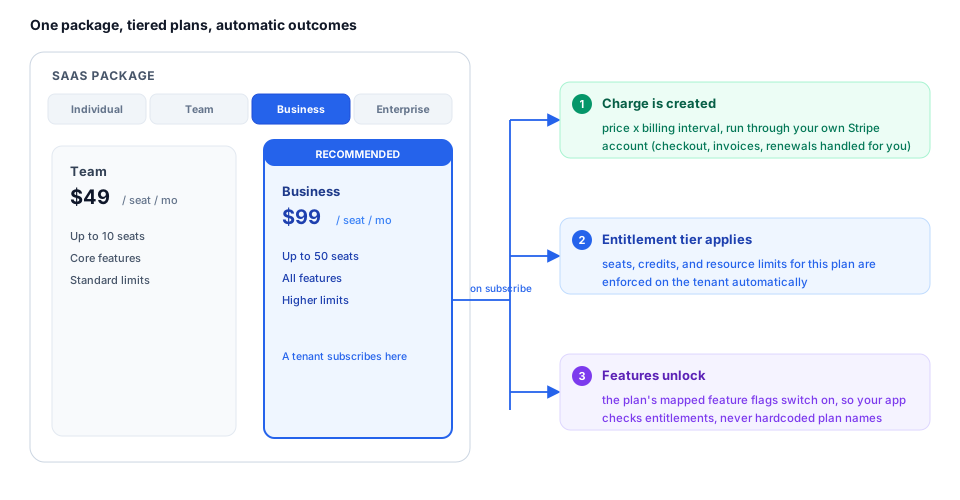
team, or business) so the signup screen can present
them as tabs.
When a tenant subscribes to a plan, three things happen: they are charged according to the plan’s price and billing interval, their account is granted the plan’s entitlement tier and limits, and the features you mapped to that plan unlock (see Feature Flags & Entitlements).
Repackage Without a Deploy
Packaging is a configuration surface, not application code. Creating a plan, renaming it, reordering it, marking one highlighted, changing a price, adjusting a trial or grace period, and mapping features to tiers are all config operations. You do not ship code to change how your product is packaged, because your application resolves a subscriber’s entitlements at runtime rather than checking hardcoded plan names. Change the plan, and access rules update deterministically for everyone the change applies to. This is the difference that keeps a pricing experiment from turning into a multi-sprint refactor.
Limits are enforced, not just displayed. The limits you set on a plan (projects, members, seats, monthly credits, storage) are applied at the point of use, not merely shown on the pricing page. A subscriber who reaches a limit is stopped at the action that would exceed it. See Feature Flags & Entitlements for how the effective entitlement is resolved and Warnings, Caps & Running Out for what a user experiences at the boundary.
Anatomy of a plan
The fields below are the ones you control when you create or update a plan.
Identity
| Field | Type | Description |
|---|---|---|
name | string | The display name your tenants see, e.g. “Business Gold”. Required. |
slug | string | A stable, URL-safe identifier (lowercase letters, numbers, hyphens). Auto-derived from the name if omitted. |
description | string | Optional marketing copy shown alongside the plan. |
is_active | boolean | Whether the plan is offered. Inactive plans are hidden from new subscribers. |
is_highlighted | boolean | Marks the plan as “recommended” in the plan picker. |
sort_order | integer | Controls the plan’s position within its category. |
Category (your grouping)
The category is a builder-defined group key:
it is whatever you decide, not a fixed list Backbuild imposes. It must match
one of the category keys you have defined on the package (the package’s
plan groups), and it must be a lowercase slug
(letters, numbers, and hyphens). The key system is reserved and
cannot be used.
Categories are purely a presentation grouping. The signup screen renders one
tab per category and lists the plans in that category underneath. A package
might define individual, team,
business, and enterprise, with several plans
in each.
Entitlement tier
Every plan declares a plan_tier, the entitlement bucket the
subscriber lands in. This is distinct from category:
the category is your UI grouping, while the tier is the canonical
entitlement level. Accepted values are:
| Tier | Typical use |
|---|---|
academic_free | Free / academic access |
pro | Individual professional plans |
team | Small-team plans |
business | Business / company plans |
enterprise | Enterprise plans |
plan_tier is required on every plan. Choose the tier that
matches the entitlement level you want subscribers of that plan to receive.
Plan type & billing interval
| Field | Values | Description |
|---|---|---|
plan_type | free, one_time, recurring | How the plan is billed. Defaults to recurring. |
billing_interval | monthly, yearly, quarterly | Required for recurring plans; must be omitted for non-recurring plans. |
currency | ISO 4217 code | Three-letter currency, e.g. USD. Defaults to USD. |
Two rules are enforced: a recurring plan must specify a billing
interval, and a free plan must have a zero price. Only recurring
plans can carry a billing interval.
Price
Prices are expressed in the smallest currency unit (cents),
as integers; 9900 means $99.00. You set the price; you
keep the revenue (less Stripe’s and Backbuild’s fees, configured
through your connected Stripe account).
| Field | Type | Description |
|---|---|---|
price_cents | integer | The plan’s base price in cents. Required (use 0 for free plans). |
price_cents_yearly | integer | Optional annual price in cents, for plans that offer both a monthly and a yearly rate. |
trial_days | integer | Optional free-trial length in days (0–365). |
grace_period_days | integer | Optional grace period after a failed payment before access is suspended (0–365). |
Per-timeframe prices (optional)
Beyond a single monthly/yearly price, a plan can offer a price per
timeframe: hourly, daily, weekly, monthly, quarterly,
semi-annual, yearly, or a custom period. Supply a prices array,
one entry per timeframe you want to offer. Each entry maps to a distinct
Stripe price.
| Field | Type | Description |
|---|---|---|
timeframe_key | string | One of hourly, daily, weekly, monthly, quarterly, semiannual, yearly, custom. |
interval_unit | string | hour, day, week, month, or year. Filled automatically for presets; required for custom. |
interval_count | integer | Number of units per billing cycle (1–366). Required for custom. |
label | string | The tab label shown to tenants, e.g. “Annual”. Required for custom. |
price_cents | integer | The price for this timeframe, in cents. |
currency | string | Optional ISO 4217 currency for the row. |
badge | string | Optional badge, e.g. “Save 50%”. |
is_active | boolean | Whether this timeframe is offered. |
Limits & included usage
Limits are the entitlements a subscriber gets. Use them to differentiate tiers; for example, a higher tier might allow more projects, more members, and a larger monthly credit allowance.
| Field | Type | Description |
|---|---|---|
max_projects | integer | Maximum projects a subscribing tenant may create. |
max_members | integer | Maximum members in the tenant’s organization. |
credits_monthly | integer | Credits granted each billing cycle (for usage-metered features). |
credit_cost_microcents | integer | Optional price per credit, in micro-cents, for overage billing. |
storage_bytes | integer | Included file-storage allowance in bytes. |
db_storage_bytes | integer | Included database-storage allowance in bytes. |
limits | object | An open key/value object for any additional limits your product enforces. |
Per-seat plans
For team and business plans you can bill per seat. Set
is_per_seat to true and optionally bound the seat
count with min_seats and max_seats
(max_seats must be greater than or equal to min_seats).
The plan’s price_cents is then charged per seat.
Changing a plan without breaking existing subscribers
The most important thing to understand before you edit a live plan is that changing a plan’s definition does not silently re-bill the people already on it. Two rules make plan changes safe:
- Existing subscribers keep what they bought. A tenant’s subscription references the price it was created with. Editing the plan for new sign-ups does not retroactively move current subscribers or change what they pay. In effect, current subscribers are grandfathered by default.
- Migrating a subscriber is an explicit action. When you do want a customer on the new pricing, you move them deliberately by updating their subscription to the new plan (see Tenants & Subscriptions). New pricing then applies from that change; nothing happens behind your back.
So a routine packaging change (new tier, adjusted limits, a price for a new market) reaches new subscribers immediately after you sync it, while your existing book stays exactly where it is until you choose to migrate it.
Renaming a plan’s slug is safe too. The slug is a friendly identifier; the plan’s permanent identity is its ID, and existing subscriptions are tied to that ID, not the slug. Renaming is an explicit, atomic operation (never an accidental side effect of another edit), so it changes the slug without disturbing current subscribers. Use the dedicated rename endpoint below.
Syncing plans to Stripe
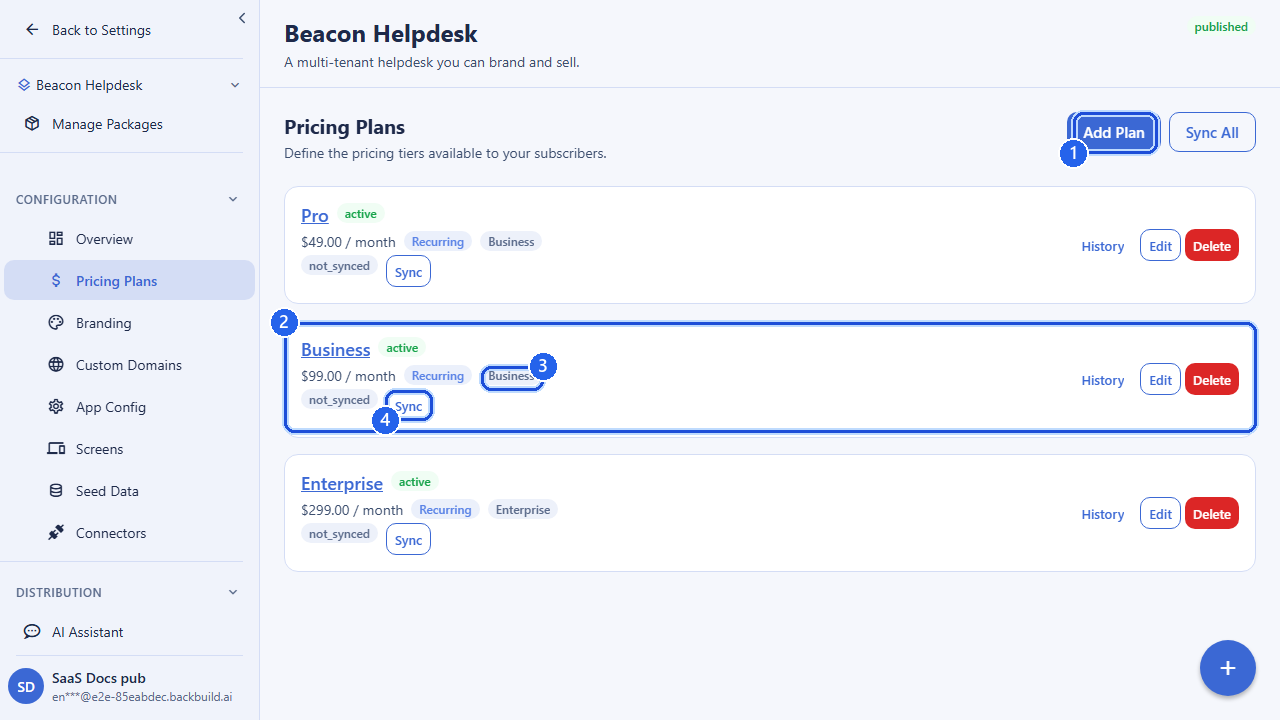
You define plans in Backbuild, but the actual charging happens through your own connected Stripe account. Syncing a package creates or updates the matching Stripe Products and Prices so the plans you defined become chargeable. A plan only becomes purchasable by tenants after it has been synced. Sync is performed per environment, so you can validate pricing in development before it reaches production.
Public pricing is then served from Stripe (cached), which is why a freshly created plan appears for tenants only once the package has been synced for that environment.
You can define, group, and refine plans at any time. A plan only takes live payments once you have linked a Stripe Connect account for that environment, which is where charging, the application fee, and payouts are covered.
Verifying a plan reached Stripe
After you sync, confirm the plan actually reached Stripe before you point customers at it. There are three independent checks, from fastest to most thorough:
- The plan’s sync status in Backbuild. Each plan
records a sync state per environment:
syncedonce it has been pushed,not syncedif it never has, anderror(with the reason) if a push failed. Because sync is per environment, a plan you synced to one environment staysnot syncedin the others until you sync there too. - The public pricing endpoint. Fetch
GET /v1/pricing?package_id={packageId}&environment=production(or your target environment). A synced plan appears in the returnedplansarray with its Stripe-backed price; an unsynced plan does not. This is the exact data your storefront and signup screens read, so if the plan is here, your customers will see it. - Your Stripe Dashboard. Each sync creates one Stripe
Product for the plan and one Price per
billing interval or timeframe you defined. Open the matching mode in your
Stripe Dashboard (test mode for
developmentandstaging, live mode forpreprodandproduction) and you will find the Product and its Prices under your own connected account.
Editing a synced plan and re-syncing is safe. A price change creates a new Stripe Price and archives the previous one; the Product is updated in place. Existing subscribers keep the price they bought (an archived Price stays valid for the subscriptions already on it), and new checkouts use the new Price. Re-sync whenever you change a plan.
If a plan will not sync, the usual cause is that no Stripe Connect profile is linked to the package for that environment, or the linked profile has not finished onboarding. Link an onboarded profile for the environment (see Payments & Stripe Connect), then sync again.
Example: creating a plan
POST /v1/saas-packages/{packageId}/pricing-plans
Authorization: Bearer <token>
Content-Type: application/json

{
  "name": "Business Gold",
  "slug": "business-gold",
  "description": "For growing teams",
  "category": "business",
  "plan_tier": "business",
  "plan_type": "recurring",
  "billing_interval": "monthly",
  "currency": "USD",
  "price_cents": 9900,
  "price_cents_yearly": 99900,
  "trial_days": 14,
  "max_projects": 50,
  "max_members": 25,
  "credits_monthly": 5000,
  "is_highlighted": true
}
The same package can hold a yearly-only enterprise plan, a free academic plan, and a per-seat team plan, each in its own category and each granting its own tier and limits.
API reference
All endpoints require an authenticated session. The owning organization is
resolved from your session; {packageId} is the SaaS
package the plan belongs to.
List pricing plans
GET /v1/saas-packages/{packageId}/pricing-plansQuery parameters
| Parameter | Type | Description |
|---|---|---|
status | string | Optional status filter. |
limit | integer | Page size (1–100). |
offset | integer | Number of plans to skip. |
Create a pricing plan
POST /v1/saas-packages/{packageId}/pricing-plans
Body fields are described in the sections above. name,
category, plan_tier, and price_cents
are required; billing_interval is required for recurring plans.
Returns the created plan with 201 Created.
Get a pricing plan
GET /v1/saas-packages/{packageId}/pricing-plans/{planId}Update a pricing plan
PUT /v1/saas-packages/{packageId}/pricing-plans/{planId}
Send only the fields you want to change. At least one field must be present.
The same validation rules apply (recurring plans need an interval, free
plans must be zero-priced, max_seats ≥ min_seats).
Delete a pricing plan
DELETE /v1/saas-packages/{packageId}/pricing-plans/{planId}Rename a plan’s slug
POST /v1/saas-packages/pricing-plans/{planId}/rename-slugRequest body
{
  "new_slug": "business-gold-annual"
}
The slug is renamed atomically. This is the only way to change a plan’s slug after creation.
Sync plans to Stripe
POST /v1/saas-packages/{packageId}/pricing-plans/syncRequest body
{
  "environment": "production",
  "plan_id": "019d..."
}
environment is required (development,
staging, preprod, or production).
Omit plan_id to sync every plan in the package, or pass it to
sync a single plan. The plans are queued for synchronization with your
connected Stripe account for that environment.
Public pricing
GET /v1/pricing?package_id={packageId}&environment=productionReturns the published, Stripe-backed pricing for a package: the same data your storefront and signup screens consume. This endpoint is public (no authentication) and is IP rate-limited. Plans appear here only after they have been synced to Stripe for the requested environment.
Query parameters
| Parameter | Type | Description |
|---|---|---|
package_id | uuid | The package whose public pricing to return. |
environment | string | One of development, staging, preprod, production. Pricing can differ per environment. |
Response shape
{
  "success": true,
  "plans": [ /* published, Stripe-backed plans */ ],
  "meta": { /* package + currency context */ },
  "cached": true,
  "cacheAge": 42
}
Frequently asked questions
- Can I really change plans and packaging without an engineering cycle?
- Yes. Creating, renaming, reordering, highlighting, re-pricing, and mapping features to plans are all configuration. Your app resolves entitlements at runtime, so a plan change updates access without a code deploy.
- Are limits enforced, or just shown on the pricing page?
- Enforced. Project, member, seat, credit, and storage limits are applied at the point of use; a subscriber is stopped at the action that would exceed the limit, not merely warned on a marketing page.
- When I change a plan, what happens to existing subscribers? Can I grandfather them?
- Existing subscribers keep the price and plan they bought until you explicitly migrate them. New pricing applies to new sign-ups after you sync. To move a current customer to new pricing, update their subscription deliberately.
- Is renaming a plan slug safe?
- Yes. The slug is a friendly label; the plan’s identity is its permanent ID, and subscriptions are tied to that ID. Renaming is an explicit, atomic operation that does not disturb current subscribers.
- Will hidden usage-metered fees blow up the price I charge my customers?
- What is metered (usage credits and storage) is published openly on the pricing page, so you can price it into your own plans. There is no undisclosed success-scaling platform fee.
- What is the difference between a category and a plan tier?
- A category is your presentation grouping (the tabs on the signup screen). A plan tier is the canonical entitlement bucket a subscriber lands in. You choose both independently.
- How do I confirm a plan actually reached Stripe?
- Three ways, fastest first: the plan’s sync status reads
syncedfor the environment you synced; the public pricing endpoint returns the plan for that environment; and the Stripe Product and Price appear under your own connected account in the matching Stripe Dashboard mode (test for development and staging, live for preprod and production). See Verifying a plan reached Stripe above. - Who on my team can change pricing, and is it recorded?
- Pricing changes are permission-gated. Viewing plans and changing them are separate permissions you grant from your organization’s roles, so you can let people see your packaging without letting them edit it. Every create, edit, and delete is written to your organization’s audit trail with who made the change and when.
Related
- Feature Flags & Entitlements: map features to the plans defined here
- Tenants & Subscriptions: migrate a subscriber to a new plan
- Owning Your Product & Data: cost, fees, and portability
- SaaS Builder overview