

Integrations & Connectors
Your product needs to send email, deliver SMS and voice, and take payments. The SaaS integrations surface lets you connect those third-party providers to your product by supplying their credentials once. Backbuild encrypts the secrets, runs a live connectivity check on demand, and uses the connection wherever your product needs that capability, so you never store provider keys in your own app or front-end.
Pro Provider integrations are part of the Backbuild Pro SaaS Builder. See pricing.
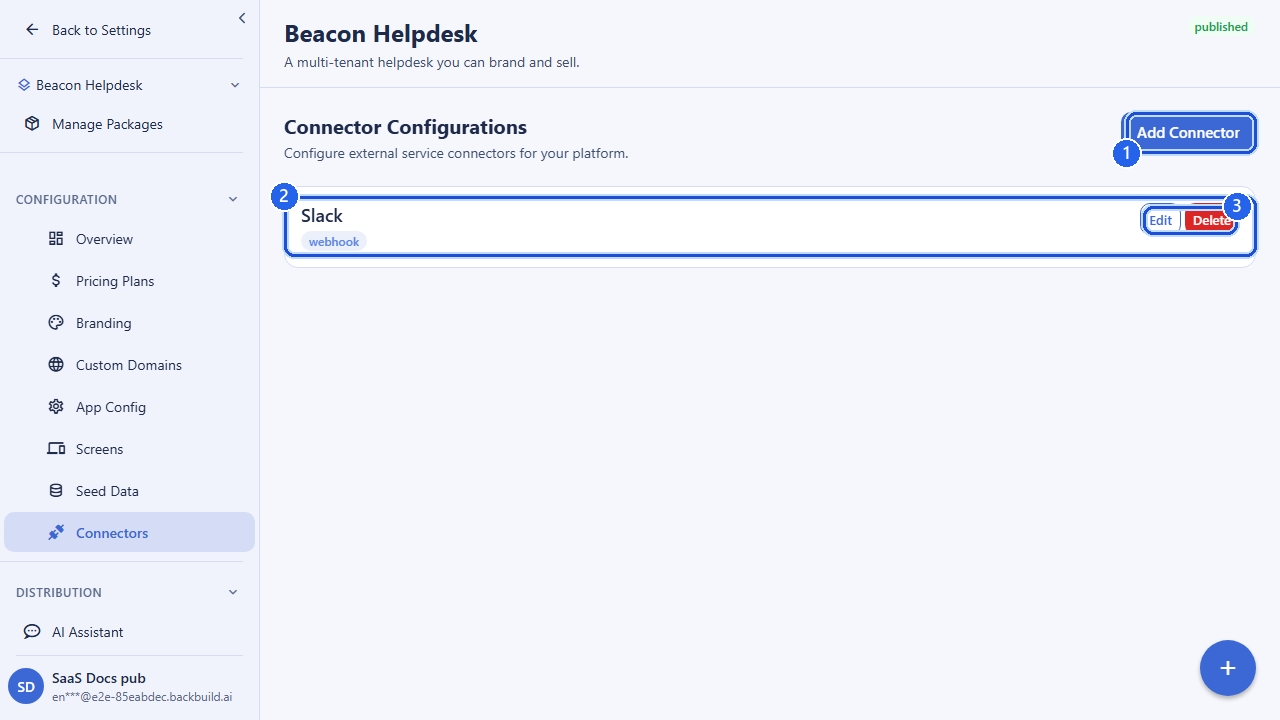
How Connectors Work
A connector is a configured link between your product and a provider you
already have an account with. To add one you tell Backbuild three things:
which provider, any non-secret config (such as a region or a
space URL), and the secrets (API keys or tokens). Backbuild
encrypts every secret at rest and stores only an opaque reference alongside
your integration record. Secret values are never written to logs and are
never returned to a client; the list and detail responses always
omit them.
- Configure: submit a provider with its config and secrets. Backbuild encrypts the secrets and upserts the integration. One configure call per provider; sending it again updates the existing connector.
- Test: ask Backbuild to make a live, read-only call to the provider with the stored credentials to confirm they work.
- Disconnect: remove the integration and its encrypted secrets when you no longer need it.
Supported Providers
Only an explicit allowlist of vetted providers is accepted. Each one expects a specific set of secret keys; supplying an unrecognized provider is rejected.
| Provider | Category | Required secrets | Notes |
|---|---|---|---|
stripe | Payments | api_key (or secret_key) | Your Stripe secret API key. For full subscription billing also see the Payments docs. |
resend | api_key | Transactional email via Resend. | |
sendgrid | api_key | Transactional email via SendGrid. | |
ses | access_key_id, secret_access_key | Amazon SES. Credentials are format-validated (access key ID must match the AWS pattern). | |
twilio | SMS / Voice | account_sid, auth_token | Messaging and voice via Twilio. |
signalwire | SMS / Voice | space_url, project_id, api_token | Messaging and voice via SignalWire. space_url must be a public HTTPS host. |
Secret names you submit must be alphanumeric with underscores (up to 100 characters), and at least one secret is required per connector. Names that are not on a provider’s expected list are stored but ignored by that provider’s connectivity test.
Email routing scopes & sender identity
For the email providers (resend, sendgrid,
ses), your organization’s provider connection carries no
From Email or From Name configuration. The sender identity is derived per
send from the sending mailbox, so mail always goes out as the mailbox that
sent it.
Which categories of outbound mail route through your own provider key is
controlled by outbound routing scopes on the org-level
integration. A scope set is any combination of all_outbound,
marketing, transactional, and
system; all_outbound matches every send from the
org’s onboarded domains.
# Read the current routing scopes for a provider
GET /v1/org-integrations/resend/send-scopes

# Replace them
PUT /v1/org-integrations/resend/send-scopes
Content-Type: application/json

{ "scopes": ["marketing", "transactional"] }
When a send matches one of your scopes, your organization’s provider
key is dispatched ahead of the platform sender. There is deliberately no
platform fallback on a provider error: if your provider rejects the send,
the failure surfaces instead of being silently rerouted through the
platform, so you always know your own sending path is what delivered the
mail. Setting scopes on a provider that is not connected returns a
409.
Configuring a Connector
Submit the provider, a config map of non-secret values, and a
secrets map. The response echoes the integration record and
your non-secret config, never the secret values.
curl -X POST https://api.backbuild.ai/v1/saas/integrations/configure \
  -H "Authorization: Bearer $TOKEN" \
  -H "Content-Type: application/json" \
  -d '{
    "provider": "resend",
    "config": {},
    "secrets": { "api_key": "re_xxxxxxxxxxxxxxxxxxxx" }
  }'
An email provider using Amazon SES, with two secrets:
curl -X POST https://api.backbuild.ai/v1/saas/integrations/configure \
  -H "Authorization: Bearer $TOKEN" \
  -H "Content-Type: application/json" \
  -d '{
    "provider": "ses",
    "config": { "region": "us-east-1" },
    "secrets": {
      "access_key_id": "AKIAEXAMPLEKEY12345",
      "secret_access_key": "wJalrXUtnFEMI/K7MDENG/bPxRfiCYEXAMPLEKEY"
    }
  }'
Configure returns 201 with the integration record. If the
encryption subsystem is unavailable the endpoint returns 503
rather than storing an unencrypted secret. Validation failures (unknown
provider, no secrets, an invalid secret name) return 400 with
details.
Testing Connectivity
After configuring a connector, run a connectivity test. Backbuild decrypts the stored secrets in memory and makes a single lightweight, read-only request to the provider (for example fetching the Stripe balance, listing Resend domains, or reading the SendGrid profile) to confirm the credentials are valid. The SES test validates credential format rather than calling AWS.
curl -X POST https://api.backbuild.ai/v1/saas/integrations/$INTEGRATION_ID/test \
  -H "Authorization: Bearer $TOKEN"

# Success
{ "success": true, "data": { "success": true } }

# Failure (credentials rejected by the provider)
{ "success": true, "data": { "success": false, "message": "Resend API returned 401" } }
Connectivity errors are sanitized: the test never echoes your credentials back, and provider error detail is truncated. A connector whose stored provider is no longer supported, or that is missing required secrets, is reported as a failed test rather than an error.
Listing & Disconnecting
List all of your product’s connectors (paginated), or remove one you no longer need. Listing returns each integration’s provider, status, and non-secret config; any fields that reference stored secrets are stripped from the response.
# List connectors (limit/offset paginate; default limit 20, max 100)
curl "https://api.backbuild.ai/v1/saas/integrations?limit=20&offset=0" \
  -H "Authorization: Bearer $TOKEN"

# Disconnect (also deletes the connector's encrypted secrets)
curl -X DELETE https://api.backbuild.ai/v1/saas/integrations/$INTEGRATION_ID \
  -H "Authorization: Bearer $TOKEN"

# Disconnect response
{ "success": true, "data": { "deleted": true, "id": "019d..." } }
Disconnecting removes the integration record and best-effort deletes the encrypted secrets associated with it, so credentials do not linger after a connector is removed.
Permissions
Each operation maps to a least-privilege permission, so you can let a teammate view and test connectors without granting the ability to change or remove them:
| Operation | Permission |
|---|---|
| List connectors | integration.view |
| Configure a connector | integration.create |
| Test connectivity | integration.view |
| Disconnect a connector | integration.delete |
Security Notes
- Secrets are encrypted at rest and are never returned in any response or written to logs.
- Provider allowlist: only the vetted providers above are accepted; anything else is rejected before any credential is stored.
- Connectivity tests are read-only and run over HTTPS; provider error messages are truncated and never include your credentials.
- SSRF protection: provider hosts you supply (such as a SignalWire
space_url) must be public HTTPS hostnames; private or internal addresses are blocked.
API Reference
All routes require authentication and are scoped to your organization.
| Method & path | Description |
|---|---|
GET /v1/saas/integrations | List configured connectors. Query: limit (1–100, default 20), offset. Secret references are stripped from config. |
POST /v1/saas/integrations/configure | Configure (create or update) a connector. Body: provider, config (non-secret), secrets. Returns 201. |
POST /v1/saas/integrations/:id/test | Run a live connectivity test for a configured connector. Returns { success, message? }. |
DELETE /v1/saas/integrations/:id | Disconnect a connector and delete its encrypted secrets. |
Request body for POST /v1/saas/integrations/configure
| Field | Type | Notes |
|---|---|---|
provider | string | One of: stripe, resend, sendgrid, ses, twilio, signalwire. |
config | object (string→string) | Non-secret values (region, space URL, …). Defaults to empty. |
secrets | object (string→string) | API keys/tokens. At least one required; names are alphanumeric + underscore, up to 100 chars. Encrypted at rest, never returned. |
Common responses
| Status | Meaning |
|---|---|
200 / 201 | Success (201 for configure). |
400 | Validation error (unknown provider, no secrets, invalid secret name, malformed ID). |
403 | Missing the required permission for the operation. |
404 | Integration not found (test / disconnect). |
503 | Integration encryption is not available; the request is rejected rather than storing an unencrypted secret. |
For full subscription billing on top of a Stripe connector, see Payments. For the broader API, see the SaaS API reference.
Frequently Asked Questions
- How are my connector credentials stored?
- Encrypted at rest and held by secure reference. They are never returned back to the client after you save them.
- Can I test a connector before relying on it?
- Yes. A connectivity test confirms the integration works before you depend on it in production.
- Can I disconnect an integration later?
- Yes. You can list configured connectors and disconnect any of them.