

SaaS Builder
The SaaS Builder turns the product you build on Backbuild into a launchable, multi-tenant SaaS business. You define the product, package it, price it, connect payments, gate features by plan, brand it under your own domain, list it on the marketplace, and onboard your own customers, all without writing billing, multi-tenancy, or distribution code.
Pro The SaaS Builder is part of Backbuild Pro. See pricing.
Who This Is For
This documentation tree is written for builders: you, the Backbuild customer who is shipping and selling your own product. Your end customers are called tenants. Each tenant runs inside their own isolated organization with their own data, members, and subscription, all under the product you defined.
The unit you ship is a SaaS package: a single, versioned definition of your product that bundles everything below: pricing, feature entitlements, branding, screens, configuration, marketing pages, and the data that ships with a fresh tenant. You build it once; every tenant who subscribes gets their own instance of it.
What Is Already Built, and What You Decide
The reason to use the SaaS Builder instead of assembling a stack yourself is that the repetitive, error-prone 80% of a SaaS product already exists and is driven by configuration, not code. You do not build auth, multi-tenancy, a pricing page, plan-to-feature gating, checkout, the subscription lifecycle, or custom-domain SSL. You configure them. Knowing exactly where the line between the two falls is the fastest way to set your expectations correctly:
| Already built (you configure it) | Your decisions (only you can make them) |
|---|---|
| Tenant accounts, isolation, and sign-in | What your product actually does for its users |
| The pricing page and plan picker | Your tiers, prices, trials, and limits |
| Plan-to-feature gating and entitlements | Which features each tier unlocks |
| Checkout, subscriptions, invoices, dunning | Connecting your own payout account once |
| Custom-domain SSL and DNS verification | Adding one DNS record to prove the domain is yours |
| The marketplace listing and public pricing feed | Your positioning, screenshots, and copy |
Every launch involves a few decisions only you can make, and no builder can make them for you. What it can do is everything else: every item in the left column is done for you, so the only work left is the handful of real decisions in the right column. A non-technical founder can complete all of them through the builder UI by entering prices and flipping feature toggles, never touching Stripe internals or DNS records beyond a single copy-and-paste.
The End-to-End Flow
A typical builder journey moves through these stages. You do not have to do them strictly in order (the package is a living definition you keep refining), but this is the shape of the path from idea to paying tenants.
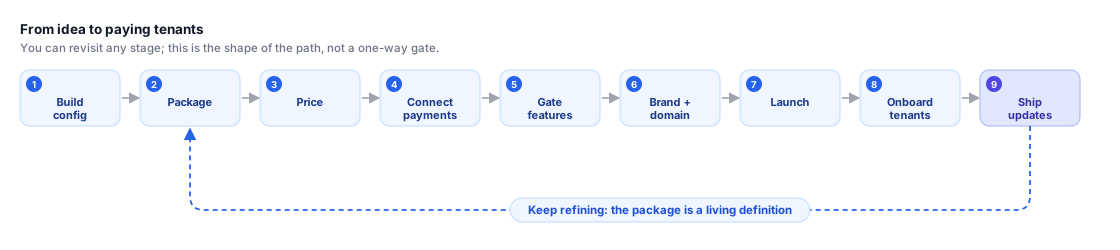
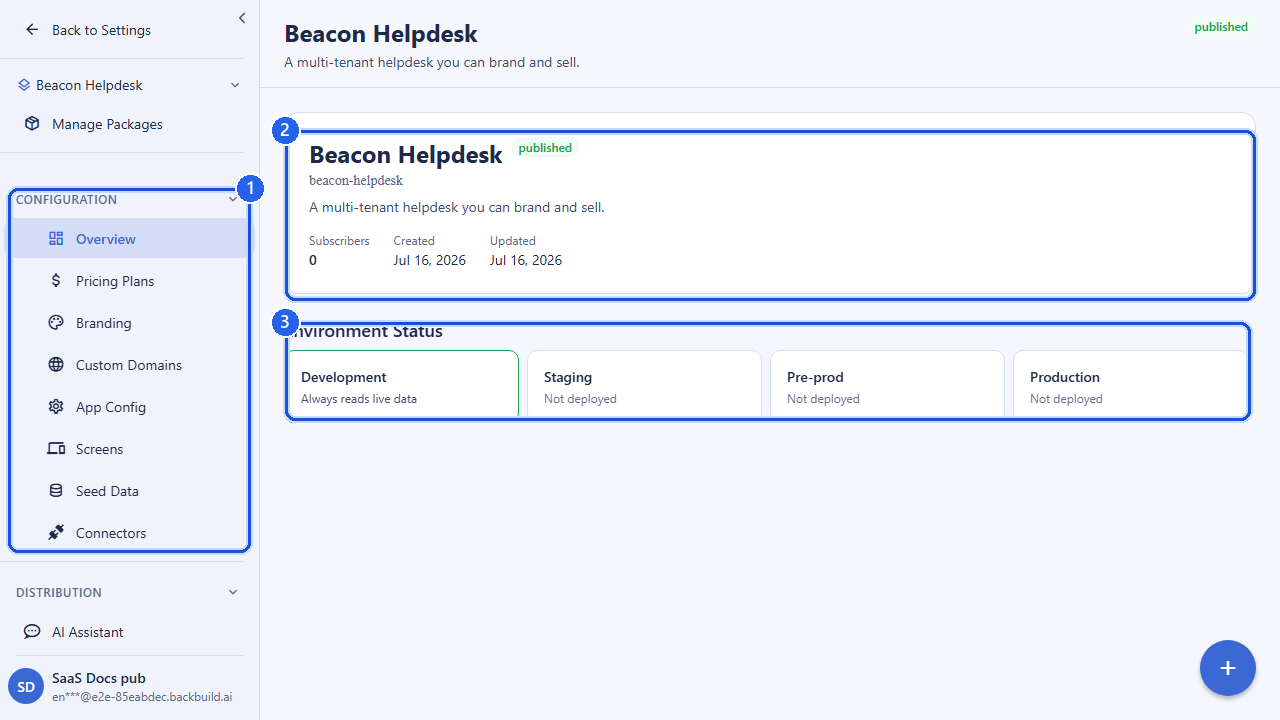
- Build your configuration. Design your product on Backbuild: projects, entity types, views, workflows, screens, and AI capabilities for your domain.
- Package it. Create a SaaS package that bundles your configuration into a single distributable, multi-tenant product with a name, slug, and subdomain.
- Price it. Define pricing plans as free, one-time, or recurring tiers with billing intervals, seats, credits, and resource limits.
- Connect payments. Link your Stripe account through Stripe Connect so subscription revenue from your tenants flows to you, and sync your plans to Stripe.
- Gate features by plan. Map feature flags to each plan so subscribing to a tier automatically unlocks the right capabilities for that tenant.
- Brand and domain. Apply your branding (logo, theme, app name) and attach your own custom domains with managed SSL and DNS verification.
- Launch. Publish your package and list it on the marketplace so prospects can discover, compare, and subscribe.
- Onboard tenants. New customers sign up, pick a plan, pay, and get a provisioned tenant pre-seeded with your data bundle.
- Ship updates. Cut versioned releases and promote changes through environments to your live tenants.
How a Package Bundles Everything
A SaaS package is the root object. Everything else in this tree hangs off a
package: its pricing plans, its domains, its marketing pages, its
screens, its app configurations, its data bundles, and its branding all
belong to a specific package and are managed under
/v1/saas-packages/:packageId/.... When you publish a package,
that whole bundle becomes the product your tenants subscribe to.
You Own What You Build
Before you invest in building on any platform, you deserve a straight answer about ownership and lock-in. On Backbuild the answer is simple: your customers pay into your own payment account, your tenants are your organizations, your product configuration is versioned and retrievable, and the platform takes one clearly stated fee. If you ever decide to leave, your money is already in your own Stripe account, your data is reachable through a standard API, and your configuration is a snapshot you can pull. And if you retire a product, existing customers keep running: unpublishing removes a product from discovery without dropping the tenants who already subscribed. The full treatment, including exactly what is portable and what happens to subscribers if you stop, is on Owning Your Product, Customers, and Data.
Cost, Predictably
Pricing you can plan around matters as much as the features. The SaaS Builder is part of Backbuild Pro at a flat per-seat rate; what is metered beyond your plan (usage credits and storage) is published openly so there are no surprise, success-scaling platform fees. The authoritative numbers, what is included, what is metered, and what each plan costs, live on the pricing page. When you sell your own product on top, Backbuild’s only take is a single transparent application fee per transaction, covered on Payments & Stripe Connect.
Environments: Test Without Touching Live Customers
Every package runs across separate environments (development, staging, preprod, and production) so you can validate pricing, features, and configuration without ever charging a real customer or exposing test data to live tenants. Payments sync per environment (test-mode payments stay in test-mode environments), and you promote a vetted configuration forward with release management rather than editing production by hand.
Topic Map
Every page in the SaaS Builder tree, grouped by stage:
Start here
| Topic | What it covers |
|---|---|
| Owning Your Product & Data | What stays yours: revenue, tenants, data, and configuration, and what happens if you ever leave |
Package & product definition
| Topic | What it covers |
|---|---|
| SaaS Packages | The launchable, multi-tenant product definition: create, update, publish, clone, and the package lifecycle |
| Screens | Screen definitions that shape the in-app experience your tenants see |
| App Configs | Per-platform application configuration (web, iOS, Android, desktop) |
| Data Bundles | Versioned snapshots of the configuration and seed data each tenant starts with |
Pricing, payments & entitlements
| Topic | What it covers |
|---|---|
| Pricing Plans | Tiers, billing intervals, per-timeframe prices, seats, credits, and limits |
| Payments | Stripe Connect onboarding, plan sync, checkout, and subscription billing |
| Feature Flags | Map capabilities to plans so a subscription unlocks the right features |
Brand, domains & marketing
| Topic | What it covers |
|---|---|
| Branding | Logo, favicon, theme, app name, and login-screen appearance |
| Custom Domains | Attach your own domains with managed SSL and DNS verification |
| Marketing Pages | Landing, feature, pricing, and about pages for your product site |
Launch, sell & grow
| Topic | What it covers |
|---|---|
| Marketplace | List, position, and publish your product for discovery and subscription |
| Store | Publish native builds to the app stores: accounts, listings, age ratings, compliance checks, and submissions |
| Tenants | Onboard, manage, and administer your end customers and their subscriptions |
| Releases | Versioned releases and promotion across environments |
Extend & operate
| Topic | What it covers |
|---|---|
| Integrations | Connectors and third-party integrations available to your product |
| AI Models | Configure the AI models and providers your product uses |
| KYC | Identity and eligibility verification for signup and onboarding |
Frequently Asked Questions
- Does the SaaS Builder actually save time, or do I still wire everything myself?
- Auth, tenant isolation, the pricing page, plan-to-feature gating, checkout, the subscription lifecycle, and custom-domain SSL already exist and are driven by configuration. You make a handful of real decisions (your product, tiers, prices, features, payout account, domain), not a rebuild of the plumbing.
- Can I launch without coding or hiring a developer?
- Yes. The whole path, brand, plans, payouts, and a custom domain, is configured through the builder UI by entering prices and flipping toggles. The only technical step is pasting one DNS record to prove your domain is yours, and that is guided.
- Is the money going to me, and what does the platform take?
- Your customers pay into your own Stripe account and payouts land in your bank. Backbuild takes a single transparent application fee per transaction. See Payments & Stripe Connect.
- Do pricing or packaging changes require a redeploy?
- No. Plans, prices, trials, and which tier unlocks which feature are configuration. Your app checks entitlements rather than hardcoded plan names, so a change takes effect without shipping code. See Feature Flags & Entitlements.
- Can I export everything and leave?
- Yes. Your billing is in your own Stripe account, your data is reachable through the API, and your configuration is a versioned snapshot. See Owning Your Product & Data.
- How do I keep test and live separate?
- Every package runs across development, staging, preprod, and production. Test-mode payments stay in test environments, and you promote vetted configuration forward with release management.
API Reference
The SaaS Builder is driven by a REST API. Every resource in this tree is managed under the package it belongs to. The core entry points are:
GET /v1/saas-packages: list your SaaS packagesPOST /v1/saas-packages: create a packagePOST /v1/saas-packages/:packageId/publish: publish a packagePOST /v1/saas-packages/:packageId/pricing-plans: create a pricing planGET /v1/marketplace/plans: public marketplace plans for a packageGET /v1/pricing: public, read-only pricing for your product (no auth)
Each topic page below includes a full REST API reference for its area. Start with SaaS Packages.