

AI Support with Virtual Workers
Your help desk is a first-class place of work for a Backbuild Virtual Worker. You can assign a named AI worker and a skill to a stage of a ticket workflow, and tickets that reach that stage are picked up, read, and answered, as a draft a person reviews by default. This gives you faster first responses and genuine nights-and-weekends coverage, while you stay in control of what a worker does on its own and what a person must approve. After this page you will understand how AI staffing works on the help desk, why it is built around resolution rather than closing tickets to inflate a number, and exactly where the human stays in control.
Virtual Workers are available on every plan and run on universal usage credits only while they work. The full worker model, hiring, budgets, and the autonomy dial, is in Backbuild Virtual Workers; this page covers how they attach to the help desk.
Staffing a Stage or a Category
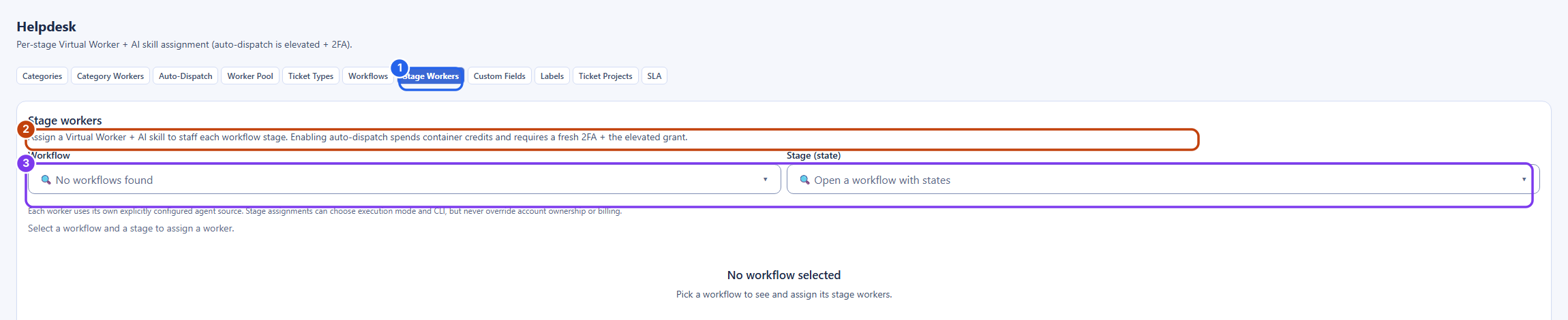
After this section you will be able to route tickets to an AI worker at the right point. In your help desk settings you bind a worker and a skill to a specific workflow stage, or to a category, so the tickets you choose, and only those, are handled by the worker. When a ticket reaches that stage, the worker runs the assigned skill on it, reads the ticket's real conversation, and posts its answer as an internal note for your team to review. You map AI onto your existing process one stage at a time, rather than turning it loose on the whole queue.
Drafts by Default, Under Your Control
After this section you will know the single most important boundary. By default, a support worker does not message the customer on its own. It reads the public conversation, writes a reply, and posts that reply as an internal note on the ticket, the same kind of note your human agents leave each other. A person then reads it, edits it if needed, and sends it, or discards it. Whether a worker may post a public reply itself, or advance or resolve a ticket, is a separate per-capability grant you control: keep it supervised until a queue's answers have proven correct, then extend it. Above every dial sits one gate you cannot switch off: dispatching an external email to an outside recipient always requires a person, in every setting. This is why AI support here raises your response speed without risking your satisfaction scores: the worker does the reading and the writing, which is most of the work, and you decide, per capability, what it may do on its own. The full draft-review flow and the separate reply-versus-resolve gates are in Support Workers.
No Surprise Spend
After this section you will know AI support cannot run away with your budget. The controls are conservative by design:
- Auto-dispatch is off by default. Until you turn it on for a stage, tickets wait for a person to hand them to the worker, so nothing spends credits by surprise.
- Per-ticket budgets bound the work. Auto-advancing a ticket on a worker's success is bounded per ticket, so a stage cannot loop a worker indefinitely.
- A customer reply never spins up a worker. When a requester replies, your team is notified, but a reply on its own does not dispatch a container. Work happens on your terms, not on every inbound message.
- Auto-advance is gated on success. A stage moves forward only when the worker's run actually succeeds, and you keep a human gate wherever you want one.
Coverage Around the Clock
After this section you will be able to cover the hours your team does not. A worker keeps a shift. Put a support worker on an evening or weekend shift and it picks up tickets after your human team logs off, drafting replies that are waiting for review when the team returns. Off shift, a worker does nothing unless a task was scheduled, so nothing happens at an hour you did not intend, and nothing that arrives is dropped. Shifts and holidays are covered in Support Workers.
Will AI staffing help or hurt my satisfaction and cost? It is built to help both. The worker drafts an answer for a human to review, so a wrong answer never reaches a customer unreviewed, and it works only when you dispatch it, on credits metered only while it works. It raises first-response speed and covers off-hours without an overnight team.
Will the AI make my agents look bad in front of customers? By default it does not talk to the customer at all: it posts an internal draft, and your agent decides what to send. Letting a worker post a reply itself is a separate grant you extend only once a queue's answers have proven reliable, and an external email to a customer always requires a person. You stay in control of the customer-facing message.
Does the worker close tickets to inflate a deflection number? No. Replying and resolving are separate gated capabilities. A worker can draft replies on a queue while still being unable to close anything there, so nothing gets marked resolved just to move a metric. Grant close only where a queue's answers have proven correct.
Can the AI leak data across tenants or promise something on my behalf? A worker runs under your organization's roles and can never exceed the access of the identity behind it, and it drafts for human review rather than committing to a customer. The isolation and governance detail is in Security, Privacy and Governance.
Where to Next
- Support Workers: the full guide to staffing a ticket stage, the draft-review flow, and reply versus resolve.
- Autonomy and Approvals: the per-capability dial and the send-email approval floor.
- Ticket Types, Workflows and SLAs: the stages a worker is assigned to.
- Security, Privacy and Governance: how a worker is bounded and audited.