

Real-time Collaboration
Backbuild lets several people edit the same document at once, shows you who else is there and where their cursor is, and guarantees that no one’s changes overwrite anyone else’s. Your edits are saved continuously, survive a refresh or a dropped connection, and merge back cleanly when you reconnect. This page teaches what that feels like in use, why you never lose work, and how to read the signals the editor gives you.
Editing Together, Live
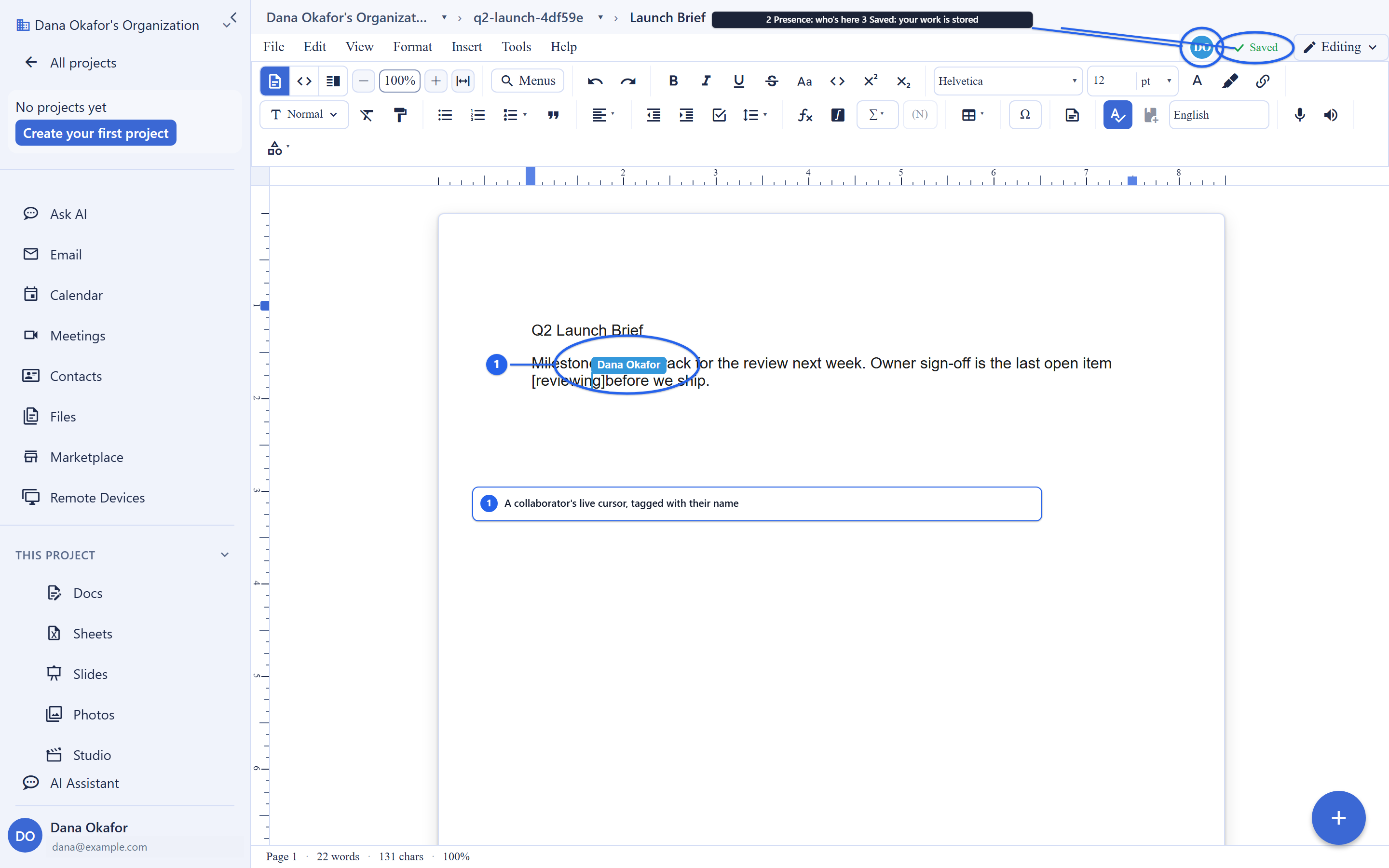
Open a document that a colleague already has open and you are both simply editing it, at the same time, with no locking and no turn-taking. As each of you types, your changes appear in the other’s view within moments, and you can each see the other’s cursor and text selection move. There is no “check out” step, no “someone else is editing” wall, and no reconciling two copies afterward.
The fear everyone brings to co-editing is “we both typed and one of us
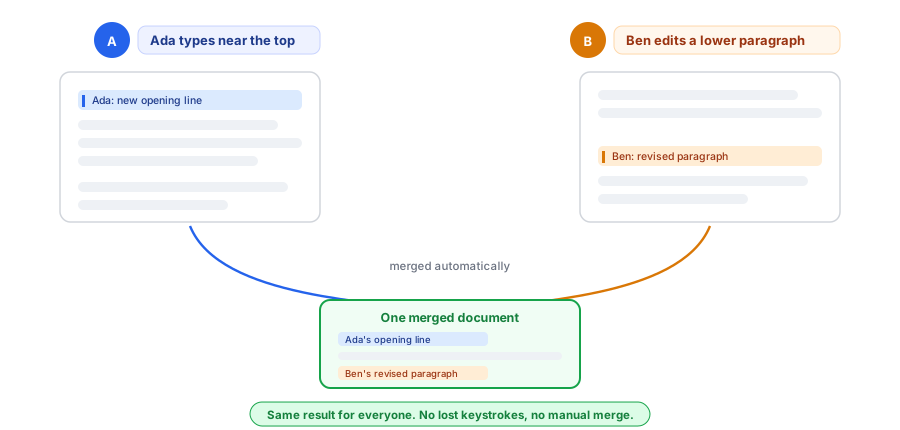
got clobbered.” That cannot happen here. Concurrent edits from every
participant are merged deterministically so they all converge to the same
final document, no matter the order in which changes arrive. There is no
winner-takes-all save, and there is no final_v3 file. The
outcome is the plain one you want: everyone’s changes are kept, and
everyone sees the same result.
- No locks: participants never block each other; all edits apply concurrently.
- Live cursors and selections: each person’s caret position and highlighted range are visible to the others as they move.
- Presence: the editor shows who is currently viewing or editing.
- Conflict-free merging: concurrent edits always converge to one consistent document, automatically.
Your Work Is Never Lost: Offline-First
After this section you will know exactly what happens to an edit you make on a flaky connection or fully offline, and how to tell at a glance whether your work is saved. Offline is treated as a normal state, not an error.
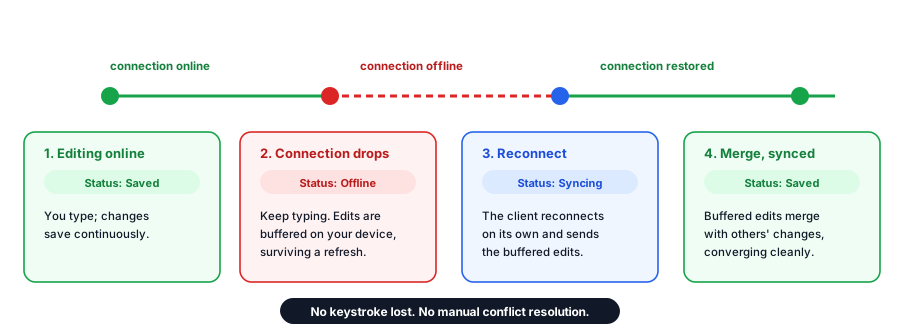
While you type, your changes are captured locally first. If your connection drops, you keep editing: the changes are held on your device and queued. When connectivity returns, the client reconnects on its own and sends the queued changes, and they merge with anything others changed in the meantime using the same conflict-free logic as live editing. Nothing you typed is thrown away, and you are never asked to pick which version to keep.
- Local persistence: your document state is kept on your device, so edits survive a page refresh or a dropped connection.
- Automatic reconnection: the client reconnects by itself when the network returns.
- Queued updates: changes made while offline are buffered and sent once you are back online.
- Automatic merge: offline edits merge with remote changes on reconnect, guaranteeing convergence with no manual conflict step.
Reading the sync-status indicator
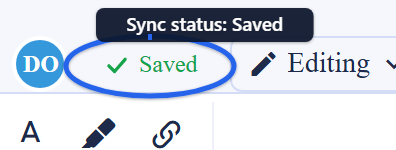
The editor shows a sync-status indicator so you always know whether your work is saved and synchronized. It tells you when everything is saved, when a sync is in progress, and when you are working offline with changes waiting to send. When it reads saved, your edits are safely recorded; when it shows offline, keep working, because your changes are being held and will send automatically.
Who Is Here Right Now
Presence answers the everyday question “is anyone else in this document, and did they get my edit?” The editor shows the participants currently in the document, and renders each person’s live cursor and selection in their own color as they work. Opening the same document on two of your own devices, or in two tabs, is ordinary collaboration, not a conflict or a takeover: every connection to the same document joins one shared, authoritative session, so all views stay consistent.
Version History and Reverting
Backbuild keeps a full, revertible version history for a fixed set of platform resources, so you can inspect any earlier version and roll back to it with a complete record of who changed what and when.
Scope, so you are not surprised: resource versioning covers
builder-configuration resources, not your files or documents. The versionable
types are skill, entity_type,
screen_definition, workflow,
pricing_plan, and tool. Your documents are handled
differently: collaborative editing preserves your work continuously as you
type, and managed published documents update in place by source path (see
Publishing managed documents).
If you are looking for file version history specifically, that is a separate
mechanism from the resource versioning described here.
Inspecting the history
Each version records what changed, who made the change, and when, giving you an auditable trail of modifications to a resource.
# List version history for a resource
curl -H "Authorization: Bearer $TOKEN" \
  https://api.backbuild.ai/v1/versioning/workflow/019d...

# Response
{
  "success": true,
  "data": {
    "versions": [
      {
        "version": 3,
        "changelog": "Updated status from in_review to approved",
        "created_by": "019d...",
        "created_at": "2026-04-13T14:30:00Z"
      },
      {
        "version": 2,
        "changelog": "Updated description and assigned reviewer",
        "created_by": "019d...",
        "created_at": "2026-04-12T10:15:00Z"
      },
      {
        "version": 1,
        "changelog": "Initial creation",
        "created_by": "019d...",
        "created_at": "2026-04-11T09:00:00Z"
      }
    ],
    "pagination": {
      "total": 3,
      "limit": 50,
      "offset": 0
    }
  }
}
Getting a specific version
Retrieve the full snapshot of any individual version by its version number.
# Get a specific version of a resource
curl -H "Authorization: Bearer $TOKEN" \
  https://api.backbuild.ai/v1/versioning/workflow/019d.../2
Reverting
Revert a resource to any previous version. Reverting creates a new version on top of the history rather than deleting anything, so the revert itself is tracked and nothing is lost. You can add a short changelog note explaining why.
# Revert a resource to a previous version
curl -X POST https://api.backbuild.ai/v1/versioning/workflow/019d.../revert \
  -H "Authorization: Bearer $TOKEN" \
  -H "Content-Type: application/json" \
  -d '{
    "version": 1,
    "changelog": "Reverting to original draft after review feedback"
  }'
A request for a resource you cannot see returns a not-found result rather than revealing that it exists; reverting to the version already current returns a conflict; and reverting requires the permission to modify the resource.
How the Collaboration Connection Works
This section is for the reader who wants to understand the connection model before integrating with it. Collaboration runs over secure WebSocket connections, and every connection authenticates itself, because browsers cannot attach custom headers to a WebSocket.
The live document channel
Real-time editing of a document runs over a WebSocket that takes a short-lived authentication token and the target document’s identifier. Every connection to the same document, across all participants and all of their devices, joins one authoritative session that is isolated to your organization. The server decides for itself what kind of document is being opened and whether you may read or write it; a client cannot talk its way into a document it is not entitled to, and a denial looks the same whether the document is off-limits or simply does not exist.
# WebSocket connection for real-time document editing
# `token` carries a short-lived auth token; `documentId` (a UUID) selects the document
wss://api.backbuild.ai/v1/yjs/ws?token=AUTH_TOKEN&documentId=019d...

# Every connection with the same documentId joins one authoritative,
# per-organization session. Multiple devices or tabs is collaboration,
# not a takeover.
The presence and change channel
A separate WebSocket carries presence, cursor movement, and notifications that a list of documents changed, so the app can update live without polling. It is opened with a single-use, short-lived join ticket that you request first over an authenticated call and that is consumed the moment the connection opens, so a ticket cannot be reused or replayed.
How the token is protected
Because a browser has to put the token in the URL for a WebSocket, Backbuild applies defense-in-depth around it:
- Short-lived: collaboration tokens and tickets are tightly time-bounded.
- Connection-scoped: the token authenticates the connection at establishment only and is not retained afterward.
- Leak-resistant: the token is kept out of logs and request metadata.
- Attributable: connections are logged with the identity of the connecting user for security monitoring.
Message format
Once connected, document synchronization and awareness (cursors, selections, presence) travel as compact binary messages, and session and authentication status travels as JSON.
| Message type | Format | Purpose |
|---|---|---|
| Sync | Binary | Document state synchronization and incremental updates. |
| Awareness | Binary | Cursor positions, selections, and user presence. |
| Auth | JSON | Authentication status and session information. |
Frequently Asked Questions
Did my changes save? What happens to edits I make offline?
Your edits are captured locally as you type and saved continuously. If you go
offline they are held on your device and queued, then sent automatically when
you reconnect, where they merge with everyone else’s changes. The
sync-status indicator tells you at any moment whether your work is saved,
syncing, or waiting to send.
Who else is in the document right now?
The editor shows presence: the participants currently in the document, each
with a live cursor and selection in their own color. Your own second device or
second tab shows up as normal collaboration, not a conflict.
Two of us edited at the same time. Will one overwrite the other?
No. Concurrent edits merge deterministically and converge to the same
document for everyone. There is no save-over and no lost keystroke.
Can I see who changed what, and roll back?
For versionable resources (skills, entity types, screen definitions,
workflows, pricing plans, and tools) you get a full history of who changed
what and when, and you can revert to any earlier version; the revert itself is
recorded. Your documents are preserved continuously by collaborative editing,
and managed published documents update in place; file version history is a
separate mechanism from resource versioning.
Is a document from another organization ever reachable over the
collaboration connection?
No. Every collaboration session is isolated to your organization, and each
connection is authorized per document. A denial is indistinguishable from a
document that does not exist, so the connection cannot be used to probe for
content you are not entitled to.
API Reference
WSS /v1/yjs/ws: WebSocket endpoint for real-time document editing (token+documentIdquery parameters).WSS /v1/collaboration/ws: presence, cursor, and document-list change channel (single-use ticket auth).GET /v1/versioning/:resourceType/:resourceId: list version history for a resource.GET /v1/versioning/:resourceType/:resourceId/:version: get a specific version.POST /v1/versioning/:resourceType/:resourceId/revert: revert to a previous version.
Related concepts
- Files: the documents you co-edit, plus visibility, sharing, and managed publishing.
- Semantic Search: find documents by meaning.
- AI: the assistant that reads and grounds answers in your content.
See the API Reference for complete request and response documentation.