

AI Assistant, Skills & Agents
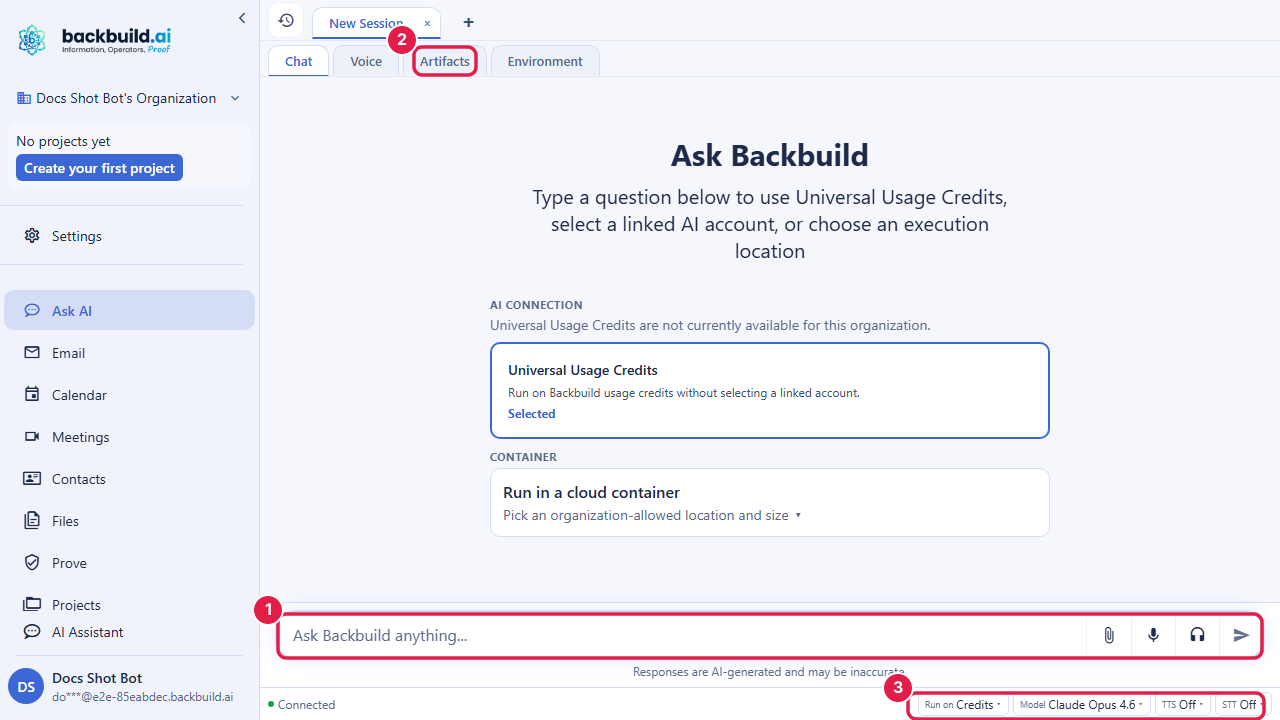
Backbuild includes a built-in AI assistant for real-time, context-aware conversation grounded in your organization’s data. It can answer questions about your work, produce artifacts, run custom skills you author, operate autonomously inside on-demand container environments as a virtual worker, and talk with you hands-free in voice mode. Every request runs under your identity and your access-control policies, so the assistant can only see and do what you can.
After reading this page you will be able to: hold a grounded conversation with the assistant; author a multi-step skill; understand what the assistant can do in a container and when to reach for a virtual worker; explain the data-privacy posture to a security reviewer; know how usage is metered so there are no surprises; and, as an administrator, set the policies that decide who can use these capabilities and where they run.
The AI assistant, custom skills, artifacts, containers, and virtual workers are available on every plan, including Free. You can power the AI with your own provider keys or with universal usage credits. Container runtime, voice, and speech draw on usage credits. See the pricing page.
The assistant, and what “grounded” means
The assistant is a real-time, streaming conversation. Responses stream token by token, conversation state is kept across messages so it stays fast and context-aware, and it can format replies as plain text or richer structured output when that improves clarity.
What makes it useful rather than a generic chatbot is that it is grounded in your organization’s data. It can reason over your projects, entities, documents, tasks, and search results, so you can ask real questions (“summarize the open tickets for the Acme project,” “what changed on this entity this week?”) and get answers from your actual data rather than guesses. When it is not sure, a well-authored skill asks a clarifying question or hands off rather than inventing an answer; grounding plus that habit is how you keep it from confidently stating something false.
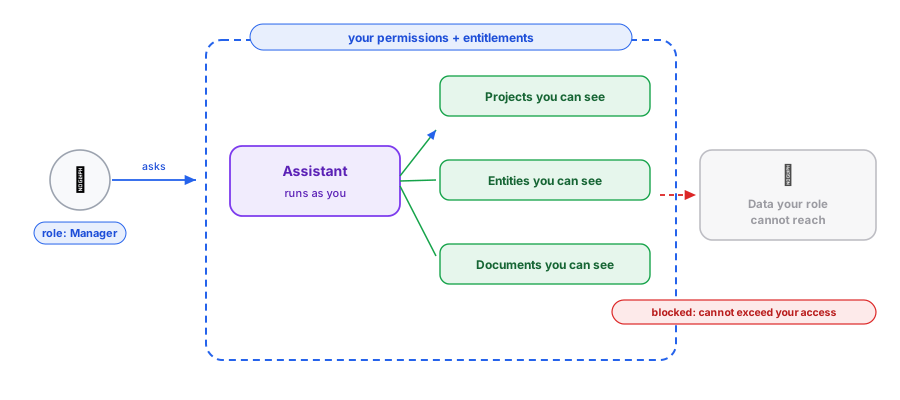
Every request runs under your identity and respects the same role-based access control, organization membership, and feature entitlements as the rest of the platform. The assistant can only see and act on what you are allowed to see and act on; it cannot be used as a side door to data your role does not reach.
Need to find something rather than chat about it? Meaning-aware search over your content is documented separately in Semantic Search.
Assistant, automation, or agent?
The assistant chats and reasons on demand. An automation rule is a fixed trigger-and-action you set up once and let run. An agent is the assistant given a goal and the room to decide its own steps, which is what happens inside a container or as a virtual worker. Reach for a fixed automation when the process is known and repeatable; reach for an agent when the path is genuinely open. They compose, and an automation can start an AI session as one of its steps.
Data and privacy posture
This section is for anyone who has to approve AI before the team can use it. The short version: your data stays yours.
- No training on your data. Your organization’s content is not used to train AI models.
- Encrypted in transit and at rest. Data moving to and from the assistant is protected with modern transport encryption, and stored data is encrypted at rest.
- Bounded by your access. Every request runs under the requesting user’s identity and permissions. The assistant, a skill, and a virtual worker all inherit that boundary and cannot exceed it, which is the direct answer to the oversharing concern: an agent cannot reach data the person who invoked it could not.
- Attributable. AI activity is tied to the identity that ran it, and virtual-worker sessions are surfaced and labelled as such, so an AI-authored action is never mistaken for an unattributed human one.
- Where it runs is governed. Container workloads honor your organization’s residency policy, so you can keep AI compute in approved regions. See Artefact Data Residency.
For the platform-wide security and compliance posture (isolation, audit, encryption, frameworks), see Security & RBAC and the Trust Center.
Conversations and history
Conversations are stored and can be retrieved later. Each conversation is scoped to a user and an organization, preserving full context across sessions so you can pick up where you left off. The endpoints that list and open conversations are authenticated and return only conversations you are permitted to access; another user’s conversation identifier resolves to a not-found for you, never to their content.
Custom AI skills
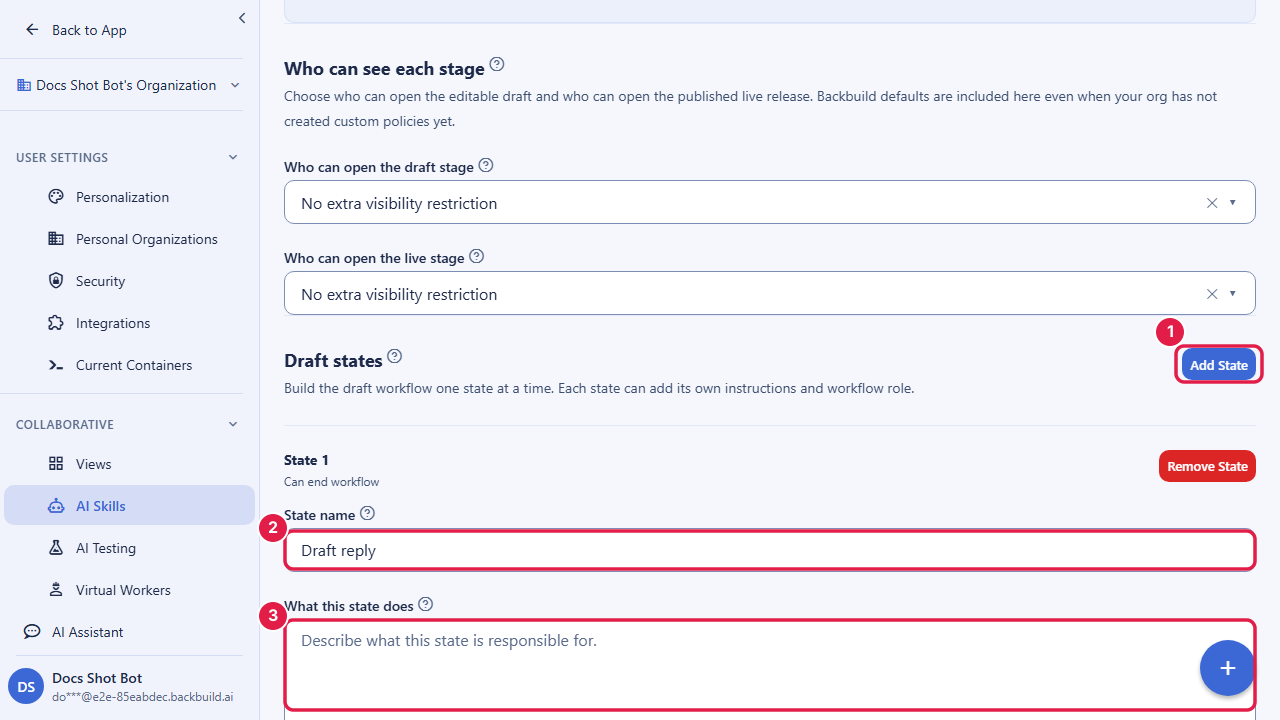
A skill is a reusable, custom AI capability you author for a specific job. It is more than a single prompt: each skill is a guided flow of states and transitions, so you can model multi-step behavior that gathers inputs, branches on conditions, asks clarifying questions, and produces a structured result, rather than relying on one monolithic instruction. This is what an automation rule invokes when it runs an AI session, and what a support team points at ticket events for triage.
- Per-state prompts: shape behavior step by step across the flow, not just once.
- Model selection: choose the model that powers the skill, and override it per state when a step needs more or less capability. Only models included in your plan are selectable.
- Test and live stages: iterate a skill in a test stage, then publish a versioned snapshot to a separate live stage, so changes to production behavior are deliberate and reviewable.
- Visibility policies: control who can use each skill (by user, role, group, or department), independently for the test and live stages, and let people request access.
- Per-organization: each organization defines and manages its own skills.
Artifacts
As the assistant works, it produces artifacts: the files and outputs created during a session, such as code, documents, images, and data files. Artifacts are first-class outputs, captured, named, and made available to download, separate from the chat transcript. They are pushed to you live as they are produced, so the artifacts list updates in real time with no manual refresh, and each carries its name, type, size, last-updated time, and an authenticated download path.
| Artifact type | Examples |
|---|---|
| Code | Source files and scripts the assistant writes |
| Document | Generated reports, summaries, and written deliverables |
| Image | Generated or rendered images |
| Data | Structured data files and exports |
| Other | Any other generated output produced during the session |
Working in a container
For work that goes beyond conversation, the assistant can operate inside an on-demand container environment: a private, isolated workspace provisioned just for your session. Inside a container the assistant is an agent, running tools and code to carry out multi-step work rather than only answering.
Container environments are an advanced capability metered on usage credits, with larger sizes costing more per hour. A session that lacks the credits to start will not start. See the pricing page.
- Interactive terminal: drive a real shell, run commands, inspect output.
- Code execution: write and run code in the workspace and read back results, so the assistant can build, test, and validate as it goes.
- Browser-based IDE: open the workspace in a code editor in your browser to review and edit alongside the assistant.
- Agentic tasks: plan and execute longer, multi-step work toward a goal, using the tools available in the environment.
- Source control: clone a project’s repository, work on a branch, and commit changes back to that branch.
Your workspace persists
Each user has a durable, private home workspace mounted into the container. Your files persist across sessions: a container can be torn down to release its compute and later resumed, restoring the same workspace. Tearing a session down reclaims compute; it does not lose your work.
Connecting is brokered for security
Connecting from the browser is brokered. When you open a container, the platform issues a one-time, short-lived ticket and a separate short-lived connect token bound to you and that specific session, then returns the URL your browser opens against. Long-lived credentials never travel in the connection URL, and the running container independently verifies that the browser, the session, and its data access all belong to the same authenticated user.
Virtual workers
A container session can run as a plain assistant workspace, or as a virtual worker: an autonomous session that runs the agentic assistant to complete dispatched work, surfaced and labelled as a virtual worker in your history. A virtual worker can be bound to a project so its work is scoped to that project’s repository.
This is how teams get coverage that does not depend on someone being awake: a virtual worker can pick up repetitive first-touch work around the clock. The scoping rules are the point that makes it safe to trust: a virtual worker runs under an authorized identity and inherits that identity’s permissions and entitlements, so it cannot act beyond what that identity could, and its actions are attributed to it rather than passed off as a human’s. Keep humans for judgment and relationships; let a virtual worker absorb the repetitive volume.
Where your AI work runs
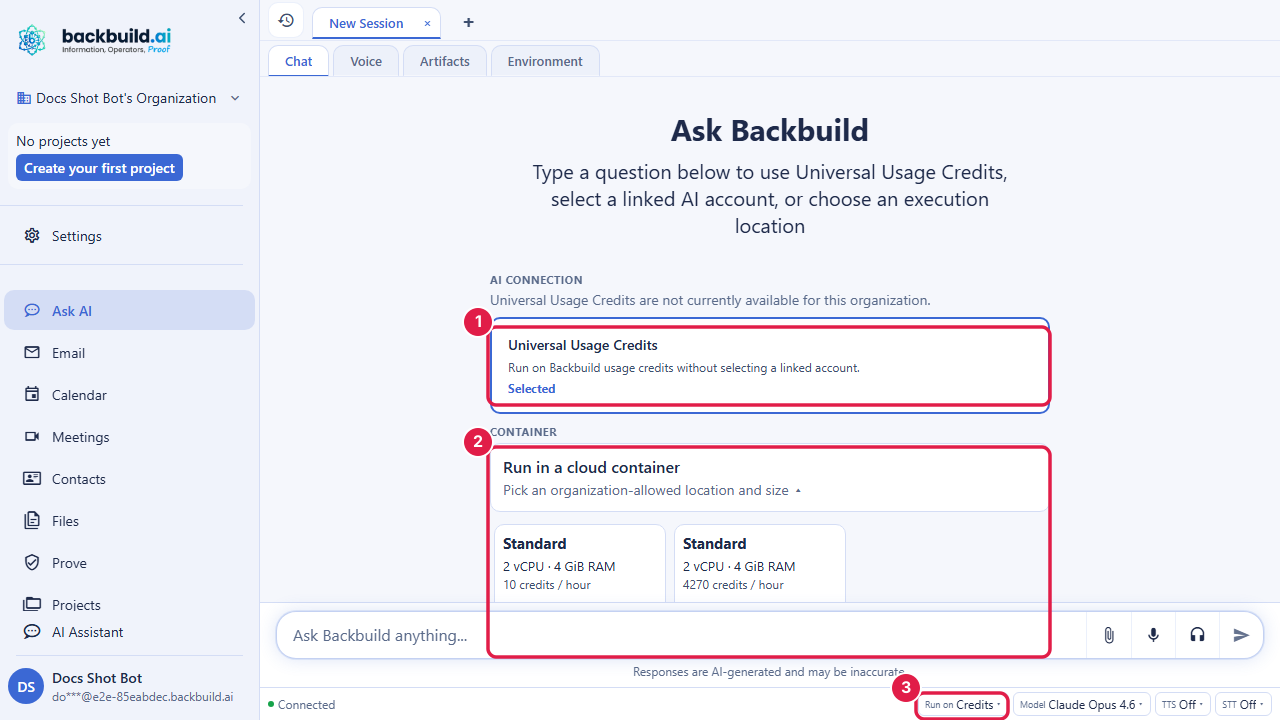
When you start agentic work, you choose where it runs. The run-location selector shows the targets available to you and why: your credit balance and whether container runs are permitted by policy, plus any of your own connected hosts. Beyond platform containers, you can run agent turns on a host you control:
- A connected IDE extension or desktop app that has linked to your account can receive and run agent turns locally.
- A local command-line agent you have linked can serve as a run target too.
Each section of the selector degrades safely: if a target is unavailable (no credits, policy off, nothing connected), it simply does not offer that option. Connecting your own hosts is covered in Browser Extension and Connect a Local AI Agent; external agents reaching your org over the standard protocol are covered in MCP & Agent Integration.
Voice mode
The assistant supports voice mode for hands-free, spoken interaction over the same real-time connection as text chat. You start a voice session, speak your request, and the assistant responds with speech. Voice replies are tuned to be heard rather than read (short, conversational, free of visual-only formatting like tables or code blocks), and you choose the voice the assistant speaks with. It is designed for quick confirmations, status updates, and brief explanations, with the assistant offering more detail when you ask.
Voice mode is an advanced capability gated by plan and feature entitlement. Speech synthesis and transcription draw on usage credits. See the pricing page.
Choosing the AI model
Models are organized into performance tiers, fast, balanced, and reasoning, and availability is controlled by your plan’s entitlements. You set a model at the organization level, and can also choose a specific allowed model per conversation when a chat needs more or less capability. Skills can pin their own model and per-state overrides on top of that. Only models your plan includes are ever selectable, so a chat cannot quietly run on a model you are not entitled to.
Eligibility and metering
The assistant itself is available on every plan. The advanced capabilities, containers and voice, are gated by plan and feature entitlement, and are metered so cost is predictable.
- AI model usage: bring your own AI provider keys, or use universal usage credits to cover model usage.
- Container runtime: metered by the hour against your credits, with larger sizes costing more. A session without enough credits will not start.
- Voice and speech: text-to-speech and speech-to-text are metered against your credits.
Container, voice, speech, and AI-model usage all draw on the same universal usage credits (with the option to bring your own AI keys for the model itself). See Universal Usage Credits and the pricing page.
Governance controls
This section is for administrators. You decide whether these capabilities are available, who may use them, and where they run. Policies are enforced on the server: turning a surface off in the interface is backed by an authoritative check, so a disabled capability cannot be used by forcing a request. A UI toggle is never the only thing standing between a user and a capability.
Container policy
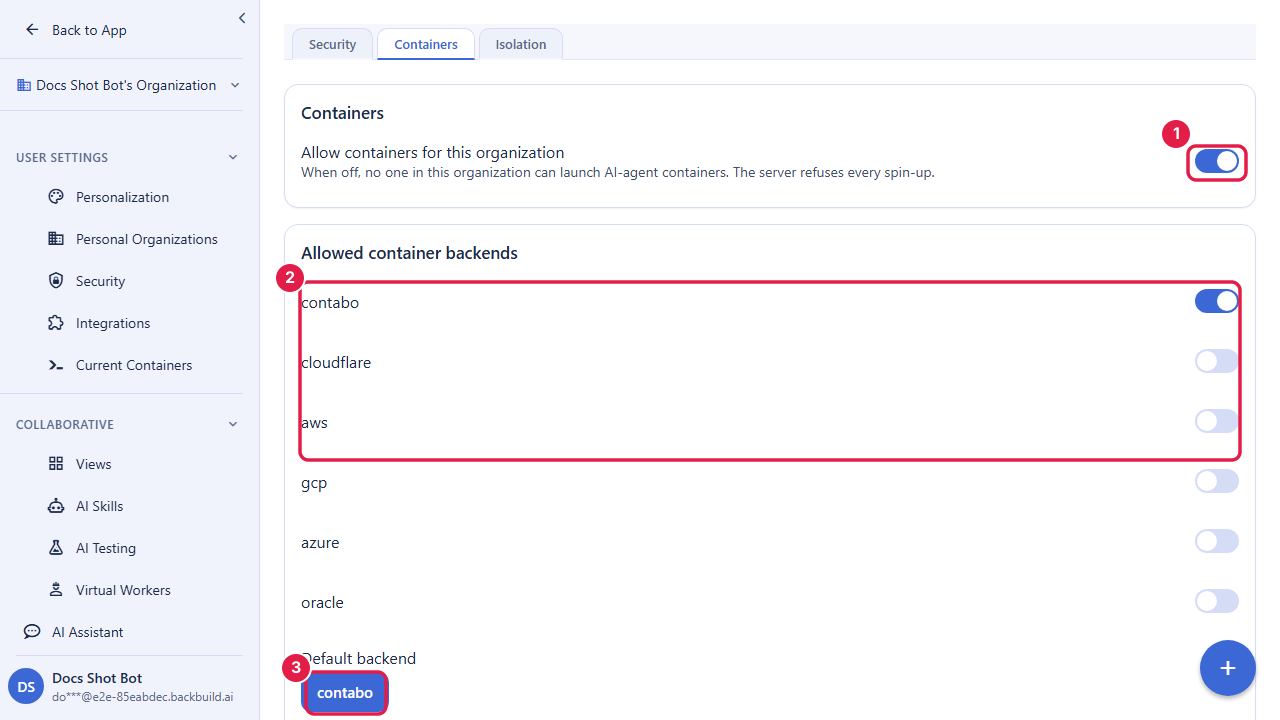
- Org-wide master switch: when off, container launches are refused for every member.
- Who may use them: access requires membership plus the right permissions; grant container use through roles, and members without a grant are denied.
- Which sizes: select the allowed sizes and a default, so members can only provision approved instance types.
- Where they run: select allowed cloud backends and a default, and restrict to specific regions for data residency, so workloads stay in approved locations.
- Pin or allow choice: decide whether members may pick a backend, size, or region, or are pinned to your defaults.
- Idle and concurrency limits: set idle grace and auto-teardown windows to stop billing on unused sessions, and a cap on concurrent containers.
- Per-project overrides: a project can narrow the org policy (for example fewer backends or sizes) or inherit the defaults.
- SaaS-package configuration: organizations that resell on the platform can configure container availability per package and set their own resale pricing.
Voice policy
Voice follows the same plan-and-entitlement model: available to an organization only when its plan grants the voice entitlement, enabled for the organization, and scoped to the members who should have it. Because speech draws on credits, voice availability follows the same credit and entitlement controls as the rest of the assistant.
Is my data used to train the models?
No. Your data is not used to train models, is encrypted in transit and at
rest, and every request runs bounded by the requesting user’s
permissions. See Data and privacy posture.
Can the AI reach data a user should not see?
No. The assistant, skills, and virtual workers all run under the invoking
identity and inherit its permissions and entitlements; they cannot exceed
that boundary, which is why an agent cannot become an oversharing side door.
Can the AI actually do things, or just chat?
It can act. In a container it runs a terminal, executes code, edits files,
and works with source control; through skills and automations it can take
real actions, always within your permissions.
Will it confidently make something up?
It is grounded in your data, and a well-authored skill asks a clarifying
question or hands off when it is unsure rather than guessing. Author skills
to escalate on uncertainty for anything customer-facing.
How is an AI-authored action attributed?
To the identity that ran it. Virtual-worker sessions are labelled as such,
so AI activity is never mistaken for unattributed human activity.
Is a disabled capability really off, or just hidden?
Really off. Policies are enforced on the server; a disabled capability
cannot be used by forcing a request past a hidden button.
What happens when I run out of credits mid-work?
A session that cannot cover its cost will not start, so you are not
surprised by a runaway bill. Add credits to resume. See
Warnings, Caps & Running Out.
API reference
WebSocket /v1/assistant/ws: real-time assistant connection (chat and voice)GET /v1/assistant/conversations: list your conversationsGET /v1/assistant/conversations/:id: get a conversation with its message historyGET /v1/assistant/run-targets: list the run locations available to youGET/POST /v1/skills: list or create custom AI skills (POST /v1/skills/:id/publishto promote to live)GET/POST /v1/virtual-workers: list or create virtual workers
See the AI & Assistant API for complete request and response documentation, Semantic Search for meaning-aware search, and MCP & Agent Integration for connecting external AI agents to your organization.