

Outbound Routing and Allowances
You decide how your outbound mail leaves the building. By default Backbuild sends it for you, authenticated for your verified domain. If you already run a provider, you can route some or all of your mail through it by category and keep everything else on Backbuild, with no lock-in. This guide teaches you to choose a route, connect your own provider safely, prove the route works, and understand what is included and what draws credits. After this page you will have outbound mail routed exactly how your organization wants it.
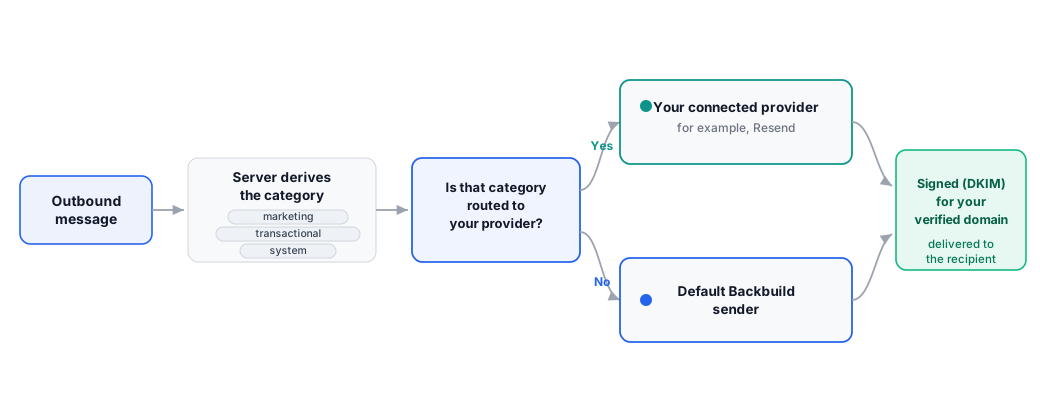
The Default: Backbuild Sends Your Mail
After this section you will understand the out-of-the-box route. With no configuration, Backbuild sends your outbound mail through its built-in sender, signed for your verified domain so it authenticates cleanly at the receiving end. For most organizations this is all you need: link a domain, and mail sends.
Bring Your Own Provider
After this section you will be able to route mail through your own email provider without giving up the workspace. If you already invested in a provider such as Resend, you can send through it. This is always available, and it is the anti-lock-in escape hatch: you are never forced onto a single sender.
- Connect your provider key. Link your provider's key through the secure vault-linking step. The key is stored in the workspace vault and resolved when mail sends; it is never shown back to you or written to a log. Connecting a key requires unlocking the vault, so only an authorized person can do it.
- Choose which categories route through it. Assign any combination of the categories below to your provider. Mail in an assigned category sends through your provider; everything else continues through Backbuild.
- Test the connection. A built-in probe validates the linked key so you know it works before you rely on it.
The categories, called send-scopes, are:
- All outbound: every outbound message from your onboarded domains.
- Marketing: marketing mail.
- Transactional: transactional mail.
- System: system mail.
The sender identity is always the mailbox the message is sent from, so you never configure a separate "from" name or address for the connection. You are only choosing the path the mail travels, not changing who it is from.
Can I keep my existing provider and not get locked in? Yes. Connect your provider's key and route All, Marketing, Transactional, or System mail through it in any combination; everything else uses the default Backbuild sender. The provider key lives in the vault and is never returned or logged, so switching or disconnecting is entirely in your hands.
Categories Are Decided by the Server
After this section you will understand why routing cannot be tricked. The category of a message is derived by the server, not set by whoever sends the request. A caller cannot label a message to force it down a particular path, and, as covered in Composing and Sending, the From address and the identifying headers are set by the server based on the mailbox, so a message cannot be sent as an address it does not own. Routing follows the real category, every time.
How is the send category decided, and can a client spoof it to route the wrong way? The category is derived on the server and is not client-settable, and the sending identity is server-authoritative, so a caller cannot force a message onto the wrong route or send as an address it does not control.
Prove the Route Works Before You Ship
After this section you will be able to verify a route end to end. During setup, a self-test mailbox lets you send a message along the chosen route and confirm it arrives, so you validate the whole path before you depend on it. You can also send yourself a real message and check the authentication status in the client. Driving this from code is covered in API and AI Agents.
How do I test that my sending route actually works? Use the self-test mailbox in the setup wizard to send along the chosen route and confirm delivery, and send yourself a message to check that authentication passes. Verify both inbound and outbound before you rely on the route.
Metered Platform Outbound
Coming soon. A future option will let you send platform-metered outbound mail that draws universal usage credits per recipient, without connecting your own provider. It is not generally available yet. Today your two live choices are the default Backbuild sender and your own connected provider, both covered above.
Allowances and Credits
After this section you will know what is included and what an overage costs. The pricing page is the authoritative source for current allowances and rates.
- Included sends: every plan includes email at your own domain with 500 sends per month.
- Overage: sends beyond your allowance draw universal usage credits, counted per recipient across To, Cc, and Bcc, at the rate on the pricing page. There is no separate invoice; overage settles against your credits. See Universal Usage Credits.
- Mailing-list blasts: the Free plan includes 5 per month; Lite, Pro, and Enterprise are unlimited, with the email itself drawing credits.
- Free-plan footer: on the free email plan, a short provenance line is added to the mail you send.
What does it cost, and what happens if I go over the allowance? Email at your own domain is included on every plan (500 sends per month), not a per-seat upsell. Beyond the allowance, sends draw universal usage credits counted per recipient at the pricing-page rate, settled against your credits with no surprise invoice. The pricing page is authoritative for current numbers.
Related Guides
- Composing and Sending: the send limits and server-authoritative sending identity.
- API and AI Agents: manage domains and mailboxes, and test a route, from code.
- Universal Usage Credits: how outbound-mail overage is metered and settled.
- Pricing: current outbound allowances and credit rates per plan.