

Help Desk Security, Privacy & Governance
A help desk holds some of the most sensitive data your customers ever hand you: their problems, their accounts, sometimes their personal details. This page is the honest account of how that data is protected, who can reach it, what is recorded, and how it is deleted. It is written for the person whose job is to say yes or no to a tool: the security, privacy, or compliance reviewer. After this page you will understand the isolation model, the access controls, the audit trail, the encryption posture, and how deletion and data-subject rights are honored.
The help desk inherits Backbuild's platform-wide security and compliance posture. For the full account, including how it maps to frameworks, see Security and Compliance.
Tenant Isolation
After this section you will understand the isolation guarantee. Tickets are scoped strictly to the organization they belong to. One organization can never read, list, or reach another organization's tickets. For a builder running white-label support, that means one customer can never see another customer's tickets, and no customer can see the builder's internal work. Isolation is enforced at the data layer on every read and every write, not by filtering in the interface, so there is no view or query that crosses the boundary.
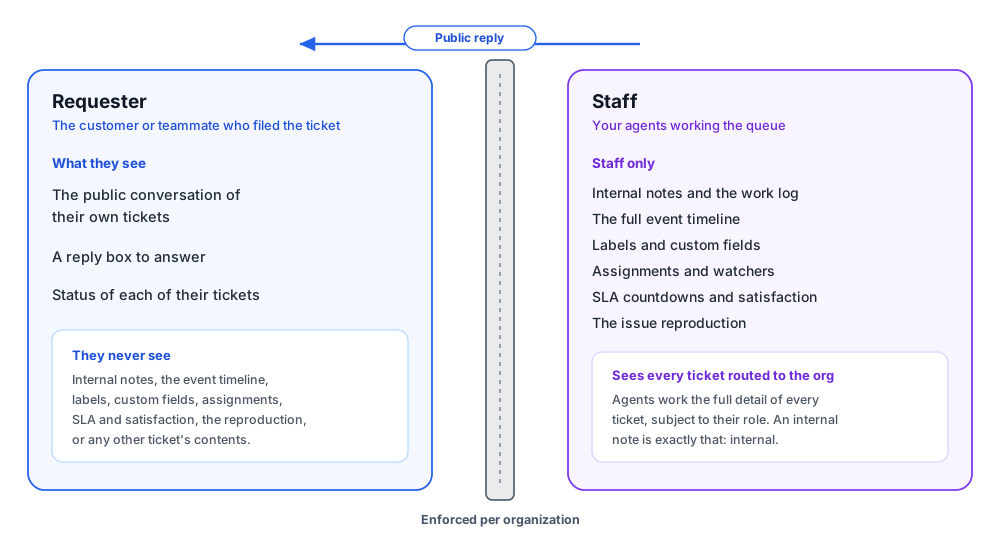
Two Security Models: Requester and Agent
After this section you will understand the privacy wall. The requester and the agent are two separate models, not one model with a flag. A requester acts only on their own tickets and sees only the public conversation of those tickets. An agent acts within the organization that received the ticket, under a role. The wall between them is absolute:
Role-Based Access
After this section you will understand who can do what. Access to the staff console and to configuration is governed by roles and permissions, scoped to each organization. A role decides who may read tickets, who may work them, and who may change the help desk configuration, so a frontline agent, a support lead, and an administrator hold different capabilities. Sensitive workflow transitions can additionally require an approval and a step-up re-verification (see Ticket Types, Workflows and SLAs), so a risky move takes more than a single click by a single person.
The Audit Trail
After this section you will know what is recorded. Security-relevant actions are attributed and logged. Every write to a ticket is audited with who did it and when. A message you edit is not overwritten: the prior wording is kept as an append-only version, so the edit history of a conversation is tamper-evident. Exports are recorded, and reading, storing, or purging a reproduction is recorded, so access to the most sensitive artifact on a ticket is itself accountable. A supervisor can reconstruct the complete story of a ticket, and an auditor can see who touched what.
Encryption and Data Minimization
After this section you will know how the data is protected and kept small. Ticket data is encrypted in transit and at rest. Beyond encryption, the system is built to hold less: the reproduce flow captures the shape of an interaction and never its content, no keystrokes, no field values, no page text, no screenshots, and identifying details in the diagnostic breadcrumbs attached to a described ticket are stripped before storage. Collecting less sensitive data in the first place is the strongest privacy control there is, and it is the default here.
Deletion and Data-Subject Rights
After this section you will know how data leaves. When a data-subject erasure is carried out for a requester, their own messages, the versioned history of those messages, and their reproductions are scrubbed, so an erasure reaches the content a person contributed, not just a top-level record. Erasures, like exports and reproduction access, are audited. Retention and deletion behavior aligns with data-minimization expectations; the platform-wide detail is on the Security and Compliance page.
How AI Is Bounded
After this section you will know the limits on AI. A Virtual Worker on the help desk runs under your organization's roles and can never exceed the access of the identity behind it, so it is bound by the same per-organization isolation as a person and cannot reach across tenants. By default it drafts a reply as an internal note for a human to review rather than messaging a customer; whether it may post a reply itself, or advance or resolve a ticket, is a separate per-capability grant you control. Above those dials sits a floor you cannot switch off: dispatching an external email to an outside recipient always requires a person, so the highest-impact action never happens on the worker's own authority. Its activity is audited like any other actor's.
Is ticket data encrypted at rest and in transit? Yes, both.
What is your retention and deletion policy, and can data be erased? Ticket data follows data-minimization principles, and a data-subject erasure scrubs a requester's own messages, their versioned history, and their reproductions. Erasures are audited. See the platform Security and Compliance page for the full policy.
Is there a complete audit trail of who accessed or changed what, including exports? Yes. Every write is attributed and logged, message edits are kept as append-only versions, and exports and reproduction access are recorded.
What is the access-control model? Role-based and scoped per organization, with separate requester and agent models and step-up re-verification available on sensitive transitions. A role decides who can read tickets, work them, or change the configuration.
Do you have a documented compliance posture? The help desk inherits Backbuild's platform-wide security and compliance posture, published on the Security and Compliance page. It is presented honestly there rather than overstated here.
Can AI leak data across tenants or commit something to my customer? A worker is bound by the same per-organization isolation as a person and can never exceed the access of the identity behind it, so it cannot cross tenants. By default it drafts for human review rather than sending, and dispatching an external email to a customer always requires a person, a floor no setting can loosen, so the highest-impact action never happens on the worker's own authority.
How is PII in tickets handled and minimized? The system is designed to hold less: reproductions capture no content, and identifying details in diagnostic breadcrumbs are stripped before storage. What remains is encrypted and access-controlled, and erasable on request.
Where to Next
- Security and Compliance: the platform-wide posture the help desk inherits.
- Roles and Permissions: the roles that govern who can read and work tickets.
- Administration, Routing and White-Label Support: tenant isolation for your own subscribers.
- Ticket Types, Workflows and SLAs: approvals and step-up gates on sensitive transitions.