

Signing In, Sync, Device Unlock and Security
The desktop app signs in as the same account you use on the web, keeps your work in sync across every surface, and adds one native security convenience: on a computer you register as trusted, it can unlock your vault without making you repeat two-factor. This guide teaches the sign-in story, how your data stays consistent online and off, the device-based vault unlock, and exactly what the app is and is not allowed to connect to. After this page you will trust where your work lives and understand the security posture of the app on your machine.
One Account, Everywhere
After this section you will understand that the desktop app is not a separate identity. There is one Backbuild account, and the desktop app is simply another way into it. You sign in with the same email and password, or with Google, and you land in the same organizations with the same data. Google sign-in completes and returns you to the app automatically, so there is no copying codes between windows. If you protect your account with multi-factor authentication or a passkey, those work in the app exactly as they do on the web, and switching between multiple accounts or organizations behaves the same too.
Everything about credentials, Google, passkeys, multi-factor authentication, and working across accounts is covered once, for every surface, in Signing In and Account Security. If your organization uses single sign-on, the desktop app honors it the same as the web.
Your Work, Online and Offline
After this section you will know where your data lives and what happens when the network drops. Your content lives in your Backbuild account, not on any single device. It syncs automatically across the web app, the desktop app, and (soon) mobile, so a change you make in one place shows up in the others. When your connection drops, recent work stays available and editable, and it reconciles when you are back online, so a tunnel, a plane, or a flaky network does not stop you mid-task. Because nothing important is stored only inside the installed app, uninstalling or reinstalling the desktop client never risks your data.
Will my data still be there and stay in sync? Yes. Your work lives in your account and syncs across web, desktop, and mobile automatically. The desktop app is a view onto the same data, not a separate copy.
Does it work offline? Recent work stays available and editable when your connection drops, and reconciles when you reconnect. Actions that need the network wait until it returns.
Unlock Your Vault Without Repeating Two-Factor
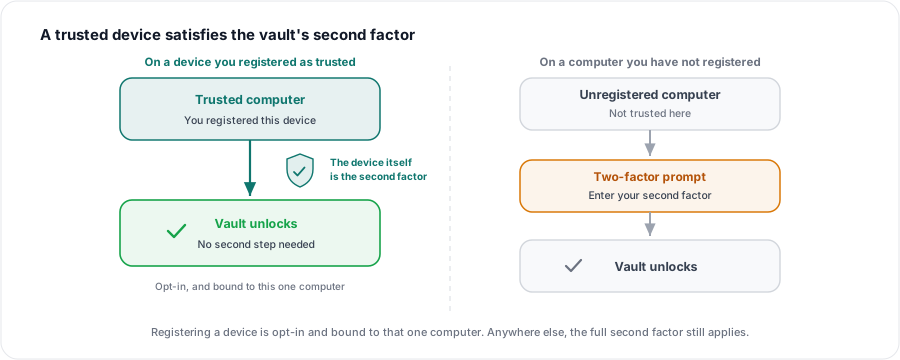
After this section you will be able to unlock your Secrets vault on a trusted computer without a second two-factor step every time. Unlocking your Backbuild Secrets vault asks for a second factor, which keeps your secrets safe but becomes repetitive on the computer you use every day. On the desktop, you can register that computer as a trusted device. Once you do, the machine itself acts as the second factor for unlocking your vault, backed by the same kind of secure hardware your operating system already uses to protect sign-in, the sort behind Windows Hello and Touch ID. Unlocking your vault on that registered machine then resolves without asking you to repeat two-factor.
- It is opt-in. Registering a device is a deliberate choice: you confirm the prompt offered after you link, or use the register-this-device control in settings. Nothing is trusted until you say so.
- It is tied to that one computer. The trust is bound to the machine you registered. It does not follow you to another computer, where you unlock the normal way.
- You stay in control. A trusted device is a convenience you grant and can remove; on any machine you have not registered, the full unlock still applies.
This is the native counterpart to the vault's device factor described in Unlocking, Device Factor and Recovery. The desktop app makes the trusted computer itself satisfy the step, so your own everyday machine stops asking you to prove it twice.
Does this make my vault less secure? No. Your secrets are still protected by strong encryption, and the device factor is a second factor you deliberately register, bound to one computer and backed by that computer's secure hardware. On any machine you have not registered, unlocking still requires the full second factor.
What if I lose the trusted computer? Trust is tied to that machine and does not transfer. You continue to unlock normally on your other devices, and you can remove a device you no longer control. Recovery paths for the vault are covered in Unlocking, Device Factor and Recovery.
What the App Connects To
After this section you will be able to answer, plainly, what the app talks to. Backbuild Desktop is locked down to connect only to Backbuild's own services and to Google's sign-in when you choose it. It does not reach out to anything else. The released app also ships without the debugging and developer surfaces that exist only in internal builds, so what you install is the finished, hardened application and nothing more. Combined with the sign-in and vault protections above, that gives you a simple mental model: the app connects to Backbuild, and to Google only when you sign in with Google, full stop.
If you are rolling the app out across an organization and a security review needs the deployment-and-egress picture, that is gathered in one place in Deploying to a Fleet.
Does the desktop app phone home to third parties? No. It connects to Backbuild's own services, and to Google only when you choose Google sign-in. It is not wired to talk to anything else.
Where to Next
- Unlocking, Device Factor and Recovery: the vault's unlock methods and every way back in, in full.
- Signing In and Account Security: credentials, Google, passkeys, multi-factor, and multiple accounts, for every surface.
- Deploying to a Fleet: for administrators, including the security-review picture.