

Webhooks
Webhooks push events to an endpoint you host, so your systems react without polling. This page teaches the receiver you should build: how to verify a delivery is genuine, how to stay correct when the same event arrives twice, how to acknowledge quickly, and how to rotate a signing secret without dropping a single event.
After reading this page you will be able to: stand up a reliable webhook receiver, verify a signature the way that survives body-parsing pitfalls, dedupe on a stable event id, respond fast enough to avoid duplicate deliveries, rotate a signing secret with no downtime, and know where to look when a delivery fails.
The Receiver Pattern
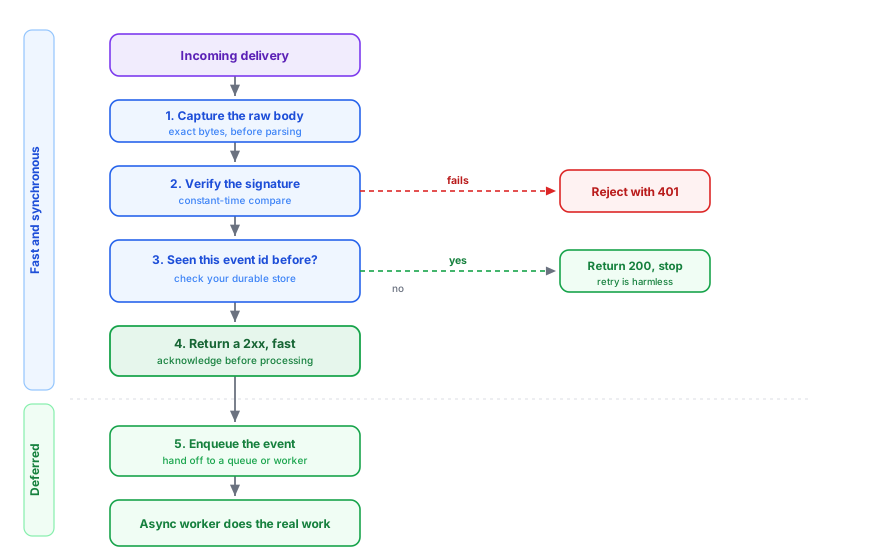
Every reliable webhook handler follows the same shape. Do the cheap, safe work synchronously and defer the real processing:
- Capture the raw body. Read the exact bytes of the request before any JSON parsing (signature verification depends on them).
- Verify the signature. Reject anything that does not verify with a
401. Never trust an unverified payload. - Dedupe on the event id. If you have already processed this event id, acknowledge and stop.
- Acknowledge fast. Return a
2xximmediately, before doing slow work. - Enqueue and process asynchronously. Hand the event to a queue or background worker; do the real work off the request path.
Verifying a Signature
A signed webhook carries a signature computed from the request body and a secret only you and the platform know. To verify it:
- Use the raw request body bytes, exactly as received. Do not verify against a re-serialized JSON object: even a whitespace or key-order difference changes the bytes and breaks the check. This is the single most common reason a signature check “always fails.”
- Compute the expected signature from the raw body and your signing secret, then compare it to the signature on the request.
- Compare in constant time. Use a constant-time comparison, never a plain equality check, so the comparison cannot leak the secret through timing.
- Reject on mismatch. Any delivery that does not verify is not from the platform; drop it.
Keep the signing secret in a secret manager alongside your API keys, and treat a leaked signing secret exactly like a leaked key: rotate it (below).
Staying Idempotent
Webhook delivery is at-least-once, never exactly-once. A slow handler, a network blip, or a timed-out acknowledgement can cause the same event to be delivered again, so your receiver must be safe to run twice on the same event. The timeout-induced duplicate (your handler did the work but was too slow to acknowledge, so the event is redelivered) is the most dangerous case and the reason step four above says acknowledge before you process.
Give every event a durable identity in your own store keyed by its stable event id, and check that store before you act. If the id is already recorded, acknowledge and do nothing else. That one check makes retries harmless.
Retries and Acknowledgement
A delivery is considered successful when your endpoint returns a
2xx quickly. A non-2xx response, a timeout, or a
connection failure is treated as a failure and the delivery is retried on a
backoff schedule for a bounded window; after the window is exhausted, the
delivery stops and is marked failed in the delivery log. Two rules follow:
- Return a
2xxas soon as you have verified and recorded the event, even if processing continues afterward. - Do not return a
2xxfor an event you failed to accept, or you will suppress a retry you actually wanted.
Rotating a Signing Secret With No Downtime
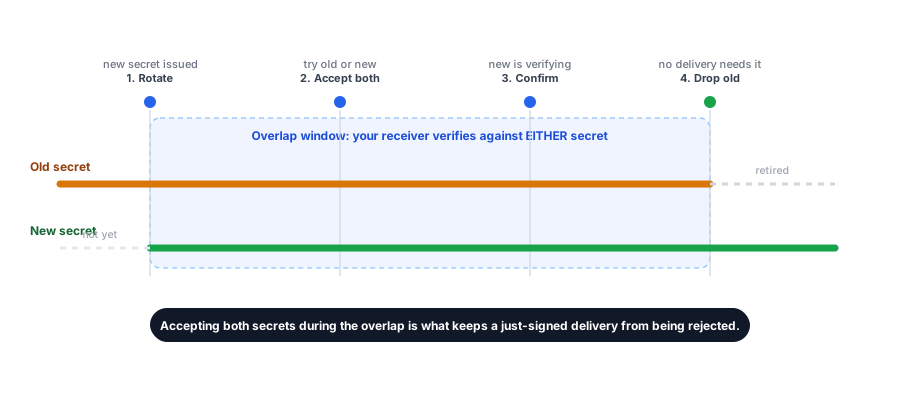
Rotate a webhook signing secret the same way you rotate an API key: overlap the old and new secret so no in-flight delivery is dropped. The live example is a payments (Stripe Connect) profile, whose webhook signing secret you can rotate:
POST /v1/stripe-profiles/{profileId}/webhook-secret/rotateThe zero-downtime rollout:
- Rotate to obtain the new signing secret.
- Update your receiver to accept a delivery that verifies against either the old or the new secret.
- Confirm new deliveries are verifying against the new secret.
- Remove the old secret from your receiver once no delivery relies on it.
Accepting both secrets during the cutover is what keeps you from rejecting a delivery that was signed just before the switch.
The Delivery Log
You should never have to guess whether an event arrived. A delivery log records each attempt: the event, the timestamp, the response your endpoint returned, and whether the delivery ultimately succeeded or failed. Use it to confirm a delivery, diagnose a failing endpoint (wrong status code, timeout, signature rejection), and see when retries were exhausted. Inspecting the log is how you turn a silent “did we miss an event?” into a definite answer.
Webhook Management for Backbuild Prove
Backbuild Prove is launching soon. When it is available, it adds managed webhook endpoints for proof and verification events with the full lifecycle described above: register a delivery endpoint, list your endpoints, rotate a per-endpoint signing secret, and read a per-endpoint delivery log to audit every attempt. The receiver patterns on this page apply to it unchanged. See the Backbuild Prove product page for availability.
Frequently Asked Questions
Why does my signature check always fail?
Almost always because you verified against parsed-and-re-serialized JSON
instead of the raw request body bytes. Verify against the exact bytes you
received, and compare in constant time.
The same event arrived twice. Is that a bug?
No. Delivery is at-least-once. Dedupe on the stable event id: record it and
skip any event id you have already processed.
Which responses trigger a retry?
Anything that is not a fast 2xx: a non-2xx status,
a timeout, or a connection failure. Retries continue on a backoff for a
bounded window, then stop and are marked failed in the delivery log.
How do I rotate a signing secret without missing events?
Rotate to get the new secret, accept deliveries signed with either the old
or new secret during the overlap, confirm the cutover, then drop the old
secret.
Is a signing secret shown again after it is created?
No. A signing secret, like an API key, is shown once. If you lose it,
rotate to issue a new one.
How do I know a delivery was dropped?
Check the delivery log. It records each attempt, the response, and whether
the delivery succeeded or exhausted its retries, so you never rely on a
silent guess.