

Help Desk & Support Tickets
The Backbuild help desk is a complete support and issue-tracking system built into your workspace. On one side, the people you serve, your customers or your own teammates, file tickets and follow them to resolution. On the other, your agents work those tickets in a console with saved views, kanban boards, bulk actions, and export. Underneath both sits a data-driven workflow engine that models anything from a simple support queue to a full engineering bug tracker, with ticket types, custom states, SLAs, approvals, hierarchy, and relations. Virtual Workers can staff a stage under human supervision, and if you build a product on Backbuild, your own subscribers can file tickets that route to the right organization. After this page you will understand the two sides of the help desk, be able to file or work your first ticket, and know which guide answers the job in front of you.
The help desk is included on every plan. The Free plan covers up to 20 tickets a month; every paid plan is unlimited. A dedicated support contract with a response-time commitment is a separate optional annual add-on. See the pricing page for the current figures.
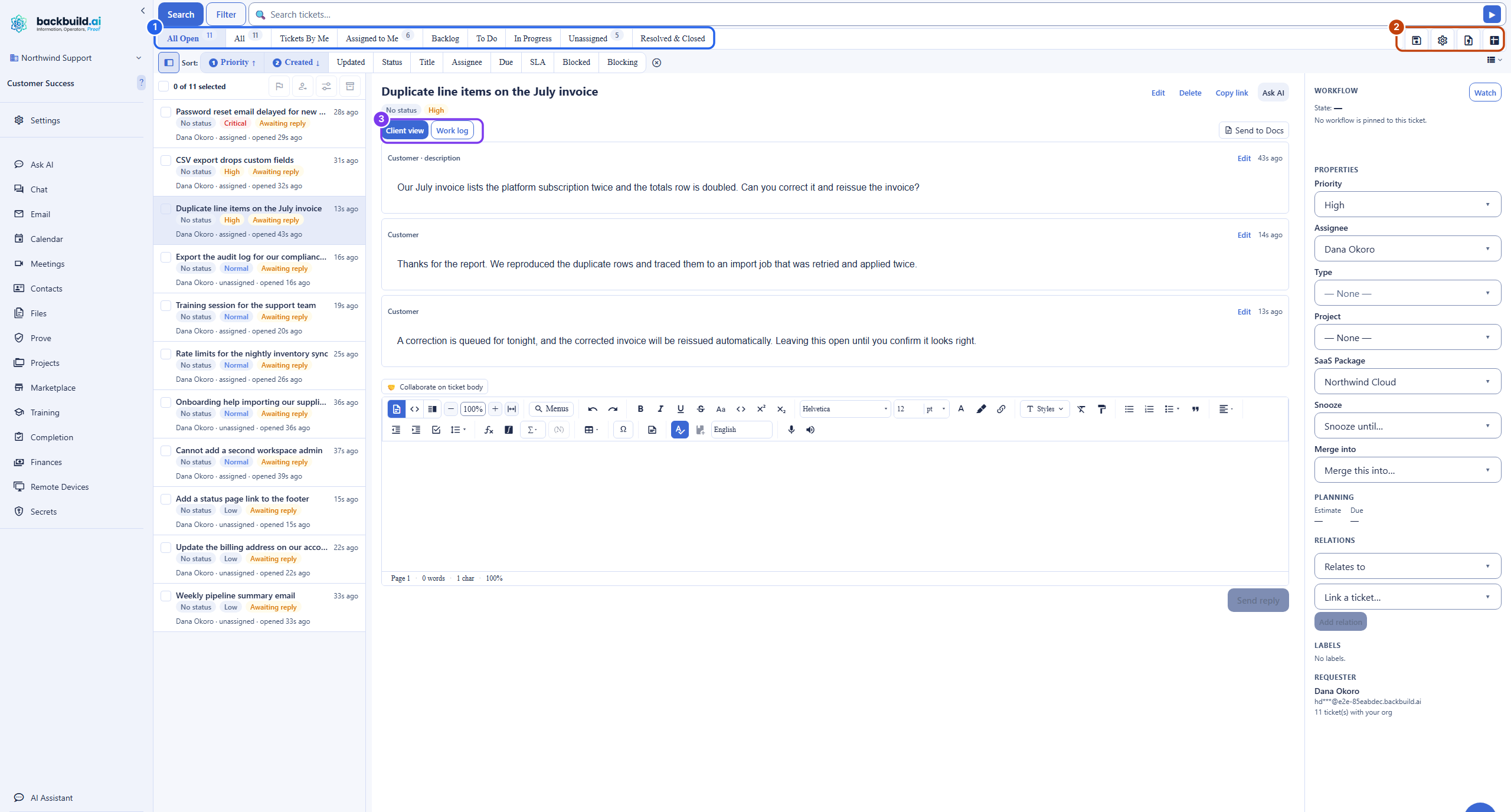
Two Sides: Requesters and Agents
After this section you will understand who sees what. The help desk has two distinct experiences, and the wall between them is the whole point.
- Requesters are the people who need help: a customer, or a teammate raising an internal request. A requester files a ticket, follows its public conversation, and replies. A requester sees only the public thread of their own tickets. They never see internal notes, the work log, labels, internal fields, assignments, or the event timeline.
- Agents are your staff who work the queue. Agents reach the Tickets console, see every ticket routed to your organization, and work the full detail: the public conversation, the staff-only work log, priorities, assignments, SLAs, and everything the workflow engine tracks.
An internal note is exactly that: internal. It is visible only to your staff and never appears in the requester's view. This is the single most important promise of the system, and it holds in every view, on every plan, for every ticket. See Working a Ticket for how the public reply and the internal note are kept apart.
File Your First Ticket
After this section you will have opened a ticket. Anyone with an account can raise one from the profile menu.
- Open your profile menu and choose Open Ticket.
- Give it a subject and pick a category so it routes to the right team.
- Describe the problem in the rich composer, or choose Reproduce the issue for us to record a privacy-safe walkthrough of what went wrong. See Filing and Tracking a Ticket.
- Submit. The ticket appears under View Support Tickets, and a bell in the header notifies you when someone replies.
Work Your First Ticket
After this section you will know where staff work happens. When the help desk is enabled for your organization, a Tickets item appears in your sidebar.
- Open Tickets. You land on All Open, the tickets that need attention.
- Click a ticket to open its detail. The Client view tab is the public conversation; the Work log tab is the staff-only record.
- Type a reply in the composer on Client view to answer the customer, or on Work log to leave an internal note for your team.
- Set a priority and an assignee, and move the ticket along its workflow when the work is done. See The Tickets Console.
What the Help Desk Covers
After this section you will know why one tool replaces several. Most teams stitch a support inbox to a separate issue tracker and lose the connection between them. The Backbuild help desk is one system that does all of it, so a customer ticket and the engineering work that resolves it are the same object, linked, with status flowing back automatically.
- Customer support. A unified queue, routing by category, SLAs and first-response targets, canned responses, CSAT, and satisfaction and backlog reporting. For the daily driver, see The Tickets Console.
- Internal IT service desk. Separate ticket types for an incident versus a service request, per-state SLAs, approvals and step-up gates on sensitive transitions, custom fields with internal-only visibility, and role-based access. See Ticket Types, Workflows and SLAs.
- Engineering issue tracking. Types like Bug, Feature, Epic, Story, and Task with parent-child roll-up, typed relations, a board grouped however you like, a table view, and a structured query language. See Ticket Types, Workflows and SLAs.
- AI support with a human in the loop. A Virtual Worker can staff a workflow stage, read a ticket, and draft a reply for a person to review. See AI Support with Virtual Workers.
- White-label multi-tenant support. If you sell a product built on Backbuild, expose specific projects so your subscribers can file tickets routed to your organization, under a label you control. See Administration, Routing and White-Label Support.
Is this a support inbox or a real issue tracker? Both, in one system. The same object graph carries a customer support ticket and an engineering Bug or Epic, so the two are linked rather than living in two disconnected tools. You choose per organization how simple or how rich your workflows are.
Do my customers ever see internal notes? No. Requesters see only the public conversation of their own tickets. Internal notes, labels, fields, assignments, and the event timeline are staff-only, always.
What does it cost as my team or my customer base grows? The help desk is included on every plan, unlimited on paid plans, with the Free plan capped at 20 tickets a month. See the pricing page; a separate support contract with a response SLA is an optional annual add-on.
Choose Your Guide
Each guide teaches one job end to end.
- Filing and Tracking a Ticket: for anyone raising a ticket. The Open Ticket dialog, the describe and the reproduce flows, tracking your tickets, replying, and the bell.
- The Tickets Console: for agents. Quick filters and counts, search versus structured filter, the List, Grid, Board, and Table views, saved views, multi-sort, bulk actions, and export.
- Working a Ticket: for agents. The Client view and Work log tabs, public replies versus internal notes, editing your own message, the meta panels, and the issue-reproduction timeline.
- Ticket Types, Workflows and SLAs: for admins, IT, and engineering. Types, custom states and transitions, per-state SLAs, approvals and step-up gates, hierarchy, labels, relations, and custom fields.
- AI Support with Virtual Workers: assigning a worker and a skill to a stage, drafts as internal notes, budgets, and the human-approval floor.
- Administration, Routing and White-Label Support: categories, routing, SLA policies, canned responses, and exposing projects so your subscribers can file tickets to you.
- The API, MCP and Automation: drive the whole help desk over the public REST API and the native MCP tools.
- Security, Privacy and Governance: for reviewers. Tenant isolation, the audit trail, encryption, retention and deletion, and how AI is bounded.
Related Surfaces
- Support Workers: the Virtual Workers guide to staffing a ticket stage with an AI worker.
- Workflows and Automation: the workflow engine the help desk shares with the rest of the platform.
- Projects: tickets associate to projects, and exported threads land in a Support Ticket Workspace project.
- Roles and Permissions: the roles that decide who can read and work tickets.