

Binary Distribution & Data Residency
Backbuild distributes binary release artefacts (desktop app updates, CLI binaries, LSP updates, and any white-labeled variants you build) to your own users. You register a distribution product, publish signed versions through a staged flow, sign each release against a key chain your update clients can verify, roll it out by channel and percentage, and pin where the artefacts physically live: the United States or the European Union. This page is the full publisher guide. It is a separate system from Release Management, which versions the configuration of a SaaS package.
Pro Binary distribution and white-label variants are part of the Backbuild Pro build-and-ship platform. See pricing.
What This System Distributes
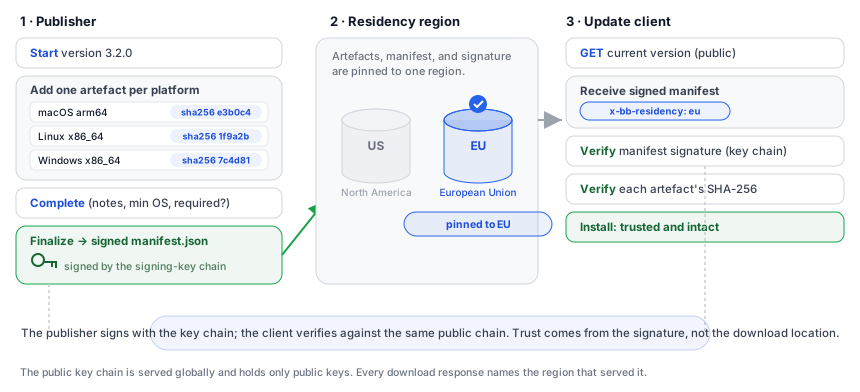
After this section you will know what a distribution product is and the pieces that make up a published release. A distribution product is a named channel through which one application is delivered to its users: your desktop app, your CLI, your LSP, or a branded variant of one of them. Each published version of that product consists of:
- The binary artefact for each platform you support (for example
macos-arm64.dmg,linux-x86_64.tar.gz, or a Windows installer). - A signed manifest that names those artefacts and carries their SHA-256 digests.
- A detached signature over the manifest, which update clients verify against your signing-key chain before trusting anything.
Update clients fetch the manifest, verify its signature, then verify each artefact’s SHA-256 against the manifest before installing. That chain, signature over manifest, digest over binary, is what lets a user trust an update was published by you and arrived intact.
Register a Distribution Product
After this section you will be able to create the product your versions publish under and choose where its artefacts live. Upsert a product by its slug, which is part of the URL path. The slug identifies the product; the body carries its display configuration and its data residency.
| Field | Required | Meaning |
|---|---|---|
base_tool | Yes | The underlying tool this product distributes. |
display_name | Yes | The name users see. |
branding_config_id | No | A branding configuration for a white-labeled variant. |
custom_domain | No | A domain for update delivery. It is globally unique; a domain already claimed by another product is refused. |
data_residency | No | us (the default) or eu. Any other value is rejected. |
PUT /v1/releases/products/acme-desktop
Authorization: Bearer $TOKEN
Content-Type: application/json

{
  "base_tool": "backbuild-desktop",
  "display_name": "Acme Desktop",
  "custom_domain": "updates.acme.example",
  "data_residency": "eu"
}
Publish a Version: The Staged Flow
After this section you will be able to publish a new version with an artefact for each platform. Publishing is staged so a version is only live once it is fully assembled and signed. You start the version, attach one artefact per platform, mark it complete, then finalize it with the manifest hash and signature. Until finalize, the version is a draft you can cancel.
- Start the version. Name the version and, optionally, the channel it belongs to.
POST /v1/releases/products/acme-desktop/versions Authorization: Bearer $TOKEN Content-Type: application/json { "version": "3.2.0", "channel": "beta" } - Add an artefact per platform. For each operating system and architecture, supply the storage key, archive format, the SHA-256 digest (64 hex characters), the size in bytes, and optionally an OS-level code signature.
POST /v1/releases/versions/019e.../artefacts Authorization: Bearer $TOKEN Content-Type: application/json { "os": "macos", "arch": "arm64", "r2_key": "acme-desktop/3.2.0/macos-arm64.dmg", "archive_format": "dmg", "sha256_hex": "e3b0c44298fc1c149afbf4c8996fb924...", "size_bytes": 84213760 } - Complete the version. Optionally attach release notes, a minimum supported OS, and whether this is a required upgrade.
POST /v1/releases/versions/019e.../complete Authorization: Bearer $TOKEN Content-Type: application/json { "release_notes_url": "https://acme.example/notes/3.2.0", "required_upgrade": false } - Finalize with the signed manifest. Supply the manifest’s SHA-256 (64 hex) and its signature (128 hex). Finalize is what makes the version publishable.
POST /v1/releases/versions/019e.../finalize
Authorization: Bearer $TOKEN
Content-Type: application/json

{ "manifest_sha256_hex": "9f86d081884c7d659a2f...", "manifest_sig_hex": "3045022100..." }
To discard a staged version before it is finalized, cancel it with
DELETE /v1/releases/versions/:id.
Sign Your Releases: The Key Chain
After this section you will be able to establish and rotate the keys your update clients trust. Every manifest is signed, and clients verify that signature against a chain of public keys. You register a signing key with its identifier and public key. When you rotate, you link the new key to its predecessor with a successor signature, so the chain of trust is continuous and a client that trusts an older key can follow the chain to the new one.
# Register a signing key
POST /v1/releases/signing-keys
Authorization: Bearer $TOKEN
Content-Type: application/json

{
  "key_id": "acme-2026",
  "public_key_hex": "d75a980182b10ab7d54bfed3c964073a...",
  "signed_by_key_id": "acme-2025",
  "successor_signature_hex": "3046022100..."
}

# Revoke a key (identified by its key_id)
POST /v1/releases/signing-keys/acme-2026/revoke
Authorization: Bearer $TOKEN
Content-Type: application/json

{ "reason": "Scheduled rotation." }
Only public key material is ever submitted or served. The corresponding private key stays in a managed secrets store, is never transmitted, and never leaves the signing boundary.
Channels and Staged Rollout
After this section you will be able to release to a subset of users
first and widen the rollout as confidence grows. A version belongs to
a channel (for example beta or stable). You promote a
version from one channel into another when it is ready, and within a channel
you control what percentage of update clients are offered the new version.
# Promote a version into another channel
POST /v1/releases/products/acme-desktop/channels/beta/promote
Authorization: Bearer $TOKEN
Content-Type: application/json

{ "version": "3.2.0", "target_channel": "stable" }

# Set the rollout percentage for a version
PATCH /v1/releases/versions/019e.../rollout
Authorization: Bearer $TOKEN
Content-Type: application/json

{ "product_slug": "acme-desktop", "version": "3.2.0", "percentage": 25 }
Set the percentage from 0 to 100. Start low, watch, and raise it as the release proves out, so a regression reaches only a fraction of users before you catch it.
Pull a Bad Release: Yank
After this section you will be able to stop a problem version from reaching users. If a published version turns out to be broken, yank it. Yanking records a reason and takes the version out of circulation for update clients.
POST /v1/releases/versions/019e.../yank
Authorization: Bearer $TOKEN
Content-Type: application/json

{ "product_slug": "acme-desktop", "version": "3.2.0", "reason": "Startup crash on older macOS." }
How Update Clients Consume Releases
After this section you will understand exactly what an update client fetches and how it verifies the download. The consumption endpoints are public: an update client does not need to authenticate to check for a new version, because everything it receives is signed and verifiable on its own.
# The current version and its signed manifest for an update client
GET /v1/releases/acme-desktop/current?org_id=019d...&channel=stable

# The public signing-key chain the client verifies against
GET /v1/releases/signing-keys/chain?org_id=019d...
A client passes its organization, optionally its channel and current version, and receives the version it should be on together with the signed manifest. It then verifies the manifest signature against the key chain and checks each artefact’s SHA-256 against the manifest before installing. The public key chain is also published globally at a well-known path at the distribution root; it contains only public keys and carries no customer data.
Downloads are served from the product’s residency region, and every
response carries an x-bb-residency header naming the region that
served it:
HTTP/2 200 OK
content-type: application/octet-stream
cache-control: public, max-age=2592000, immutable
x-bb-residency: eu
Data Residency: Where Artefacts Live
After this section you will be able to choose where your binaries and
manifests are physically stored to meet a residency requirement. Each
product carries a data_residency marker that controls where its
artefacts, signed manifests, and detached signatures live.
| Residency | Storage region | Used for |
|---|---|---|
us (default) | North America | Customers with no specific residency requirement, and customers based in North America. |
eu | European Union | Customers whose contracts or regulators require EU-only storage of binary releases. |
The residency marker applies to the binary artefacts, the signed manifest JSON that names them and carries their digests, and the detached signature over that manifest. The public signing-key chain registry is distributed globally from the edge because it holds only public keys. Additional regions can be arranged for enterprise contracts; ask during onboarding.
Change Residency on an Existing Product
After this section you will know how residency moves after you have already published releases, and why it is a coordinated operation. You set residency when you create a product. Moving a product from US to EU residency (or the reverse) after versions already exist is a coordinated operation, because the objects that were already published have to be copied to the new region.
- Open a ticket with the onboarding team to request the change.
- The team schedules a short coordinated window during which the residency marker is changed and the existing objects are copied to the new region.
- Clients that have already downloaded and verified a version keep working. Future downloads come from the new region.
Residency is not moved by an automatic flag flip, because a partial migration would leave the product briefly inconsistent with the customer’s residency requirement. The coordinated approach keeps the residency guarantee intact at every observable moment.
Verifying Integrity After a Migration
After this section you will be able to confirm downloads are intact even across a residency move. Verification is unchanged by a residency migration:
- Fetch the manifest and its signature from the new region.
- Verify the signature against the signing-key chain, which is managed independently of residency storage and is unaffected by the move.
- Compute the SHA-256 of the downloaded artefact and compare it to the entry in the verified manifest.
The SHA-256 digests are baked into the manifest at publish time, so copying objects to a new region does not invalidate previously issued manifests. A version you verified before the move verifies identically after it.
Frequently Asked Questions
How does a user trust that an update really came from me?
Every version ships a manifest signed by your key chain, and every artefact
carries a SHA-256 digest in that manifest. The update client verifies the
signature, then verifies each digest, before installing. Nothing is trusted
on the strength of where it was downloaded from.
Can I release to a few users before everyone?
Yes. Publish to a channel such as beta, then set a rollout
percentage from 0 to 100 within the channel and raise it as the release
proves out. Promote a version into a wider channel when you are confident.
A version is broken. How do I stop it reaching users?
Yank it with a reason. The version is taken out of circulation for update
clients, and the reason is recorded.
Where are my binaries stored, and can I keep them in the EU?
Set data_residency to us or eu on the
product. The artefacts, signed manifests, and signatures live in that region,
and every download response confirms it with an x-bb-residency
header.
What happens to my signing keys?
Only public keys are ever submitted or served. Private key material stays in
a managed secrets store, is never transmitted, and never leaves the signing
boundary. Rotate by registering a successor key linked to its predecessor, and
revoke a key with a recorded reason.
If I move residency later, do existing downloads break?
No. Residency changes are coordinated so the objects are copied cleanly, and
the SHA-256 digests baked into each manifest survive the copy. Clients that
already verified a version keep working, and verification of new downloads is
unchanged.
API Reference
PUT /v1/releases/products/:slug: create or configure a distribution product.POST /v1/releases/products/:slug/versions: start a version.POST /v1/releases/versions/:id/artefacts: add a per-platform artefact.POST /v1/releases/versions/:id/complete: mark the version complete.POST /v1/releases/versions/:id/finalize: finalize with the signed manifest.DELETE /v1/releases/versions/:id: cancel a staged version.POST /v1/releases/products/:slug/channels/:channel/promote: promote a version into a channel.PATCH /v1/releases/versions/:id/rollout: set the rollout percentage.POST /v1/releases/versions/:id/yank: yank a version.POST /v1/releases/signing-keys: register a signing key.POST /v1/releases/signing-keys/:id/revoke: revoke a signing key.GET /v1/releases/:slug/current?org_id=: current version and signed manifest (public).GET /v1/releases/signing-keys/chain?org_id=: public signing-key chain (public).
Related reading
- Release Management: versioning the configuration of a SaaS package, a separate system.
- Branding & Themes: the branding used by white-labeled distribution products.
- Trust Center: Data Residency and Sub-processors.