

Entity Types
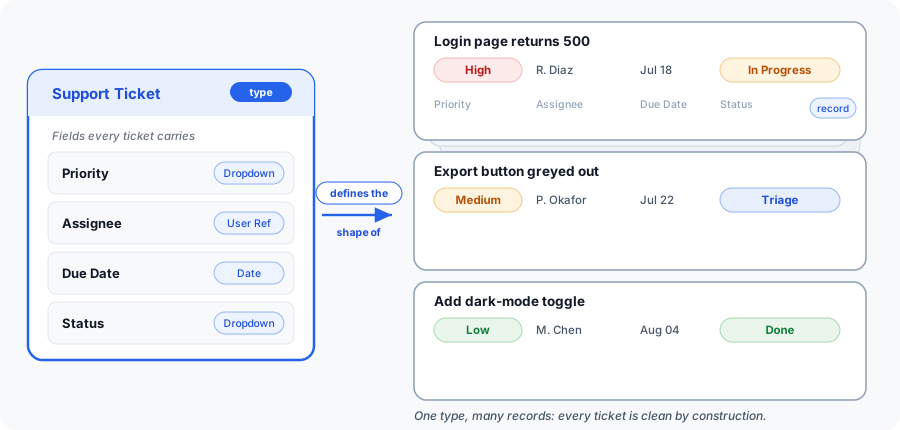
An entity type is your data model: a reusable schema that defines the shape of one category of records. Where an entity is a single record (one contact, one ticket, one asset), the entity type is the blueprint behind it: the fields every record of that kind carries, how those fields are typed and validated, how the record is displayed, and how the AI assistant should reason about it. You model a domain (a CRM, a ticketing system, an inventory, a construction submittal log) once, without writing a line of schema code, and every record you create afterward inherits that structure.
Free Custom data modeling (entity types, entities, relationships, and views) is included on every plan, including Free, as is the Files app. The SaaS Builder, which packages your data model into installable, sellable apps, is part of Backbuild Pro. See pricing.
Why a type, and not just a spreadsheet column?
A spreadsheet lets anyone type anything into any cell. There is no rule that a due date is a date, that a priority is one of four allowed words, or that an owner is a real person on your team, so the data drifts: three spellings of “in progress”, a phone number in the email column, a blank where a required value should be. An entity type fixes the shape in one place. When a field is declared as a date, the platform will not store text in it; when a field is a single-select with four options, a fifth value is rejected; when a field is required, a record cannot be saved without it. The structure lives on the type, so every record built from it is clean by construction, and you never re-explain the rules row by row.
Create Your First Entity Type
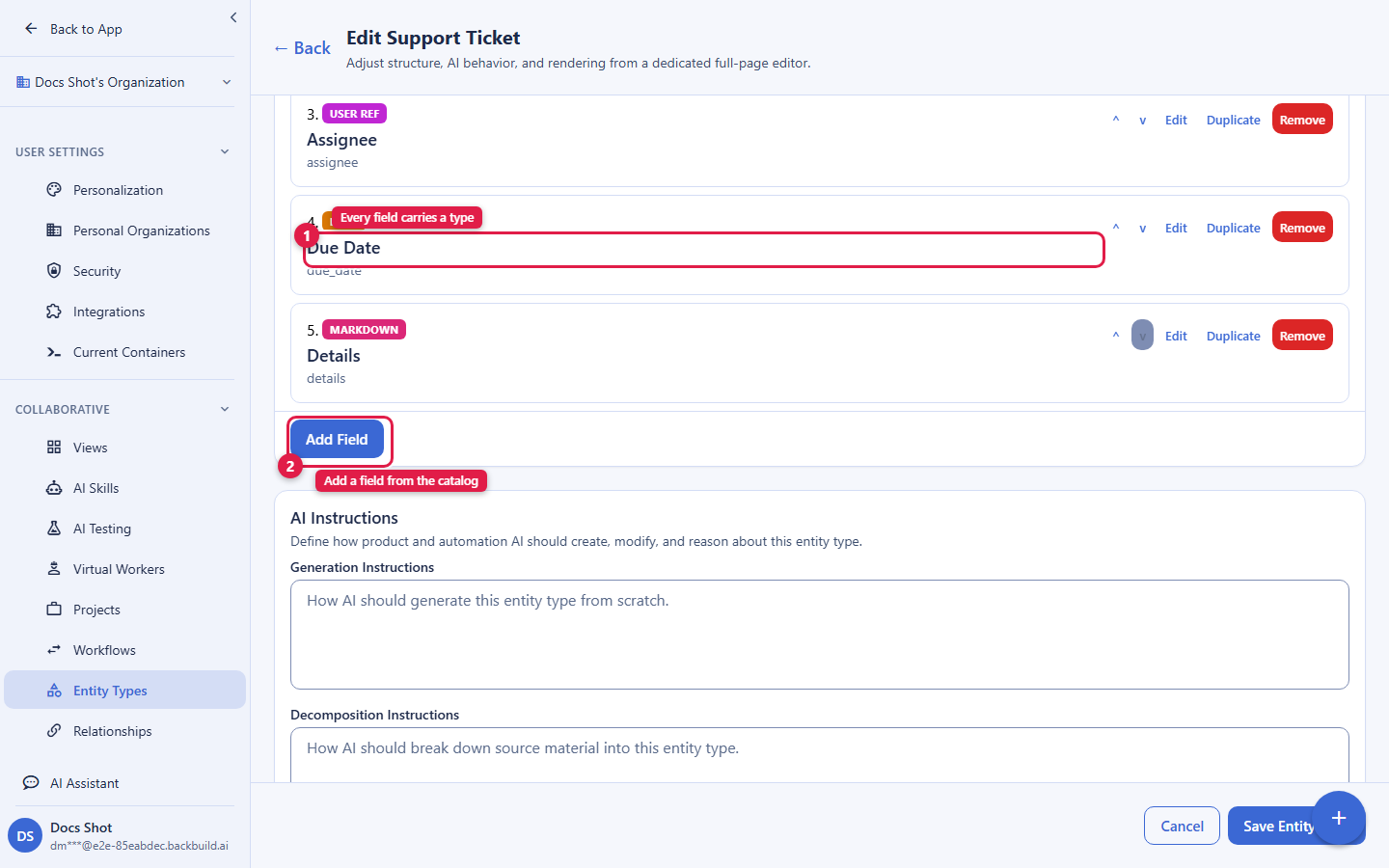
After this section you will have a working custom type with a handful of fields, ready to hold real records. Open your workspace, go to the data model area for your project, and choose New Entity Type. You give the type a name, then add fields one at a time: for each field you pick a label, choose a field type from the catalog, and decide whether it is required. Save, and the type is immediately usable; the next time you create an entity, your new type appears as a choice, and the editor shows exactly the fields you defined.
Prefer to start from a proven model rather than a blank type? Every organization can clone a built-in system blueprint and extend it, so you begin with a sensible set of fields and adjust from there. The rest of this page teaches each capability behind that builder in the order you will meet it.
What a Type Defines
Every entity belongs to exactly one entity type, and the type fully describes that entity’s structure and behavior. A single entity type carries:
- Identity: a display name, an optional slug, a description, an icon, a color, and a category for grouping in the UI.
- Fields: the ordered list of custom fields with their data types, options, and validation rules (see Fields and Field Types).
- Hierarchy: an optional parent type, so types can be organized into trees (for example, a Course type that contains Chapter and Lesson types).
- Relationship mode:
open(links are allowed broadly) orrestricted(only explicitly configured links are permitted). See Relationships. - Render templates: two presentation templates with their own styles, a full template for the record detail card and an icon template for the compact list pill (see Controlling how a record looks).
- AI instructions: per-lifecycle guidance the AI assistant follows when it generates, decomposes, edits, or cleans up records of this type.
- Ownership defaults: who owns the type, and who owns the records created from it (see Ownership).
- Permission flags: custom, type-level flags that mask or edit-gate individual fields (see Visibility and Sharing).
Fields and Field Types
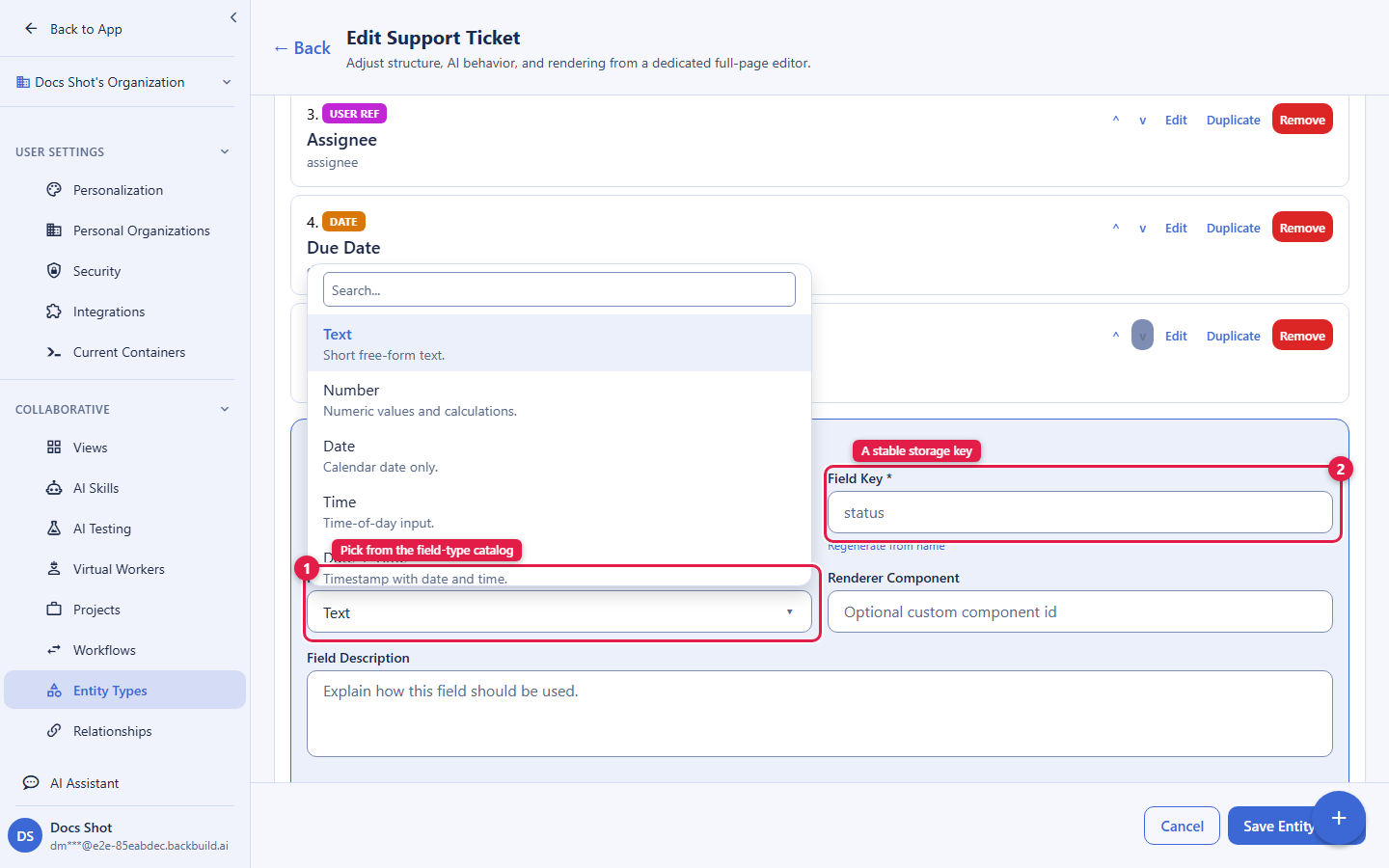
Fields are where a type earns its keep. A common complaint about lighter tools is a shallow catalog (text, number, date, single-select, and little else), which forces you to fake rich data inside a text field. Backbuild offers thirty-one first-class field types, so a reference to a teammate is a real person picker, an embedded document is a real document, and a rollup is a real, live list of related records, never a string you have to keep in sync by hand.
A type’s fields is an ordered array of field definitions.
Each field has a stable key (a lowercase, snake-cased
identifier used to store its values), a human name, a
type, and options that depend on the type:
| Attribute | Type | Description |
|---|---|---|
key | string | Stable identifier used as the storage key for values. Lowercase, snake_case. |
name | string | Human-readable field label. |
type | enum | One of the field types listed below. |
required | boolean | When true, the field must have a value before a record can be saved. |
isArray | boolean | When true, the field holds a list of values rather than a single value. |
description | string | Help text shown alongside the field. |
options | object | Choice and reference configuration (see option sources). |
constraints | object | Validation rules (for example min, max, length, pattern, step). |
access | enum | read (rendered but never editable) or edit (the default). |
permissionFlags | string[] | Names of the type’s permission flags that gate this field. |
hidden | boolean | Hide the field from the default rendering. |
The full field-type catalog
The thirty-one field types you can choose from, grouped by what they hold:
| Type | Label | Use for |
|---|---|---|
text | Text | Short free-form text. |
number | Number | Numeric values and calculations. |
date | Date | Calendar date only. |
time | Time | Time of day. |
datetime | Date + Time | A timestamp with both date and time. |
boolean | Boolean | A true/false toggle. |
dropdown | Dropdown | A single-select choice list. |
radio | Radio | A single choice with explicit options. |
markdown | Markdown | Long-form rich text content. |
url | URL | External or internal links. |
email | An email-style string. | |
image | Image | An image asset (see entity media). |
audio | Audio | An audio asset. |
video | Video | A video asset. |
attachment | Attachment | An uploaded file or document. |
entity_ref | Entity Ref | A reference to another entity, optionally constrained to one type. |
user_ref | User Ref | A reference to a user account. |
group_ref | Group Ref | A reference to a group. |
role_ref | Role Ref | A reference to a role. |
entity_rollup | Entity Rollup | A read-only, derived list of related records of a chosen type, with a live count (see references, lookups, and rollups). |
breadcrumb | Breadcrumb | A hierarchy-aware navigation field. |
json | JSON | A structured JSON payload. |
code | Code | Source code with language-aware highlighting. |
doc | Document | An embedded Backbuild Doc reference. |
sheet | Spreadsheet | An embedded Backbuild Sheet reference. |
slides | Slides | An embedded Backbuild Slides deck reference. |
diag | Diagram | A reference to a diagram. (The Diagrams app is coming soon; the field type is selectable today.) |
calendar | Calendar | An embedded calendar reference. |
calendar_event | Calendar Event | An embedded calendar-event reference. |
ticket | Ticket (Helpdesk) | A linked helpdesk ticket, with View and Create Ticket actions. |
file_renderer | File Renderer | Pick a file from the Files browser and render it with the right viewer per type. |
Set isArray: true on any field to make it hold a list of values,
for example a multi-select dropdown or a list of related entity references.
A field marked access: "read" is displayed but never editable, so
you can surface a computed or reference value without letting anyone type over
it.
References, lookups, and rollups
The most common data-modeling question is when to use a reference, a lookup, and a rollup. They are three different things and it is worth being precise:
- A reference (
entity_ref,user_ref,group_ref,role_ref) points one record at another. A Deal that references a Company, a Task that references its Assignee. You can constrain anentity_refto a single target type, so a “Company” field can only ever point at a Company record, never at a Contact. That constraint is what keeps a model clean as it grows. - A lookup surfaces selected fields of the record you referenced, read-only and always current. Reference a Company, and its industry or region can render on the Deal without being copied into it; when the company’s value changes, the displayed value follows. You express a lookup by giving a reference field one or more display fields, which render the referenced record’s chosen values on this record.
- A rollup (
entity_rollup) lists the child records of a chosen type that sit under the current record, read-only, with a live count: every line item under an order, every Task under a Project. You pick the referenced type and which of its fields to show per row, and the list stays current as records are added or removed. A rollup answers “which records, and how many”; it is a list with a count, not a numeric sum or average.
A worked example: model a Company type and a Deal type. On
Deal, add a company reference constrained to the Company type, and
give it a display field or two so each deal shows its company’s region
without copying it. On Company, add an entity_rollup of the Deal
type so the company lists the deals recorded under it with a live count; add a
deal and the list updates on its own, and you never maintain it by hand. The
link that connects two records across types is a
relationship; that page teaches the
link, lookup, and rollup distinction in full and shows how to set up
one-to-many and many-to-many models.
Embedded documents, and referencing proofs from a record
A doc field does not hold a snippet of text; it holds a real
Backbuild Docs document, edited in the full editor and stored as a document in
its own right. Add one the same way as any other field: on the entity type, add
a field, choose the Document type, and give it a key and a
label. Every record of that type then gets its own document under that field,
created on first use, so a Requirement can carry an
acceptance_criteria document and a Chain Row can carry a
process document without either being squeezed into a text box.
The same pattern gives you sheet, slides, and
calendar fields for the other document kinds.
Open a Document field in read-first mode
For records that people usually review before they edit, configure the Document field to open as a clean reading surface. Set the two options on that field’s definition:
{
  "key": "process",
  "name": "Process",
  "type": "doc",
  "options": {
    "viewOnlyByDefault": true,
    "clickToEdit": true
  }
}
With viewOnlyByDefault enabled, the embedded document initially
appears as a read-only preview without rulers, menus, or the formatting
toolbar. An authorized editor sees Click to edit. Selecting
it edits the document in place, keeps the surrounding record visible, and
restores the editing controls configured for that field. Activating edit is
local to the current screen; it does not save a field value or alter the
document by itself. Moving to another record or referenced document starts
that document in its configured preview state again.
These options control presentation, not access. Document permissions, field
read or edit access, and masking still decide what each person may see and
change. Someone without edit access does not receive the click-to-edit
control. Existing Document fields with neither option keep their familiar
immediately editable behavior. Setting viewOnlyByDefault without
clickToEdit keeps that field in preview for the current visit;
setting clickToEdit alone does not change an edit-first field.
Because the field holds a document rather than a value, anything you can put in a document you can put in the field, including a proof reference. A proof reference is a live pointer to a proof in Backbuild Prove. To insert one, open the document and use Insert › Proof reference, then pick the project and the proof you want. The editor drops in a proof card at the cursor.
A proof reference carries no copy of the proof. It stores only the identity of the proof it points at, then renders the live artifact: its label, kind, state, and when it was last evaluated. When the proof is re-evaluated in Backbuild Prove and its verdict changes, the card in your document changes with it; there is nothing to re-paste and nothing to keep in sync. Choose the card display for a full panel or the badge display for a compact chip when you are citing several proofs in a paragraph of prose.
A document can hold as many proof references as you like. They
are ordinary blocks in the document, so you insert a second, third, or tenth the
same way you inserted the first, and you can interleave them with headings,
prose, and equations. This is the intended way to model a record whose subject
is discharged by more than one proof: the record keeps one doc field, and that document embeds every proof that bears on it,
in whatever order reads best. You do not need a separate field per proof, and
you do not need a child record per proof.
Access is resolved per viewer, not baked into the reference. A reader who cannot see the referenced proof sees a neutral “not accessible” state rather than its contents, so embedding a reference never widens who can read the underlying proof.
Choice and reference options
Choice fields (dropdown, radio) and reference fields
populate their options from a source rather than only a
hard-coded list. Three sources are the everyday workhorses:
static: a fixed list of values you type in (for example the four priorities of a ticket). This is the right choice for a small, stable set of labels.entity_types: the organization’s active entity types, so a field can let a user pick which kind of record to reference.entities_of_type: the actual records of another type, so a “Company” picker lists your Company records and stays current as you add more.
Additional sources support more advanced models and draw their options from
other parts of your configuration: fields_of_type (the fields
defined on another type), unique_field_values (the distinct
values a field already holds across records),
relationship_types and valid_relationships (your
configured relationship vocabulary
and its allowed pairings), and workflow (the states of a
workflow). When you are building a
first model, reach for the three everyday sources; add the advanced ones as
your model calls for them.
Validation that actually blocks bad data
Validation is declared on each field and enforced on every write at the API boundary, not merely hinted in the UI. That distinction matters: a validation that lives only in the browser is bypassed the moment a record is created by an integration, an import, or the AI assistant. Because Backbuild validates on save, a required field left empty, a value of the wrong type, a number outside its min/max, a string that violates a length or pattern rule, or a choice outside the allowed set are all rejected the same way, whoever or whatever is writing:
- Required: a missing value on a
requiredfield is rejected with a clear, field-attributable error. - Type correctness: values must match the field’s declared type.
- Constraints: the
constraintsbag (min/max, length, pattern, step, and similar) is applied per field. - Allowed options: choice fields reject values outside their configured option set.
Invalid input returns a 400 with an actionable message naming the
problem; the write is never silently coerced or dropped. This is what makes a
required field a real gate rather than a cosmetic asterisk.
Controlling How a Record Looks
By default a record renders as its fields. When you want more control, a type can carry two render templates, each with its own styles: a full template for the detail card and an icon template for the compact list or card pill. Templates let you present a record the way your team reads it, a bold title with a colored status chip and a formatted summary, rather than a raw field dump. Template markup and styles are sanitized by the platform before they render, so a displayed record can never load an external resource or run active content; your presentation stays entirely inside your workspace.
Ownership: Who Owns the Records a Type Creates
A type sets ownership defaults that determine who can see the records built from it, before any explicit sharing. Two settings matter:
- The type’s own owner (
owner_scopeandowner_id): who the entity type itself belongs to, chosen from user, project, group, department, or the whole organization. - The default owner of new records
(
default_entity_owner_scope): the visibility scope every new entity of this type takes when it is created, chosen from creator, project, group, department, or org. Choosingcreatormakes each record private to whoever created it; choosingorgmakes new records visible organization-wide.
Ownership sets the floor. It composes with the five-right permission grants rather than replacing them: a record starts owned by its default scope, and grants extend access beyond that scope to specific people, groups, or projects. Setting a sensible default owner on the type is the single most effective way to keep new records visible to the right audience without hand-sharing each one.
System Types vs Custom Types
Backbuild ships a catalog of system entity types: platform-provided, read-only blueprints available to every organization. They are global and are never edited in place by an organization; think of them as starting points you copy from, not schemas you change.
Custom entity types are the ones you create. They live in your organization, are fully editable, and are what your records are built from. To base a new type on a system blueprint without altering the blueprint, clone it into your organization.
Organization and Environment Scope
Custom types are organization-scoped: the owning organization is taken from your authenticated session, never from the request body. A type defined once is reusable across every project in that organization; you do not redefine the same schema per project. This is how a model stays a single source of truth instead of sprawling into per-team copies that drift apart.
Types are also environment-scoped. Backbuild separates development, staging, preprod, and production within an organization. A type is created and versioned inside the active environment, so you can build and test a model in development and promote it forward without touching production data. All access is governed by org-scoped access control, and every create, update, and delete is audit logged.
Evolving a Type Without Breaking Live Records
The fear that stops people committing to a data model is simple: “what if I build this and later cannot change it, or a change silently corrupts what I already have?” Backbuild answers that with versioning and a breaking-change guard.
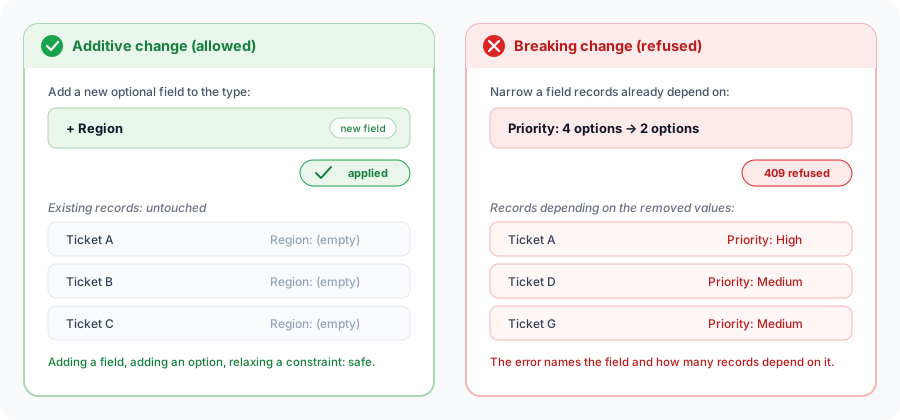
Updating a type creates a new version (you may attach a
changelog note). Additive and non-destructive changes, adding a
field, adding an option, relaxing a constraint, are safe and apply cleanly.
A change that would invalidate data already stored on an in-use field,
such as narrowing a field while records depend on its current values, is
refused with a 409 that names the field and how
many records depend on it. You are told exactly what would break before
anything does, so you can migrate deliberately instead of discovering the
damage later.
Cloning a Proven Type
Cloning copies a system blueprint (or another type in your own organization) into a new custom type, preserving its fields, AI instructions, render templates, and sample data. It is the supported way to base a new type on an existing one, and it is the fastest path from “blank workspace” to “working model”.
- Source: clone from a
systemcatalog type or anorgtype you already own. Cross-organization cloning is never permitted. - Rename: give the clone a new display name.
- Extend:
add_fieldsappends new fields. It cannot redefine or drop an existing field, so cloning is strictly additive and the clone stays interpretable by anything that already understands the source. - Lineage: the clone records the source it came from, which lets it later adopt published updates from that source.
# Clone a system blueprint into your org, renamed and extended
curl -X POST https://api.backbuild.ai/v1/training/entity-types/clone \
  -H "Authorization: Bearer $TOKEN" \
  -H "Content-Type: application/json" \
  -d '{
    "source_type_id": "019d...",
    "source_scope": "system",
    "rename": "Onboarding Checklist",
    "add_fields": [
      { "key": "owner_team", "name": "Owner Team", "type": "text" }
    ]
  }'
Adopting Packaged Updates
When a type descends from a published source (a system blueprint or a
SaaS package type), the publisher can release an
update to it. Additive updates propagate to your clone automatically with a
no-clobber merge: new fields and properties arrive, but any
local edits you made to the clone are preserved rather than overwritten.
Breaking changes are never applied automatically. When automatic propagation
was skipped because your clone had diverged, an update_available
marker appears on the type, and you pull the update on demand:
POST /v1/entity-types/:entityTypeId/adopt-package-updateThe result is that a template author can improve a model for everyone, and every clone can take the improvement, without a central edit clobbering the local customizations each team has made.
Visibility and Sharing
By default a type is visible to members of the owning organization according to their role and permissions. You extend access more finely with grants. A grant targets a single type by id or a set of types by criteria, and conveys any combination of five independent rights:
- Visibility: whether the subject can see the type exists at all.
- Read: view the type’s definition.
- Edit: modify the type.
- Delete: soft-delete the type.
- Purge: permanently remove it (never conveyed implicitly).
Each grant is made to a subject scope, so you can share a
type with an individual user, a group, a
department, a project, or the whole org.
Grants are created and listed by the resource owner or an organization
administrator, are audit logged, and can be revoked at any time. You can also
query the effective rights a user has on a type: the resolved five
rights plus the grants that contributed them, which is what an access review
needs.
For in-record control, a type can define its own
permission flags and attach them to individual fields
(permissionFlags on a field). A viewer without a required flag
sees that field masked while the rest of the record stays visible, so you can,
for instance, hide a salary or a cost field from most of the team without
hiding the record itself. The full share-grant request shape, the created-grant
response, and every return code are documented under
Entities: Sharing (the same
endpoint, targeting a type by setting resource_type to
entity_type).
Shipping a Model to Your Tenants
When you package your product with the SaaS Builder, the types you modeled travel with it. This is what lets one author standardize a data model across many teams or many customers without hand-rebuilding it in each.
- Seed on provision: when a tenant subscribes and is provisioned, the package’s types are cloned into the tenant’s own isolated organization as their own editable types. Each tenant gets a clean copy; tenants never share type definitions.
- Lineage and updates: each tenant clone remembers the package type it came from. When you publish an additive update, subscribers receive it automatically (or pull it on demand) under the same no-clobber rule that preserves each tenant’s local customizations.
- Breaking changes are gated: only safe, additive changes auto-propagate; a change that would invalidate a tenant’s stored data is never pushed automatically.
- Per-plan entitlement: whether a tenant can use custom data modeling is controlled by the package’s feature-flag entitlements. A plan might enable
entity-typeson every tier and reserveviews,relationships, orworkflowsfor higher tiers.
Frequently Asked Questions
- Will I hit a wall with the field types and have to fake data in a text field?
- The catalog has thirty-one field types, including references to people, groups, and roles, rollups, embedded documents, sheets, and calendars, media, code, and JSON. Rich data is a first-class field, not a string you keep in sync by hand.
- Can I restrict a reference so it only points at one kind of record?
- Yes. An
entity_refcan be constrained to a single target type, so a “Company” field can only ever reference a Company record. Constraining references is how a model stays clean as it grows. - If I change a field or its type, will I lose data?
- Type edits are versioned. Additive changes apply cleanly; a change that would invalidate data on an in-use field is refused with a
409that names the field and how many records depend on it. You are warned before anything breaks. - Can I start from a proven model instead of a blank type?
- Yes. Clone a system blueprint (or a type you own), rename it, and append fields. The clone keeps a lineage back to its source so it can later adopt published updates.
- How do I push a model update to many teams without overwriting their edits?
- Additive updates propagate to clones automatically with a no-clobber merge that preserves local edits; breaking changes never auto-apply. A diverged clone shows an
update_availablemarker and can pull the update on demand. - Can I test a model before it hits production?
- Yes. Types are environment-scoped across development, staging, preprod, and production, so you build and validate a model in a lower environment and promote it forward without touching production data.
API Reference
All endpoints require an authenticated bearer token. The owning organization
and active environment are taken from the session; system-assigned fields
(id, org_id, version, timestamps) are
never accepted in a request body.
List Entity Types
GET /v1/entity-typesLists the entity types available to your organization.
| Parameter | Type | Description |
|---|---|---|
project_id | UUID | Scope the listing to a project context. |
limit | integer | Max results (1 to 100). |
offset | integer | Pagination offset. |
Get an Entity Type
GET /v1/entity-types/:entityTypeId
Returns one type’s full definition, including its fields, AI
instructions, render templates and styles, version, and, for a clone, whether
a packaged update is available. A type you cannot see returns 404.
Create an Entity Type
POST /v1/entity-types| Field | Type | Description |
|---|---|---|
name | string | Required. Display name (1 to 200 chars). |
slug | string | Optional URL-safe identifier (lowercase, hyphens/underscores). |
description | string | Optional description. |
icon | string | Optional icon (emoji or short token). |
color | string | Optional hex color (for example #2563EB). |
parent_uuid | UUID | Optional parent type for hierarchy. |
category | string | Optional grouping category. |
fields | array | Field definitions (see Fields and Field Types). |
relationship_mode | enum | open or restricted. |
ai_instructions | object | Per-lifecycle AI guidance. |
render_template_full / render_template_icon | string | Full and icon render templates (with matching *_styles). |
owner_scope / default_entity_owner_scope | enum | Type ownership and the default owner scope of new records. |
permission_flags | object | Type-level custom permission flag definitions. |
A successful create returns 201 Created with the complete new
type in the canonical success envelope:
{
  "success": true,
  "data": {
    "id": "019d...",
    "org_id": "019a...",
    "display_name": "Support Ticket",
    "description": "Customer support requests",
    "icon": "📋",
    "color": "#2563EB",
    "parent_uuid": null,
    "category": "Support",
    "fields": [ /* the field definitions you supplied */ ],
    "ai_instructions": {},
    "relationship_mode": "open",
    "render_template_full": null,
    "render_template_full_styles": null,
    "render_template_icon": null,
    "render_template_icon_styles": null,
    "source_system_type_id": null,
    "owner_scope": "org",
    "owner_id": null,
    "default_entity_owner_scope": "org",
    "permission_flags": {},
    "version": 1,
    "is_active": true,
    "created_by_user_id": "019b...",
    "created_at": "2026-01-01T00:00:00Z",
    "updated_at": "2026-01-01T00:00:00Z"
  }
}
Response Codes
| Status | Meaning |
|---|---|
201 Created | The type was created; the full record is returned. |
400 Bad Request | Validation error: missing/invalid name, bad hex color, malformed UUID, or a rejected template/style. |
401 Unauthorized | Missing or invalid bearer token. |
403 Forbidden | Caller lacks the entity-type create permission, or the body’s org_id does not match the session. |
404 Not Found | A supplied parent_uuid does not reference an existing active type. |
500 Internal Server Error | Unexpected server error. |
Update an Entity Type
PUT /v1/entity-types/:entityTypeId
Updates a type and creates a new version. Any create field may be supplied;
include an optional changelog. A change that would invalidate
data on an in-use field is refused with 409 and the offending
field’s usage details.
Clone an Entity Type
POST /v1/training/entity-types/clone| Field | Type | Description |
|---|---|---|
source_type_id | UUID | Required. The type to clone. |
source_scope | enum | system (default) or org. |
rename | string | Optional new display name for the clone. |
add_fields | array | Optional additional fields to append (cannot redefine existing fields). |
parent_uuid | UUID | Optional parent type for the clone. |
Returns 201 Created with the full cloned type, including its new
id, the merged fields, and the
source_system_type_id lineage.
Response Codes
| Status | Meaning |
|---|---|
201 Created | The clone was created; the full record is returned. |
400 Bad Request | Validation error: missing/invalid source_type_id, an unrecognized source_scope, an over-long rename, or add_fields that redefine an existing field. |
401 Unauthorized | Missing or invalid bearer token. |
403 Forbidden | Caller lacks the create permission, lacks read on the source, or sends a mismatched org_id. |
404 Not Found | The source type (or a supplied parent_uuid) was not found. Cross-organization sources are reported as not found. |
500 Internal Server Error | Unexpected server error. |
Adopt a Packaged Update
POST /v1/entity-types/:entityTypeId/adopt-package-updatePulls the latest published update from the type this clone descends from (used when automatic propagation was skipped because the clone had diverged).
Delete and Purge
DELETE /v1/entity-types/:entityTypeId        # soft-delete
POST   /v1/entity-types/:entityTypeId/purge  # permanent removal
Delete is a reversible soft-delete; purge permanently removes the type and is gated separately from delete.
Sharing and Permissions
POST /v1/entity-permissions: create a grant (setresource_typetoentity_type).GET /v1/entity-permissions: list grants (owner or admin only).DELETE /v1/entity-permissions/:permissionId: revoke a grant.GET /v1/entity-types/:entityTypeId/effective-permissions: resolve the effective five rights and their contributing grants.
The full request shape and return codes for grants are documented under Entities: Sharing.
Related concepts
- Entities: the records built from these types, with their media, comments, workflow state, visibility, and sharing.
- Relationships: typed links between records, and the full link, lookup, and rollup distinction.
- Views: saved presentations (board, table, calendar, timeline, gantt) over these records.
- Workflows: the states and role-gated transitions a record moves through.
See the API Reference for complete request and response documentation.