

Security & Compliance
This is the security operator’s and reviewer’s guide to Backbuild. It teaches an IT administrator how to wire up single sign-on, automate joiner and leaver provisioning, enforce multi-factor authentication, and manage roles and keys; it gives a security leader the precise, checkable posture behind the zero-knowledge secrets vault, the post-quantum cryptography, and the tenant-isolation model; and it shows a compliance owner exactly what the audit trail captures and how to pull the evidence an auditor samples. Every control described here is part of the platform itself and applies on every plan, including Free. Security is never sold as an enterprise add-on.
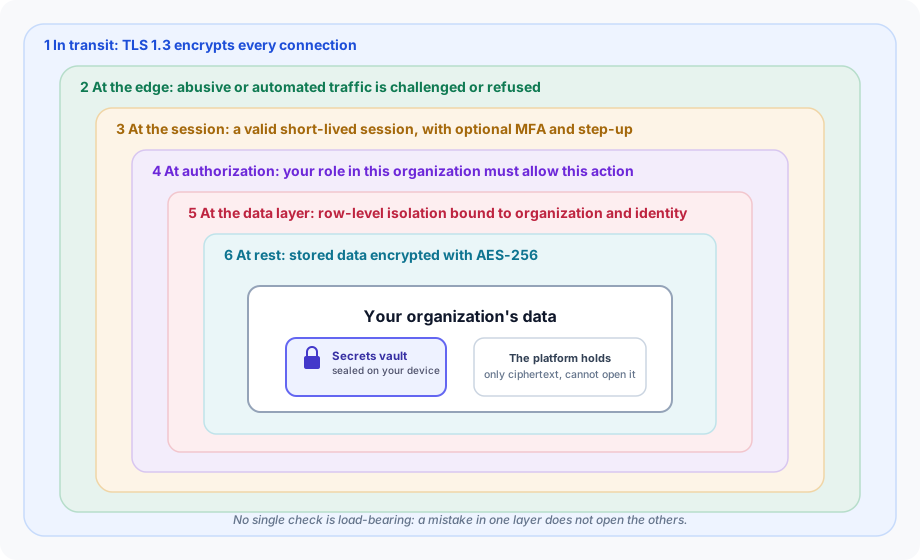
The model in one minute
Before the individual controls, here is the shape of the whole system, so every later section has a place to hang. A request to Backbuild passes through independent layers, and each one can refuse it on its own:
- In transit, every connection is encrypted with modern TLS.
- At the edge, abusive or automated traffic can be challenged or refused before it reaches your data.
- At the session, the caller must hold a valid, short-lived session, and sensitive actions can demand a fresh second factor.
- At authorization, the caller’s role in that specific organization must include the permission for the exact operation.
- At the data layer, row-level security scopes every read and write to the bound organization and identity, independent of the application code.
- At rest, stored data is encrypted, and your secrets live in a vault that is encrypted on your own devices so the platform cannot read them at all.
This is defense in depth: no single check is load-bearing. A mistake in one layer does not open the others, which is the property a security reviewer is really asking about when they ask what happens if something goes wrong. The rest of this page walks each layer and teaches you how to operate it.
Authentication
Backbuild supports several ways to sign in. All of them converge on the same token-based session (a short-lived access token plus a rotated refresh token), so the controls in every later section apply no matter how a person authenticated.
Email and password
Standard registration and login with email verification. Passwords are hashed with Argon2id, the memory-hard algorithm recommended by OWASP and the winner of the Password Hashing Competition, at the memory-hard parameters OWASP recommends, and every new or changed password is screened against known-breach corpora so a password already exposed in a public breach cannot be set. Registration dispatches a verification email rather than signing the user in directly; the account activates through the email-verification flow. Registration and password-reset responses are intentionally uniform whether or not an account exists, so they cannot be used to enumerate which addresses are registered.
# Register (dispatches a verification email; does not return tokens)
curl -X POST https://api.backbuild.ai/v1/auth/register \
  -H "Content-Type: application/json" \
  -d '{"email": "user@example.com", "password": "Sr9!qP2mVx7wLk"}'

# Login (returns access and refresh tokens, or an MFA challenge)
curl -X POST https://api.backbuild.ai/v1/auth/login \
  -H "Content-Type: application/json" \
  -d '{"email": "user@example.com", "password": "Sr9!qP2mVx7wLk"}'
See the Authentication API reference for the full request and response shapes, including the code-based email-verified sign-up flow and the responses returned when a challenge is required.
Google sign-in
One-click authentication with a Google account. The flow creates an account for a new user and links to the existing account for a returning user, so people are not accidentally split across two identities.
# Complete Google sign-in (exchange the Google authorization code)
POST https://api.backbuild.ai/v1/auth/google-oauth
Enterprise single sign-on (SAML and OIDC)
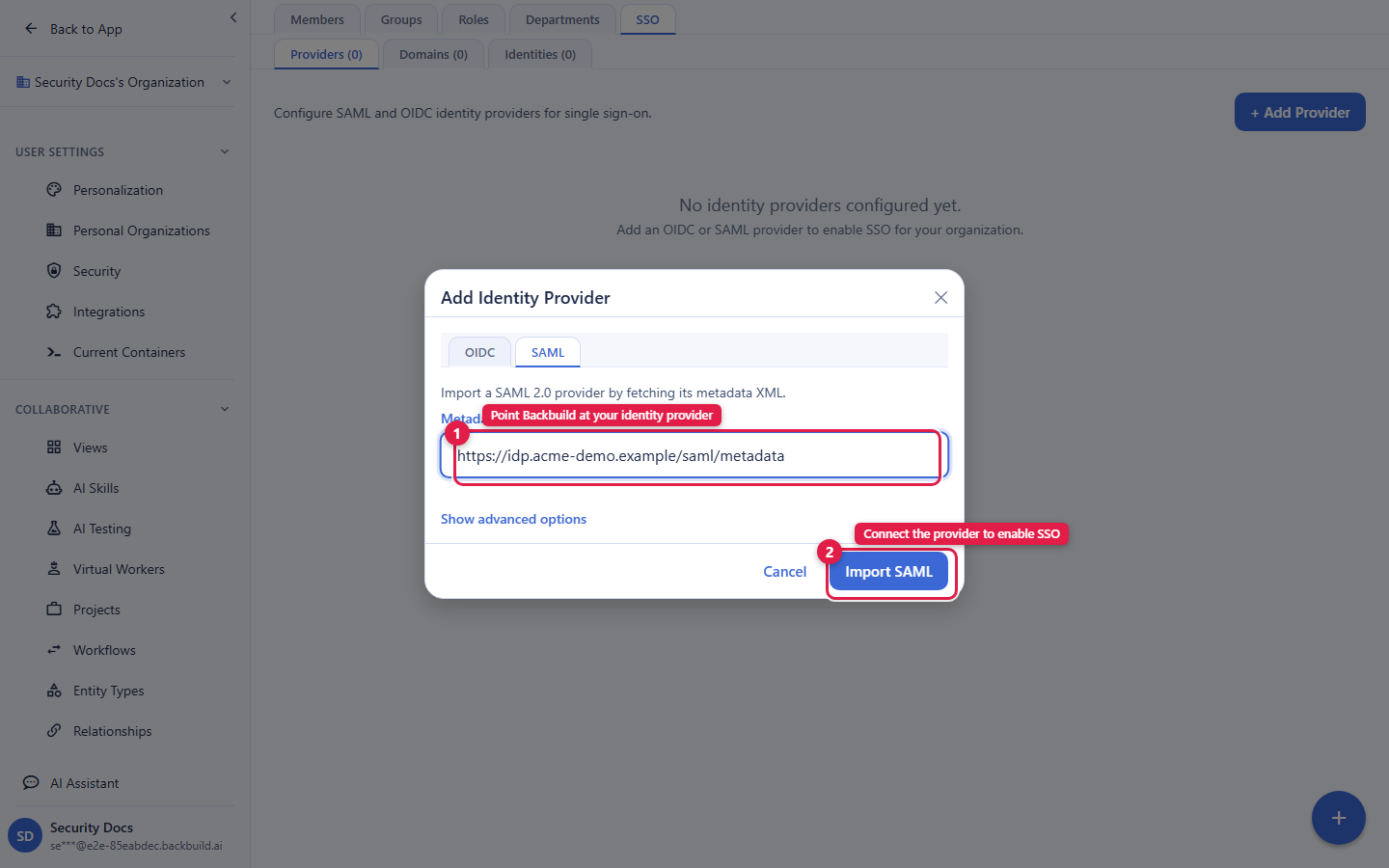
After this section an administrator can connect their identity provider so the whole organization signs in through it. Backbuild supports enterprise single sign-on over both SAML 2.0 and OpenID Connect (OIDC), configured per organization, so each tenant connects its own provider (for example Okta, Microsoft Entra ID, or OneLogin). SSO is available on every plan, not gated behind a separate enterprise tier.
Wiring an identity provider is a two-sided exchange. On the Backbuild side you retrieve the service-provider details your identity provider needs; on the identity-provider side you create an application and paste those values in, then copy your provider’s details back. The endpoints involved:
# SSO endpoints (mounted under /v1/auth/sso)
GET  /v1/auth/sso/saml/login            # SAML login redirect (SP-initiated)
POST /v1/auth/sso/saml/acs              # SAML assertion consumer service (ACS)
GET  /v1/auth/sso/saml/metadata/:id     # SAML service-provider metadata
GET  /v1/auth/sso/oidc/authorize        # OIDC authorization
The essentials to have on hand when you configure the identity-provider side:
- The ACS (assertion consumer service) URL is the
/v1/auth/sso/saml/acsendpoint above; this is where your provider posts the signed assertion after a user authenticates. - The service-provider metadata for your configuration is
served at the
metadataendpoint, so most providers can import the entity ID and ACS automatically instead of you typing them. - SP-initiated sign-in starts at the
loginredirect; users who begin from your identity provider’s app dashboard (IdP-initiated) are handled at the same ACS.
For the exact request and response shapes, including OIDC, see the SSO & SCIM API reference.
Automated provisioning (SCIM)
The deprovisioning gap, a former employee who still has a way in because their access was removed in one system but not another, is the failure this solves. Backbuild implements SCIM 2.0 for the Users resource, so your identity provider (Okta, Entra ID, OneLogin) creates, updates, and, most importantly, deactivates users automatically as your directory changes. When you disable a person in your directory, that change propagates to Backbuild and their access is revoked; you close the loop in one place instead of remembering every app.
# SCIM endpoints (mounted under /v1/scim/v2)
GET    /v1/scim/v2/Users          # List users
POST   /v1/scim/v2/Users          # Create user
GET    /v1/scim/v2/Users/:id      # Get user
PUT    /v1/scim/v2/Users/:id      # Replace user
PATCH  /v1/scim/v2/Users/:id      # Update user (including deactivate)
DELETE /v1/scim/v2/Users/:id      # Deactivate user
One boundary to plan around: SCIM Group provisioning is not
supported. The /Groups resource returns a clear SCIM
“not supported” (501) response, and Groups is omitted from the
discovery document, so a provisioning connector gets an unambiguous signal
rather than silently failing. Map people to Backbuild roles, groups, and
departments inside Backbuild (see
Roles & Permissions)
rather than expecting group membership to sync from your directory. User
lifecycle, the part that actually closes the offboarding gap, is fully
covered.
Common questions
Which identity providers work, and is it SAML or OIDC?
Any SAML 2.0 or OIDC provider, configured per organization. Okta, Microsoft
Entra ID, and OneLogin are the common ones; choose whichever protocol your
provider prefers.
When I deactivate someone in my directory, are they cut off
here?
Yes. SCIM deactivation revokes the Backbuild account, and their existing
sessions cannot be refreshed once revoked. This is the evidence an auditor
samples for prompt deprovisioning (see Audit logging).
Does SCIM push Groups?
No. Users are provisioned; Groups is deliberately not implemented and
answers with an honest 501. Manage role membership inside Backbuild.
Is SSO or SCIM on my plan?
Yes, on every plan including Free. There is no separate SSO tier.
Multi-factor authentication
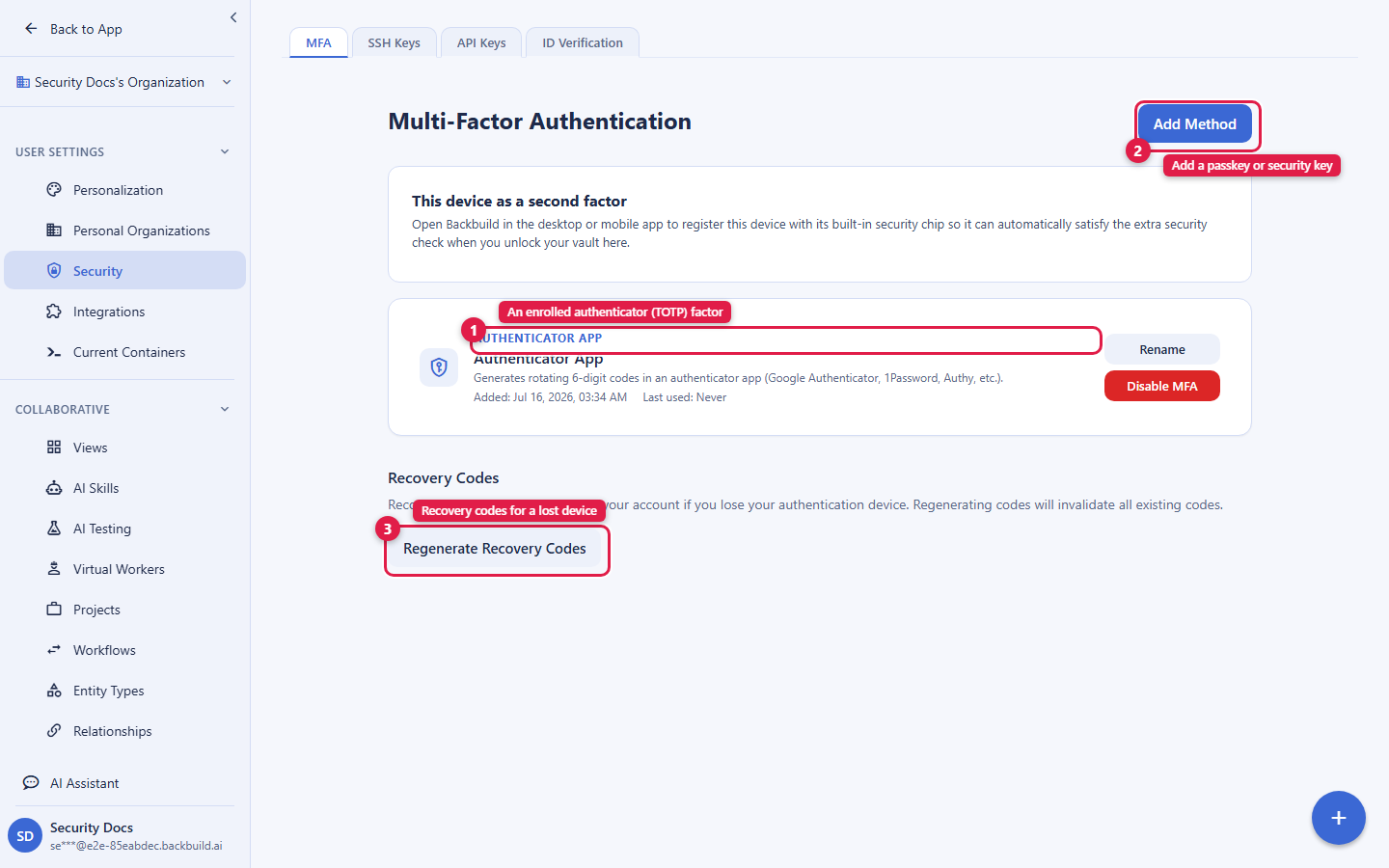
After this section you will be able to add a second factor to your account, choose the right factor type, keep a recovery path, and (as an administrator) help a member who has lost their device. When MFA is enabled, login returns a challenge instead of tokens, and the session is issued only after the second factor is verified.
Backbuild supports three kinds of second factor, and you can enroll more than one:
- Authenticator apps (TOTP). Scan a QR code with an app such as Google Authenticator, 1Password, or Authy, then confirm with the six-digit code. This is the most portable option.
- Security keys and passkeys (WebAuthn). Register a hardware key (YubiKey and similar) or a platform passkey (Touch ID, Windows Hello, a phone passkey). This is the strongest, phishing-resistant option because the key will only respond to the real site.
- Recovery codes. A set of one-time backup codes, generated when you enroll, for the case where you lose access to your other factors. Store them somewhere safe and offline (a printout, or your Backbuild vault under a different account).
Step-up verification for sensitive actions
Some actions are sensitive enough that a valid session is not sufficient on its own: they require a fresh second-factor verification at the moment you perform them, even if you signed in earlier. This “step-up” check guards the highest-impact operations (for example unlocking or reconfiguring vault access), so a walked-away, still signed-in laptop cannot be used to reach them. Actions that require step-up prompt you for it inline and cannot be completed with an API key alone.
Losing a device, and admin reset
If you lose your phone or security key, sign in with one of your recovery codes as the second factor, then enroll a new factor and regenerate your codes. If you have no recovery codes either, an organization administrator can reset your MFA enrollment so you can enroll again from scratch. Every reset is recorded in the audit log with the acting administrator, so the recovery path is itself accountable. Administrator resets are covered on the Members & Invitations page.
Common questions
Can I enforce MFA for everyone in the organization?
Yes. Combined with SSO, you can also let your identity provider’s own
conditional-access policy carry the MFA requirement; either way sensitive
actions still demand step-up.
What if I lose my phone?
Use a recovery code, then re-enroll. With no codes, an administrator resets
your enrollment. This is why you keep recovery codes offline when you set MFA
up.
Roles and least-privilege access
All authorization in Backbuild is scoped to an organization: a person’s
role in one organization has no effect on their access in another. The
platform ships seven built-in roles (owner, admin,
manager, developer, member,
viewer, and guest) arranged from broadest to most
restricted, plus custom roles you shape to an exact job and groups and
departments that assign roles at team scale. This is what lets a compliance
reviewer demonstrate separation of duties, for example a role that can
read the audit log but cannot change settings.
Every operation is authorized on the server in this order:
- The caller holds a valid session.
- The caller is a member of the target organization.
- The caller’s role in that organization includes the required permission for this exact operation.
- The organization context is bound to the operation so it can only touch that organization’s data.
Role changes are bound by a hierarchy ceiling: you can only assign a role at or below your own level, so an account cannot escalate itself. The full per-role capability table, custom roles, groups, departments, and how to run a periodic access review all live on the Roles & Permissions page.
Per-organization data isolation
Isolation between organizations is enforced at the data layer, independent of the application code. Every table carries row-level security policies that scope reads and writes to the bound organization and identity, and on every request the platform binds the authenticated user and organization into the request’s data context so access decisions evaluate against that bound identity. If application code ever failed to scope a query, the data layer still would not return another organization’s data.
This is the direct answer to the reviewer’s question “does isolation depend on your application being bug-free?” It does not: it is defense in depth, so a single missing check in application code cannot leak cross-tenant data. These isolation controls are never disabled or bypassed to make a feature work, and a probe for a record in another organization returns a uniform not-found rather than confirming the record exists.
Audit logging
After this section a compliance owner will know exactly what every audit record captures, how to export it, how to produce access-review and deprovisioning evidence, and the precise integrity wording to reuse in an audit. Every write operation (INSERT, UPDATE, DELETE) across the platform is recorded. Each record captures:
- Who: the user that performed the action.
- What: the operation type and the affected resource.
- When: the timestamp, from a trusted synchronized time source.
- Where: the organization and project context.
- Before and after: the previous and new values for updates.
- Request context: request identifier, IP address, and user agent.
The log is tamper-evident: the audit write is a precondition of the change it records, so an operation cannot occur without its audit trail. Note the precise word: tamper-evident, not “immutable.” That is the honest and defensible claim, and it is the language to carry into your own audit. Records are retained according to your organization’s compliance requirements, and they can be queried and exported (for delivery into your SIEM or GRC tooling) through the Security & Compliance API.
Two evidence tasks auditors ask for repeatedly, and where each comes from:
- “Prove this ex-employee’s access was revoked promptly.” Their deactivation event (from SCIM or a manual removal) is a timestamped audit record with the acting identity; export it alongside the SCIM deactivation to close the sample.
- “Show current entitlements and how they were granted.” Role grants, group and department membership changes, and every refused attempt are all recorded with actor and timestamp. Combine that trail with the effective-permissions view on the Roles & Permissions page to produce an access review.
Common questions
Can I get the specific “who accessed what, and when”
record?
Yes. Every write is attributed to a user with a timestamp and the affected
resource, and updates carry before-and-after values.
Are the logs exportable for our SIEM?
Yes, through the Security & Compliance API, for ingestion into your own
tooling.
Are they immutable?
They are tamper-evident: the change cannot happen without its audit record.
We describe them precisely as tamper-evident rather than immutable.
The zero-knowledge secrets vault
Backbuild includes a full password and secrets manager, on every plan, and it is built on a zero-knowledge foundation with post-quantum cryptography. This section teaches the daily user how to use it, gives the security leader the exact posture to verify, and shows the developer how to give automation a credential without ever handling the raw value.
What zero-knowledge means here
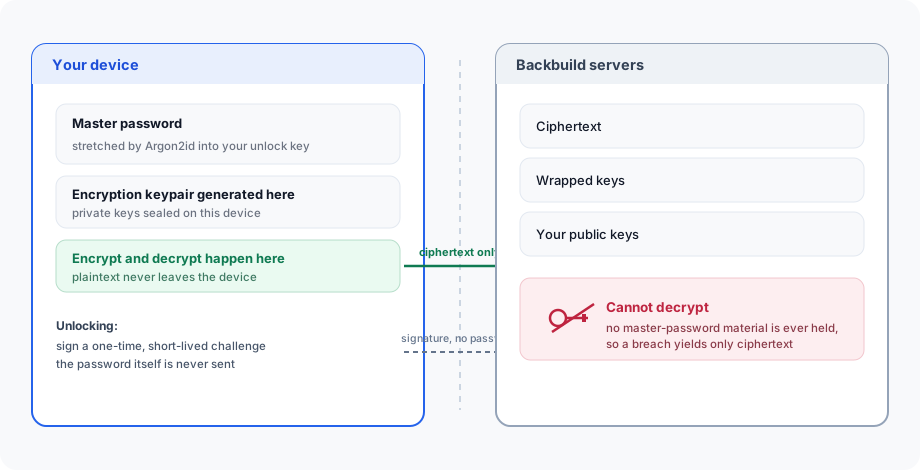
You initialize your vault with a master password. From it, your device derives your unlock key locally using memory-hard Argon2id key derivation, generates your encryption keypair in your browser, and seals your private keys on your device. The platform only ever stores ciphertext, wrapped keys, and your identity-bound public keys. It holds no master-password verifier and cannot decrypt your secrets or guess your master password offline. Your master password never travels over the wire: unlocking proves knowledge of your key by signing a single-use, short-lived challenge, not by sending the password.
So the two questions a security leader always asks have concrete answers. Can Backbuild read your vault? No, it cannot, by construction: it never holds a key that opens your secrets. What happens to your secrets if Backbuild’s servers are breached? An attacker with the stored data still has only ciphertext and wrapped keys, with no master-password material to derive the keys from.
Post-quantum cryptography and harvest-now-decrypt-later
A capture-today, decrypt-later adversary is a real concern for anything with a long secret life. The vault is built to resist it. It uses hybrid cryptography that combines a classical primitive with a NIST-standardized post-quantum one, so a channel or a wrapped key stays secure as long as either primitive holds:
- Key wrapping (KEM): X25519 combined with ML-KEM-768 (NIST FIPS 203).
- Signatures (identity, authorship, and unlock proofs): Ed25519 combined with ML-DSA-65 (NIST FIPS 204).
- Content encryption: authenticated encryption (XChaCha20-Poly1305) with a fresh per-encryption subkey.
This means data captured today cannot be quietly stockpiled for a future quantum computer to open, and it is the board-ready answer to a harvest-now-decrypt-later question: the platform is already on the NIST post-quantum standards, in hybrid form so you lose nothing if either primitive is ever weakened.
Using the vault day to day
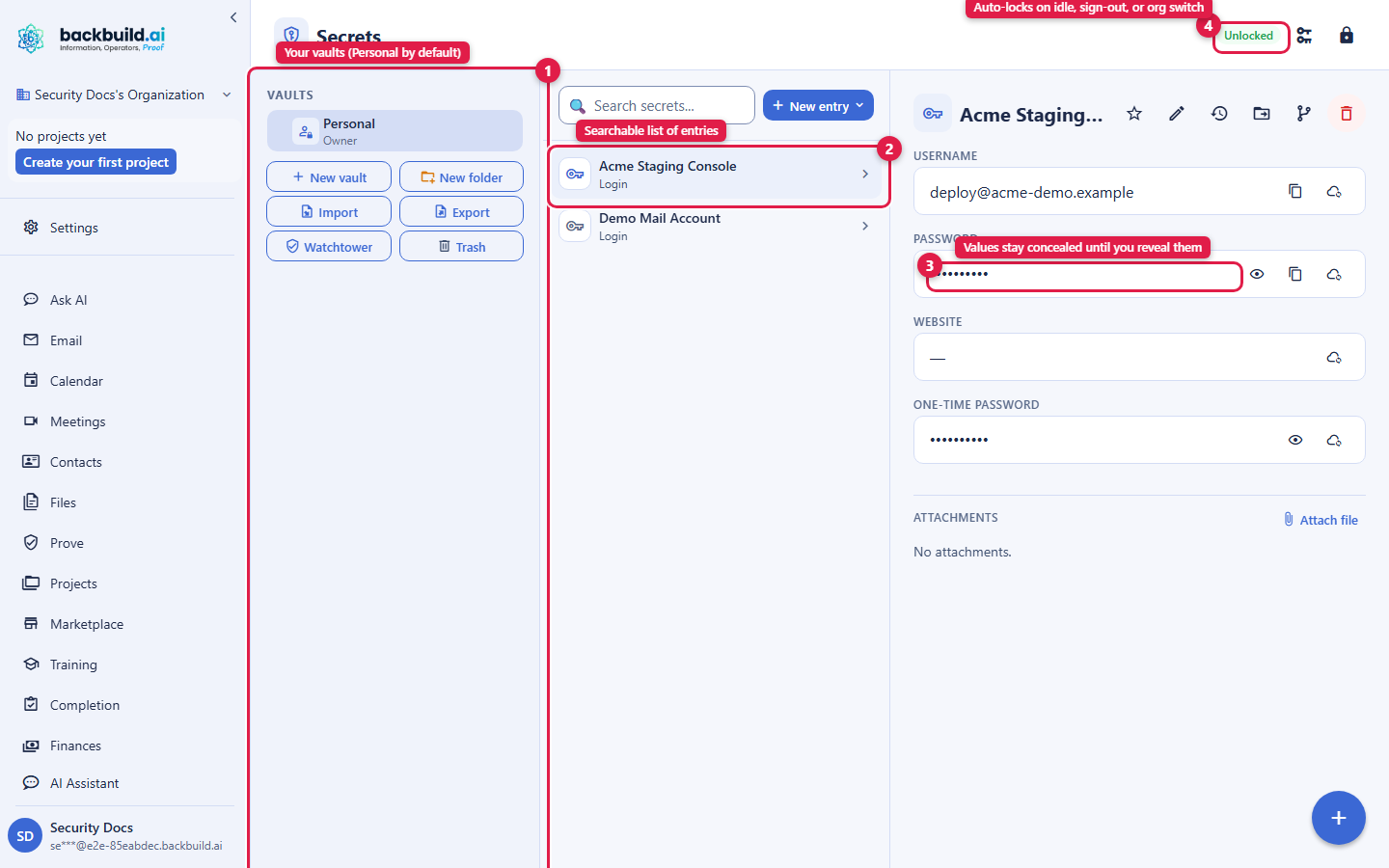
You get a default Personal vault, and you can create more named vaults. The vault opens from the Secrets item in the sidebar as a three-pane workspace, familiar if you have used a dedicated password manager: a rail of your vaults, a searchable list of entries, and a detail pane for the selected entry.
- Organize entries by category, with custom sections and a range of field types (password, email, URL, phone, one-time-code, file, address, and more).
- Generate strong passwords, reveal or conceal a value, and copy a value with automatic clipboard clearing so it does not linger.
- Every item keeps a history of its recent prior values; restoring an old value re-encrypts it into a new current version rather than copying stored bytes.
- Attach files to an entry; the file is encrypted under the vault key, and fetching an attachment is gated by a fresh second-factor check.
- The vault auto-locks on idle, on explicit lock, on sign-out, and when you switch organizations, so a left-open session does not leave secrets exposed.
Sharing a vault, and what happens when someone leaves
Sharing is at the vault level, not the individual entry: you grant a person a whole vault and they can open every entry in it, so you group secrets into vaults that match how you want to share them. A grant wraps the vault’s key to that recipient’s public key; it never hands over a copy of your master password, and it is individually revocable.
Access inside a shared vault follows three presets over a granular permission set: a member can view items, copy values, and see history; a manager adds editing and adding members at or below their own level; an owner adds managing the vault and its owners and managers. Nobody can grant access above their own level, a vault always keeps at least one owner, and any organization member can create a new vault (and is its sole owner).
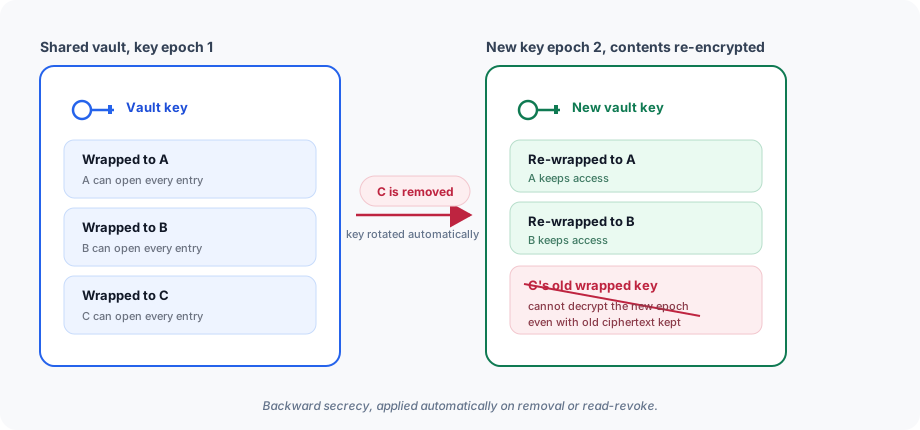
The property a security leader cares about most: when you remove a member or downgrade their read access, the vault’s key is rotated immediately. A new key epoch is issued, re-wrapped to the remaining members, and the current contents are re-encrypted, so a removed member cannot decrypt anything going forward even if they kept a copy of old ciphertext. That is backward secrecy, and it is automatic.
Giving machines, integrations, and workers a secret (without your code touching it)
A grant recipient does not have to be a person. The same vault-level, revocable, zero-knowledge model lets you deliver a credential to the automation that needs it, so the raw value reaches the work without anyone, or any of your code, copying or pasting it. The key idea for a developer: you stop hardcoding secrets and let the credential be delivered at the point of use.
- Machine grants authorize a specific registered device or container to use a vault. You approve each machine yourself, confirming with a fresh step-up verification. The machine then retrieves only the wrapped vault key and the item ciphertext and unwraps it locally, so the platform never holds a vault key or plaintext. Revoke the grant and access ends immediately.
- Integration grants give a connected integration the specific credentials it needs from a vault, authorized through a consent screen that shows you in plain language exactly what is being granted. At use time the platform applies those credentials on your behalf, so your own application code and front end never handle the raw secret.
- Virtual worker grants give an autonomous virtual worker a scoped, revocable vault so it can use the secrets its task requires, bounded to that task’s scope and revocable the moment the work is done. Because a virtual worker has no master password of its own and must run unattended, this custody is disclosed and consented, per organization, with segregated key handling; it is a stated feature you turn on for a worker, not a hidden path.
For the CLI workflow, fetching a secret at runtime rather than baking it into a build, see Secrets from the CLI.
How the AI never sees your secrets
Backbuild is an AI-operator platform, so the obvious question is whether the AI can be talked into revealing a credential. It cannot, because the AI is never given the plaintext in the first place. AI and virtual-worker tools work with references and placeholders, never raw secret values. At the moment a task actually uses a credential, a trusted substitution step swaps the placeholder for the real value outside the model’s context, and the real value is never echoed back into the transcript or logs.
- There is no “reveal this secret’s value” capability exposed to the model. It does not exist for the AI to call, so it cannot be coaxed into calling it.
- The AI can do the safe operations: check whether a secret is set, ask you to initialize your vault, generate a new strong password (whose value, and even its length and character set, are never returned to the model), list the names and descriptions of entries and allowed connection targets, and soft-delete only entries it created itself.
- Metadata from a human vault is available to the AI only inside an unlocked in-app session, and only for the specific items you attached to that run.
So a prompt-injection attempt cannot extract a value the model was never given: the credential is substituted in at the execution boundary, not held in the conversation.
Common questions
If my company runs this, can my employer or Backbuild see my saved
passwords?
Backbuild cannot; your secrets are encrypted on your device with keys it never
holds. Your employer can only see what you deliberately share by granting them
a vault; your Personal vault is yours.
Does my master password or key ever leave my device?
No. Keys are derived and used on your device, and unlocking is a signature over
a one-time challenge, never a password sent to the server.
How do I store a secret so it is never hardcoded, and fetch it at
runtime?
Keep it in a vault and grant the machine, integration, or worker that needs it.
The value is delivered at the point of use, so it never lands in your source,
your build, or your logs. Rotating the secret in the vault takes effect without
redeploying.
When someone leaves, are the keys rotated so they cannot decrypt going
forward?
Yes, immediately and automatically, on removal or read-revoke.
Is there any recovery or escrow, and if so is it a backdoor?
Human vaults are not escrowed and Backbuild cannot open them. The one escrowed
case, an autonomous virtual worker that has no master password, is a disclosed,
consented, per-organization feature you explicitly enable, with segregated key
handling, not a hidden path into human vaults.
API keys
API keys provide programmatic access for integrations, CI/CD pipelines, and
agent connections. Keys are scoped to an organization and follow the format
bb_live_{prefix}_{secret}.
- Organization-scoped, with the permissions and scopes you choose, so a key can be as narrow as a single job needs (for example read-only access to one capability rather than a broad grant).
- Revocable at any time; revocation takes effect immediately.
- Usage is tracked in the audit log, so a key’s activity is attributable.
- Available on plans with the
api-keyscapability enabled.
Because they are non-interactive, API-key principals are deliberately barred from the most sensitive actions, which require a fresh interactive step-up instead. Give each integration its own narrowly scoped key rather than sharing one, so you can revoke exactly one integration without disturbing the others.
Session management
- Access tokens are short-lived and used to authenticate API calls.
- Refresh tokens are longer-lived and are rotated as they are used.
- Logout revokes the session’s tokens; a revoked session cannot be refreshed.
- Multiple devices can hold concurrent sessions, and signing out on one does not disturb the others.
Encryption
| Layer | Standard |
|---|---|
| In transit | TLS 1.3 for all connections |
| At rest | AES-256 for stored data |
| Password hashing | Argon2id (memory-hard, at the OWASP-recommended parameters) |
| Sensitive third-party values | API keys and OAuth secrets encrypted with dedicated, isolated keys |
| Your secrets vault | Zero-knowledge, encrypted on your device; hybrid post-quantum key wrapping (X25519 with ML-KEM-768, FIPS 203) and authenticated content encryption |
Post-quantum remote desktop
The same store-now-decrypt-later posture extends to live sessions. The Backbuild remote desktop stack uses hybrid post-quantum cryptography: the end-to-end overlay combines a classical and a post-quantum primitive so the channel stays secure as long as either holds, with authenticated encryption applied per channel. Key exchange and authentication are aligned with the NIST post-quantum standards (FIPS 203 and FIPS 204). The native host and desktop client run the hybrid overlay on every session, and the browser-based viewer is joining them.
Abuse protection at the edge
Identity endpoints are protected against credential stuffing, brute force, and automated abuse before a request reaches your data. If you integrate directly with the API, handle these responses gracefully:
- Proof-of-human (401): high-volume or automated traffic on
identity endpoints may be challenged with a Cloudflare Turnstile check. The
API responds with
401and{ "error": "turnstile_required" }; render a Turnstile widget and resubmit with the token in thecf-turnstile-responseheader or theturnstileTokenbody field. - Rate limiting (429): over-limit requests receive
429. Honor theRetry-Afterheader and back off before retrying. - Region restrictions (451): requests from embargoed or
sanctioned regions are refused with
451for sanctions compliance. - Access denied (403): requests from blocked sources are
refused with
403.
Rate-limited responses surface standard headers when available:
X-RateLimit-Limit (maximum per window),
X-RateLimit-Remaining (remaining in the current window),
X-RateLimit-Reset (Unix timestamp when the window resets), and
Retry-After (seconds to wait, on a 429).
CSRF protection
All state-changing API requests require a valid Origin or
Referer header, and requests without them are rejected with a
403. Webhook endpoints are exempt so they can accept inbound
notifications from external services (for example a payment processor
confirming a charge).
Compliance
Backbuild is built to meet the requirements of the frameworks below. This is a statement of the control bar the platform is engineered to, and it is the row that goes in your vendor risk register; for current attestations and supporting documentation, see the trust center linked at the end.
| Framework | Scope |
|---|---|
| PCI DSS | Payment Card Industry Data Security Standard: billing runs through a PCI-compliant payment processor, so card data is handled to that standard. |
| ISO 27001 | Information Security Management Systems: systematic security controls and risk management. |
| HIPAA | Health Insurance Portability and Accountability Act: safeguards for protected health information. |
| SOC 2 Type II | Service Organization Control: trust-service criteria for security, availability, and confidentiality. |
| OWASP Top 10 | The current OWASP Top 10 web-application risks are addressed in the platform architecture. |
For the security, compliance, and legal documentation a procurement or vendor-risk reviewer needs, visit the Backbuild Trust Center.
API reference
POST /v1/auth/register: create an account and send a verification emailPOST /v1/auth/initiate: start the code-based email-verified sign-up flowPOST /v1/auth/complete-registration: redeem the verification code and receive tokensPOST /v1/auth/login: authenticate and receive tokensPOST /v1/auth/refresh: refresh an expired access tokenPOST /v1/auth/logout: revoke the current sessionPOST /v1/auth/password/reset/request: request a password resetPOST /v1/auth/password/reset: complete a password resetPOST /v1/auth/google-oauth: complete the Google sign-in flow* /v1/auth/sso/*: SSO endpoints (SAML and OIDC)* /v1/scim/v2/*: SCIM provisioning endpoints (Users)
See the API Reference for complete request and response documentation, the SSO & SCIM and Security & Compliance API pages for the identity and audit surfaces, and Roles & Permissions for the full role and permission model.