

Access, Security and the API
Financial and employee data is the most sensitive data a business keeps, and the person evaluating an accounting tool, an owner, a bookkeeper, or an outside accountant, is right to scrutinize how it is protected and who can reach it. This guide answers those questions: how access is scoped so people can do their job and no more, how every change is attributed and logged, how your data is isolated and encrypted, how you get everything back out, how AI is bounded, and how the books are drivable over the API. After this page you will be able to set up access safely and satisfy a reviewer.
Role-based access, the audit trail, encryption, tenant isolation, and export are included, free on every plan. Security is never sold as an enterprise add-on. See the pricing page.
Scoped Access and Segregation of Duties
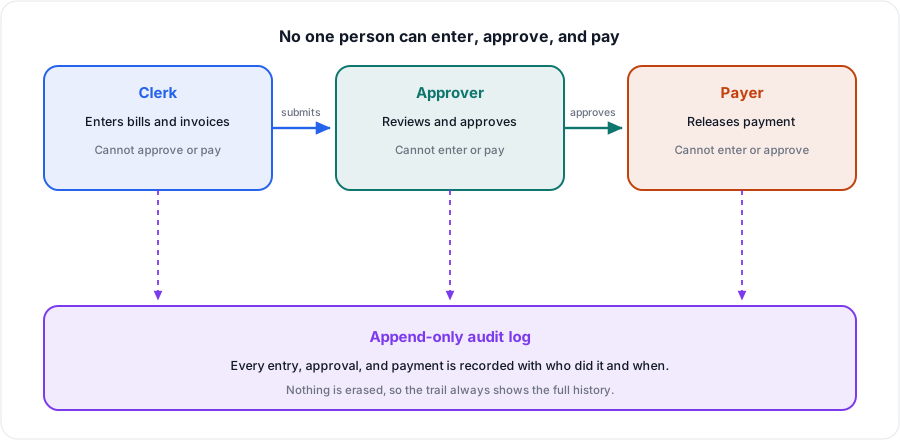
After this section you will let people in without letting them do everything. The named risk in any accounting system is one person who can add a vendor, issue a payment, and reconcile with no second pair of eyes. Backbuild Finances lets you avoid that with finance-scoped roles you define and assign, on top of your organization's roles.
- Define roles within Finances and assign them, so a clerk can enter transactions while approval and payment sit with someone else.
- Scope access by area, so a person sees and touches only the parts of the books their job requires.
- Everyone works under their own login, never a shared one, which is what keeps the audit trail meaningful.
Assigning the least access that lets each person do their job is the control an auditor looks for, and it is a policy you set rather than an all-or-nothing switch. See Roles and Permissions for the organization-level model these build on.
Every Change Is Logged
After this section you will have an answer to "who changed this." Every write in Backbuild Finances is recorded in an append-only audit log, attributed to the person who made the change, with what changed and when. Open Audit Log in Finances and filter it to follow the history of the books.
Combined with individual logins and safe reversals (a correction posts an opposite entry rather than deleting the original, see The Accounting Ledger), the audit log means nothing happens to your books anonymously and nothing quietly disappears. That is the trail an outside accountant needs to clean up messy books safely and the record a compliance review expects.
Isolation, Encryption, and Vaulted Identifiers
After this section you will know how your data is protected at rest. Your books are scoped to your organization and isolated from every other organization on the platform. Data is encrypted in transit and at rest, and the most sensitive identifiers, an employee's Social Security number, your organization's tax ID, and any bank or connector credential, are held in the zero-knowledge Secrets vault, not in the finance records in the clear. A vaulted value is entered once and revealed only by an explicit action from someone you authorize, and Backbuild stores only ciphertext it cannot read. So running your finances does not scatter your most sensitive data across your books.
Give Your Accountant Access, Without Sharing a Login
After this section your accountant can work in your books properly. You never hand out your password. Instead, add your accountant or bookkeeper to your organization and assign them a finance role scoped to what they need. They work under their own identity, so their actions are attributed in the audit log like anyone else's, and you can revoke their access the moment the engagement ends. That is how an outside professional gets into your books safely: named, scoped, attributed, and revocable, never a shared credential.
Your Data Is Yours: Export and No Lock-In
After this section you will know you can always leave. A tool you cannot get your data out of is a tool you should not put your data into. You can export your reports in standard formats such as CSV, and because the whole platform is drivable over the public REST API, you can pull your customers, invoices, bills, payments, and ledger straight out under your own key. Your books are your property; the platform holds them, it does not hold them hostage. See Security and Compliance and how storage works for the platform-wide posture.
AI That Reads, but Never Posts on Its Own
After this section you will trust the AI near your books. Backbuild is AI-native, and accounting is exactly where that has to be careful. The assistant can read a receipt or a bank statement and draft the entries it suggests, but nothing posts automatically: extracted data is marked for your review, and you decide what enters the ledger. The assistant works through the same permission-checked actions and roles that protect the rest of the workspace, and it cannot reach around them. An automated bookkeeper that posts unreviewed entries is precisely what Backbuild Finances does not do, by design.
Drive the Books Over the API
After this section you will know Finances is programmable. The whole Backbuild platform is drivable over the public REST API with the same authentication and the same enforced access as the app, and Backbuild Finances is part of that surface: you can create customers and invoices, record bills and payments, run reports, and more, from your own systems, under a role you control. Nothing the API does bypasses the roles and audit logging above. For authentication, keys, and the endpoint reference, see the REST API documentation.
Can I stop a clerk from approving or paying what they enter? Yes. Define finance roles so entering, approving, and paying are separate, scope access by area, and keep everyone on their own login so the audit trail stays honest.
Is every change logged? Yes. Every write is recorded in an append-only audit log attributed to the person who made it. Corrections reverse rather than delete, so nothing disappears.
Can my accountant get in without me sharing my login? Yes. Add them and assign a scoped finance role; they work under their own identity and you can revoke access anytime. Never share a credential.
Can I get all my data out? Yes. Export your reports in standard formats such as CSV, and pull your customers, invoices, bills, payments, and ledger over the public REST API under your own key. Your books are yours.
Is my financial and employee data secure? It is isolated to your organization, encrypted in transit and at rest, and the most sensitive identifiers are held zero-knowledge in the vault, where Backbuild cannot read them.
Will the AI post entries on its own? No. It drafts from documents you upload and marks the result for your review; you decide what posts.
Where to Next
- The Accounting Ledger: safe reversals and the double-entry discipline behind the audit trail.
- Roles and Permissions: the organization roles finance access builds on.
- Password and Secrets Vault: how vaulted identifiers and credentials work.
- REST API: authentication, keys, and the endpoint reference for driving Finances.