

SaaS Packages
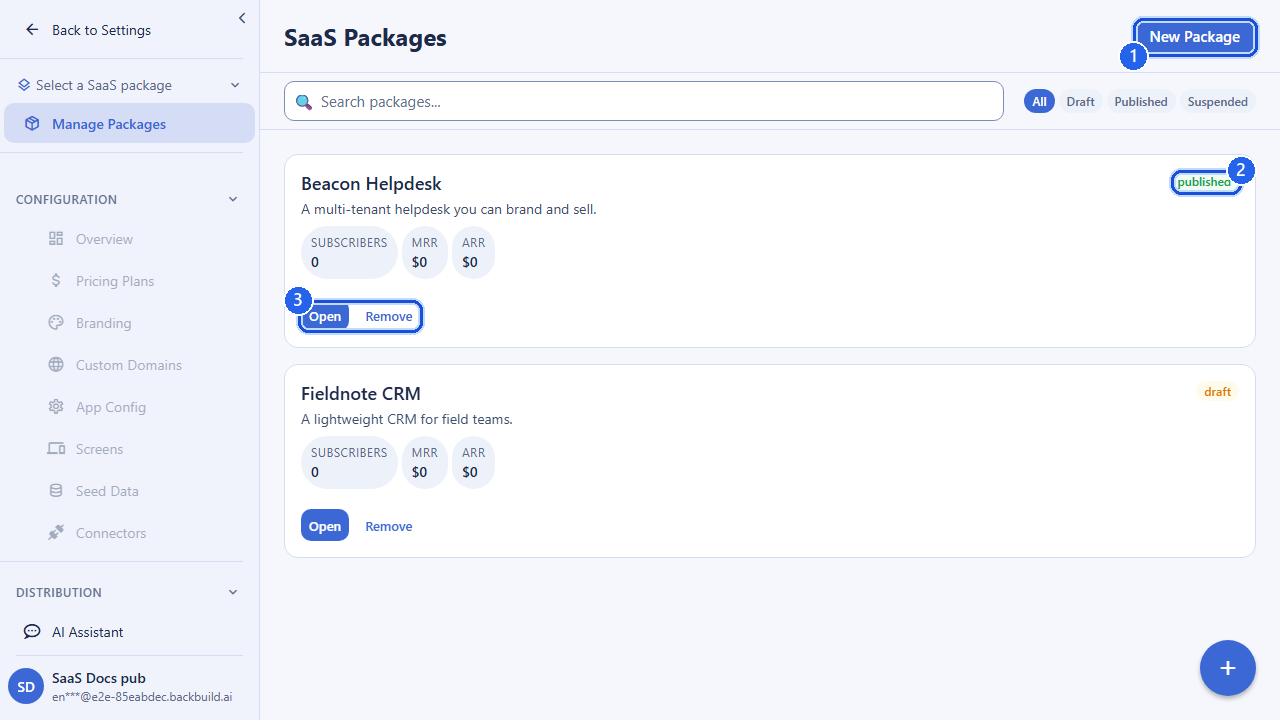
A SaaS package is the root of everything you ship. It is a single, versioned, multi-tenant definition of your product: the thing your customers (tenants) subscribe to. Pricing plans, branding, screens, custom domains, marketing pages, and the seed data a fresh tenant starts with all hang off a package. Build it once; publish it; every subscriber gets their own instance.
Pro SaaS packages are part of Backbuild Pro. See pricing.
What a Package Is
Think of a package as the product master record. By itself it carries the
product’s identity and presentation: its name, slug, subdomain,
app name, logo, favicon, and theme. But its real job is to be the container
that bundles every other part of your offering. Each related resource is
managed under the package’s own URL space at
/v1/saas-packages/:packageId/...:
| Bundled under the package | What it adds |
|---|---|
| Pricing plans | The tiers your tenants pay for |
| Custom domains | Your own domains, with managed SSL and DNS verification |
| Marketing pages | Landing, feature, pricing, and about pages |
| Screen definitions | The in-app screens your tenants see |
| App configs | Per-platform application configuration |
| Data bundles | Versioned snapshots of the config and seed data a new tenant starts with |
| Branding & theme | Logo, favicon, theme, and login-screen appearance |
Because everything is scoped to the package, you can develop, clone, and ship multiple products from a single Backbuild organization without their configurations bleeding into each other.
Identity: Name, Slug, Subdomain, App Name
A package carries a few identity fields that show up in URLs and in the running app:
| Field | Purpose |
|---|---|
name | The human-readable name of the package in your builder workspace. Required on create. |
slug | A human-readable, URL-safe identifier that can stand in for the package’s ID in links. Lowercase letters, numbers, and single internal hyphens, length 3–63. It is globally unique across all builders, so a clash returns a conflict. Optional; if you omit it, one is derived from the name. You can change it later, or clear it by sending null. |
subdomain | The subdomain label used to serve your product before you attach a custom domain. Lowercase alphanumeric with hyphens. |
app_name | The display name shown inside the running application. Defaults to the package name if not set. |
The package’s UUID is its permanent identity. The slug is a convenience for friendlier URLs; resolving a slug never changes which package the ID points to.
The Package Lifecycle
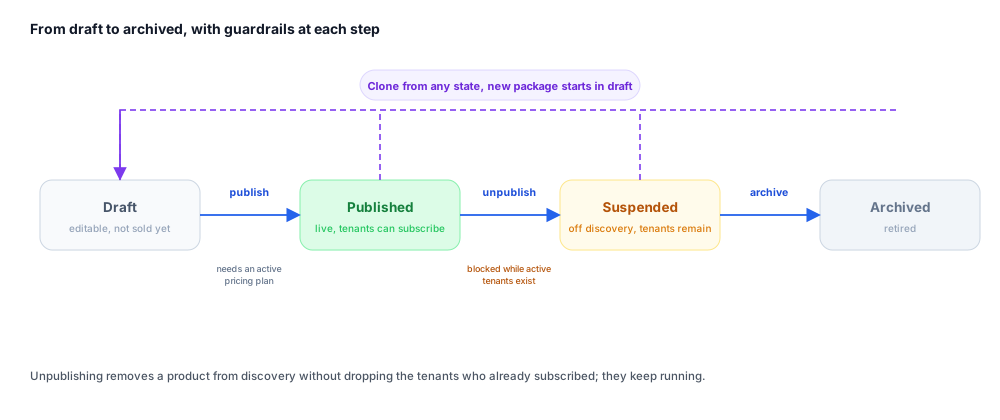
A package moves through a small set of states as you build and ship it:
| State | Meaning |
|---|---|
| draft | The default after creation (and after cloning). You can edit freely; it is not yet offered to customers. |
| published | Live and offered to tenants. Publishing has preconditions; for example, a package must have an active pricing plan before it can go live. If a precondition is unmet, the publish request is rejected so you can fix it first. |
| suspended | The result of unpublishing. The package is pulled from public discovery. Existing subscribers are not affected; their tenants keep running. |
| archived | A retired package. You archive a suspended package to take it fully out of rotation. |
The typical path is: create a draft → configure pricing, branding, and the rest of the bundle → publish → (if needed) unpublish to suspend → archive when fully retired. Cloning a package always starts the copy in draft so you can evolve a new variant safely.
Creating a Package
Create a package under your organization. Only name is required;
everything else is optional and can be filled in later.
POST /v1/saas-packages

{
  "name": "My SaaS Product",
  "slug": "my-saas-product",
  "description": "A construction management platform",
  "app_name": "My SaaS",
  "subdomain": "my-saas-product"
}
The package is created in draft under the authenticated user’s organization. The response is the new package record, including its generated ID, which you use for every subsequent call.
Updating a Package
Update identity, description, branding, and configuration with a
PUT. Send only the fields you want to change; at least one field
is required.
PUT /v1/saas-packages/:packageId

{
  "app_name": "My SaaS",
  "logo_url": "https://cdn.example.com/logo.png",
  "favicon_url": "https://cdn.example.com/favicon.ico",
  "theme_config": { ... },
  "login_screen_config": { ... }
}
Updating presentation fields such as app_name,
logo_url, favicon_url, theme_config,
or subdomain refreshes the cached app configuration for any
domains pointing at the package, so tenants pick up the change. To clear an
optional URL field, send it as null. To clear the slug, send
"slug": null; this also releases the slug for reuse.
Publishing and Unpublishing
Publishing makes the package available to customers; unpublishing pulls it from public discovery without touching existing tenants.
# Go live
POST /v1/saas-packages/:packageId/publish

# Pull from discovery (existing tenants keep running)
POST /v1/saas-packages/:packageId/unpublish

# Fully retire a suspended package
POST /v1/saas-packages/:packageId/archive
If a package cannot be published yet (for instance, it has no active pricing plan), the publish call returns a conflict explaining what is missing.
Cloning a Package
Clone an existing package to spin up a new variant (a different market, a redesign, a staging version) without disturbing the original. The clone is a deep copy that starts in draft. The body carries only the new package’s name and an optional description.
POST /v1/saas-packages/:packageId/clone

{
  "name": "My SaaS Product (EU)",
  "description": "European edition"
}
Resolving by Slug
Because the slug is a friendlier alternative to the UUID, the API provides a reverse lookup. Both a slug and a UUID resolve to the same canonical package and owning organization, and both return an identical not-found response when nothing matches, so slugs cannot be used to probe which packages exist.
# Resolve a slug (or UUID) to the canonical package
GET /v1/saas-packages/resolve?slug=my-saas-product

# Same result, path form
GET /v1/saas-packages/by/my-saas-product
When you pass a UUID, the response includes a hint pointing at the canonical slug URL so links can be upgraded over time. Resolving a published package by slug also works for customers who are not members of your organization, which is what makes public discovery links shareable.
API Reference
List Packages
GET /v1/saas-packagesThe organization is resolved from the authenticated session.
Query Parameters
| Parameter | Type | Description |
|---|---|---|
search | string | Filter packages by name or slug (max 255 chars) |
page | integer | Page number, 1-based |
page_size | integer | Results per page (1–100) |
Returns a paginated list. Each item includes id, name,
slug, status, app_name,
subdomain, subscriber_count, published_at,
and timestamps.
Get Package
GET /v1/saas-packages/:packageIdReturns the full package record. Responds 404 if not found in your organization.
Create Package
POST /v1/saas-packagesRequest Body
| Field | Type | Required | Description |
|---|---|---|---|
name | string | yes | Package name (1–255 chars) |
slug | string | no | Globally unique URL slug; derived from name if omitted |
description | string | no | Up to 4096 chars |
app_name | string | no | In-app display name |
subdomain | string | no | Lowercase alphanumeric with hyphens |
Responds 201 with the created package. A duplicate slug returns 409.
Update Package
PUT /v1/saas-packages/:packageIdRequest Body
| Field | Type | Description |
|---|---|---|
name | string | Package name |
slug | string / null | New slug, or null to clear it |
description | string | Up to 4096 chars |
app_name | string | In-app display name |
subdomain | string | Lowercase alphanumeric with hyphens |
logo_url | string / null | Logo URL, or null to clear |
favicon_url | string / null | Favicon URL, or null to clear |
theme_config | object | Theme configuration |
org_config | object | Organization-level configuration |
login_screen_config | object | Login-screen appearance |
plan_group_config | object | Plan grouping used by pricing categories |
billing_interval_config | object | Billing-interval presentation options |
At least one field is required. A duplicate slug returns 409.
Delete Package
DELETE /v1/saas-packages/:packageIdDeletes or archives the package. Responds 404 if it does not exist.
Publish Package
POST /v1/saas-packages/:packageId/publishMakes the package live. Returns 409 if a precondition (such as an active pricing plan) is unmet.
Unpublish Package
POST /v1/saas-packages/:packageId/unpublishSuspends the package and removes it from discovery. Existing subscribers are unaffected.
Archive Package
POST /v1/saas-packages/:packageId/archiveArchives a suspended package.
Clone Package
POST /v1/saas-packages/:packageId/cloneRequest Body
| Field | Type | Required | Description |
|---|---|---|---|
name | string | yes | Name of the new package (1–500 chars) |
description | string | no | Up to 4096 chars |
Responds 201 with the new draft package.
Resolve by Slug or ID
GET /v1/saas-packages/resolve?slug=SLUG_OR_UUID
GET /v1/saas-packages/by/:idOrSlug
Resolves either form to the canonical package and owning organization. Returns
a uniform 404 for anything that does not match, so existence
cannot be probed. Passing a UUID adds a hint pointing at the canonical slug
URL.
Frequently Asked Questions
- Why can I not publish my package?
- Publishing has preconditions; most commonly, a package needs an active pricing plan before it can go live. The publish call explains what is missing so you can fix it and retry.
- If I unpublish, do I lose my existing customers?
- No. Unpublishing removes the package from public discovery only; existing subscriber tenants keep running untouched. A package with active tenants is protected from an unpublish that would abandon them.
- Can I build several products from one organization?
- Yes. Every resource is scoped to its package, so you can develop, clone, and ship multiple products from a single organization without their configurations bleeding together.
- What is the safest way to try a big change to a live product?
- Clone the package. The clone is a deep copy that starts in draft, so you can evolve a variant without disturbing the original or its subscribers.
Continue with Pricing Plans to add the tiers your tenants pay for, or return to the SaaS Builder overview.