

Universal Usage Credits
Credits are the single prepaid currency behind everything Backbuild meters. After this page you will be able to say precisely what a credit is, estimate what any activity costs before you do it, choose a credit package with confidence, and read the monthly settlement that keeps your balance honest. If you have been burned by credit systems elsewhere, read the whole page: most of what you learned to fear does not apply here, and the parts that need attention are called out plainly.
What a Credit Is
A universal usage credit is a fixed unit of prepaid platform usage. One pool of credits belongs to your whole organization and covers every metered activity: the built-in AI models, containers and virtual workers, Studio audio (speech-to-text and text-to-speech), outbound email beyond your included sends, file and database storage beyond your allowances, and Real-Time Session Minutes beyond the free monthly 10,800.
Credits are not AI tokens and are not analogous to them. A token is a unit of text inside one AI model; a credit is a unit of platform usage with a published rate for each activity class. The rates below do not fluctuate with model load or provider pricing, so a credit buys the same amount of work on the last day of the month as on the first.
What One Credit Buys
These are the published rates for the allowance-metered classes. The pricing page is the canonical, always current source; the dollar figures below use the entry package rate of $6.65 per million credits, so larger packages cost less per unit of work.
| Activity | Rate | In practice |
|---|---|---|
| Real-Time Session Minutes overage | 1 credit per active session-second | An extra hour of active sync is 3,600 credits, about 2.4 cents |
| File storage overage | 21 credits per GB-hour | An extra GB held for a month is about 15,330 credits, about 10 cents |
| Database storage overage | 685 credits per GB-hour | An extra GB held for a month is 500,000 credits, about $3.33; 1M credits keeps 2 GB for a month |
| Outbound email overage | Per recipient, at the rate on the pricing page | Counted across To, Cc, and Bcc; draws credits at send time |
| Built-in AI, containers, Studio audio | Metered per use | Every action is recorded and counted in your usage breakdown; no free allowance, no charge when idle |
To make the entry package concrete: 750,000 credits ($4.99 per month) covers, on its own, roughly 208 extra hours of active session time, or about 49 GB-months of extra file storage, or 1.5 GB-months of extra database storage, or any mix of everything metered. Most organizations that stay near their allowances find the smallest packages more than enough; heavy AI and container users size up from their first month's usage breakdown rather than guessing.
Where Credits Come From
- Included with your plan. Lite includes 250,000 credits per seat per month, Pro includes 750,000, and Enterprise includes 3M per seat per month, all pooled across the organization. Free includes none.
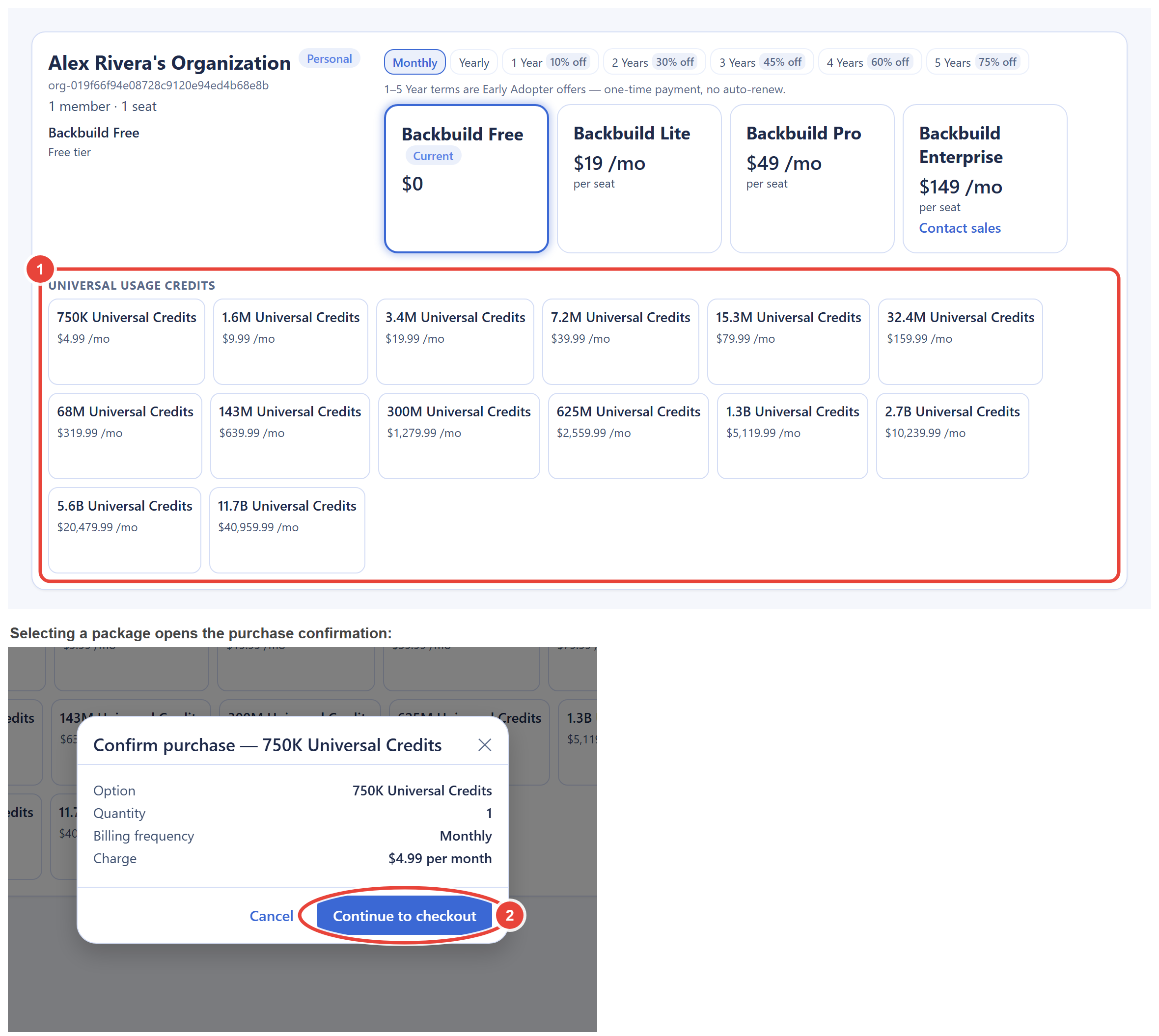
- Credit packages. Monthly recurring packages from $4.99 per month (750,000 credits) up to a volume floor rate of $3.50 per million, available on every plan including Free. The full package table is on the pricing page. Packages are monthly only; there is no annual credit billing.
You buy packages in-app. Open your user settings and choose Personal Organizations: every organization you own appears as a card with its plan and the full Universal Usage Credits package grid. Selecting a package shows a confirmation with the exact monthly charge before any checkout starts. A purchase raises your balance and capacity immediately: pay-per-use actions that were being refused succeed as soon as you retry them, and a blocked usage class clears at its next automatic re-evaluation rather than at the next billing cycle. The updated balance is visible on the Billing & Usage screen. There is no need to wait for a new month to recover from an empty balance.
Rollover: Bank What You Do Not Use
Unused credits roll over for up to 3 months. Practically, your banked balance can grow to three months' worth of your incoming monthly credits; anything above that expires when the month settles, and the expiry appears as its own clearly labeled line item, "Rollover expiry," in the Credit history on your Billing & Usage screen, with the balance it left behind. It is never silent.
The bank is what makes bursting possible. A quiet month builds savings; a heavy month (a big render, a storage-hungry project, a launch week of long sessions) spends them without requiring a bigger package. If you cancel a credit package, the credits you already received stay in your balance and remain spendable; the rollover clamp only applies while monthly credits are still arriving.
Bring Your Own AI Keys
Connect your own AI provider keys and all AI usage through them bypasses credits entirely: you pay your provider directly and Backbuild meters that usage for visibility only, showing you an estimated cost so your reporting stays complete. The same applies when you drive your own local or CLI-based AI agents. Credits then matter only for the platform-side meters (sessions, storage, containers, email), which makes heavy AI workloads on your own contract entirely predictable.
How Monthly Overage Settles
Session minutes and both storage pools use deferred deduction rather than point-of-use billing, and understanding it takes one paragraph. During the month, overage in these classes is metered continuously and totaled. When the month closes, the total converts to credits and is automatically subtracted from your next month's incoming credits, oldest month first. If the balance cannot cover the whole deduction, the remainder carries forward to the following month. No invoice is generated at any point; each settlement appears as its own clearly labeled line item in the Credit history on your Billing & Usage screen (for example "Real-Time Session Minutes" or "Storage overage"), with the running balance, and the settlement arrives as a reduced incoming allotment rather than as a charge.
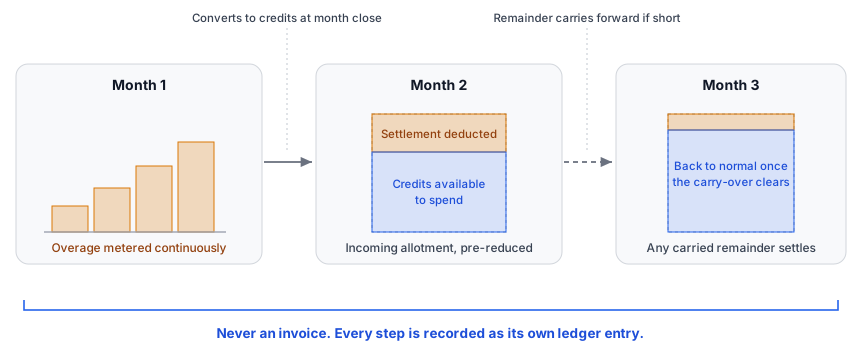
For anyone forecasting or reconciling: this means a month's storage and session overage is a liability against the following month's credits, not a payable. Accrue it that way, from the storage meters and usage figures on the Billing & Usage screen and the published rates above, so the next month's effective allotment is never a surprise. Backbuild also protects the pool itself: each deferred class is independently capped at half of your month's available credits, covered in Warnings, Caps, and Running Out.
Credits and Discounts
Annual billing (15% off) and prepaid Early Adopter terms discount the plan subscription price only. Credit packages and usage rates are never discounted, so the rate table above holds regardless of how your subscription is billed. Enterprise "included credits" are pooled: seats contribute to one organization-wide balance rather than per-seat silos.
Frequently Asked Questions
What exactly does one credit buy?
A fixed amount of the activity in the rate table above: one second of
active session overage, a fraction of a GB-hour of storage, and so on.
Because rates are published per class, you can price any planned
workload in advance instead of discovering the cost afterward.
Do unused credits expire?
They bank for up to 3 months (three months' worth of your incoming
monthly credits). Anything above the bank cap expires with a visible
ledger entry. If your monthly credits stop arriving, the balance
you already hold does not expire.
Can I buy credits mid-month, and how fast do they apply?
Yes, on any plan, at any time. The balance rises immediately; pay-per-use
actions that were being refused succeed when you retry them, and a
blocked usage class clears at its next automatic re-evaluation.
Can I get a refund on unused credits?
Credit packages are monthly subscriptions you can cancel at any time;
canceling stops future charges while everything already purchased stays
in your balance and remains spendable. Because unspent credits persist
and blocks lift as soon as they are needed again, an unused balance is
never stranded value.
Why is there no annual credit package?
Credit needs vary month to month far more than seat counts do. Monthly
packages plus the 3-month bank let you resize every month without
locking a year of usage in advance. Annual and prepaid discounts apply
to the plan subscription instead.
Are credits shared across my whole organization?
Yes. The pool is organization-wide, including plan-included credits,
which keeps budgeting simple: one balance, one breakdown, one place to
look.